1. Бүттүview
This manual provides detailed instructions for the TECKNET TK-KB006 4-Device Wireless Keyboard. This keyboard offers versatile connectivity options, including 2.4G wireless and three Bluetooth channels, allowing seamless switching between up to four devices. It features a rechargeable battery, quiet scissor-switch keys, and an ergonomic design for comfortable use across various operating systems.

Figure 1: TECKNET TK-KB006 Wireless Keyboard with its 2.4G USB receiver.
2. Пакеттин мазмуну
Пакетиңизде бардык буюмдар бар экенин текшериңиз:
- 1 x TECKNET TK-KB006 Multi-Device Wireless Keyboard
- 1 x 2.4G USB Receiver (stored in the keyboard's back compartment)
- 1 х USB-C кубаттоо кабели
- 1 x User Manual
3. Продукциянын өзгөчөлүктөрү
- 4-режимдик байланыш: Supports 2.4G wireless and three Bluetooth channels (BT1, BT2, BT3) for connecting up to four devices simultaneously.
- Кайра заряддалуучу батарея: Built-in 500mAh battery provides extended use, lasting up to 180 days on a single 2-hour charge (based on 2 hours of daily use).
- Quiet Scissor-Switch Keys: 86 upgraded scissor-switch keys offer 90% noise reduction and a comfortable typing experience with 2mm key travel.
- Эргономикалык дизайн: Keys are shaped to fit fingertips, and adjustable support allows for a 3°-7° tilt angle. Five non-slip pads ensure stability.
- Кеңири шайкештик: Compatible with Windows, iOS, macOS, and Android operating systems.
- 14 Multimedia Hotkeys: Dedicated hotkeys for quick access to common functions.
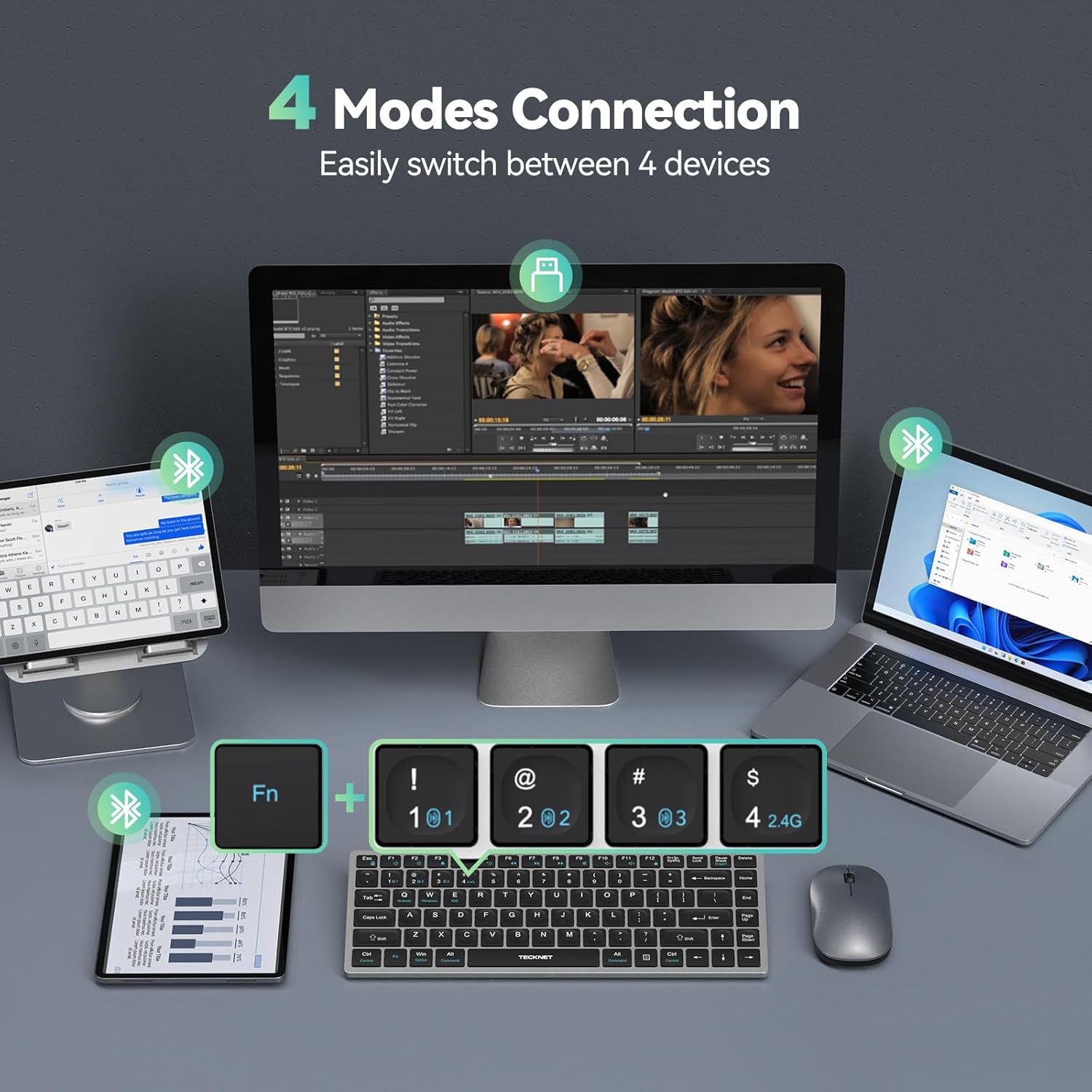
Figure 2: The keyboard supports 4 modes of connection, allowing easy switching between devices.

Figure 3: Illustration of the scissor-switch key structure for comfortable and quiet typing.
4. Орнотуу
4.1 Баскычтопту заряддоо
Before initial use, fully charge the keyboard. Connect the provided USB-C charging cable to the keyboard's USB-C port and the other end to a power source (e.g., computer USB port, USB wall adapter).

Figure 4: The keyboard features a USB-C port for quick charging.
4.2 Күйгүзүү/өчүрүү
Locate the power switch on the back of the keyboard. Slide it to the 'ON' position to power on the keyboard. Slide it to 'OFF' when not in use to conserve battery.

5-сүрөт: Арткы view of the keyboard highlighting the power switch, charging port, and 2.4GHz USB receiver storage.
4.3 2.4G зымсыз байланыш
- Retrieve the 2.4G USB receiver from its storage slot on the back of the keyboard.
- Plug the USB receiver into an available USB-A port on your computer or smart TV.
- The keyboard will automatically connect to the device. The 2.4G indicator light will illuminate briefly.
4.4 Bluetooth туташуусу (BT1, BT2, BT3)
- Баскычтопту күйгүзүңүз.
- басып, кармап туруңуз Fn баскычын жана Bluetooth канал баскычтарынын бири (1, 2, же 3) for 3-5 seconds until the corresponding Bluetooth indicator light (BT1, BT2, or BT3) starts blinking rapidly. This indicates the keyboard is in pairing mode.
- Түзмөгүңүздө (ноутбук, планшет, смартфон) Bluetooth жөндөөлөрүнө өтүп, жаңы түзмөктөрдү издеңиз.
- Select "TECKNET Keyboard" or a similar name from the list of available devices.
- Follow any on-screen prompts to complete the pairing process. The indicator light will stop blinking and remain solid for a few seconds, then turn off, indicating successful pairing.

Figure 6: Use Fn + 1, 2, or 3 to initiate Bluetooth pairing for different channels.
4.5 Операциялык системаларды алмаштыруу
The keyboard automatically detects and adapts to different operating systems. For optimal functionality, you can manually switch the keyboard layout to match your device's OS:
- Android үчүн: Басыңыз Fn + Q
- Windows үчүн: баскычын басыңыз Fn + W
- For iOS/macOS: Press Fn + E
5. Иштөө нускамалары
5.1 Туташкан түзмөктөрдүн ортосунда которулуу
Туташкан түзмөктөрүңүздүн ортосунда которулуу үчүн:
- For 2.4G wireless connection: Press fn+4
- For Bluetooth 1 connection: Press fn+1
- For Bluetooth 2 connection: Press fn+2
- For Bluetooth 3 connection: Press fn+3
5.2 Мультимедиалык Ыкчам баскычтар
The keyboard includes 14 multimedia hotkeys for quick access to various functions. To use these hotkeys, press and hold the Fn каалаган функция баскычы менен бир убакта басыңыз.
| Ачкыч айкалышы | Функция |
|---|---|
| Fn + Esc | Lock Fn (Toggle Fn lock) |
| Fn + F1 | Screen Brightness - |
| Fn + F2 | Экран жарыктыгы + |
| Fn + F3 | Браузердин башкы бети |
| Fn + F4 | издөө |
| Fn + F5 | Жок кылуу |
| Fn + F6 | Мурунку трек |
| Fn + F7 | Ойнотуу/Тыныгуу |
| Fn + F8 | Кийинки трек |
| Fn + F9 | Үнсүз/Ачуу |
| Fn + F10 | Көлөмү - |
| Fn + F11 | Көлөм + |
| Fn + F12 | Кулпуланган экран |
| Fn + Menu Key | Контексттик меню |

Figure 7: A visual guide to the keyboard's 14 multimedia hotkeys.
5.3 Жөнгө салынуучу эңкейиш
The keyboard features adjustable support buckles on the back, allowing you to set a comfortable typing angle between 3° and 7°.
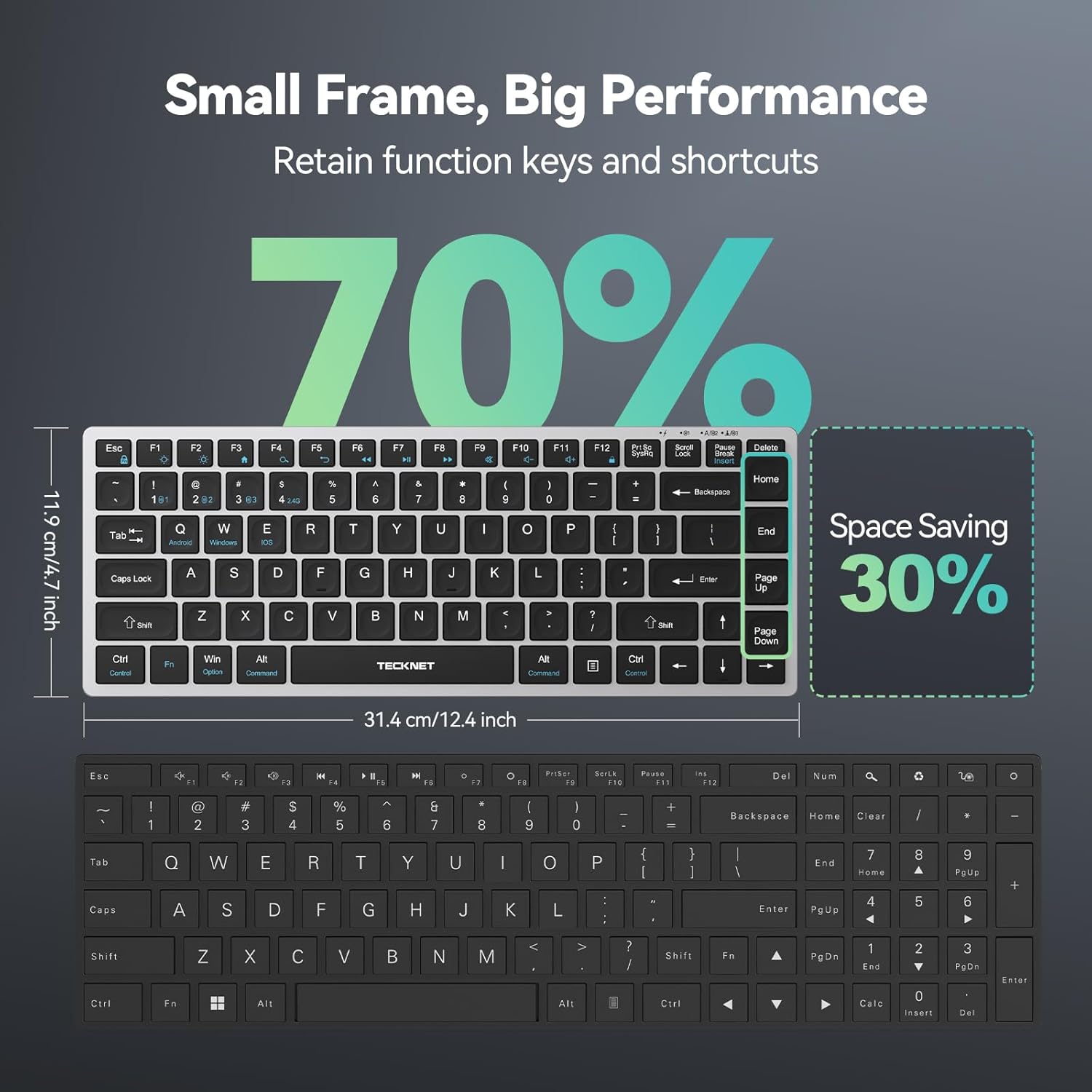
Figure 8: The adjustable stand provides an ergonomic typing angle.
5.4 Автоматтык уйку режими
To conserve battery life, the keyboard automatically enters sleep mode after 30 minutes of inactivity. Press any key to wake it up instantly.
6. Техникалык тейлөө
- Тазалоо: жумшак колдонуу, damp Клавиатуранын бетин тазалоо үчүн чүпүрөк колдонуңуз. Катуу химиялык заттардан же абразивдүү материалдардан алыс болуңуз.
- Сактагыч: When not in use for extended periods, turn off the keyboard and store it in a dry, cool place.
- Батареяга кам көрүү: Батареянын иштөө мөөнөтүн узартуу үчүн, аны тез-тез толук зарядсыздандырбаңыз. Аны үзгүлтүксүз кубаттап туруңуз.
- USB кабыл алгыч: Store the 2.4G USB receiver in its designated slot on the back of the keyboard to prevent loss.
7. Кыйынчылыктарды
7.1 Баскычтоп туташпай жатат
- Күчтү текшерүү: Баскычтоп күйүк турганын жана батареясы жетиштүү заряддалганын текшериңиз.
- 2.4G туташуу: Verify the USB receiver is securely plugged into your device. Try a different USB port.
- Bluetooth байланыш: Ensure Bluetooth is enabled on your device. Re-enter pairing mode (Fn + 1/2/3 for 3-5 seconds) and re-pair the keyboard. Remove previous pairings from your device's Bluetooth list if necessary.
- Операция системасы: Confirm the keyboard's OS mode matches your device (Fn + Q/W/E).
7.2 Ачкычтар жооп бербейт
- Толуктоо: The battery might be low. Charge the keyboard.
- Кайра туташуу: Try turning the keyboard off and on, or re-establishing the connection (2.4G or Bluetooth).
- Интерференция: Баскычтопту түзмөгүңүзгө жакыныраак жана тоскоолдук жаратышы мүмкүн болгон башка зымсыз түзмөктөрдөн алысыраак жылдырыңыз.
7.3 Keyboard Keeps Disconnecting
- Батарея деңгээли: Баскычтоп шайкеш кубатталганын текшериңиз.
- Аралык: Keep the keyboard within the effective range (up to 15 meters).
- Интерференция: Башка зымсыз түзмөктөрдүн кийлигишүүсүн азайтыңыз.
- Түзмөктүн жөндөөлөрү: Check your device's power management settings to ensure it's not turning off Bluetooth or USB ports to save power.
8. Техникалык шарттар
| Өзгөчөлүк | Деталь |
|---|---|
| Модель номери | TK-KB006 |
| Байланыш технологиясы | Bluetooth, 2.4G Wireless (USB-A) |
| Шайкеш түзмөктөр | Laptop, PC, Smart TV (BT 5.0 only), Smartphone, Tablet |
| Продукциянын өлчөмдөрү | 12.4 x 4.7 x 0.57 дюйм (31.4 x 11.9 x 1.45 см) |
| Элемент Салмагы | 14.1 унция (399.7 грамм) |
| Батарея | 1 литий-иондук батарея (кошулган), 500 мАч |
| Өзгөчөлүктөр | 14 Multimedia Hotkeys, 90% Noise Reduction, Low-Profile Key, Rechargeable, Spill Proof |
| Түс | Sliver+Black |
| Материал | Пластик |
9. Кепилдик жана колдоо
TECKNET provides up to 36 months of support for this product (registration may be required). If you encounter any issues or have questions regarding your TK-KB006 keyboard, please contact our professional customer service team for assistance.
For customer service, please refer to the contact information provided on the TECKNET official webсайтка же продуктунун таңгагына.
Video 1: Official TECKNET overview of the 4-Device Bluetooth and 2.4G Wireless Keyboard, demonstrating its multi-device switching capabilities and features.


