Introduction
This manual provides comprehensive instructions for the safe and efficient use of your DOOGEE V Max Pro Rugged Phone. Please read this manual thoroughly before operating the device to ensure optimal performance and longevity. The DOOGEE V Max Pro is designed for durability and high performance, featuring a robust build and advanced mobile technology.

Figure 1: DOOGEE V Max Pro Rugged Phone and included Tablet Stand.
Жайгашуу
1. Кутудан чыгаруу жана алгачкы текшерүү
Carefully unpack all components from the box. Verify that the package contains the DOOGEE V Max Pro phone, the tablet stand, a charging cable, and a power adapter. Inspect all items for any signs of damage.
2. Баштапкы заряддоо
Before first use, fully charge the phone. Connect the charging cable to the phone's charging port and the power adapter, then plug the adapter into a wall outlet. The phone supports 33W fast charging. A full charge ensures optimal battery calibration.
3. SIM карта жана MicroSD карта орнотуу
Locate the SIM card tray on the side of the phone. Use the provided SIM ejector tool to open the tray. Insert your Nano-SIM card(s) and/or a MicroSD card (up to 2TB supported) into the designated slots. Ensure the cards are correctly oriented before reinserting the tray firmly into the phone.
4. Күйгүзүү
Press and hold the power button located on the side of the phone until the DOOGEE logo appears on the screen. Follow the on-screen prompts to complete the initial setup, including language selection, Wi-Fi connection, and Google account setup.
5. Tablet Stand Assembly and Usage
The included tablet stand is designed for versatile viewing. Unfold the stand to its desired angle. Place your DOOGEE V Max Pro or a compatible tablet onto the stand's cradle. The stand features a sturdy base and adjustable angles for comfortable viewing.
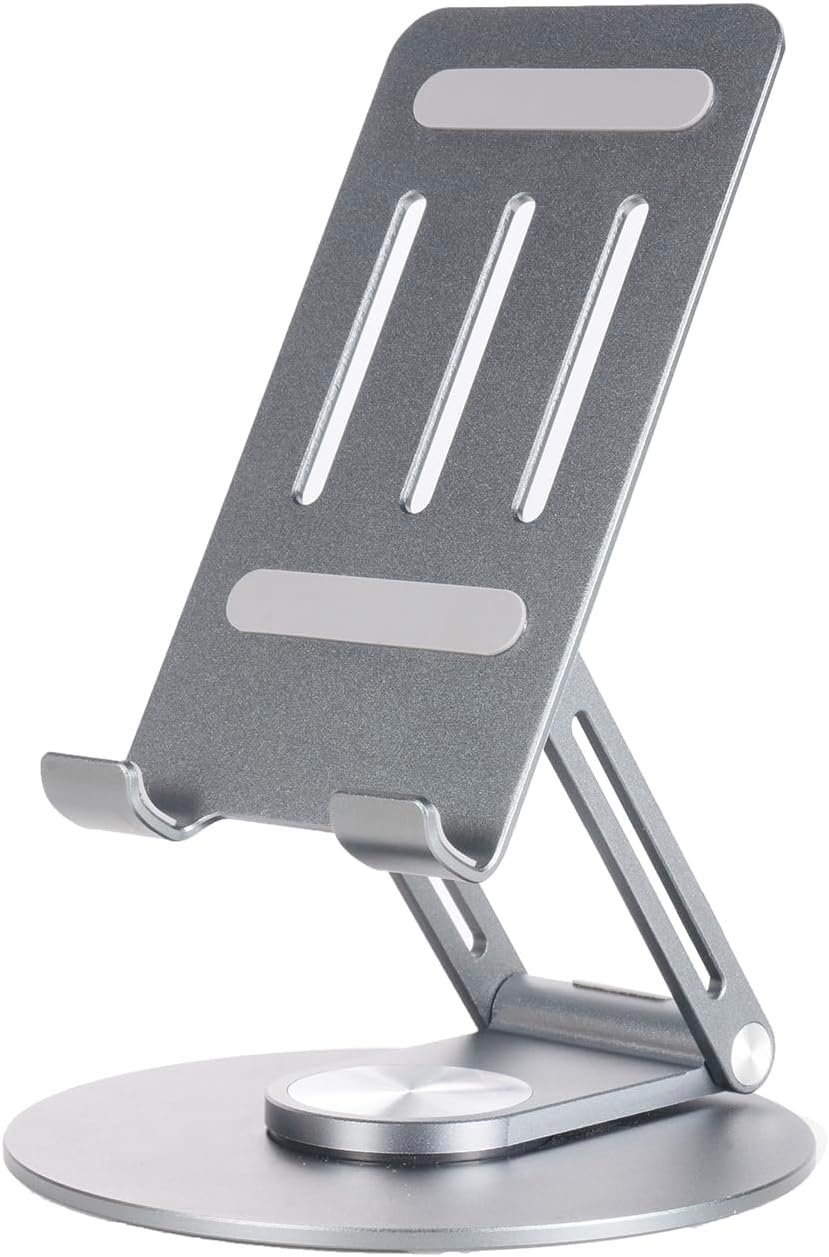
Figure 2: The adjustable tablet stand.

Figure 3: Tablet stand in use with a device.
Иштөө нускамалары
1. Телефондун негизги функциялары
- Чалууларды жасоо: Телефон тиркемесин ачып, номерди терип, чалуу баскычын басыңыз.
- Кабарларды жөнөтүү: Кабарлар колдонмосун ачып, жаңы сүйлөшүүнү баштаңыз, алуучуну жана билдирүүңүздү киргизиңиз.
- Интернет байланышы: Connect to Wi-Fi via Settings > Network & internet > Wi-Fi, or enable mobile data via Settings > Network & internet > Mobile network. The phone supports 5G connectivity for fast data speeds.
2. Дисплей өзгөчөлүктөрү
The DOOGEE V Max Pro features a 6.58-inch FHD+ IPS Waterdrop Display with a 120Hz high refresh rate for smooth visuals. It offers 2.4K screen resolution, 401 PPI, 16.7 million colors, and a 1500:1 contrast ratio, ensuring vibrant and clear images. The display has an 85% screen-to-body ratio for an immersive viewтажрыйбасы.

Figure 4: Visual representation of the 120Hz display and its specifications.
3. Камераны колдонуу
The phone is equipped with a versatile camera system:
- 108MP AI негизги камерасы: Жасалма интеллект менен жакшыртылган жогорку чечилиштеги сүрөттөр үчүн.
- 20MP түнкү көрүү камерасы: Кыйын жарыкта же толук караңгылыкта тунук сүрөттөрдү тартат.
- 8MP кең бурчтуу жана макро камера: For expansive landscape shots or detailed close-ups.
- 16MP алдыңкы камера: Селфи жана видео чалуулар үчүн.
Open the Camera app and select your desired mode (Photo, Video, Night Vision, Macro, etc.). Tap the shutter button to capture images or start/stop video recording.

Figure 5: ашыкview of the phone's multi-camera system.
4. Батареяны башкаруу
The DOOGEE V Max Pro features a massive 22000mAh battery, providing extended usage times. It supports 33W fast charging. The phone also supports OTG (On-The-Go) reverse charging, allowing you to use it as a power bank to charge other devices.
- Жанымда бол: 1540 саатка чейин
- Чалуу: 156 саатка чейин
- Музыка ойнотуу: 142 саатка чейин
- Видео көрүү: 45 саатка чейин
- Web Серептөө: 18 саатка чейин

6-сүрөт: Батареянын кубаттуулугу жана болжолдуу колдонуу убактысы.
5. Smart Interaction Lights
The phone features smart interaction lights that provide visual notifications for various events:
- Кирүүчү чалуулар
- SMS билдирүүлөр
- Музыканы ойнотуу
- Заряддоо абалы

7-сүрөт: Мисamples of smart interaction light indications.
6. Процессор жана аткаруу
The DOOGEE V Max Pro is powered by the Dimensity 7050 5G Octa-core Processor, designed for boosted performance and reduced power consumption. This ensures smooth multitasking, gaming, and overall system responsiveness.

Figure 8: Illustration of the Dimensity 7050 5G Octa-core Processor.
7. Сактоо
The phone offers massive storage with up to 32GB RAM (12GB physical + 20GB extended RAM) and 512GB ROM. It also supports an external MicroSD card up to 2TB, providing ample space for applications, media, and documents.

Figure 9: Visual representation of RAM and ROM capacities.
Техникалык тейлөө
1. Тазалоо
Телефонуңузду тазалоо үчүн жумшак, түксүз чүпүрөктү колдонуңуз. өжөр тактар үчүн, бир аз гampen the cloth with water or a screen cleaner. Avoid using harsh chemicals, abrasive materials, or excessive moisture, especially near ports.
2. Бышыктык жана коргоо
The DOOGEE V Max Pro is designed as a rugged phone, featuring a durable construction of metal or strong plastic composite. While it is built to withstand harsh environments, avoid intentional drops, extreme temperatures, or prolonged submersion in water beyond its rated capabilities (if any specific IP rating is available, it would be mentioned here, but it's not in the provided data). Ensure all port covers are securely closed to maintain water and dust resistance.
3. Программалык камсыздоону жаңыртуу
Regularly check for and install software updates to ensure your phone has the latest features, security patches, and performance improvements. You can usually find this option in Settings > System > System update.
Проблемаларды чечүү
Жалпы маселелер жана чечимдер
- Телефон күйбөй жатат: Батарея заряддалганын текшериңиз. Кайра күйгүзүүдөн мурун заряддагычка кеминде 15 мүнөт туташыңыз.
- Экран жооп бербейт: Try restarting the phone by holding the power button for about 10-15 seconds.
- Poor signal/connectivity: Check if SIM card is properly inserted. Try restarting the phone or toggling Airplane Mode on/off. Ensure you are in an area with network coverage.
- Колдонмолор бузулуп жатат: Көйгөйлүү колдонмонун кэшин тазалаңыз (Орнотуулар > Колдонмолор > [Колдонмонун аталышы] > Сактоочу жай жана кэш > Кэшти тазалоо). Эгер көйгөй чечилбесе, колдонмону кайра орнотуп көрүңүз.
- Батареянын бат түгөнүп калышы: Экран жарыктыгын азайтыңыз, фондо иштеп жаткан пайдаланылбаган колдонмолорду жабыңыз жана колдонулбаганда GPS же Bluetooth сыяктуу керексиз функцияларды өчүрүңүз.
For issues not listed here, please refer to the official DOOGEE support webсайтка же кардарларды тейлөөгө кайрылыңыз.
Техникалык шарттар
| Өзгөчөлүк | Спецификация |
|---|---|
| Модел | DOOGEE V Max Pro |
| Батарея сыйымдуулугу | 22000mAh |
| Заряддоо | 33W тез заряддоо, OTG тескери заряддоо |
| Процессор | Dimensity 7050 5G Octa-core |
| RAM | Up to 32GB (12GB physical + 20GB extended) |
| ROM | 512 ГБ |
| Кеңейтүүчү сактагыч | Supports up to 2TB MicroSD Card |
| Дисплей | 6.58" FHD+ 120Hz IPS Waterdrop Display |
| Display Resolution | 2.4K Screen Resolution, 401 PPI |
| Башкы камера | 108 мегапиксельдүү AI негизги камерасы |
| Түнкү көрүнүш камерасы | 20MP |
| Кең бурчтуу жана макро камера | 8MP |
| Алдыңкы камера | 16MP |
| Байланыш | 5G |
| Материал | Metal or Strong Plastic Composite |
| ASIN | B0DR8DRWF7 |
| Биринчи жеткиликтүү күн | 23-декабрь, 2024-жыл |


