Introduction
This manual provides detailed instructions for the installation, operation, and maintenance of your EZVALO 12-inch Rechargeable Motion Sensor Under Cabinet Lights. Designed for convenience and efficiency, these lights feature smart motion sensing, adjustable color temperatures, and dimming capabilities, making them ideal for various indoor spaces such as kitchens, closets, and hallways.
Кутуда эмне бар
- 6 x EZVALO 12-inch Under Cabinet Lights
- 12 x Желим темир барактар
- 2 x USB-C заряддоо кабелдери
- 1 x Instruction Manual
Негизги өзгөчөлүктөрү
- Акылдуу кыймыл сенсору: Detects motion within a 120° angle and up to 10 feet, automatically turning off after 20 seconds of no motion.
- Кайра заряддалуучу батарея: Equipped with a 2500mAh battery, offering up to 7.5 hours in Always-On Mode or 10-30 days in Auto Mode. Features a 4-level LED battery indicator for easy power monitoring.
- Жөнгө салынуучу түс температурасы: Choose from Warm White (3000K), Natural White (4500K), and Cool White (6500K).
- Кадамсыз күңүрттөө: Жарыктыкты 10%дан 100%ке чейин өз муктаждыктарыңызга ылайыкташтырыңыз.
- Төрт жарык режими: Includes Always-On, All-Day Motion, Night Motion, and Always-Off modes.
- Оңой магниттик орнотуу: No wiring or drilling required. Lights can be adsorbed directly onto iron surfaces or attached to non-metal surfaces using the included adhesive iron plates.
Орнотуу жана орнотуу
EZVALO шкафтын астындагы чырактар шаймандарды же татаал зымдарды колдонуунун кажети жок тез жана оңой орнотуу үчүн иштелип чыккан.
Орнотуу ыкмалары
- For Iron Surfaces: The lights have built-in magnets and can be directly attached to any iron surface.
- Металл эмес беттер үчүн:

Image: A diagram illustrating the three steps for installing the lights on non-metal surfaces using adhesive iron plates. Step 1: Remove the adhesive film from the iron plate. Step 2: Place the iron sheet on the desired position. Step 3: Place the light on the iron sheet.
- Clean the desired installation area thoroughly to ensure it is dry and free of dust.
- Remove the protective film from one side of an adhesive iron sheet.
- Firmly press the adhesive side of the iron sheet onto the clean surface.
- Align the magnetic back of the light with the installed iron sheet and attach it.
Орнотуу боюнча кеңештер
- Maintain a distance of more than 20 inches (50 cm) between individual lights to prevent interference with motion sensors.
- Avoid placing lights too close to the edge of a surface (e.g., less than 4 inches) to ensure optimal motion detection and light distribution.
- Do not install lights facing each other directly, as this can cause sensor interference.

Image: A diagram illustrating recommended distances and placements for multiple under cabinet lights to ensure proper motion sensor functionality.
Иштөө нускамалары
Your EZVALO light features a toggle switch for mode selection and a physical button for color temperature and brightness adjustments.
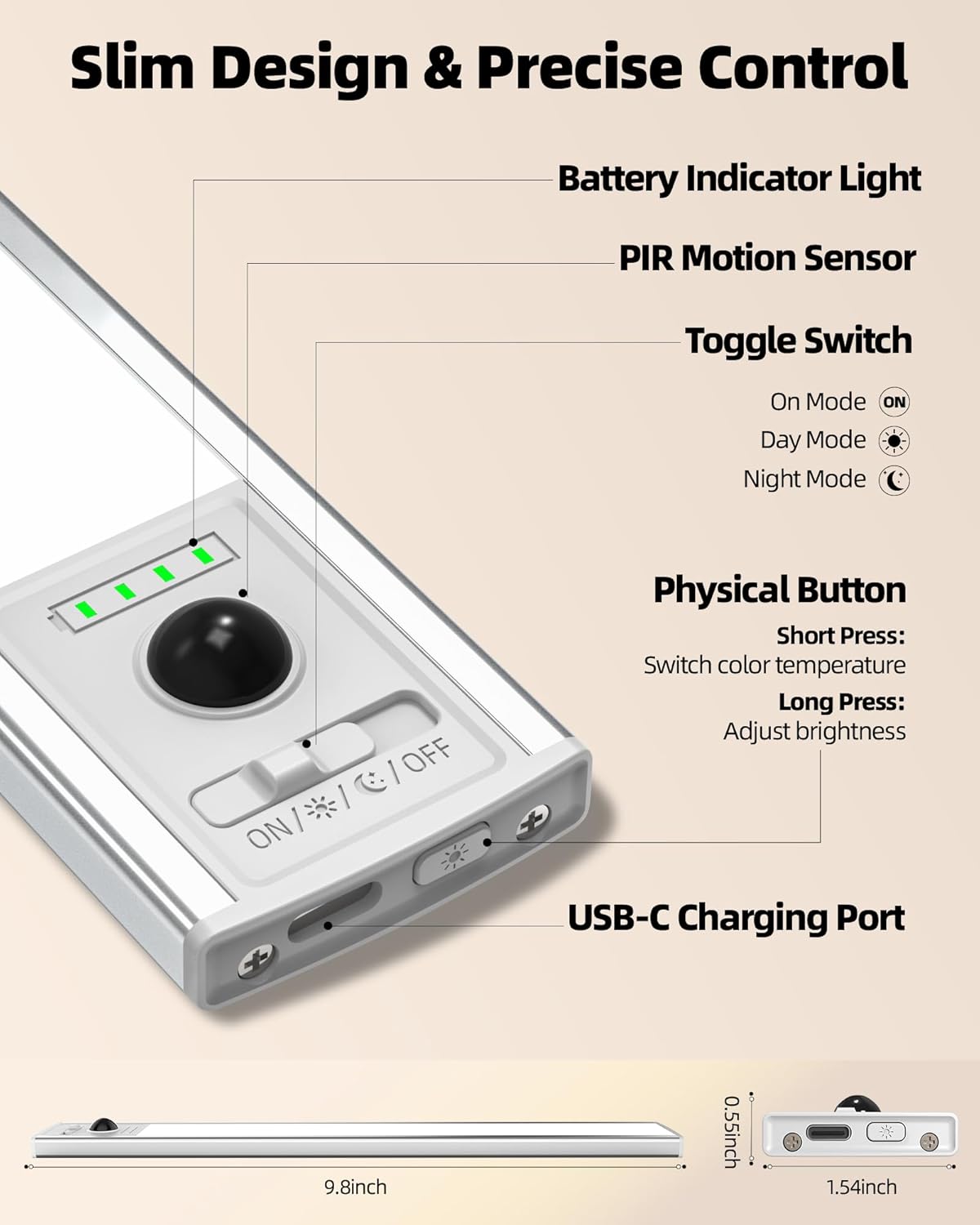
Сүрөт: деталдуу view of the light's control panel, highlighting the battery indicator, PIR motion sensor, toggle switch (ON/DAY/NIGHT/OFF), physical button for color/brightness, and USB-C charging port.
Mode Selection (Toggle Switch)
- Ар дайым күйгүзүү режими (ON): The light provides continuous illumination until manually turned off or the battery runs out.
- All-Day Motion Mode (DAY): The light activates automatically whenever motion is detected, regardless of ambient light conditions.
- Night Motion Mode (NIGHT): The light activates automatically only when motion is detected in a dark environment.
- Always-Off Mode (OFF): Жарык өчүк бойдон калууда.

Image: Visual representation of the three main operating modes: Always On (continuous light), Day Mode (motion-activated anytime), and Night Mode (motion-activated in darkness).
Color Temperature & Brightness Adjustment (Physical Button)
- Түс температурасын өзгөртүү: Short press the physical button to cycle through Warm White (3000K), Natural White (4500K), and Cool White (6500K).
- Жарыктыкты жөндөө: Long press the physical button to activate stepless dimming. The brightness will cycle between 10% and 100%. Release the button when the desired brightness is reached.

Image: Demonstrates the three adjustable color temperatures (3000K, 4500K, 6500K) and the stepless dimming range from 10% to 100% brightness.
Заряддоо
The EZVALO lights are equipped with a 2500mAh rechargeable battery. Use the provided USB-C charging cables to recharge the lights.
- Connect the USB-C end of the charging cable to the light's charging port.
- USB-A учун шайкеш келген USB кубат адаптерине туташтырыңыз (кошулмага кирбейт).
- The 4-level LED indicator will show the charging progress. Each light represents approximately 25% of the battery capacity.
- All four indicator lights will turn solid green when fully charged.
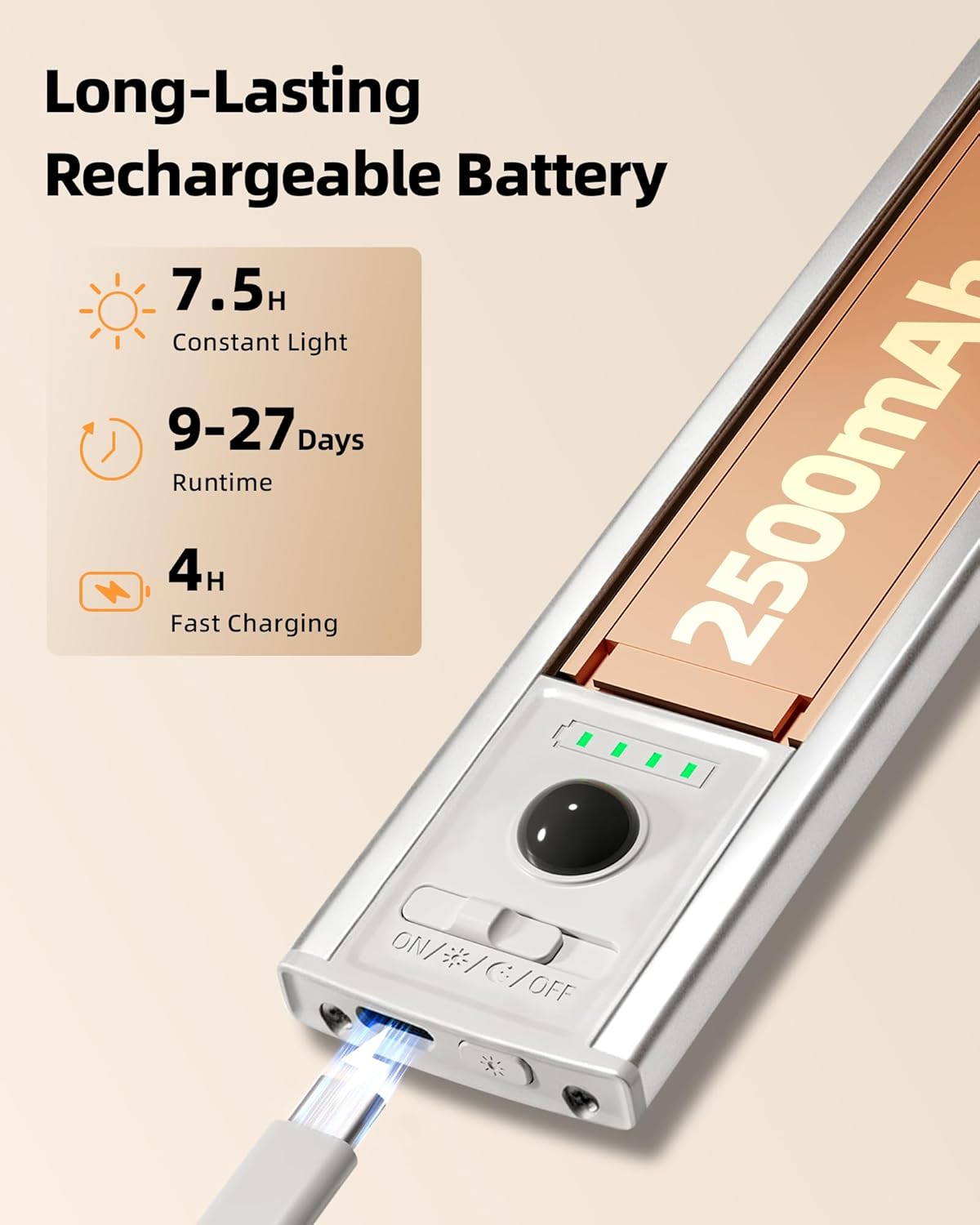
Image: A close-up of the EZVALO light showing the USB-C charging port in use and the battery indicator lights.

Image: Several EZVALO lights laid out and connected to USB-C charging cables, demonstrating simultaneous charging.
Техникалык тейлөө
- To clean the light, gently wipe it with a soft, dry cloth. Do not use abrasive cleaners or solvents.
- Ensure the charging port is free of dust and debris before charging.
- Store the lights in a cool, dry place when not in use for extended periods.
Проблемаларды чечүү
- Жарык күйбөйт: Ensure the light is fully charged. Check the mode switch to confirm it's not in 'OFF' mode.
- Кыймыл сенсору иштебей жатат: Verify the light is in 'DAY' or 'NIGHT' motion mode. Ensure there are no obstructions blocking the sensor. Check that the lights are not placed too close to each other or to the edge of a surface, which can interfere with detection.
- Батареянын бат түгөнүп калышы: In 'Always-On' mode, battery life is shorter. Consider using 'DAY' or 'NIGHT' motion modes for extended battery life. Ensure the light is fully charged before use.
- Жарык бүлбүлдөгөн: Бул батареянын аздыгын көрсөтүшү мүмкүн. Жарыкты кайра заряддаңыз.
Техникалык шарттар
| Өзгөчөлүк | Деталь |
|---|---|
| Бренд | ЭЗВАЛО |
| Модель аты | EZL2432A |
| Өлчөмү | 12 дюйм |
| Материал | Акрилонитрил бутадиен стирол, алюминий |
| Power Source | Батарея менен иштейт |
| Батарея сыйымдуулугу | 2500mAh |
| Жарык булагы түрү | LED |
| Жарыктык | 120 Lumen |
| Түс температурасы | Жылуу ак (3000K), табигый ак (4500K), муздак ак (6500K) |
| Өзгөчөлүктөр | Adjustable Color Temperature, Battery Indicator, Dimmable, Motion Sensor, Portable |
| Орнотуу түрү | Магниттик |
| Ички/тышкы колдонуу | Indoor |
| Продукциянын өлчөмдөрү | 11.8"L x 1.54"W x 0.55"H |
| Элемент Салмагы | 5.3 унция |
Кепилдик жана колдоо
EZVALO offers a Lifetime Warranty on its Flagship Under Cabinet Lights. For any support needs or warranty claims, please refer to the contact information provided in your product packaging or visit the official EZVALO webсайт.
Расмий продукт Videos
EZVALO Indoor Rechargeable Motion Sensor Light Overview
Видео: Бул видео кыскача маалымат беретview of the EZVALO Indoor Rechargeable Motion Sensor Light, demonstrating its key features and functionality in various settings. It highlights the motion sensor, different lighting modes, and ease of installation.
EZVALO Under Cabinet Lights with Battery Indicator
Video: This video focuses on the battery indicator feature of the EZVALO Under Cabinet Lights, showing how the 4-level LED display provides real-time battery status and charging progress.


