1. Киришүү
This manual provides comprehensive instructions for the proper use and maintenance of your Dasqua Digital External Caliper Gage and Bore/Telescoping Gauges Set. This precision tool is designed for accurate external and internal measurements in various industrial and scientific applications. Please read this manual thoroughly before operation to ensure optimal performance and longevity of the instruments.

Figure 1: Dasqua Digital External Caliper Gage and Bore/Telescoping Gauges Set. This image displays the complete set, including the digital external caliper and the various bore and telescoping gauges.
2. Продукт бүтүп калдыview
2.1 Компоненттер
- Digital External Caliper Gage: For precise outside measurements, featuring a large LCD display.
- Bore Gauges: Spring-loaded plungers designed to expand within bores, grooves, slots, and holes for internal diameter or width determination.
- Telescoping Gauges: Similar to bore gauges, these expand to measure internal dimensions, often used in conjunction with an external micrometer.
2.2 Негизги өзгөчөлүктөрү
- Accuracy of 0.0008"/0.02mm and 0.0005"/0.01mm resolution for precise measurements.
- Large LCD display for clear readings in inch, metric, or fractional measurements.
- Important and convenient Hold function.
- Spring-loaded plungers on bore/telescoping gauges for self-centering and constant spring force.
- Satin chrome finish on gauges for durability.

Figure 2: Labeled components of the Digital External Caliper. This image highlights the electronic unit, operating lever, movable measuring arm, and fixed measuring arm of the digital caliper.
3. Орнотуу
3.1 Battery Installation (Digital Caliper)
- Locate the battery compartment cover on the back of the electronic unit.
- Gently slide or unscrew the cover to open.
- Insert one CR2032 battery with the positive (+) side facing upwards.
- Батарея бөлүкчөсүнүн капкагын бекем орнотуңуз.
3.2 Initial Calibration/Zeroing (Digital Caliper)
- Press the 'ON/OFF' button to power on the caliper.
- Ensure the measuring arms are fully closed and clean.
- Press the 'Set' button to zero the display. The display should read '0.0000' or '0.000'.
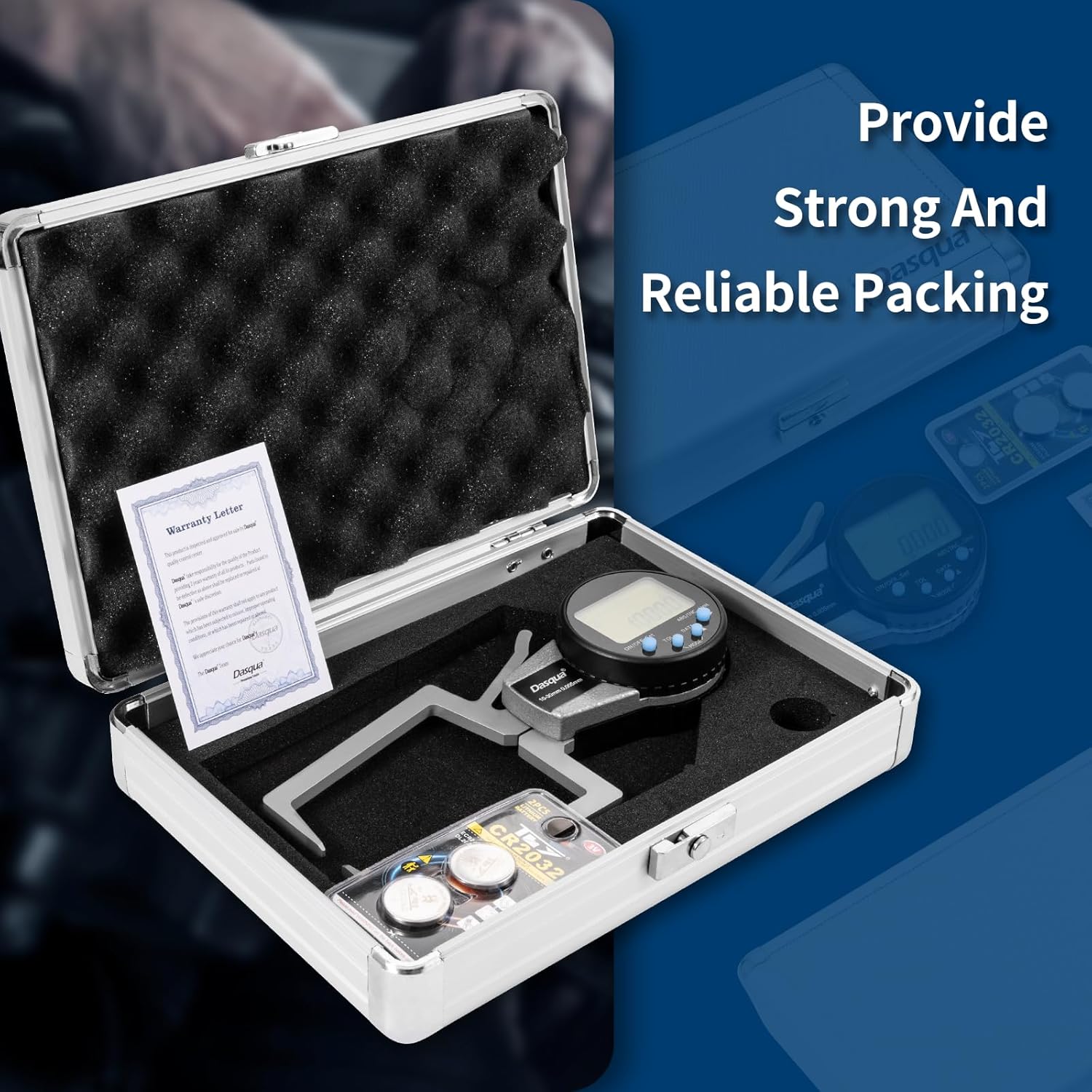
Figure 3: Digital Caliper packaging with battery. This image shows the digital caliper stored in its protective case, alongside a CR2032 battery and a warranty letter.
4. Иштөө нускамалары
4.1 Using the Digital External Caliper Gage
- Күйгүзүү/өчүрүү: Press the 'ON/OFF' button to turn the caliper on or off.
- Бирдикти айландыруу: Press the 'ABS/INC/Unit' button to switch between inch (in) and millimeter (mm) units. Some models may also offer fractional measurements.
- Нөл орнотуу: After cleaning the measuring arms and closing them, press the 'Set' button to zero the display for absolute measurement.
- Relative Measurement (INC): Press the 'ABS/INC/Unit' button repeatedly until 'INC' appears on the display to set a temporary zero point for incremental measurements.
- кармап туруу функциясы: Press the 'TOL' button (or 'HOLD' if labeled) to freeze the current reading on the display. Press again to release.
- Маалымат чыгаруу: If applicable, the 'DATA' button can be used for data transmission to external devices. Refer to specific data output instructions if using this feature.
- Өлчөө: Gently open the measuring arms, place the object between them, and close the arms until they make firm contact. Read the measurement on the LCD display.

Figure 4: Caliper in operation. This image shows a hand holding the digital external caliper, with the measuring arms open to measure an object.
4.2 Using Bore and Telescoping Gauges
- Тандоо: Choose the appropriate size bore or telescoping gauge for the internal dimension you wish to measure.
- Кыстаруу: Compress the spring-loaded plungers and insert the gauge into the bore, groove, or hole.
- Кеңейтүү: Release the plungers to allow them to expand and make contact with the internal surfaces. The knurled clamp can be used to secure the plungers in place.
- Алып салуу: Carefully remove the gauge without disturbing the set measurement.
- Окуу: Use an external micrometer or caliper to measure the dimension across the expanded plungers of the bore/telescoping gauge. This reading represents the internal dimension of the original feature.

Figure 5: Bore and Telescoping Gauges Set. This image displays the complete set of bore and telescoping gauges, typically used for internal measurements.

Figure 6: Measuring with a telescoping gauge. This image illustrates the process of using a telescoping gauge to capture an internal dimension, which is then measured with an external micrometer.
5. Техникалык тейлөө
- Тазалоо: After each use, wipe all measuring surfaces with a clean, dry, lint-free cloth. For stubborn dirt, use a cloth lightly dampизопропил спирти менен жасалган. Катуу химиялык заттардан же абразивдүү материалдардан алыс болуңуз.
- Сактагыч: Store the instruments in their protective case in a dry, clean environment, away from direct sunlight, extreme temperatures, and corrosive substances.
- Батареяны алмаштыруу: Replace the CR2032 battery in the digital caliper when the display becomes dim or erratic. Dispose of old batteries responsibly.
- Майлоо: No lubrication is typically required for these instruments. Avoid applying oils or greases to the measuring surfaces.
6. Кыйынчылыктарды
No specific troubleshooting steps are provided for this product. If you encounter issues, ensure the battery is correctly installed and charged, and that the measuring surfaces are clean. For persistent problems, refer to the warranty and support information.
7. Техникалык шарттар
- Measurement Range (Digital Caliper): 0.400"-1.2" / 10-30mm (specific model range)
- Тактыгы: 0.0008" / 0.02мм
- Чечим: 0.0005" / 0.01мм
- Дисплей: Large LCD, switchable between inch, metric, and fractional units.
- Батарея түрү: CR2032 (for digital caliper)
- Gauge Finish: Сатин хром
8. Кепилдик жана колдоо
For warranty information and customer support, please refer to the warranty letter included with your product packaging. You may also visit the official Dasqua webкошумча жардам жана байланыш маалыматы үчүн сайт.


