1. Бүттүview
The AOOSTAR WTR PRO is a high-performance 4-Bay NAS Mini PC designed for versatile applications including soft routing, DIY NAS, media editing, and office tasks. Powered by the 12th generation Intel Alder Lake-N150 processor, it offers significant performance improvements and robust storage expansion options.
Негизги өзгөчөлүктөрү:
- Intel N150 CPU: 12th Gen Alder Lake-N150 processor (4 Cores/4 Threads, 6M cache, up to 3.6 GHz) with Intel UHD graphics, offering 50% performance improvement over previous generations.
- Кеңири сактоочу жай: 4 bays for 3.5" SATA hard drives (up to 22TB each, total 88TB) and 2 M.2 2280-NVMe slots for SSDs.
- Dual Channel DDR4 RAM: 2 slots supporting up to 64GB (32GB*2) of 3200MHz DDR4 RAM.
- Triple 4K Display Output: Connect up to three 4K-resolution displays simultaneously via DP1.4 (4K144Hz), HDMI 2.1, and Type-C.
- Натыйжалуу муздатуу: Through-the-wall construction with a 12CM ultra-quiet fan and intelligent fan control for optimal heat dissipation.
- Байланыш: 2x USB3.0, 2x USB2.0, 2x 2.5G LAN ports, 3.5mm Audio Jack, Micro SD Card Port, DC power input.
- Тармак өзгөчөлүктөрү: Supports WOL (Wake on LAN) for convenient remote startup.
2. Продукциянын компоненттери
Familiarize yourself with the external and internal components of your AOOSTAR WTR PRO NAS Mini PC.
Тышкы View:

2.1-сүрөт: алдыңкы жана каптал view of the AOOSTAR WTR PRO NAS Mini PC, showcasing анын компакттуу дизайны.
Порттор жана туташуу:

Figure 2.2: Rear panel of the NAS Mini PC with various ports.
- 2 x USB 3.0 порттору
- 2 x USB 2.0 порттору
- 1 x DisplayPort 1.4 (4K@144Гц)
- 2 x LAN (2.5G Ethernet) Ports
- 1 x 3.5 мм аудио уячасы
- 1 x HDMI 2.1 порту
- 1 x Micro SD Card Port
- 1 x DC Power Input
- 1 x Type-C Port
Internal Layout and Drive Bays:

2.3-сүрөт: Ички view highlighting the motherboard, RAM slots, and M.2 NVMe slots.

Сүрөт 2.4: Алдыңкы view with the 4 drive bays for 3.5" SATA HDDs.
Муздатуу системасы:
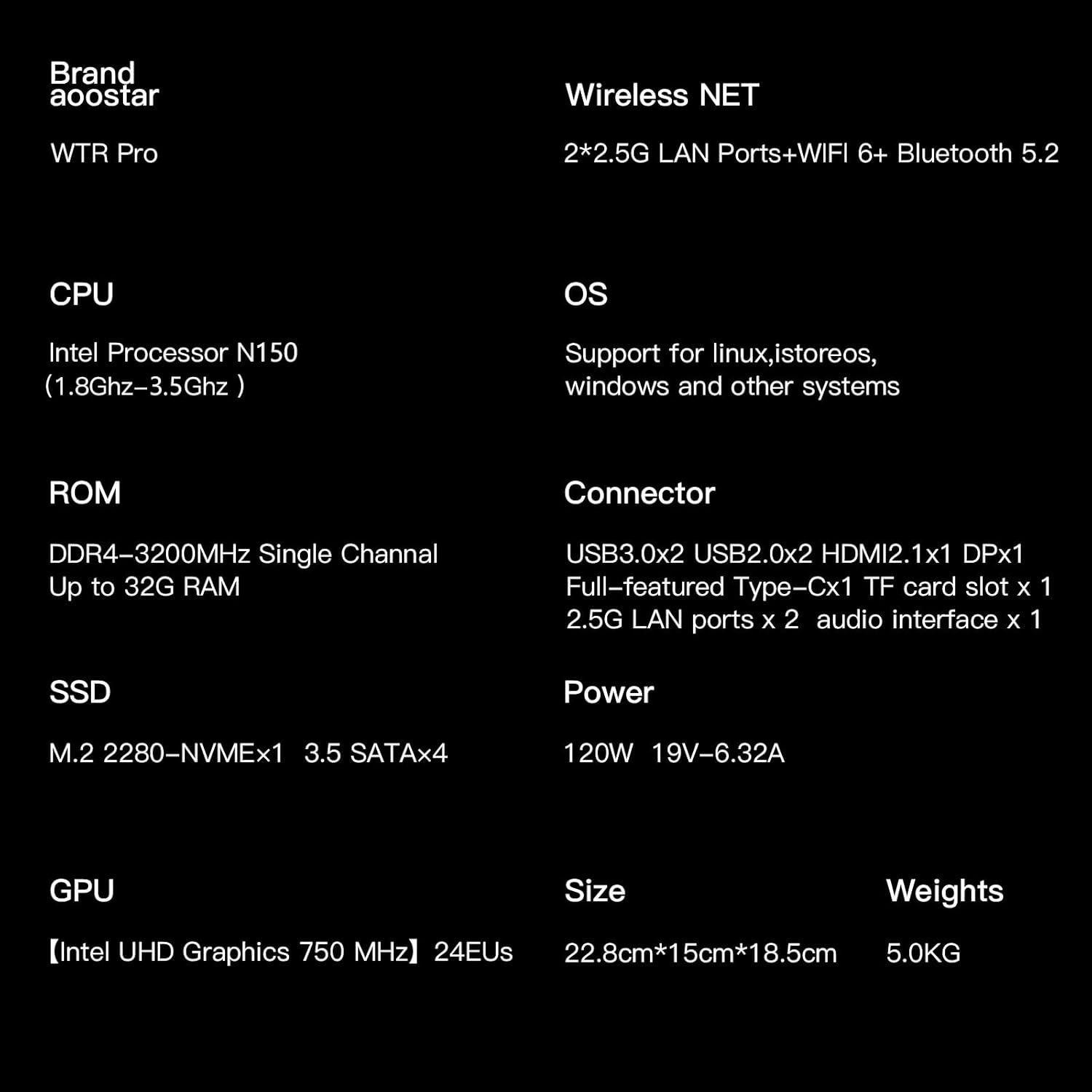
Figure 2.5: Internal diagram illustrating the through-the-wall construction and 12CM cooling fan.
3. Орнотуу
This section guides you through the initial setup of your AOOSTAR WTR PRO NAS Mini PC, including hardware installation and first power-on.
Hardware Installation (RAM, SSD, HDD):
The AOOSTAR WTR PRO is designed for user-friendly hardware upgrades. For detailed visual instructions on installing RAM, M.2 NVMe SSDs, and 3.5" SATA HDDs, please refer to the official teardown video below. Ensure the device is powered off and unplugged before performing any hardware installations.
Video 3.1: Official AOOSTAR WTR MAX Teardown Video. This video demonstrates the process of disassembling the unit and installing internal components like RAM and SSDs, which is similar for the WTR PRO model.
- Ички компоненттерге жетүү: Carefully remove the bottom and rear covers of the NAS to access the motherboard, RAM slots, and M.2 NVMe slots. Disconnect any fan cables as instructed in the video.
- RAM орнотуу: Locate the two DDR4 RAM slots. Gently insert the RAM modules into the slots, ensuring they are properly seated until the clips on the sides lock them in place.
- M.2 NVMe SSD орнотуу: Identify the M.2 NVMe slots on the motherboard. Insert the SSDs at an angle and then gently push down, securing them with the provided screw.
- 3.5" SATA HDD Installation: Slide out the drive trays from the front bays. Secure your 3.5" SATA hard drives into the trays using screws. Slide the trays back into the bays until they click into place.
- Кайра чогултуу: Reconnect any disconnected fan cables. Carefully reattach the bottom and rear covers, ensuring all screws are tightened.
Initial Power-On and Network Connection:
- Connect the DC power adapter to the NAS and plug it into a power outlet.
- Connect an Ethernet cable from one of the 2.5G LAN ports on the NAS to your router or network switch.
- Press the power button on the front of the NAS to turn it on.
- Observe the indicator lights for network activity and drive status.
4. Иштөө нускамалары
The AOOSTAR WTR PRO is designed to run various operating systems, including Windows, Linux, and other NAS-specific OS. This section covers general operational aspects.
Operating System and Initial Configuration:
Upon first boot, you will need to install your preferred operating system onto the installed storage. Follow the OS-specific instructions for installation and initial configuration. The NAS supports various operating systems, allowing for flexible deployment as a personal cloud, media server, or development platform.
File Sharing and Data Management:
- Configure network shares and user permissions through your chosen operating system's interface.
- Utilize the 2.5G LAN ports for high-speed data transfer across your network.
- The NAS supports various RAID configurations (if multiple drives are installed) for data redundancy and performance optimization.
Media Playback and Multi-Display Setup:
Leverage the Intel UHD Graphics and multiple display outputs for a rich multimedia experience.
- Connect up to three 4K displays using the DP1.4, HDMI 2.1, and Type-C ports for an extended workspace or immersive media viewing.
- The integrated GPU supports 4K video output, making it suitable for direct media playback to a monitor or TV.
Энергияны башкаруу:
The WTR PRO features low power consumption (15W-25W), making it ideal for 24/7 operation.
- Supports WOL (Wake on LAN) for remote power-on, allowing you to access your NAS even when it's powered off.
5. Техникалык тейлөө
Proper maintenance ensures the longevity and optimal performance of your AOOSTAR WTR PRO NAS Mini PC.
Cooling and Dust Management:
The NAS is equipped with a through-the-wall construction and a 12CM fan for superior cooling and silent operation. The dustproof design helps maintain stable performance over time.
- Regularly inspect the fan and ventilation grilles for dust accumulation.
- Gently clean any dust using compressed air or a soft brush to ensure unobstructed airflow.
- Ensure the NAS is placed in a well-ventilated area to prevent overheating.
Программалык камсыздоо жаңыртуулары:
Keep your operating system and any installed software up-to-date to benefit from the latest features, security patches, and performance improvements.
- Refer to your chosen operating system's documentation for instructions on checking and installing updates.
6. Кыйынчылыктарды
This section provides general guidance for common issues. For more specific problems, consult your operating system's documentation or contact support.
Жалпы маселелер:
- Кубат жок: Ensure the DC power adapter is securely connected to both the NAS and a working power outlet.
- Тармакка туташуу маселелери: Verify that the Ethernet cable is properly connected to both the NAS and your router/switch. Check your router's status and network settings. Ensure network drivers are correctly installed on your chosen OS.
- Диск аныкталган жок: Confirm that RAM, SSDs, and HDDs are correctly installed and seated. Check cable connections for SATA drives.
- Ашыкча ысып кетүү: Ensure proper ventilation and clean any dust from the fan and vents.
Колдоо кызматы менен байланышуу:
If you encounter issues that cannot be resolved with the above steps, please contact AOOSTAR customer service.
- AOOSTAR provides 12 months after-sales service from the date of order.
- Contact information can typically be found on the product packaging or the official AOOSTAR webсайт.
7. Техникалык шарттар
| Өзгөчөлүк | Спецификация |
|---|---|
| Бренд | AOOSTAR |
| Модель аты | WTR PRO N150 |
| Процессор | Intel Alder Lake-N150 (4C/4T, up to 3.6 GHz) |
| Графика | Intel UHD графикасы (интегралдык) |
| RAM түрү | DDR4 SDRAM (Dual Channel, 3200MHz) |
| RAM Slots | 2 (Max 64GB) |
| Сактоочу жайлар | 4 x 3.5" SATA (Up to 22TB each) |
| M.2 NVMe Slots | 2 x M.2 2280-NVMe |
| Max Screen Resolution | 3840x2160 (4K) |
| Video Output | 1x DP1.4 (4K144Hz), 1x HDMI 2.1, 1x Type-C |
| USB порттору | 2x USB 3.0, 2x USB 2.0 |
| LAN порттору | 2x 2.5G Ethernet |
| Аудио Jack | 1х 3.5мм |
| Карта порту | 1x Micro SD |
| Энергияны керектөө | 15 Вт - 25 Вт |
| Өлчөмдөр | 13.78 x 9.06 x 8.27 дюйм |
| Салмагы | 11 фунт |
| Түс | Кара |
8. Кепилдик жана колдоо
AOOSTAR stands behind the quality of its products.
- Кепилдик мөөнөтү: Your AOOSTAR WTR PRO NAS Mini PC comes with a 12-month after-sales service warranty from the date of order.
- Кардарларды колдоо: For any questions or assistance regarding your product, please contact AOOSTAR customer service through inquiry or email. Refer to your product packaging or the official AOOSTAR webконкреттүү байланыш маалыматы үчүн сайт.


