Introduction
The Insta360 Flow 2 Pro is an advanced 3-axis AI-powered smartphone gimbal designed to transform your smartphone into a professional content creation tool. It offers superior stabilization, intelligent tracking features, and an all-in-one design for versatile shooting. This manual provides essential information for setting up, operating, and maintaining your Insta360 Flow 2 Pro.
Негизги өзгөчөлүктөр төмөнкүлөрдү камтыйт:
- 3-Axis Stabilization: Eliminates shakes for smooth, professional-quality video.
- Active Zoom Tracking: Maintains focus on fast-moving subjects even at long distances.
- Multi-Person Tracking: Frames multiple people effortlessly for group shots.
- Баары бир дизайн: Features a built-in selfie stick, tripod, and selfie mirror.
- 360 Degree Infinite Pan Tracking: Offers unrestricted movement, keeping you in frame.
- 1-Step Rapid Deploy: Allows for instant setup and filming.
- Apple DockKit Integration: Leverages Apple's tracking technology for smooth video calls, online meetings, and live streams.
Кутуда эмне бар
Upon unboxing your Insta360 Flow 2 Pro, please verify that all the following components are included:
- 1x Insta360 Flow 2 Pro (Summit White)
- 1x Коргоочу баштык
- 1x Magnetic Phone Clamp
- 1x Type-C to A Charge Cable
- 1x EVO Gimbals Clean cloth

Image: Components included in the Insta360 Flow 2 Pro package. This includes the gimbal unit, a magnetic phone clamp for attaching your smartphone, a USB-C to USB-A charging cable, and a soft protective pouch for storage and transport.
Жайгашуу
The Insta360 Flow 2 Pro features a 1-Step Rapid Deploy system for quick setup.
- Charge the Gimbal: Before first use, fully charge the gimbal using the provided USB-C to A charge cable. Connect the USB-C end to the gimbal and the USB-A end to a power adapter (not included). The battery indicator will show charging status.
- Gimbal ачуу: Hold the gimbal firmly and unfold it. The gimbal is designed to deploy quickly into its operational position.
- Attach Your Smartphone: Securely attach your smartphone to the magnetic phone clamp. Ensure the phone is centered and balanced within the clamp for optimal performance. The gimbal supports phones with thicknesses from 0.3-0.4" (6.9-10mm) and widths from 2.5-3.3" (64-84mm).
- Күйгүзүү: Press and hold the power button to turn on the gimbal. It will automatically calibrate and be ready for use.
- Download the Insta360 App: For full functionality and advanced features, download the official Insta360 app from your smartphone's app store.
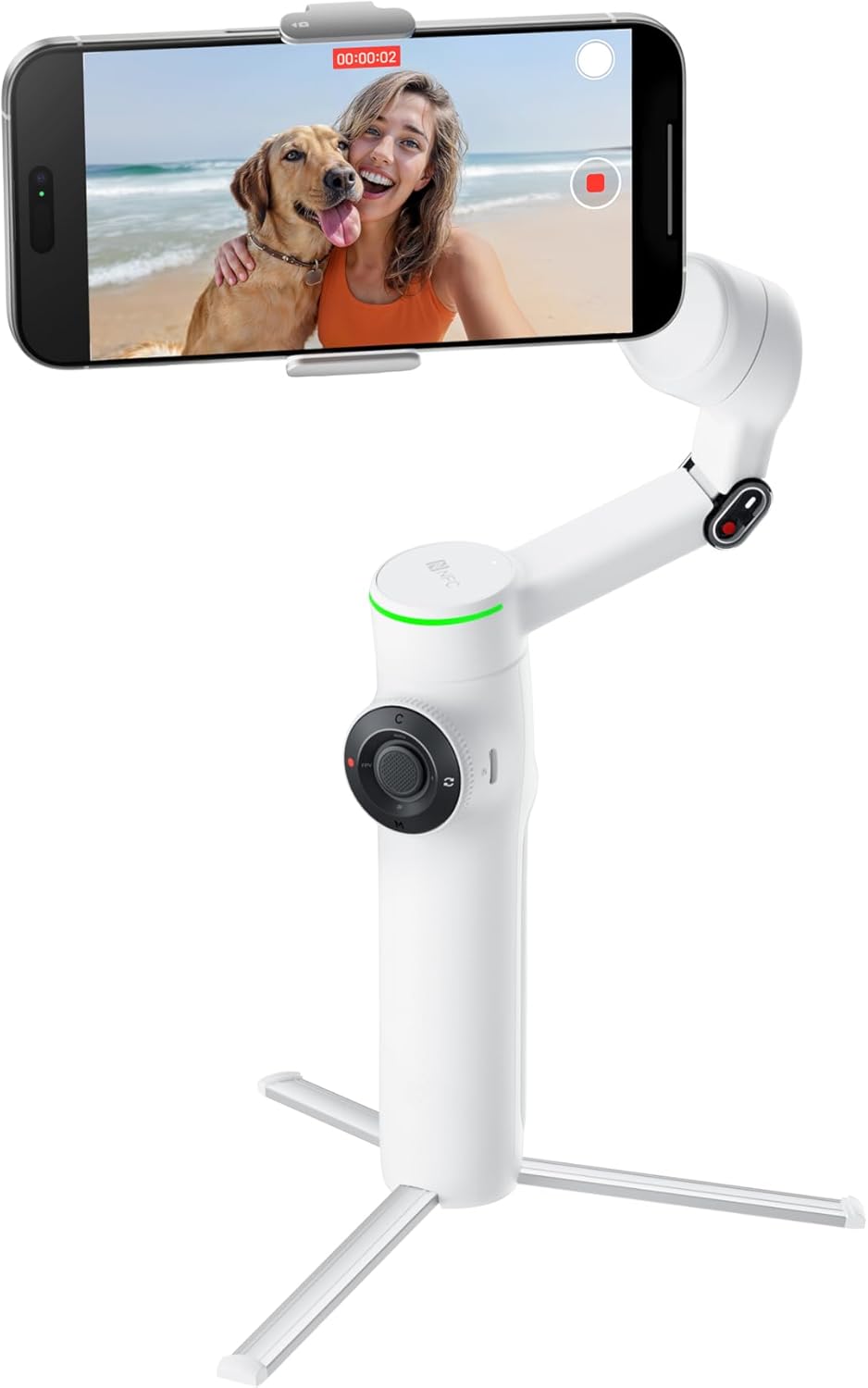
Image: The Insta360 Flow 2 Pro gimbal in its deployed state with a smartphone securely mounted. This image demonstrates the product ready for immediate use, highlighting its compact and stable design.

Image: A visual guide illustrating the quick 1-Step Rapid Deploy mechanism of the Insta360 Flow 2 Pro. It shows the gimbal transforming from its folded, compact state to its fully extended, operational state with a simple unfolding motion.
Gimbal иштетүү
The Insta360 Flow 2 Pro offers various modes and features to enhance your smartphone videography.
Негизги башкаруу элементтери
- Джойстик: Control pan and tilt movements of the smartphone.
- Жабык баскычы: Press once to take a photo or start/stop video recording.
- Режим баскычы (M): Cycle through different shooting modes (e.g., Follow, Pan Follow, FPV).
- Чоңойтуу слайдери: Adjust the zoom level of your smartphone camera.
Intelligent Tracking (Deep Track 4.0)
The gimbal's AI-powered tracking ensures your subject remains in frame.
- Active Zoom Tracking: In the Insta360 app, select a subject to track. The gimbal will automatically follow the subject, even at long distances, and can zoom in or out to maintain optimal framing.
- Multi-Person Tracking: The gimbal can identify and track multiple individuals, ensuring everyone is perfectly composed in group shots.
- 360° Infinite Pan Tracking: The gimbal can rotate continuously 360 degrees, allowing for dynamic tracking shots without limitations.
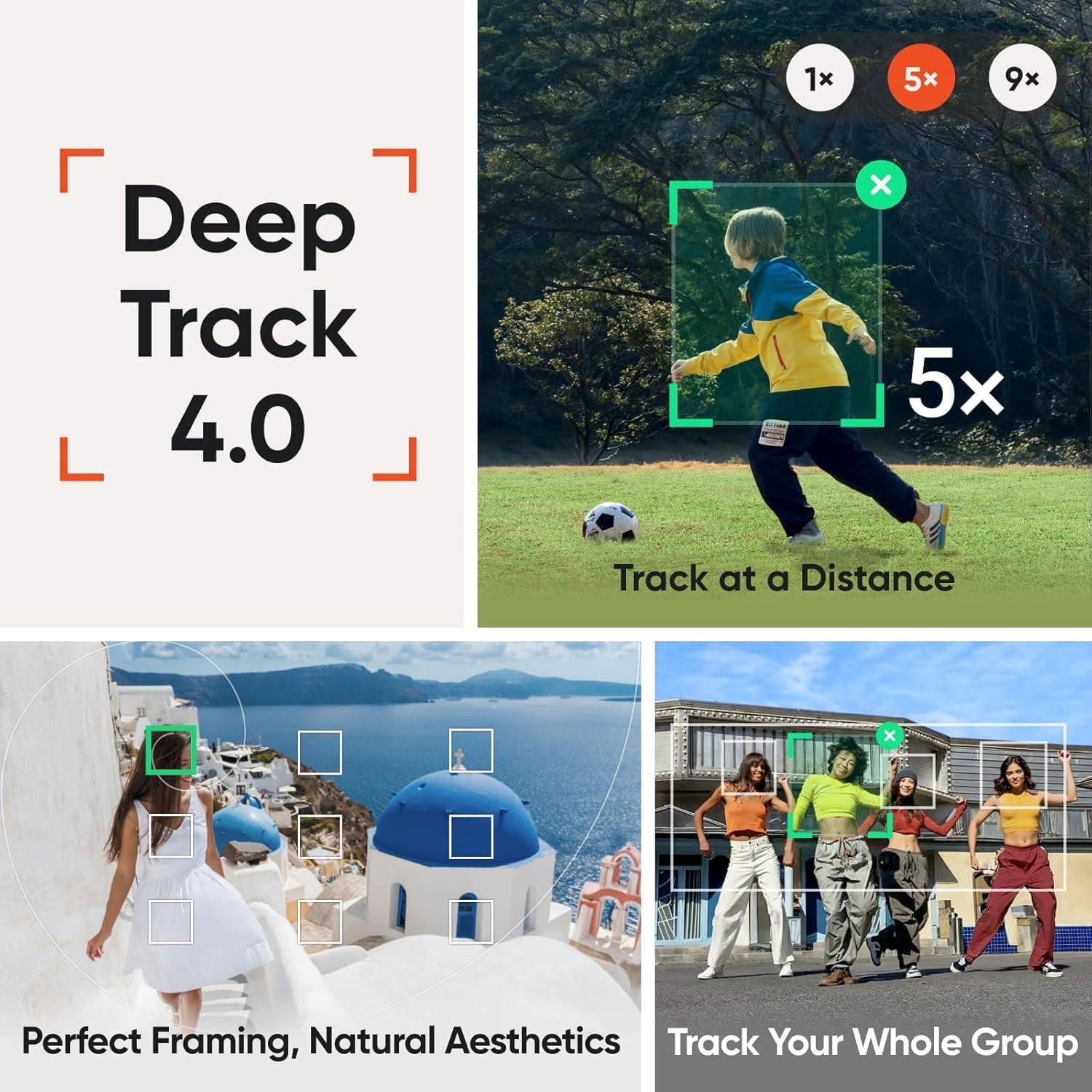
Image: A composite image demonstrating the capabilities of Deep Track 4.0. It shows the gimbal's ability to track a single subject from a distance, maintain perfect framing for individuals, and track an entire group of people simultaneously.

Image: A visual representation of the 360-degree infinite pan tracking feature. The image shows the gimbal rotating to follow subjects around a full circle, indicating its capability for unrestricted movement and dynamic shot composition.
All-in-One Design Features
- Built-in Selfie Stick: Extend the gimbal arm to use it as a selfie stick for wider shots or group photos. It extends up to 8.3" (210mm).
- Интеграцияланган штатив: The base of the gimbal unfolds to form a stable tripod, ideal for stationary shots, time-lapses, or hands-free tracking.
- Selfie күзгүсү: A small mirror is integrated near the phone clamp, allowing you to accurately frame yourself when using the rear camera for higher quality selfies or vlogs.

Image: A collage highlighting the all-in-one design of the Insta360 Flow 2 Pro. It displays the built-in selfie stick extended, the integrated tripod deployed for stable shots, and the selfie mirror for precise framing when using the rear camera.
Apple DockKit Integration
The Insta360 Flow 2 Pro is the first and only gimbal series with Apple DockKit, enabling seamless integration with iOS apps for enhanced functionality.
- Видео чалуулар: Maintain perfect framing during video calls.
- Онлайн жолугушуулар: Stay in frame during virtual meetings, even if you move around.
- Түз агым: Ensure consistent subject tracking for professional-looking live broadcasts.

Image: A smartphone mounted on the Insta360 Flow 2 Pro, displaying a video call with a baby being tracked. This illustrates the gimbal's integration with Apple DockKit, allowing for smooth and consistent tracking during video calls, online meetings, and live streams across various iOS applications.
AI Editing Suite
Бутуңузду өркүндөтүңүзtage with the AI-powered editing tools available in the Insta360 app.
- Smart Editing: Utilize AI to automatically identify highlights and create dynamic edits.
- Калыптар: Apply various creative templates for quick and professional-looking videos.

Image: A graphic featuring an "AI" logo and various video frames, representing the AI Editing Suite within the Insta360 app. This suite allows users to master their shots with AI-powered editing tools, simplifying the post-production process.
Техникалык тейлөө
Proper maintenance ensures the longevity and optimal performance of your Insta360 Flow 2 Pro.
- Тазалоо: Use the provided EVO Gimbals Clean cloth or a soft, dry cloth to wipe the gimbal body. Avoid using liquid cleaners or solvents.
- Сактагыч: When not in use, fold the gimbal and store it in the protective pouch to prevent dust and scratches. Store in a cool, dry place away from direct sunlight.
- Батареяга кам көрүү: For long-term storage, ensure the battery is charged to approximately 50-60%. Recharge every three months to prevent deep discharge.
- Программалык камсыздоонун жаңыртуулары: Regularly check for firmware updates via the Insta360 app. Updates can improve performance, add new features, and fix bugs.
Проблемаларды чечүү
If you encounter issues with your Insta360 Flow 2 Pro, try the following solutions:
- Gimbal Not Powering On:
- Ensure the battery is sufficiently charged. Connect the gimbal to a power source and try again.
- Press and hold the power button for a few seconds to ensure it's not a brief press.
- Туруксуз Footage/Vibrations:
- Ensure your smartphone is securely and centrally mounted in the magnetic clamp.
- Check for any obstructions to the gimbal's motors.
- Perform a gimbal calibration through the Insta360 app.
- Ensure the gimbal's firmware is up to date.
- Колдонмого туташуу маселелери:
- Смартфонуңузда Bluetooth иштетилгенин текшериңиз.
- Restart both the gimbal and your smartphone.
- Try reinstalling the Insta360 app.
- Tracking Not Working:
- Ensure adequate lighting for the subject.
- Avoid rapid, jerky movements that might exceed the gimbal's tracking speed.
- Ensure the subject is clearly visible and not obscured.
If problems persist, please contact Insta360 customer support for further assistance.
Техникалык шарттар
| Өзгөчөлүк | Деталь |
|---|---|
| Модель номери | CINSABBA-Grey-ALT4 |
| Продукциянын өлчөмдөрү (жалпы) | 9"D x 4"W x 6"H |
| Катталган өлчөмү | 3.6 x 7 x 1.4 дюйм |
| Элемент Салмагы | 1 фунт (16 унция) |
| Максималдуу салмак боюнча сунуш | 16 унция |
| Шайкеш телефондун калыңдыгы | 0.3-0.4 дюйм (6.9-10 мм) |
| Туура келген телефондун кеңдиги | 2.5-3.3 дюйм (64-84 мм) |
| Турукташтыруу | 3-огу |
| Pan Rotation Range | 360° (Infinite) |
| Тилтүү диапазону | -99°тан 231°ка чейин |
| Selfie Stick узартуу | 8.3 дюймга чейин (210 мм) |
| Батареянын иштөө мөөнөтү | Болжол менен 10 саат |
| UPC | 842126108259 |
| Өндүрүүчү | Arashi Vision (US) LLC |
| Дата биринчи жеткиликтүү | 14-январь, 2025-жыл |
Кепилдик жана колдоо
Insta360 products are designed for reliability and performance. For specific warranty terms and conditions, please refer to the warranty card included with your product or visit the official Insta360 webсайт.
For technical support, troubleshooting assistance, or inquiries regarding your Insta360 Flow 2 Pro, please visit the Insta360 support page or contact their customer service directly. Keep your purchase receipt and product serial number handy when seeking support.
Protection plans are also available for extended coverage. Please refer to your retailer for details on available protection plans.


