1. Киришүү
This manual provides essential information for the safe and efficient use of your DOOGEE Blade GT 5G outdoor mobile phone. Please read this manual thoroughly before operating the device to ensure optimal performance and longevity.

1.1-сүрөт: Алдыңкы жана арткы view of the DOOGEE Blade GT, highlighting its storage capacity and LED notification feature.
2. Орнотуу
2.1 SIM картаны жана MicroSD картасын орнотуу
- Аппараттын капталындагы SIM карта салгычын табыңыз.
- SIM чыгаруучу куралды ачуу үчүн лотоктун жанындагы кичинекей тешикке киргизиңиз.
- Nano-SIM картаңызды(ларыңызды) жана/же MicroSD картаңызды лотоктогу белгиленген уячаларга салыңыз. Алтын контакттары ылдый карасын.
- Аспаптын ичине лотокту чыкылдагыча этияттык менен түртүңүз.
2.2 Баштапкы күйгүзүү
Press and hold the Power button located on the side of the device until the DOOGEE logo appears on the screen. Follow the on-screen prompts to complete the initial setup, including language selection, Wi-Fi connection, and Google account setup.
2.3 Аппаратты заряддоо
Connect the USB Type-C cable to the charging port at the bottom of the phone and the other end to a compatible 18W power adapter. Plug the adapter into a power outlet. The battery indicator on the screen will show the charging status. For optimal battery life, use the original charger and cable.
3. Аппаратыңызды иштетүү
3.1 Дисплей жана навигация
The DOOGEE Blade GT features a 6.72-inch FHD+ display with a 120Hz dynamic refresh rate, providing a smooth visual experience. Navigate the device using touch gestures: tap to select, swipe to scroll, pinch to zoom. The physical buttons control power, volume, and can be customized for quick access to certain functions.

3.1-сүрөт: The 6.72-inch FHD+ display with 120Hz refresh rate, offering clear and fluid visuals.
3.2 Камераны колдонуу
The device is equipped with a 48MP AI main camera, a 5MP wide-angle camera, and a 20MP front camera. To open the camera application, tap the camera icon on the home screen or app drawer. Select different modes (e.g., Photo, Video, Portrait) by swiping across the screen. Tap the shutter button to capture images or start/stop video recording.

3.2-сүрөт: Бүттүview of the DOOGEE Blade GT's camera system, including the 48MP main sensor.
3.3 Байланыш
The DOOGEE Blade GT supports 5G cellular networks, Wi-Fi 6, Bluetooth, NFC for contactless payments, OTG for connecting USB devices, GPS for navigation, and FM radio. Access these settings via the Quick Settings panel (swipe down from the top of the screen) or the Settings app.
4. Техникалык тейлөө
4.1 Батареяга кам көрүү
The device is powered by a 5500mAh battery. To maximize battery life, avoid extreme temperatures, do not fully discharge the battery regularly, and unplug the charger once the battery is full. The phone supports 18W fast charging.

4.1-сүрөт: Illustration of the 5500mAh battery and its estimated usage times for standby, music, calls, web browsing, and video watching.
4.2 Cleaning and Durability
The DOOGEE Blade GT is designed to be rugged, with IP68/IP69K water and dust resistance, and MIL-STD-810H compliance for drop protection. To clean the device, wipe it with a soft, damp cloth. Avoid using harsh chemicals or abrasive materials. Ensure all ports are closed before exposing the device to water or dust.
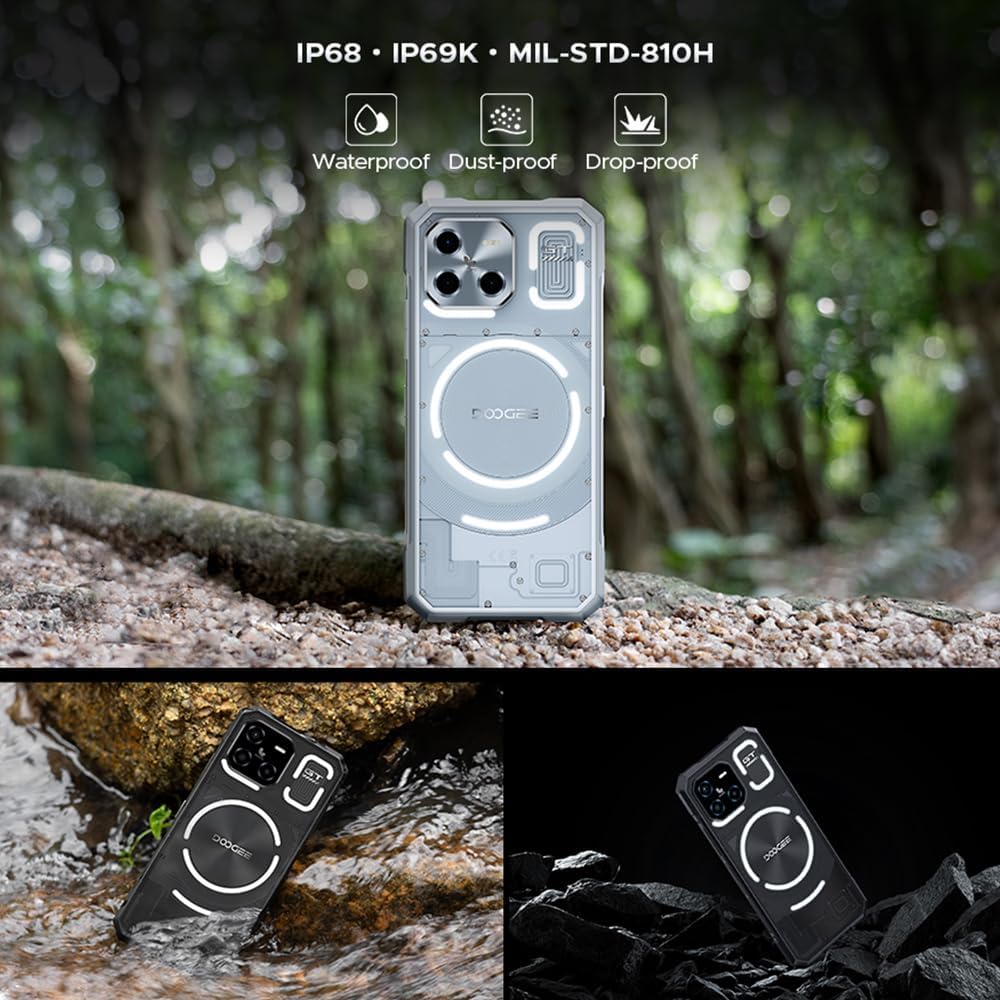
4.2-сүрөт: Visual representation of the DOOGEE Blade GT's ruggedness, including its waterproof, dust-proof, and drop-proof capabilities.
5. Кыйынчылыктарды
- Батарея бат эле түгөнөт: Check for background apps consuming power. Reduce screen brightness or disable unnecessary features like GPS, Wi-Fi, or Bluetooth when not in use. Consider performing a factory reset if the issue persists after checking app usage.
- Speaker Noise/Unclear Sound: Ensure the speaker grille is clean and free of debris. Adjust volume settings. If the issue persists, it may indicate a hardware problem requiring professional service.
- Түзмөк жооп бербейт: Өчүрүп-күйгүзүү үчүн "Кубат" баскычын болжол менен 10-15 секунд басып туруңуз.
- Байланыш көйгөйлөрү (Wi-Fi/Bluetooth/Уюлдук байланыш): Toggle the respective connection off and on. Restart the device. For cellular issues, ensure your SIM card is properly inserted and your plan is active.
- Колдонмолор бузулуп/тоңуп жатат: Көйгөйлүү колдонмонун кэшин жана дайындарын Орнотуулар > Колдонмолор бөлүмүнөн тазалаңыз. Эгер көйгөй чечилбесе, колдонмону чыгарып салып, кайра орнотуңуз.
6. Техникалык шарттар
| Өзгөчөлүк | Description |
|---|---|
| Модель аты | DOOGEE Blade GT |
| Процессор | MTK Dimensity 7050 Octa-core (6nm) |
| RAM | 12 ГБ (20 ГБ виртуалдык оперативдик эс тутуму менен 32 ГБ чейин кеңейтилиши мүмкүн) |
| Ички сактагыч | 256 ГБ ROM |
| Дисплей | 6.72-inch FHD+ (2400 x 1080) IPS, 120Hz Refresh Rate |
| Арткы камера | 48MP AI Main Camera + 5MP Wide Angle Camera |
| Алдыңкы камера | 20MP |
| Батарея | 5500 мАч, 18 Вт тез кубаттоо |
| Операция системасы | Android 14 |
| Туруктуу | IP68/IP69K Суу өткөрбөйт жана чаң өткөрбөйт, MIL-STD-810H Кулап түшпөйт |
| Өлчөмдөр | Калыңдыгы 10.5 мм, салмагы 260 г |
| Байланыш | 5G, Wi-Fi 6, Bluetooth, NFC, OTG, GPS, FM, USB Type-C |

6.1-сүрөт: Diagram illustrating the MediaTek D7050 6nm processor, central to the phone's performance.

6.2-сүрөт: Visual representation of the phone's slim profile (10.5 мм) жана жеңил салмагы (260 г).
7. Кепилдик жана колдоо
Your DOOGEE Blade GT is covered by a standard manufacturer's warranty. For specific warranty terms and conditions, please refer to the warranty card included in your product packaging or visit the official DOOGEE website. For technical support, product inquiries, or service requests, please contact DOOGEE customer service through their official channels.


