1. Киришүү
This manual provides essential information for the proper use and maintenance of your ALLDOCUBE iPlay60 Lite 11-inch Android 15 Tablet. Please read it thoroughly before operating the device to ensure optimal performance and longevity. Keep this manual for future reference.
2. Продукт бүтүп калдыview
2.1 Пакеттин мазмуну
Пакетте бардык буюмдар бар экенин текшериңиз:
- ALLDOCUBE iPlay60 Lite Tablet
- USB Type-C кабели
- SIM карта PIN
- Кубат адаптери (5V/2A)
- User Manual

Image: Contents of the ALLDOCUBE iPlay60 Lite tablet package, including the tablet, USB-C cable, SIM ejector tool, power adapter, and user manual.
2.2 Түзмөктүн жайгашуусу
Планшетиңиздин физикалык компоненттери менен таанышып алыңыз:
- Алдыңкы камера: Видео чалуулар жана селфи үчүн.
- Арткы камералар: Main camera for photos and videos.
- Кубат которгучу: To turn the device on/off or lock/unlock the screen.
- Үн баскычтары: Аудио үнүн жөндөө үчүн.
- Кубаттоо порту (C түрү): Түзмөктү кубаттоо жана маалыматтарды өткөрүп берүү үчүн.
- Баяндамачы: Аудио чыгаруу үчүн.
- TF/SIM Card Slot: For inserting microSD and SIM cards.

Image: Diagram illustrating the physical layout of the ALLDOCUBE iPlay60 Lite tablet, highlighting the front camera, rear cameras, power switch, volume buttons, charging port, speaker, and TF/SIM card slot.
3. Орнотуу
3.1 SIM жана MicroSD карталарын салуу
- Locate the TF/SIM card slot on the side of the tablet.
- Insert the provided SIM card pin into the small hole next to the slot to eject the tray.
- Place your Nano-SIM card(s) and/or microSD card into the designated slots on the tray. Note that SIM2 shares a slot with the microSD card.
- Таблетканы кылдаттык менен кайра салыңыз.

Сүрөт: Жакын план view of the SIM and microSD card tray, demonstrating how to insert the cards into the ALLDOCUBE iPlay60 Lite tablet.
3.2 Android'ди баштапкы күйгүзүү жана орнотуу
- Press and hold the Power button until the ALLDOCUBE logo appears.
- Follow the on-screen prompts to complete the initial Android 15 setup, including language selection, Wi-Fi connection, Google account login, and security settings.
- Ensure your tablet is sufficiently charged before starting the setup process.
4. Иштөө нускамалары
4.1 Display Features and Media Playback
The 11-inch in-cell display with 1280x800 resolution is suitable for video viewing, reading, and gaming. It supports Widevine L1 DRM, allowing for high-definition 1080P playback on streaming services like Netflix, Hulu, Prime Video, and Disney+ without quality loss.

Image: The 11-inch display of the ALLDOCUBE iPlay60 Lite, highlighting its 1280x800 resolution, in-cell technology, 10-point touch, 350 cd/m² brightness, and Widevine L1 support for streaming services.
Adjust display settings for comfort:
- Көздү коргоо режими: Reduces blue light to prevent eye strain.
- Түнкү режим: Darkens the interface for comfortable viewаз жарыкта.
- Окуу режими: Optimizes the display for reading text.
- Түс температурасын жөндөө: Customize the screen's color balance.

Image: Screenshots demonstrating various display modes available on the ALLDOCUBE iPlay60 Lite, including eye protection, night mode, reading mode, and color temperature adjustment.
4.2 Аткаруу жана сактоо
The tablet is equipped with a T606 octa-core processor and Arm Mali G57 GPU, providing smooth multitasking and efficient power usage. It features 12GB RAM (4GB physical + 8GB virtual) and 128GB ROM, expandable up to 512GB with a microSD card, offering ampколдонмолор, сүрөттөр жана видеолор үчүн бош орун.
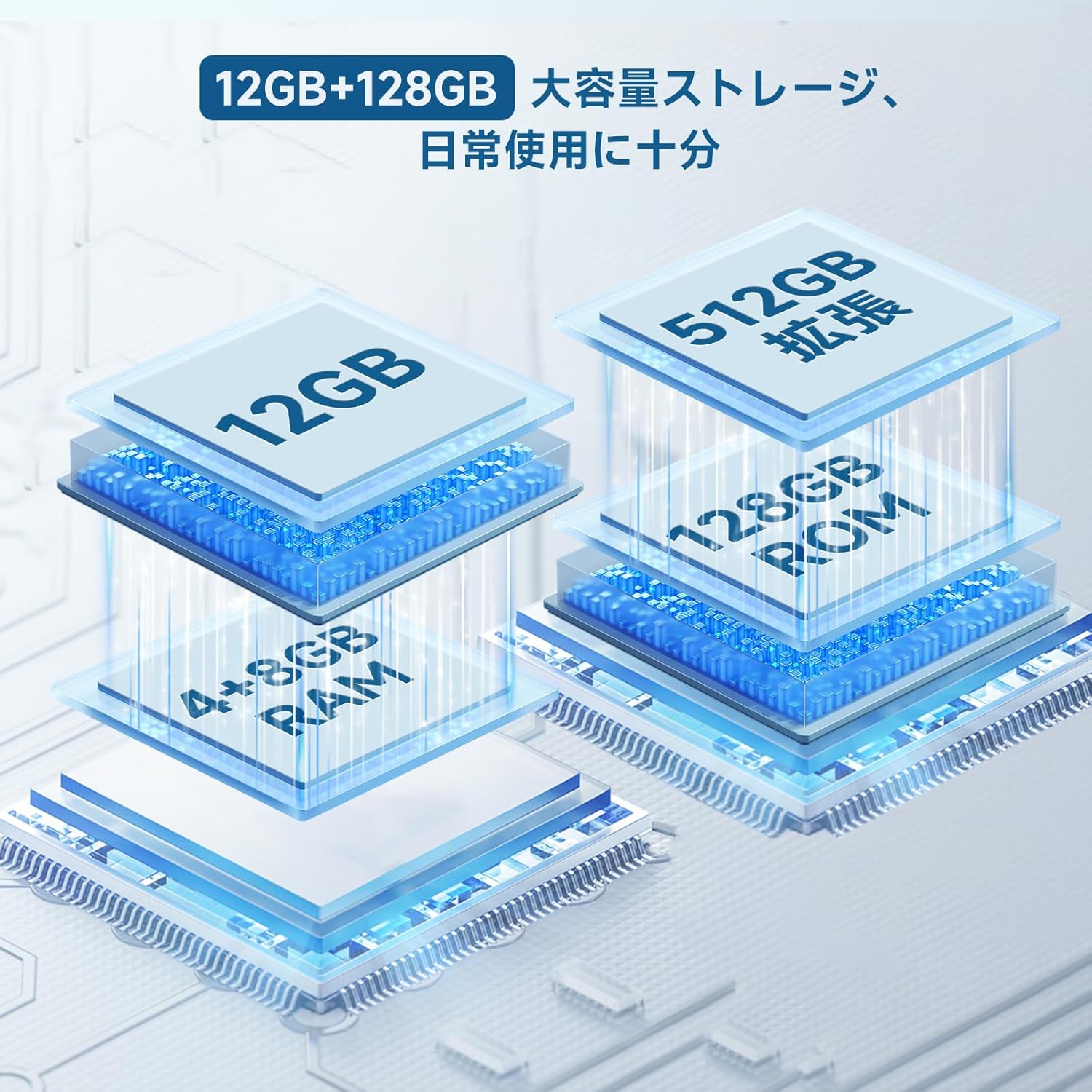
Image: Diagram illustrating the 12GB RAM (4GB + 8GB virtual) and 128GB ROM storage, expandable to 512GB, of the ALLDOCUBE iPlay60 Lite tablet.

Image: Graphic detailing the Unisoc T606 octa-core CPU and Arm Mali G57 GPU, highlighting its AnTuTu score of 290,000 points.
4.3 Байланыш
The iPlay60 Lite supports various connectivity options:
- 4G LTE: Dual SIM support for stable and high-speed mobile data and VoLTE calls.
- Кош тилкелүү Wi-Fi: Supports 2.4GHz and 5GHz for stable and fast internet connections.
- Bluetooth 5.0: For seamless connection with wireless accessories and file өткөрүп берүү.
- GPS: Integrated GPS (GPS/Beidou/Galileo/Glonass) for navigation.
Image: Visual representation of the ALLDOCUBE iPlay60 Lite's connectivity, including 4G LTE dual SIM, 2.4GHz/5GHz Wi-Fi, Bluetooth 5.0, and GPS, with examples of use cases like video calls, TV casting, and navigation.
4.4 Батареянын иштөө мөөнөтү
8000 мАч батарейка узак убакытка чейин колдонууга мүмкүндүк берет:
- Up to 10 hours of continuous video playback.
- 32 саатка чейин музыка ойнотуу.
- 16 XNUMX саатка чейин web серептөө.

Image: Graphic illustrating the 8000mAh battery capacity and estimated usage times for video playback (10 hours), music playback (32 hours), and reading/web browsing (16 hours).
4.5 Android 15 өзгөчөлүктөрү
The tablet runs on Android 15, offering enhanced features for privacy, security, and data protection. It provides more control over app data usage and security functions, along with increased customization options.
- Купуялыкты коргоо: Enhanced controls over app permissions and data access.
- Ата-энелик көзөмөл: Manage screen time and app usage for children.
- Бөлүнгөн экран: Perform multiple tasks simultaneously by dividing the screen.
- 3-Finger Screenshot: Quickly capture screenshots with a simple gesture.

Сүрөт: Скриншоттор көрсөтүлгөнasing key features of Android 15 on the ALLDOCUBE iPlay60 Lite, including privacy settings, parental controls, split-screen functionality, and the 3-finger screenshot gesture.
5. Техникалык тейлөө
- Тазалоо: Экранды жана корпусту тазалоо үчүн жумшак, мамыксыз чүпүрөктү колдонуңуз. Абразивдүү тазалоочу каражаттарды же эриткичтерди колдонбоңуз.
- Сактагыч: Планшетти күн нурунан жана экстремалдык температурадан алыс салкын, кургак жерде сактаңыз.
- Батареяга кам көрүү: To prolong battery life, avoid fully discharging the battery frequently. Charge the device using the provided charger or a compatible 5V/2A or PD18W charger.
- Программалык камсыздоо жаңыртуулары: Оптималдуу аткарууну жана коопсуздукту камсыз кылуу үчүн системанын жаңыртууларын дайыма текшерип, орнотуңуз.
6. Кыйынчылыктарды
6.1 Data Transfer Warning
Маанилүү эскертүү: If you purchased your tablet on or after April 20th, it comes with Android 15. Transferring data directly from another tablet to this device may cause errors. It is recommended to set up the new tablet as a fresh device and manually transfer data or use cloud services to avoid potential issues.
6.2 Жалпы маселелер
- Түзмөк күйбөй жатат: Батарея заряддалганын текшериңиз. Заряддагычты туташтырыңыз жана кайра күйгүзүү аракетинен мурун бир нече мүнөт күтүңүз.
- Экран жооп бербейт: Try restarting the device by holding the power button. If unresponsive, force restart by holding the power button for an extended period (usually 10-15 seconds).
- Wi-Fi/4G connectivity issues: Check if Wi-Fi is enabled and connected to the correct network. For 4G, ensure SIM cards are properly inserted and your plan is active. Try restarting the tablet and your router/modem.
- Колдонмолор бузулуп жатат: Clear the cache of the problematic app or reinstall it. Ensure the tablet's software is up to date.
7. Техникалык шарттар
| Өзгөчөлүк | Спецификация |
|---|---|
| Бренд | ALLDOCUBE |
| Модель аты | iPlay 60 Lite |
| Операция системасы | Android 15 |
| Дисплей өлчөмү | 11 дюйм |
| Display Resolution | 1280x800 пиксел |
| CPU бренди | MediaTek (T606 Octa-core) |
| Графикалык картанын түрү | Integrated (Arm Mali G57) |
| RAM | 12GB (4GB + 8GB Virtual) |
| Эстутум сактоо сыйымдуулугу | 128 ГБ (microSD аркылуу 512 ГБ чейин кеңейтүүгө болот) |
| Байланыш | Wi-Fi (802.11ac, 2.4/5GHz), Bluetooth 5.0, GPS (GPS/Beidou/Galileo/Glonass), 4G LTE |
| Батарея сыйымдуулугу | 8000mAh (3.8V, 30.4 Wh) |
| Арткы камера | 13MP (Autofocus) |
| Алдыңкы камера | 5MP |
| Продукт Салмагы | 940 g (Package weight, device weight approx. 306g) |
8. Кепилдик жана колдоо
For warranty information and technical support, please refer to the official ALLDOCUBE website or contact their customer service directly. Details are typically provided with your purchase documentation or on the manufacturer's support pages.


