Introduction
Thank you for choosing the AOLON Curve Smart Watch. This device is designed to enhance your daily life with advanced health monitoring, fitness tracking, and smart communication features. This manual provides essential information for setting up, operating, and maintaining your new smart watch.

Image: The AOLON Curve Smart Watch in Rose Gold, showcasing анын саркеч дизайны жана жандуу дисплей.
Кутуда эмне бар
Upon opening your AOLON Curve Smart Watch package, you should find the following items:
- AOLON Curve Smart Watch (with Watch Band attached)
- Заряддоо кабели
- Колдонуучунун Колдонмосу (бул документ)

Image: A visual representation of the product packaging contents, showing the watch, charging cable, and user manual.
Жайгашуу
1. Баштапкы заряддоо
Before first use, fully charge your smart watch. A full charge typically takes approximately 2.5 hours. The watch offers up to 7 days of normal use and over 20 days in power-saving mode on a single charge.
- Магниттик кубаттоочу кабелди сааттын арткы бетиндеги кубаттоочу чекиттерге туташтырыңыз.
- Кабелдин USB учун стандарттуу USB кубат адаптерине (кошулмада жок) же компьютердин USB портуна сайыңыз.
- Сааттын дисплейи заряддын абалын көрсөтөт.

Image: The smart watch connected to its magnetic charging cable, illustrating the charging process and battery icon.
2. Колдонмону жүктөп алуу жана жупташтыруу
To unlock the full potential of your AOLON Curve Smart Watch, download the companion app and pair it with your smartphone.
- Scan the QR code in your physical manual or search for "Даңк" in the Apple App Store (for iOS) or Google Play Store (for Android).
- орнотуу GloryFit смартфонуңуздагы колдонмо.
- Смартфонуңузда Bluetooth иштетилгенин текшериңиз.
- Open the GloryFit app, navigate to the "Device" section, and tap "Add Device".
- Select "Aolon Curve2" from the list of available devices to pair.
- Жупташтыруу процессин аяктоо үчүн экрандагы көрсөтмөлөрдү аткарыңыз.

Image: A step-by-step guide illustrating how to download the GloryFit app and connect the AOLON Curve Smart Watch to a smartphone.
Акылдуу саатыңызды иштетүү
1. Негизги навигация
The AOLON Curve Smart Watch features a 1.83-inch HD full-view curved display with a responsive touchscreen and an optical rotary button for intuitive navigation.
- Өйдө/ылдый сүрүү: Менюларды жана эскертмелерди сыдырыңыз.
- Солго/Оңго сүрүү: Ыкчам функцияларга же башка саат жүзүнө кириңиз.
- таптаңыз: Бир нерсени тандаңыз же аракетти ырастаңыз.
- Каптал баскычын басыңыз: Үй экранына кайтуу же күйгүзүү/өчүрүү.
- Rotate Side Button: Scroll through menus or adjust settings.

Сүрөт: деталдуу view of the smart watch's 1.83-inch HD display with 3D curved glass, highlighting its visual clarity.
2. Сааттын жүзүн ыңгайлаштыруу
Personalize your watch with over 120 customizable watch faces available through the GloryFit app. You can also set your own photos as watch faces.
- From the watch home screen, long-press the display to quickly change watch faces.
- For more options, open the GloryFit app and navigate to the watch face selection menu.

Image: Various digital and analog watch faces shown on the smart watch, demonstrating customization options.
3. Bluetooth чалуу
With its built-in microphone and speaker, the smart watch allows you to make and receive calls directly from your wrist when connected to your phone via Bluetooth.
- To make a call, access the dial pad or contact list on your watch.
- To answer an incoming call, tap the green phone icon on the watch screen.
- To reject a call, tap the red phone icon.

Image: A user interacting with the smart watch to manage calls while driving, highlighting the Bluetooth calling feature.
4. Акылдуу эскертмелер
Receive real-time notifications for messages, alarms, and other app alerts directly on your watch. Note that message reply is not supported directly from the watch.
- Ensure notification permissions are granted to the GloryFit app on your smartphone.
- Саатты ылдый сүрүңүз view акыркы эскертмелер.

Image: The smart watch displaying various app notifications, indicating its intelligent notification reminder feature.
5. Ден соолуктун мониторинги
The AOLON Curve Smart Watch provides continuous monitoring of key health metrics.
- Жүрөктүн кагышы: Continuous heart rate tracking with alerts for abnormal rates.
- Кандагы кычкылтек (SpO2): Кандагы кычкылтектин деңгээлин көзөмөлдөңүз.
- Уйкунун мониторинги: Tracks sleep duration, quality, and stages (deep, light, REM, awake).
- Стресс мониторинги: Стресс деңгээлиңиз боюнча түшүнүктөрдү берет.
- Women's Cycle Tracking: Supports tracking of menstrual cycles.
- Отуруучу эскертүүлөр: Alerts you to move after prolonged periods of inactivity.
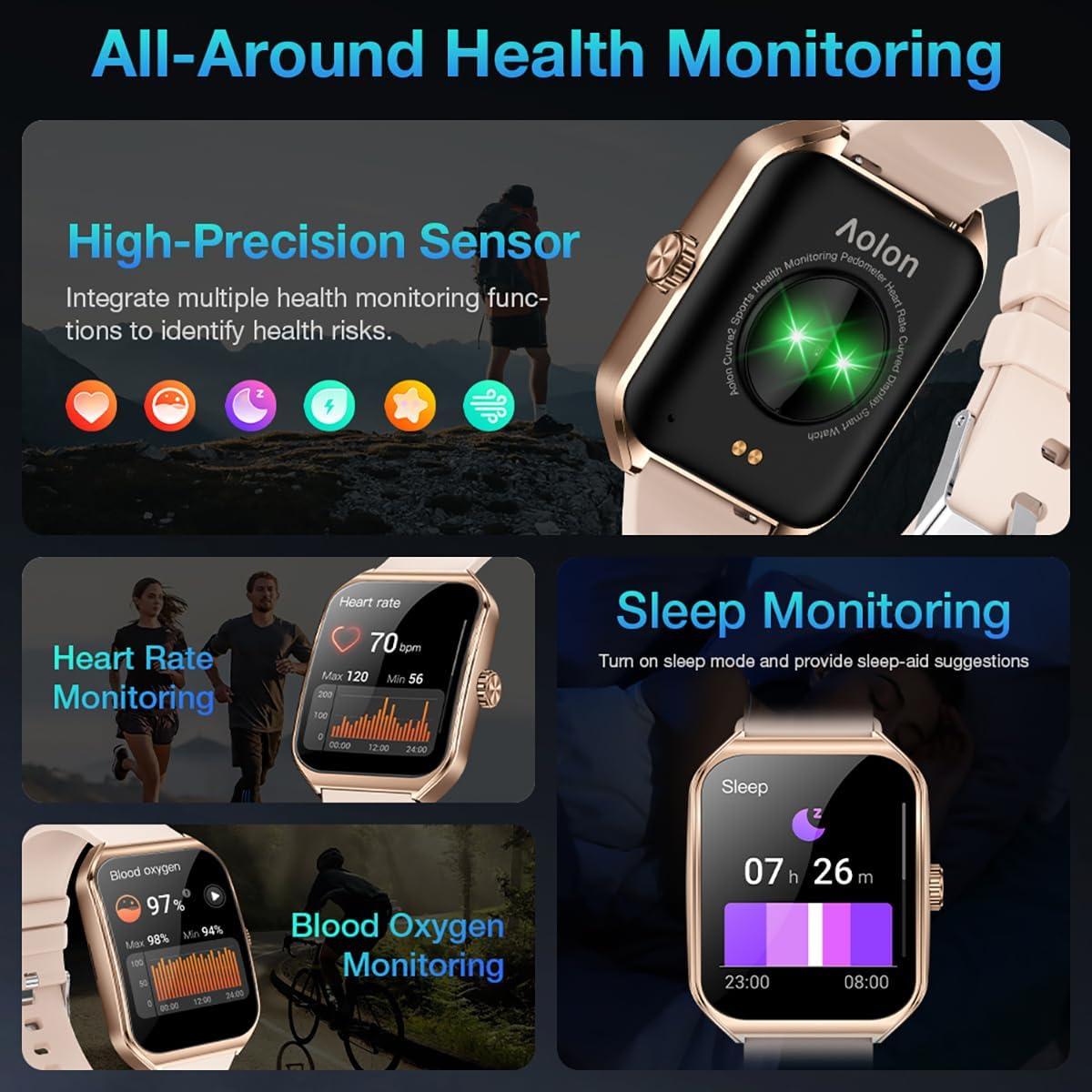
Image: A collage showing the smart watch monitoring heart rate, blood oxygen, and sleep, emphasizing its comprehensive health tracking capabilities.
Video: Demonstrates the 24/7 health monitoring features of the AOLON Smart Watch, including heart rate and SpO2 tracking.
6. Спорт режимдери жана аракеттерге көз салуу
The watch supports over 60 sports modes, allowing you to accurately monitor heart rate, calorie consumption, and exercise duration.
- Select your desired sports mode from the watch menu (e.g., outdoor run, indoor run, outdoor walk, ball games, dance, gymnastics).
- When connected to your phone, the watch can record and track your exercise routes using your phone's GPS.
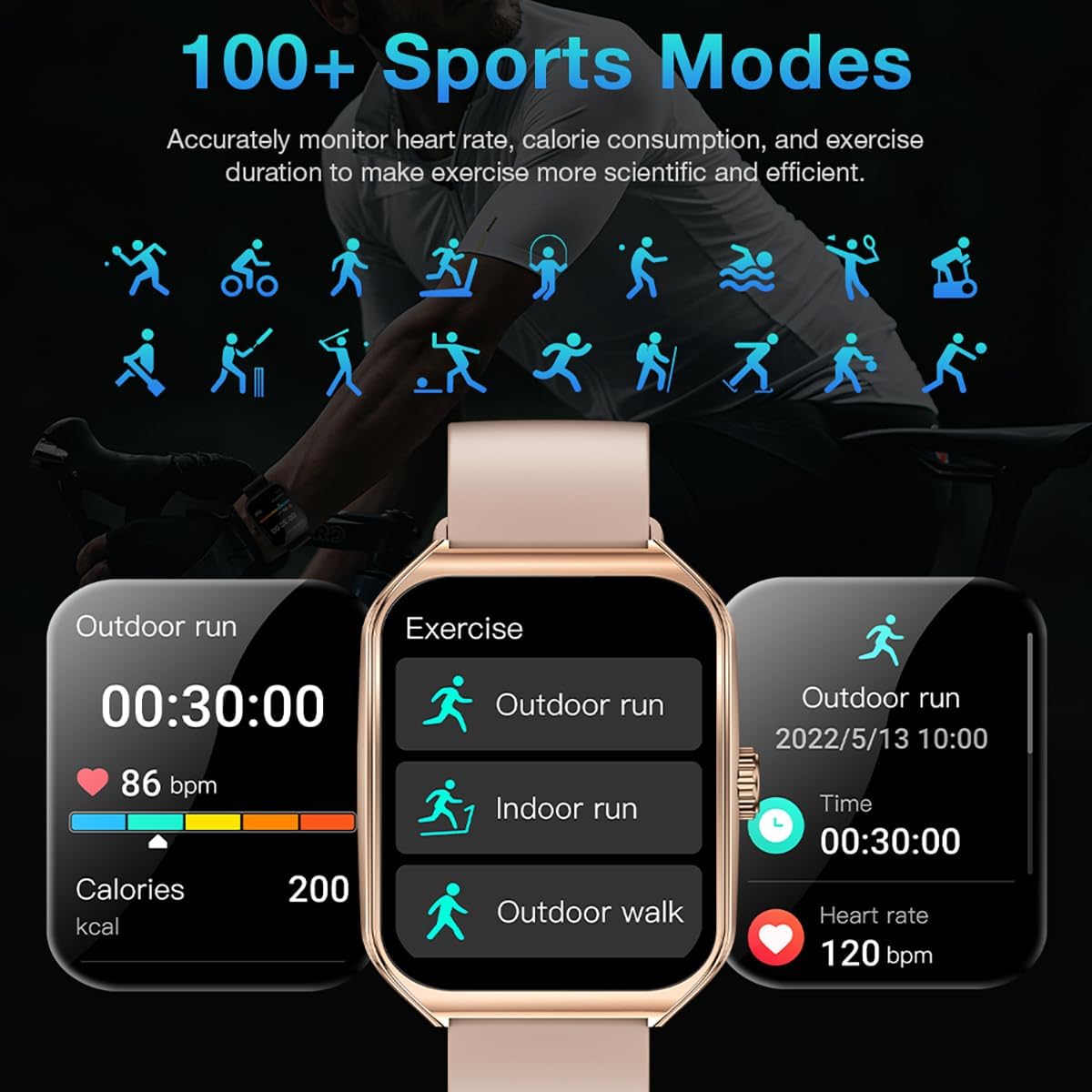
Image: The smart watch interface showing different sports modes and real-time exercise data like heart rate, calories, and distance.
7. Башка акылдуу функциялар
The AOLON Curve Smart Watch integrates several convenient features for daily use:
- AI үн жардамчысы: Quickly activate your voice assistant for tasks like making calls, checking weather, or setting alarms.
- Аба ырайы: Реалдуу убакытта аба ырайы жаңыртууларын алыңыз.
- Музыкалык башкаруу: Смартфонуңузда музыканы ойнотууну көзөмөлдөңүз.
- Ойготкуч саат: Ойготкучтарды коюу жана башкаруу.
- Секундомер жана таймер: Essential timing functions.
- Телефонуңузду табыңыз: Жупташкан смартфонуңузду табыңыз.
- Кол чырак: A simple flashlight function.
- Калькулятор: Билегиңиздеги негизги эсептөөлөр.
- SOS функциясы: Өзгөчө кырдаалдар үчүн.
Видео: Бүттүview of the Curve2 Smart Watch features, including fitness tracking, notifications, and various smart functions.
Техникалык тейлөө
1. Саатыңызды тазалоо
Regular cleaning helps maintain the appearance and functionality of your smart watch.
- Экранды жана корпусту жумшак, d менен сүртүңүзamp кездеме.
- The silicone strap is washable. You can gently clean it with mild soap and water.
- Катуу химиялык заттарды же абразивдүү материалдарды колдонуудан алыс болуңуз.
2. Сууга туруктуулук (IP67)
The AOLON Curve Smart Watch is IP67 waterproof, meaning it is resistant to dust and can withstand immersion in water up to 1 meter for 30 minutes. It is suitable for daily use and light water activities like hand washing or rain exposure.
- Do not use the watch for diving, hot showers, or prolonged submersion in water.
- Саатты жогорку басымдагы сууга же бууга дуушар кылбаңыз.

Image: The smart watch partially submerged in water, illustrating its IP67 water resistance feature.
Проблемаларды чечүү
If you encounter issues with your AOLON Curve Smart Watch, please refer to the following common solutions:
- Күйгүзүлбөй жаткан саат: Саат толук заряддалганын текшериңиз. Аны заряддоо кабелине туташтырыңыз жана аны күйгүзүүгө аракет кылуудан мурун кеминде 30 мүнөт кубаттоого уруксат бериңиз.
- Телефон менен жупташтыруу мүмкүн эмес:
- Телефонуңузда Bluetooth иштетилгенин жана саатыңыздын диапазонунда экенин текшериңиз.
- Телефонуңузду да, саатыңызды да өчүрүп күйгүзүңүз.
- Check if the GloryFit app has necessary permissions (location, Bluetooth, notifications).
- If previously paired, try unpairing and re-pairing the device through the GloryFit app.
- Туура эмес ден соолук маалыматтары:
- Саат өтө тар же өтө бош эмес, билегиңизге бекем тагылганын текшериңиз.
- Сааттын артындагы сенсорду тазалаңыз.
- Environmental factors or skin conditions can sometimes affect sensor accuracy.
- Эскертмелер көрүнбөй жатат:
- Verify that notification permissions are enabled for the GloryFit app in your phone's settings.
- Саат телефонуңузга Bluetooth аркылуу туташып турганын текшериңиз.
- Check the notification settings within the GloryFit app to ensure specific app notifications are enabled.
Техникалык шарттар
| Дисплей өлчөмү | 1.83 дюйм |
| Дисплей түрү | HD Curved Display with 3D Curved Glass |
| Байланыш | Bluetooth 5.0 |
| Батарея сыйымдуулугу | 245 миллионamp Саат |
| Батареянын иштөө мөөнөтү (Кадимки колдонуу) | 7 күнгө чейин |
| Battery Life (Power-Saving Mode) | 20 күндөн ашык |
| Заряддоо убактысы | Болжол менен 2.5 саат |
| Суу каршылык | IP67 |
| Ден соолук мониторинги | Heart Rate, SpO2, Sleep, Stress, Women's Cycle |
| Спорт режимдери | 60+ режимдер |
| Шайкештик | Android жана iOS |
| Салмагы | 40g (watch body only) |
| Модель номери | 5d738664-f1e0-4256-942f-d938b44e5e53 |
Кепилдик жана колдоо
AOLON provides a 12 айлык кепилдик for your smart watch. If you encounter any issues or require assistance, please contact our customer service team.
- Кардарларды тейлөө: Available 24 hours a day. Please contact us through Amazon Customer Service for prompt assistance.


