1. Продукт бүтүп калдыview
The Irfora 330 Electronic Cash Drawer is a robust and reliable solution designed for efficient money handling in various retail and restaurant environments. It features a durable steel construction, multiple currency compartments, and flexible opening mechanisms to integrate seamlessly with Point of Sale (POS) systems.
Негизги өзгөчөлүктөр төмөнкүлөрдү камтыйт:
- 4 adjustable bill trays and 5 fixed coin trays for organized currency storage.
- Three key positions: Electric Open, Manual Open, and Lock.
- RJ11 interface for connection to POS printers or cash registers.
- Emergency switch for manual opening.

Сүрөт 1: Алдыңкы view of the Irfora 330 Electronic Cash Drawer.
2. Орнотуу нускамалары
2.1 Пакеттен чыгаруу
Carefully remove the cash drawer from its packaging. Ensure all components, including the cash drawer unit, keys, and user manual, are present. Inspect the unit for any signs of damage during transit.
2.2 POS системасына туташуу
The Irfora 330 Cash Drawer connects to a POS printer or cash register via an RJ11 cable. This cable allows the POS system to trigger the electronic opening mechanism of the drawer.
- Locate the RJ11 port on the back of the cash drawer.
- Connect one end of the RJ11 cable (not included) to the cash drawer's RJ11 port.
- Connect the other end of the RJ11 cable to the designated cash drawer port on your POS printer or cash register.
- Ensure the POS printer or cash register is powered on and configured to send the open signal to the cash drawer.
2.3 Software Configuration (if applicable)
For some POS systems, specific software commands may be required to enable cash drawer functionality. If prompted, use the command: 27.112.0.128.128.

Figure 2: Cash drawer with included keys and manual, ready for setup.
3. Operating the Cash Drawer
3.1 Key Positions
The cash drawer features a key-lock mechanism with three distinct positions:
- Кулпу: The drawer is securely locked and cannot be opened electronically or manually.
- Кол менен ачуу: The drawer can be opened by turning the key to this position and pushing the drawer. It will not open electronically.
- Electric Open: The drawer will open electronically when a signal is received from the connected POS system. The key can be removed in this position.
3.2 Organizing Currency
The cash drawer is equipped with 4 bill trays and 5 coin trays to help organize different denominations of currency. The bill clamps are made of heavy-duty steel with highly elastic springs for frequent use.
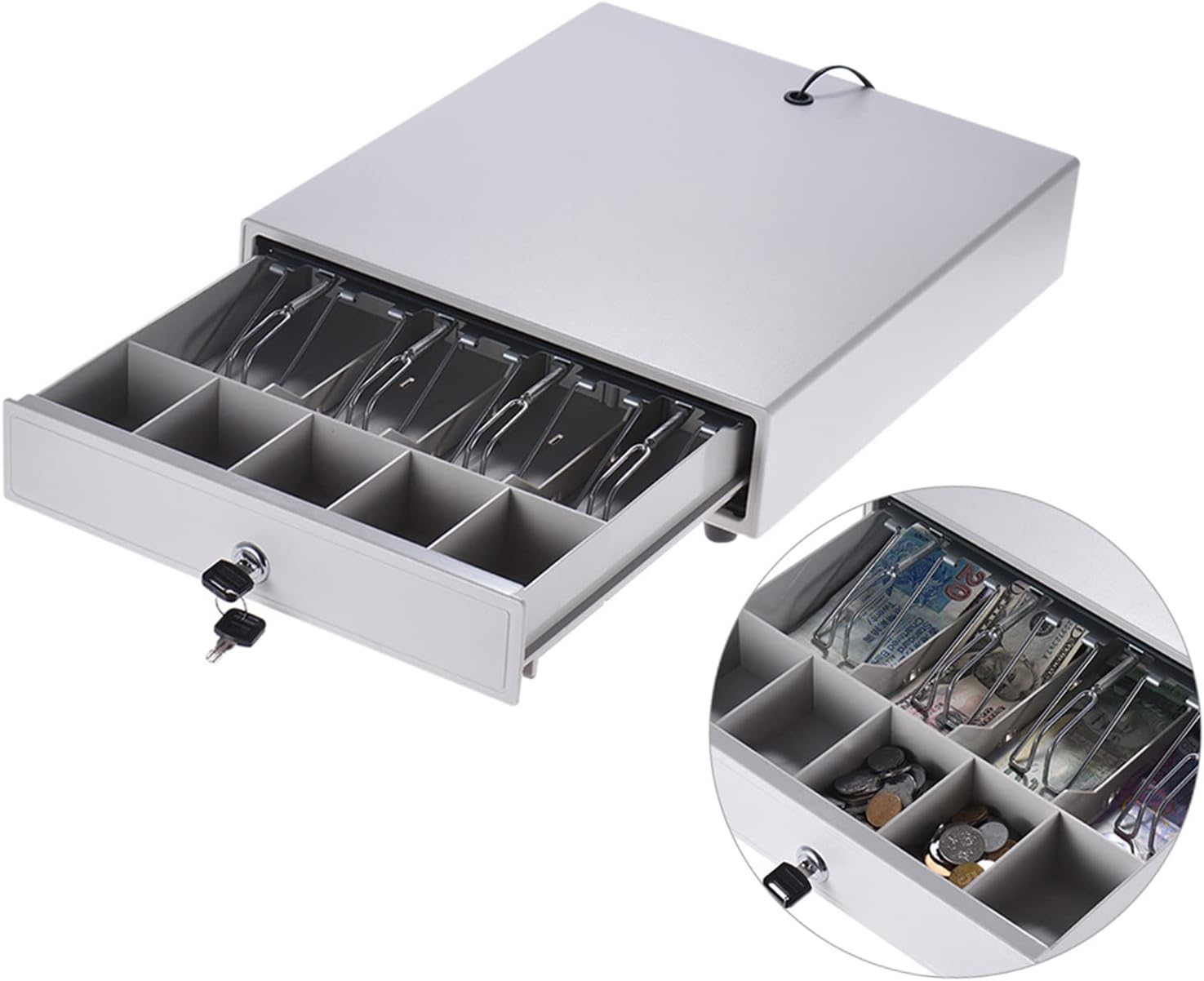
3-сүрөт: Интерьер view of the cash drawer with bill and coin trays.
3.3 Шашылыш ачуу
In case of power failure or system malfunction, an emergency switch is located on the back of the cash drawer. Pressing this switch will manually release the drawer lock, allowing it to be opened.
4. Техникалык тейлөө
The Irfora 330 Cash Drawer is designed for durability and requires minimal maintenance. Regular cleaning and proper handling will ensure its longevity.
- Тазалоо: жумшак колдонуу, damp cloth to wipe the exterior of the cash drawer. Avoid abrasive cleaners or solvents that could damage the finish.
- Ички компоненттери: Periodically check the bill clamps and coin trays for any debris that might hinder smooth operation. The pulley ball bearing shaft is designed for long-term use and generally does not require lubrication.
- Негизги кам көрүү: Keep the keys in a safe place. Avoid forcing the key if it feels stiff; ensure it is fully inserted and aligned before turning.
5. Кыйынчылыктарды
If you encounter issues with your cash drawer, refer to the following common problems and solutions:
| Көйгөй | Мүмкүн себеп | Чечим |
|---|---|---|
| Суурма электрондук түрдө ачылбайт. |
|
|
| Drawer is stuck or difficult to open/close. |
|
|
| Key does not turn or is stuck. |
|
|

Figure 4: Location of the emergency switch and non-slip support feet.
6. Техникалык шарттар
| Өзгөчөлүк | Деталь |
|---|---|
| Модел | 330 |
| Түс | Ак |
| Материал | Дат баспаган болот |
| Бөгөттөө системасы | Electric Open / Manual Open / Lock (3-position) |
| Bill Trays | 4 (Non-adjustable) |
| Coin Trays | 5 (Non-detachable, Non-adjustable) |
| Driver Voltage | DC12V |
| Интерфейс | RJ11 |
| Элементтин өлчөмү (L x W x Y) | 37.9 x 33.4 x 7.9 см (14.9 x 13.1 x 3.1 дюйм) |
| Элемент Салмагы | 3.5 кг (7.7 фунт) |

Figure 5: Detailed dimensions of the cash drawer and its internal compartments.
7. Кепилдик жана колдоо
7.1 Кепилдик маалыматы
For specific warranty terms and conditions, please refer to the documentation provided with your purchase or contact the manufacturer directly. Warranty coverage typically includes defects in materials and workmanship under normal use.
7.2 Кардарларды колдоо
If you require further assistance, have questions, or encounter issues not covered in this manual, please contact your retailer or the manufacturer's customer support. Have your product model number (330) and purchase details ready when contacting support.


