1. Киришүү
Thank you for choosing the INKBIRD Professional Vacuum Sealer Machine. This manual provides essential information for the safe and efficient operation, maintenance, and troubleshooting of your new appliance. Please read this manual thoroughly before first use and keep it for future reference.

Image: The INKBIRD Professional Vacuum Sealer Machine, Model B0DRP114SK, shown with various food items, highlighting its versatility for food preservation.
2. Коопсуздук нускамалары
- Шайманды колдонуудан мурун бардык нускамаларды окуп чыгыңыз.
- Электр шнурын, сайгычты же шайманды сууга же башка суюктуктарга салбаңыз.
- Шайманды балдар же анын жанында колдонгондо катуу көзөмөл керек.
- Колдонбогондо жана тазалоодон мурун розеткадан ажыратыңыз.
- Эч кандай шайманды зымы же сайы бузулган, же шайман иштебей калгандан кийин же кандайдыр бир түрдө бузулгандан кийин иштетпеңиз.
- Шайманды үй шартында колдонуу үчүн гана колдонуңуз.
- Сыртта колдонбоңуз.
- Иштөө алдында ар дайым капкак туура жабылып, кулпуланганын текшериңиз.
- кыймылдуу бөлүктөргө тийбегиле.
3. Продукт бүтүп калдыview
3.1 Компоненттер
The INKBIRD Professional Vacuum Sealer Machine is designed for efficient food preservation. Key components include the control panel, sealing bar, vacuum chamber, and integrated roll storage with cutter.

Сүрөт: жогорудан ылдыйга view of the INKBIRD Professional Vacuum Sealer Machine, showcasing анын кооз дизайны жана башкаруу панели.
3.2 Башкаруу панели жана режимдери
The machine features an intuitive control panel with various modes to suit different food types and sealing requirements.

Image: The control panel displaying six food modes: Dry, Moist, Liquid, Gentle, Normal, Pulse, Seal Only, and External Vacuum. This allows for precise sealing based on food consistency.
4. Орнотуу
4.1 Пакеттен чыгаруу жана мазмуну
Бардык компоненттерди таңгактан кылдаттык менен алып салыңыз. Төмөндө тизмеленген нерселердин бардыгы камтылганын текшериңиз:
- INKBIRD Vacuum Sealer Machine
- 5 x Vacuum Bags (20x30cm)
- 1 x Vacuum Roll (28x500cm)
- 1 x Аба соргуч шланг
- 1 x Replacement Foam Gasket
- 1 x User Manual
- 1 х Кубат кабели
- Өзүн-өзү жабышчаак этикеткалар

Image: A visual representation of all items included in the package: the vacuum sealer, various bags and rolls, an air suction hose, a replacement gasket, user manual, power cord, and labels.
4.2 Баштапкы жайгаштыруу жана электр кубатына туташуу
- Вакуумдук пломбаны жалпак, туруктуу жана кургак бетке коюңуз.
- Туура желдетүү үчүн машинанын айланасында жетиштүү орун бар экендигин текшериңиз.
- Электр шнурын ылайыктуу электр розеткасына сайыңыз.
4.3 Using the Integrated Roll Storage and Cutter
The machine features a convenient storage compartment for vacuum sealer rolls and an integrated cutter to create custom-sized bags.
- Вакуумдук герметиканын капкагын ачыңыз.
- Place a vacuum sealer roll into the designated storage area. The machine can accommodate rolls up to 6 meters long and 30cm wide.
- Каалаган узундуктагы баштыктын материалын чыгарыңыз.
- Use the integrated cutter to cut the bag to your preferred size.
- Seal one end of the cut bag using the 'Seal Only' function (refer to Operating Instructions).

Image: The vacuum sealer with its lid open, showing the integrated compartment for storing a vacuum roll and the sliding cutter mechanism for creating custom-sized bags.
5. Иштөө нускамалары
5.1 Basic Vacuum Sealing (Dry Food)
- Place the food item into a vacuum sealer bag, leaving at least 7-10 cm of space between the food and the top edge of the bag.
- Баштыктын ачык учунун таза жана кургак экенине ынаныңыз.
- Place the open end of the bag into the vacuum chamber. Ensure it lies flat across the sealing bar.
- Close the lid of the vacuum sealer. The machine features an automatic locking mechanism for one-hand operation.
- Select the 'Dry' food mode on the control panel.
- Press the 'Vac&Seal' button. The machine will automatically remove air from the bag and then seal it.
- Процесс аяктагандан кийин, индикатор өчөт. Капкагын ачып, жабылган баштыкты алып салыңыз.

Image: A hand operating the INKBIRD Vacuum Sealer, demonstrating the automatic locking feature that allows for convenient one-hand sealing of food items like meat.
5.2 Using Different Modes
The INKBIRD vacuum sealer offers multiple modes for optimal preservation of various food types:
- Кургак режим: Ideal for solid, dry foods like nuts, cereals, and dried fruits.
- Нымдуу режим: Suitable for foods with some moisture, such as raw or marinated meats and vegetables.
- Суюктук режими: Designed for foods with significant liquid content, like soups or stews. Use with caution and ensure sufficient headspace.
- Жумшак режим: Reduces vacuum pressure for delicate foods that might be crushed under full vacuum.
- Кадимки режим: Standard vacuum pressure for most food items.
- Импульс режими: Allows manual control over the vacuum process. Press and hold to vacuum, release to stop, then press 'Seal' to seal. Useful for very delicate items or when precise vacuum control is needed.
- Мөөр гана: Seals bags without vacuuming. Useful for making bags from rolls or sealing delicate items after manual air removal.
- Тышкы вакуум: Connect the included hose to the external vacuum port to vacuum seal canisters or wine stoppers.

Сүрөт: деталдуу view of the INKBIRD Vacuum Sealer's control panel, illustrating the six distinct operating modes (Dry, Moist, Liquid, External Vacuum, Pulse, Seal Only) and exampар бир режимге ылайыктуу тамак-аш түрлөрү.
5.3 Variable Settings
The machine allows adjustment of vacuum force and sealing time for optimal results.
- Vacuum Force Control: Choose between 'Gentle' or 'Normal' vacuum pressure depending on the food's fragility.
- Sealing Time Control: Adjust the sealing time from level 1 to 5 based on the bag's thickness. Level 3 is the default. Thicker bags may require a longer sealing time.
- Мөөрлөштүрүүнүн артка саны: The LED screen displays a countdown during the sealing process.

Image: The control panel highlighting the variable settings for vacuum force (Gentle/Normal) and sealing time (levels 1-5), along with a digital countdown display for the sealing process.
6. Техникалык тейлөө жана тазалоо
6.1 Cleaning the Vacuum Chamber
The vacuum chamber is designed to be detachable for easy cleaning, preventing liquid buildup and ensuring hygiene.
- Тазалоодон мурун шаймандын розеткадан ажыратылганын текшериңиз.
- Carefully detach the vacuum chamber component.
- Wash the detachable part with warm, soapy water. It can hold up to 300ml of liquid, reducing the need for frequent cleaning.
- Rinse thoroughly and dry completely before reattaching to the main unit.
- Жарнама менен машинанын сыртын сүртүңүзamp кездеме. Абразивдүү тазалагычтарды колдонбоңуз.
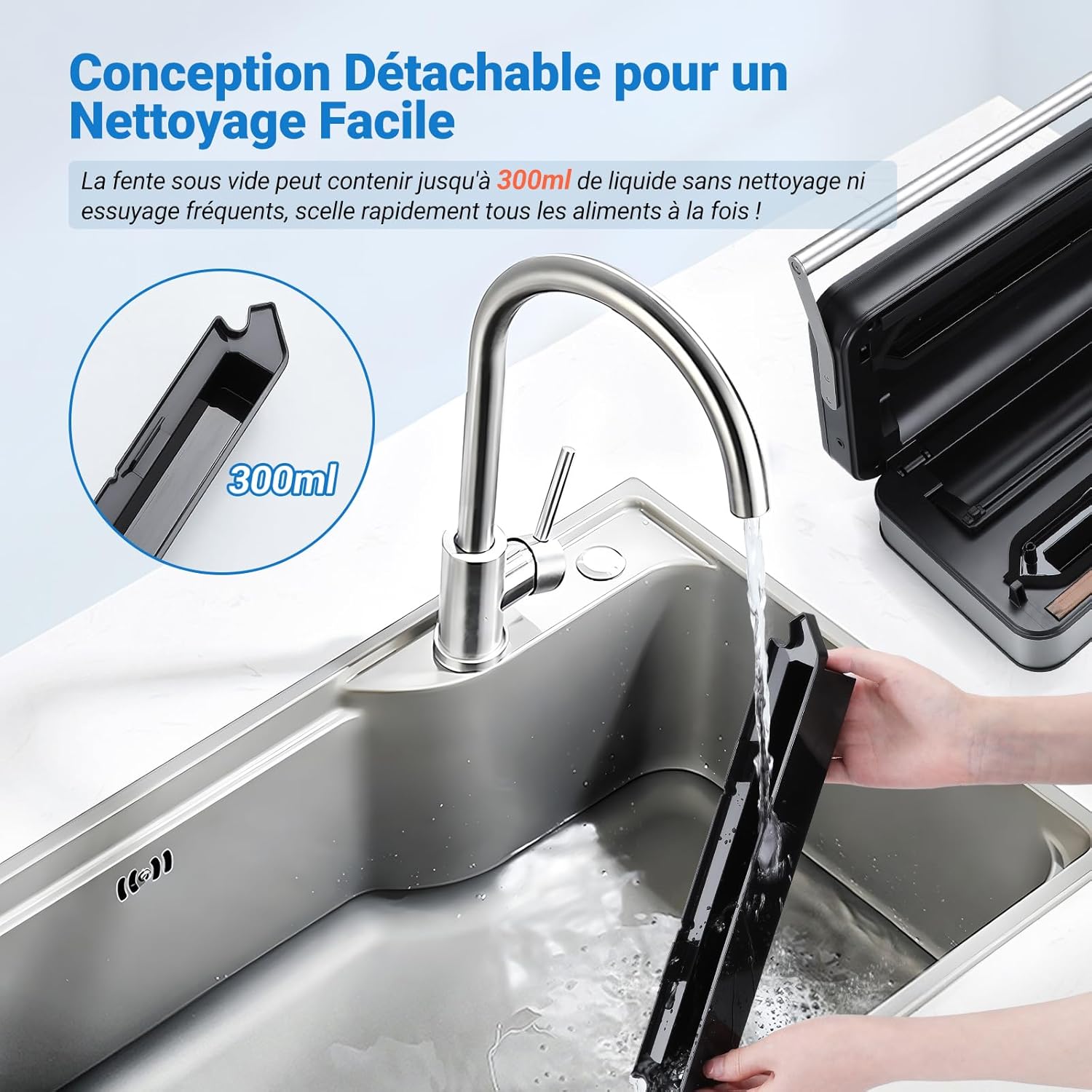
Image: The detachable vacuum slot of the INKBIRD Vacuum Sealer being cleaned under running water, illustrating its easy-to-clean design which can hold up to 300ml of liquid.
6.2 Replacing the Sealing Strip
The sealing strip is a wear-and-tear part. If seals become inconsistent, the strip may need replacement. A replacement foam gasket is included with your purchase.
- Ensure the machine is unplugged and cooled down.
- Carefully peel off the old sealing strip from the sealing bar.
- Clean the area where the strip was located.
- Align the new sealing strip and press it firmly into place along the sealing bar.
7. Кыйынчылыктарды
| Көйгөй | Мүмкүн себеп | Чечим |
|---|---|---|
| Машина күйбөйт | Электр энергиясы жок | Check if the power cord is securely plugged into the outlet and the machine. Test the outlet with another appliance. |
| Machine vacuums but does not seal | Bag not positioned correctly; Sealing strip worn out; Sealing time too short | Ensure the bag opening is flat and within the vacuum chamber. Replace the sealing strip if worn. Increase the sealing time setting. |
| Machine does not vacuum properly | Lid not closed/locked; Bag opening not clean/dry; Foam gasket damaged; Bag has holes | Ensure the lid is fully closed and locked. Clean and dry the bag opening. Inspect and replace the foam gasket if damaged. Use a new bag. |
| Ашыкча ысып кетүүдөн коргоо иштетилди | Өтө көпкө үзгүлтүксүз колдонуу | Allow the machine to cool down for 15-30 minutes before resuming operation. The machine is designed for 24 hours of continuous work, but excessive rapid use might trigger protection. |
8. Техникалык шарттар
| Өзгөчөлүк | Спецификация |
|---|---|
| Бренд | Inkbird |
| Модел | B0DRP114SK |
| Түс | Silver |
| Продукциянын өлчөмдөрү (L x W x Y) | 39.6 x 24 x 11.5 см |
| Элемент Салмагы | 3.68 килограмм |
| Power Source | Электр зымдары |
| Иштөө режими | Manual (button-controlled) |
| Күч | 160 Ватт |
| Вакуум ылдамдыгы | 20 л/мин |
| Вакуумдук басым | 80 XNUMX Кпа |
| Мөөрдүн кеңдиги | 5 мм |
| Максималдуу мөөр узундугу | 32 см |
| Тtage | 110-120V / 220-240V (Universal) |
| Үзгүлтүксүз операция | 24 саатка чейин |
9. Кепилдик жана колдоо
INKBIRD products are manufactured to high-quality standards. For warranty information, technical support, or service inquiries, please refer to the contact information provided on the official INKBIRD webсайт же сатып алуу документтери. Кепилдик дооматтары үчүн сатып алганыңыздын далилин сактап коюңуз.


