Маанилүү коопсуздук нускамалары
Please read this manual carefully before using the appliance. Keep it for future reference.
- Чаң соргучту сыртта же нымдуу жерде колдонбоңуз.
- Балдарга чаң соргучту иштетүүгө уруксат бербеңиз. Балдардын жанында колдонулганда тыкыр көзөмөл керек.
- Бензин сыяктуу күйүүчү же күйүүчү суюктуктарды албаңыз же алар болушу мүмкүн болгон жерлерде колдонбоңуз.
- Тамеки, ширеңке, ысык күл сыяктуу күйүп жаткан же чылым чеккен нерселерди албаңыз.
- Чаң баштыкчасы жана/же чыпкалары жок колдонбоңуз.
- Батарея блогун туташтыруудан же ажыратуудан мурун, же кандайдыр бир техникалык тейлөө иштерин жүргүзүүдөн мурун шайманды өчүрүңүз.
- Бул колдонмодо сүрөттөлгөндөй гана колдонуңуз. Өндүрүүчү сунуштаган тиркемелерди гана колдонуңуз.
- Эгерде шайман талаптагыдай иштебей калса, түшүп калса, бузулуп калса, эшикте калса же сууга түшүп калса, аны тейлөө борборуна өткөрүп бериңиз.
Продукт бүттүview
Familiarize yourself with the components of your JONR VC08 Pro Cordless Vacuum Cleaner and its Auto-Empty Station.
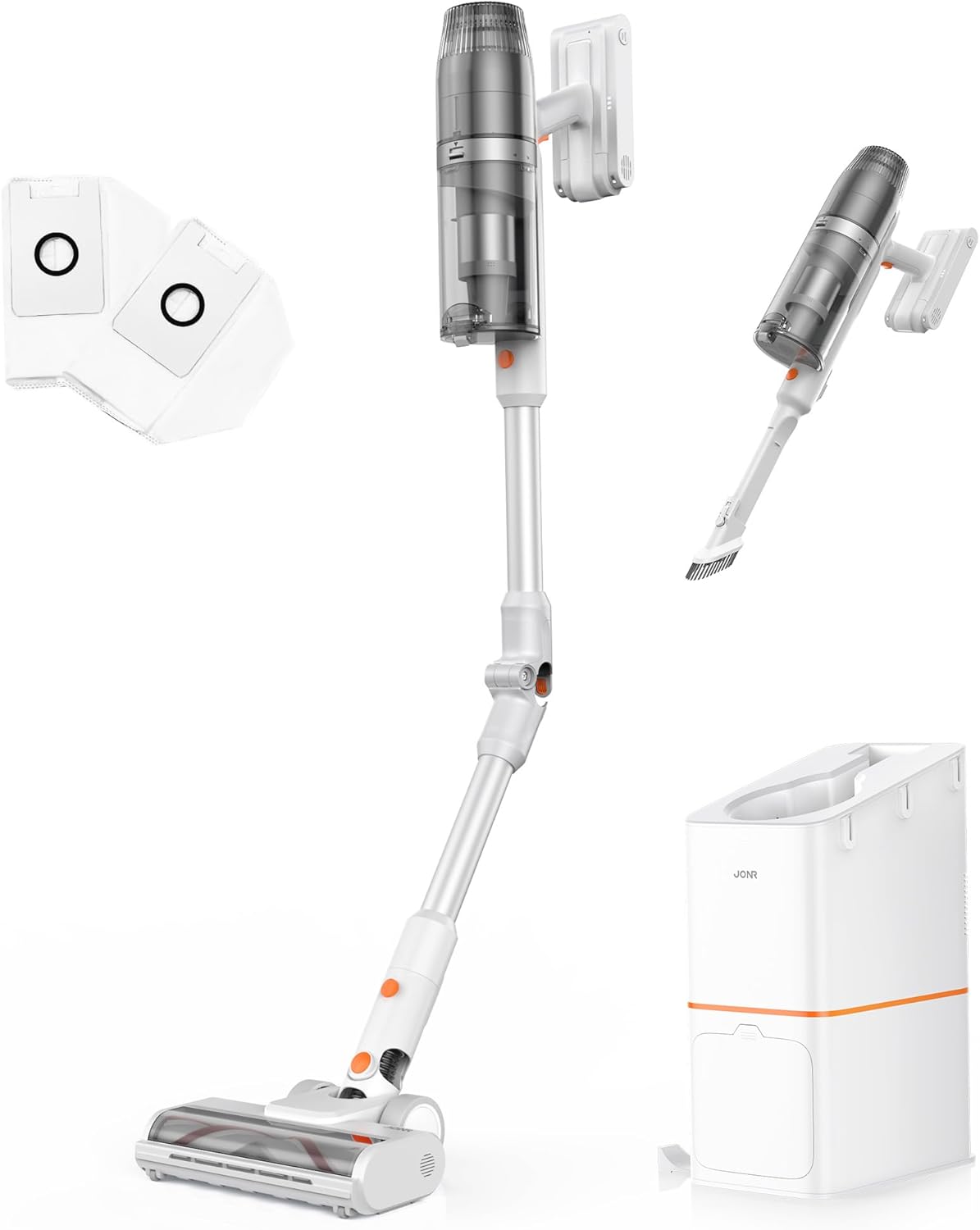
Figure 1: ашыкview of the JONR VC08 Pro Cordless Vacuum Cleaner, including the main unit, extension wand, floor brush, and the auto-empty docking station with additional dust bags and filters.
Негизги компоненттер:
- Vacuum Main Unit: Моторду, чаң чөйчөгүн жана батареяны камтыйт.
- Кеңейтүүчү таякча: Connects the main unit to the floor brush for upright cleaning. Features a 180° bendable joint for reaching under furniture.
- Пол щетка: Equipped with a tangle-free design for effective cleaning on carpets and hard floors.
- Автоматтык түрдө бошотуучу станция: A 3-in-1 clean station that automatically empties the vacuum's dust cup, charges the vacuum, and provides storage.
- Dust Bags: 2.5L capacity disposable bags for the auto-empty station, designed for hygienic dust disposal.
- HEPA чыпкасы: Майда чаңдарды жана аллергендерди кармоо үчүн өркүндөтүлгөн чыпкалоо системасы.
- 2-in-1 Mini Handheld Brush: For cleaning smaller areas, upholstery, and tight spaces.

Figure 2: The All-in-one Docking Station provides fast dust emptying, automatic charging, and convenient one-stop storage for the vacuum cleaner.
Орнотуу жана баштапкы колдонуу
1. Ассамблея
- Узартуу таякчасын тиркөө: Узартуучу таякчаны негизги чаң соргуч блогуна ал ордуна бекем орнотулганга чейин киргизиңиз.
- Connect the Floor Brush: Attach the floor brush to the other end of the extension wand, ensuring it locks firmly.
- Prepare the Auto-Empty Station:
- Open the dust bag compartment on the auto-empty station.
- Insert one of the provided 2.5L dust bags into the compartment, ensuring it is properly seated.
- Отсекти коопсуз жабыңыз.
- Position the Station: Place the auto-empty station on a flat, stable surface near a power outlet. Ensure there is enough space around it for the vacuum cleaner.
2. Баштапкы заряддоо
Биринчи жолу колдонуудан мурун, чаң соргучту толугу менен заряддаңыз.
- Plug the auto-empty station into a power outlet.
- Place the assembled vacuum cleaner onto the auto-empty station. The vacuum will automatically begin charging.
- The charging indicator lights on the vacuum or station will illuminate. A full charge typically takes approximately 4 hours.

Figure 3: The vacuum automatically charges when docked in the auto-empty station, ensuring it's always ready for the next cleaning session.
Иштөө нускамалары
1. Күйгүзүү/өчүрүү жана режимди тандоо
- To turn on, press the power button on the main unit. The vacuum will start in Standard Mode.
- To switch to Powerful Mode, press the mode selection button. This provides increased suction for tougher messes.
- Өчүрүү үчүн кубат баскычын кайра басыңыз.
2. Ар кандай беттерди тазалоо
The JONR VC08 Pro is designed for versatile cleaning across various floor types and surfaces.

Figure 4: The JONR VC08 Pro is suitable for cleaning short pile carpets, hardwood floors, and can be used as a handheld vacuum for furniture like sofas.
- Катуу полдор: Use Standard Mode for daily cleaning. The soft roller brush is gentle on delicate surfaces.
- Килемдер: Switch to Powerful Mode for deeper cleaning on short pile carpets. The brush roll effectively agitates dirt and pet hair.
- Эмеректин астында: Utilize the 180° bendable rod to easily reach under beds, tables, and sofas without excessive bending.

Figure 5: The flexible 180° bendable tube allows for easy cleaning in hard-to-reach areas like under sofas and beds.
- Кол менен тазалоо: Detach the main unit from the extension wand and attach the 2-in-1 mini handheld brush for cleaning upholstery, car interiors, or tight corners.
3. Auto-Empty Function
When you return the vacuum cleaner to the auto-empty station after cleaning, it will automatically initiate the dust emptying process.
- Place the vacuum firmly into the docking port of the station.
- The station will automatically activate its suction to transfer dust and debris from the vacuum's dust cup into the sealed 2.5L dust bag. This process typically takes about 20 seconds.
- Once emptying is complete, the station will automatically begin charging the vacuum.

Figure 6: The auto-empty station quickly transfers dust from the vacuum's bin into a sealed bag, offering a hygienic disposal solution compared to manual emptying.
Техникалык тейлөө
Regular maintenance ensures optimal performance and extends the lifespan of your JONR VC08 Pro.
1. Replacing the Dust Bag
The 2.5L dust bags in the auto-empty station can hold dust for up to 3 months, depending on usage.
- When the dust bag indicator on the station illuminates or you notice reduced emptying efficiency, it's time to replace the bag.
- Open the dust bag compartment on the auto-empty station.
- Carefully pull out the full dust bag. The bag is designed to seal automatically upon removal to prevent dust leakage.
- Dispose of the full dust bag in a trash bin.
- Insert a new 2.5L dust bag into the compartment, ensuring it is fully seated.
- Отсекти коопсуз жабыңыз.

Figure 7: Easily replace the large capacity dust bags in the auto-empty station for hygienic disposal of collected dust and debris.
2. Чыпкаларды тазалоо
The HEPA filter and other filters in the vacuum unit should be cleaned regularly to maintain suction power.
- Turn off the vacuum cleaner and remove it from the charging station.
- Чаң соргучту негизги блоктон ажыратыңыз.
- Remove the HEPA filter and foam filter from the dust cup.
- Бош чаңды кетирүү үчүн чыпкаларды таштанды челектин үстүнө акырын басыңыз.
- If necessary, rinse the filters under cold running water. Ensure they are completely dry (allow 24-48 hours) before reinserting them. Do not use a dryer or direct heat.
- Reassemble the filters and dust cup onto the main unit.

Figure 8: The sealed dust collection system and HEPA filter in the auto-empty station help to lock away dust and allergens, promoting a cleaner home environment.
3. Щетка түрмөгүн тазалоо
Periodically check the floor brush for tangled hair or debris.
- Чаң соргучту өчүрүп, полдун щеткасын ажыратыңыз.
- Use scissors or a cleaning tool to cut and remove any tangled hair or fibers from the brush roll.
- Ensure the brush roll spins freely before reattaching.
Проблемаларды чечүү
Жалпы маселелер жана алардын чечимдери үчүн бул бөлүмдү караңыз.
| Көйгөй | Мүмкүн себеп | Чечим |
|---|---|---|
| Вакуум күйбөйт. | Батарея аз же түгөнүп калган. | Place the vacuum on the auto-empty station to charge. Ensure the station is plugged in. |
| Азайтылган соргуч күчү. | Dust cup full; Filters clogged; Brush roll tangled; Obstruction in nozzle/wand. | Empty the dust cup (via auto-empty station or manually). Clean or replace filters. Remove tangled hair/debris from brush roll. Check for and clear any obstructions. |
| Auto-empty station not emptying. | Dust bag full; Dust bag not installed correctly; Obstruction in station's suction path. | Replace the dust bag. Ensure the dust bag is correctly seated. Check the station's suction port for blockages. |
| Щетка түрмөгү айланбайт. | Tangled debris; Brush roll jammed; Incorrect mode. | Clear any tangled hair or debris from the brush roll. Ensure the brush roll is properly installed. Check if the vacuum is in a mode that activates the brush roll (e.g., not handheld mode without the brush attachment). |
Техникалык шарттар
| Өзгөчөлүк | Деталь |
|---|---|
| Бренд | JONR |
| Модель аты | VC08 PRO |
| Өзгөчө өзгөчөлүк | Auto-Empty, Cordless, Foldable, Headlight, Rechargeable |
| Чыпка түрү | HEPA чыпкасы |
| Камтылган компоненттер | VC08 Vacuum cleaner, Station, Dust Bag, User Manual, 2 in 1 Mini handheld brush |
| Зымсызбы? | Ооба |
| Чаң чөйчөктүн сыйымдуулугу | 650 миллилитр |
| Чаң баштыктарынын сыйымдуулугу (Станция) | 2.5 Liters (x2 included) |
| Ватtage | 200 ватт |
| Заряддоо убактысы | 4 саат |
| Форма фактору | Таяк |
| Түс | While/Orange |
| Продукциянын өлчөмдөрү | 10.2"L x 7.1"W x 44"H |
| Ызы-чуу деңгээли | 80 дБ |
| Ampөчүрүү | 0.8 Amps |
| Элемент Салмагы | 7.04 фунт |
| Кубат деңгээли саны | 2 (Standard, Powerful) |
Кепилдик жана колдоо
For warranty information, technical support, or to purchase replacement parts and accessories, please contact JONR customer service.
- Онлайн колдоо: Visit the official JONR webКөп берилүүчү суроолор жана колдоо булактары үчүн сайт.
- Кардарларды тейлөө: Refer to the contact information provided on the product packaging or the official JONR webсайт.
- Алмаштыруучу бөлүктөрү: Genuine JONR dust bags and filters can be purchased from authorized retailers or the JONR official store.
Кепилдик дооматтары үчүн сатып алганыңыздын далилин сактап коюңуз.


