Introduction
Welcome to the user manual for your new Kalobee Watch 4 PRO+ Smart Watch. This guide provides essential information on setting up, operating, maintaining, and troubleshooting your device. Please read this manual thoroughly to ensure optimal performance and longevity of your smartwatch.
The Kalobee Watch 4 PRO+ features a vibrant AMOLED display, versatile interchangeable straps, and convenient wireless charging, designed to seamlessly integrate into your daily life.
Пакеттин мазмуну
Upon opening your Kalobee Watch 4 PRO+ package, please verify that all the following items are included:
- Kalobee Watch 4 PRO+ Smart Watch (Model SK38)
- Three (3) Interchangeable Straps (e.g., leather, silicone, metal)
- Зымсыз заряддоо док
- Колдонуучунун Колдонмосу (бул документ)

Image: The Kalobee Watch 4 PRO+ packaging, displaying the smartwatch alongside its three distinct interchangeable straps, highlighting the complete package contents.
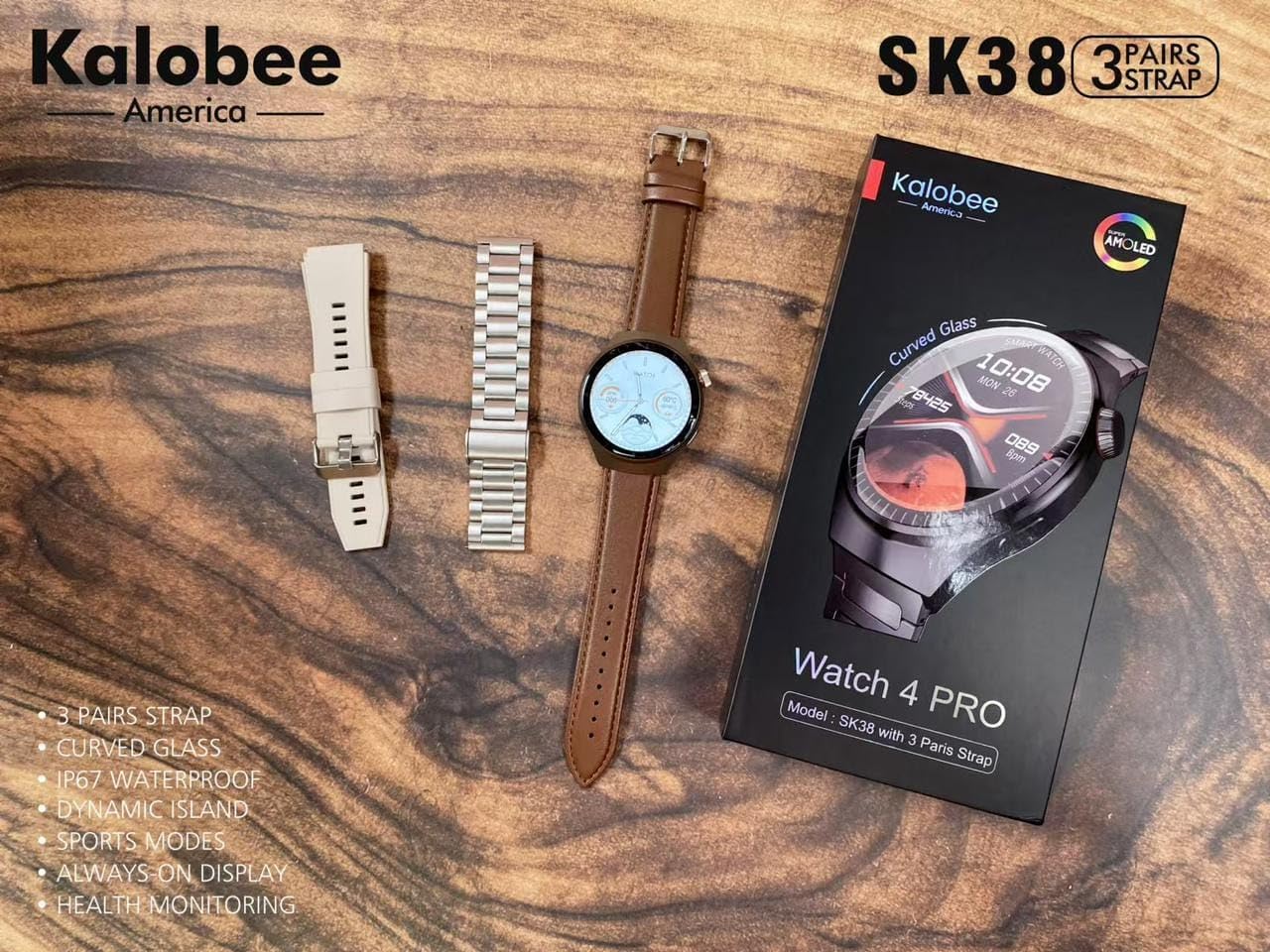
Image: A flat lay of the Kalobee Watch 4 PRO+ components, including the smartwatch, its retail box, and the three different strap options (leather, silicone, and metal), ready for assembly.
Жайгашуу
1. Баштапкы заряддоо
Before first use, fully charge your Kalobee Watch 4 PRO+. This ensures optimal battery calibration and performance.
- Connect the wireless charging dock to a USB power adapter (not included) and plug it into a power outlet.
- Place your Kalobee Watch 4 PRO+ onto the charging dock. Ensure the watch is properly aligned for charging to begin.
- Сааттын дисплейинде кубаттоо абалы көрсөтүлөт. Толук кубаттоо, адатта, болжол менен 2-3 саатты талап кылат.
2. Боону орнотуу
The Kalobee Watch 4 PRO+ comes with interchangeable straps, allowing you to customize its appearance. To install or change a strap:
- Locate the quick-release pins on the back of each strap.
- Slide the pin inwards to detach or attach the strap to the watch lugs.
- Ensure the pin clicks securely into place, indicating the strap is properly fastened.

Сүрөт: бир тарап view of the Kalobee Watch 4 PRO+ featuring a sleek metal strap, demonstrating one of the interchangeable strap options.
3. Түзмөгүңүз менен жупташтыруу (Bluetooth)
To unlock the full smart features of your watch, pair it with your smartphone via Bluetooth.
- Download the official Kalobee companion app from your smartphone's app store (iOS App Store or Google Play Store).
- Смартфонуңузда Bluetooth иштетилгенин текшериңиз.
- Open the Kalobee app and follow the on-screen instructions to add a new device.
- On your watch, navigate to the Bluetooth settings (refer to "Basic Navigation" section if needed).
- Select your watch from the list of available devices in the app. Confirm the pairing request on both your phone and watch.
- Жупташтырылгандан кийин, саат маалыматтарды жана эскертмелерди смартфонуңуз менен шайкештештирет.
Иштөө нускамалары
1. Негизги навигация
The Kalobee Watch 4 PRO+ features an intuitive touch screen and physical buttons for navigation.
- Сенсордук экран: Swipe left/right, up/down to navigate through menus and widgets. Tap to select an item.
- Таажы баскычы: Typically used to return to the home screen, scroll through lists, or zoom in/out. Press and hold for power options.
- Каптал баскычы: Often customizable, it can be set to quickly access a specific app or feature.

Image: The Kalobee Watch 4 PRO+ displaying its main watch face, showing time, date, steps, and calories, illustrating the primary user interface.
2. Сааттын жүзүн ыңгайлаштыруу
Personalize your watch by changing the watch face:
- From the home screen, press and hold the watch face.
- Жеткиликтүү циферблаттарды карап чыгуу үчүн солго же оңго серпиңиз.
- Tap on a watch face to select it. Some watch faces may offer further customization options (e.g., complications, colors) which can be adjusted by tapping the "Customize" option.
- Additional watch faces can be downloaded and managed via the Kalobee companion app.
3. Ден соолук мониторингинин өзгөчөлүктөрү
Your Kalobee Watch 4 PRO+ is equipped with various health monitoring capabilities:
- Жүрөктүн кагышын көзөмөлдөө: Access the heart rate app on your watch to measure your current heart rate. Continuous monitoring can be enabled in the app settings.
- Активдүүлүккө көз салуу: Күн бою баскан кадамдарды, аралыкты жана күйгөн калорияларды көзөмөлдөйт. View daily summaries on the watch or in the companion app.
- Уйкуга көз салуу: Wears the watch to bed to monitor sleep patterns, including deep sleep, light sleep, and awake times. Data is available in the app.
- Спорт режимдери: Машыгуунун белгилүү бир маалыматтарын көзөмөлдөө үчүн ар кандай спорт режимдеринен (мисалы, чуркоо, велосипед тебүү) тандаңыз.
4. Эскертмелер
Receive notifications from your paired smartphone directly on your watch:
- Ensure notifications are enabled in the Kalobee companion app for desired applications.
- When a notification arrives, the watch will vibrate and display the content.
- Сааттын бетинин үстүнөн ылдый сүрүңүз view сиздин эскертме таржымалы.
Техникалык тейлөө
1. Саатыңызды тазалоо
Regular cleaning helps maintain the appearance and functionality of your watch.
- Watch Body: Сааттын корпусун жумшак, мамыксыз чүпүрөк менен сүртүңүз. Зарыл болсо, бир аз сүртүңүзampчүпүрөктү суу менен. Катуу химиялык заттарды же абразивдүү материалдарды колдонуудан алыс болуңуз.
- Боолор: Clean silicone straps with mild soap and water. Leather straps should be wiped with a dry or slightly damp cloth and allowed to air dry. Metal straps can be cleaned with a soft brush and mild soapy water, then rinsed and dried thoroughly.
- Заряддоодон же кийүүдөн мурун сааттын толугу менен кургагандыгын текшериңиз.
2. Батареяга кам көрүү
Батареянын иштөө мөөнөтүн узартуу үчүн:
- Батареяны бат-баттан толук кубаттап калуудан алыс болуңуз.
- Батареянын деңгээли 20% дан төмөн түшкөнгө чейин саатты үзгүлтүксүз заряддаңыз.
- Do not expose the watch to extreme temperatures (hot or cold) for extended periods.
3. Сактоо
When not in use for an extended period, store your watch in a cool, dry place. It is recommended to charge the watch to about 50% before long-term storage.
Проблемаларды чечүү
If you encounter issues with your Kalobee Watch 4 PRO+, refer to the following common solutions:
| Көйгөй | Мүмкүн чечим |
|---|---|
| Саат күйбөй жатат | Ensure the watch is fully charged. Connect it to the charging dock for at least 30 minutes. If still unresponsive, perform a forced restart (refer to "Basic Navigation" for button functions). |
| Смартфон менен жупташтыруу мүмкүн эмес | Ensure Bluetooth is enabled on both devices. Make sure the watch is in pairing mode. Restart both the watch and smartphone. Clear previous Bluetooth connections on your phone if necessary. |
| Туура эмес ден соолук маалыматы | Ensure the watch is worn snugly on your wrist, not too loose or too tight. Clean the sensors on the back of the watch. Update the watch firmware via the companion app. |
| Эскертмелер көрүнбөй жатат | Check notification settings in the Kalobee companion app and your smartphone's system settings. Ensure the watch is connected via Bluetooth. |
| Батареянын иштөө мөөнөтү кыска | Reduce screen brightness, disable always-on display, limit background app refresh, and turn off unnecessary features like continuous heart rate monitoring if not needed. |
Техникалык шарттар
- Модел: SK38
- Дисплей: AMOLED экраны
- Операция системасы: AsteroidOS
- Байланыш: Bluetooth
- Батарея сыйымдуулугу: 449 Amp Саат
- Заряддоо: Зымсыз заряддоо
- Камтылган компоненттер: Watch Band (3 pairs), Wireless Charging Dock
- Өндүрүүчү: HUAYING COMMUNICATION CO.,LTD
- Келип чыккан өлкө: Кытай
Кепилдик жана колдоо
Information regarding product warranty and customer support is not available in this manual. Please refer to the product packaging or the official Kalobee website for details on warranty coverage and how to contact customer support for service or inquiries.


