Introduction
The TONOR Gaming Mic TCX3+ is designed to enhance your gaming and streaming experience, particularly for Xbox users. This microphone offers superior sound quality, customizable RGB lighting, and convenient controls for an immersive audio environment. Please read this manual carefully to ensure proper setup and operation.
Кутуда эмне бар
- Микрофон x1
- Boom arm stand x1
- USB-A to Type-C charging cable x1
- 3.5mm to 3.5mm audio cable x1
Жайгашуу
Follow these steps to set up your TONOR Gaming Mic TCX3+:
- Бум рычагын бекитиңиз: Securely attach the included boom arm stand to your desk. The microphone adapter comes with both 3/8-inch and 5/8-inch threaded adapters for compatibility.
- Микрофонду орнотуу: Attach the TCX3+ microphone to the boom arm.
- Connect to Xbox Controller: Use the provided 3.5mm audio connection cable to seamlessly connect the microphone to your Xbox controller. No additional splitters or power supply are needed.
- Күйгүзүү: Long press the knob on the microphone to power it on.
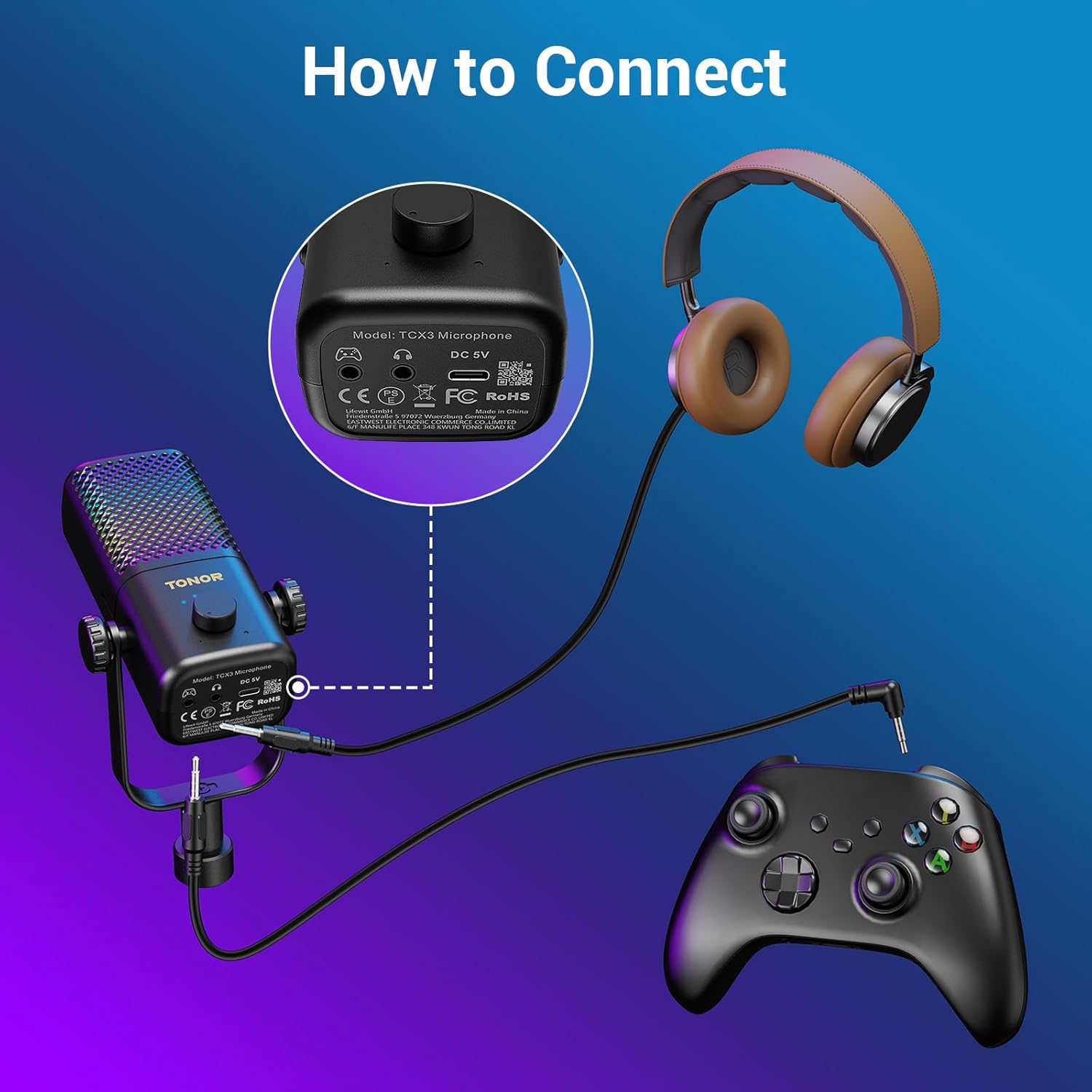
Figure 1: Connecting the TCX3+ microphone to an Xbox controller.
Эскертүү: This microphone is not compatible with PC, phone, PS4/5, or Nintendo Switch.

2-сүрөт: Шайкештик аяктадыview for the TCX3+ microphone.
Иштөө нускамалары
Күйгүзүү/өчүрүү
- To power on the microphone, long press the main knob.
- To power off the microphone, long press the main knob again.
Volume/Gain Control
- Rotate the main knob to adjust the communication volume to your desired level.
Үнсүз функция
- Tap the top button of the microphone to instantly mute or unmute.

Figure 3: Volume and Mute controls on the TCX3+ microphone.
RGB жарык эффекттери
Customize your gaming space with three dynamic RGB modes:
- To activate RGB modes, long press the mute button.
- To switch between modes, lightly press the mute button again.
- You can also turn off the lights for a pure auditory environment.

Figure 4: RGB Light Control options.
Мониторинг функциясы
- To disable the monitoring function, long press the knob.

Figure 5: Multi-functional control for gain and monitoring.
Батареянын иштөө мөөнөтү жана заряддоо
The TCX3+ microphone is equipped with a long-lasting lithium battery:
- Up to 30 hours of use in non-light mode.
- Up to 10 hours of use in color light mode.
- Quick-charge for just 5 minutes provides an additional hour of gameplay.
Маанилүү эскертүү: The microphone cannot be used while charging.
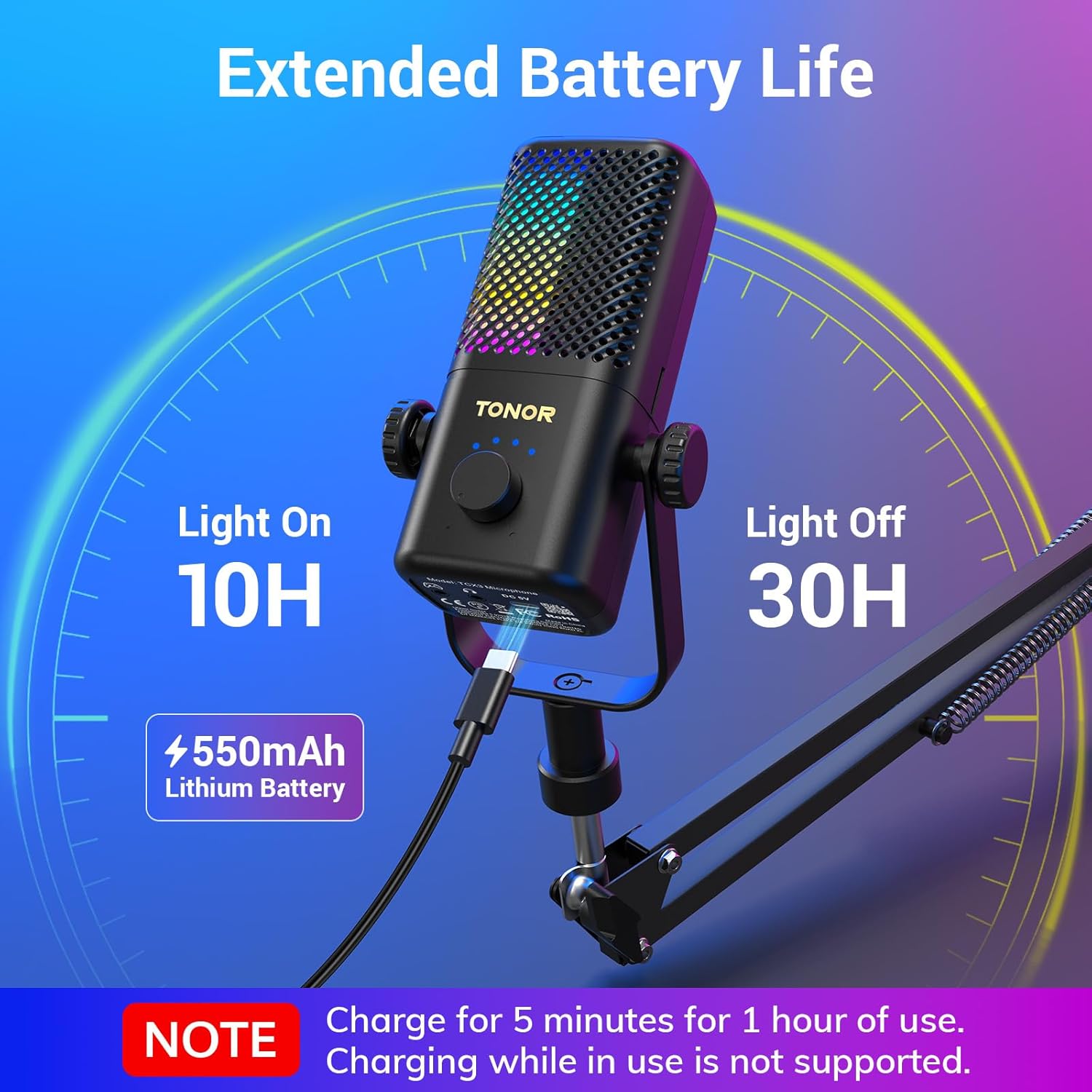
Figure 6: Battery life and quick charging features.
Техникалык шарттар
| Өзгөчөлүк | Деталь |
|---|---|
| Микрофон форма фактору | Gooseck |
| Элементтин өлчөмдөрү (L x W x Y) | 16.14 x 5.67 x 5.04 дюйм |
| Power Source | DC |
| Батареялардын саны | 1 литий-иондук батарейкалар талап кылынат (кошулган) |
| Материал | Acrylonitrile Butadiene Styrene, Alloy Steel |
| Ызы-чуунун катышы | 40 дБ |
| Каналдардын саны | 1 |
| Элемент Салмагы | 2.76 фунт |
| Модель аты | TCX3+ |
| Байланыш технологиясы | Көмөкчү |
| Туташтыргыч түрү | 3.5 мм Джек |
| Өзгөчө өзгөчөлүк | Stand, Volume control, Mute, RGB |
| Шайкеш түзмөктөр | Gamepad (Xbox Controller) |
Техникалык тейлөө
To ensure the longevity and optimal performance of your TONOR Gaming Mic TCX3+, follow these maintenance guidelines:
- Тазалоо: Use a soft, dry cloth to clean the microphone and boom arm. Avoid using harsh chemicals or abrasive materials.
- Сактагыч: Колдонулбаган учурда микрофонду күн тийбеген жана өтө температурадан алыс, салкын, кургак жерде сактаңыз.
- Кабельге кам көрүү: Зыяндын алдын алуу үчүн кабелдерди акырын кармаңыз. Курч ийилгенден же ийилгенден качыңыз.
Проблемаларды чечүү
If you encounter any issues with your TONOR Gaming Mic TCX3+, refer to the following common problems and solutions:
- Үн жок: Ensure the 3.5mm audio cable is securely connected to both the microphone and the Xbox controller. Check the volume settings on your Xbox and the microphone's gain knob.
- Бурмаланган аудио: Reduce the microphone's gain level. Ensure you are not too close to the microphone. Check for any interference from other electronic devices.
- RGB жарыктары иштебейт: Ensure the microphone is powered on. Long press the mute button to activate RGB modes, then lightly press to cycle through them.
- Микрофон кубатталбай жатат: Ensure the USB-A to Type-C cable is properly connected to the microphone and a power source. Remember, the mic cannot be used while charging.
- Шайкештик маселелери: Confirm that you are using the microphone with a compatible Xbox controller. The microphone is not compatible with PC, phone, PS4/5, or Nintendo Switch.
Кепилдик жана колдоо
TONOR products come with a standard warranty. For specific warranty details, repair requests, or after-sales service, please refer to the warranty card included in your product packaging or visit the official TONOR webсайт. Сатып алганыңыздын далили катары сатып алуу дүмүрчөгүңүздү сактаңыз.
Расмий продукт Video
Video 1: TONOR Gaming Mic Compatible. This video demonstrates the features and compatibility of the TONOR Gaming Mic TCX3+.


