1. Киришүү
Thank you for choosing the HBN Digital Outdoor Timer Socket. This device is designed to provide flexible and reliable control over your outdoor electrical appliances, such as garden lighting, pool pumps, and holiday decorations. With its 8 programmable settings, random function, and IP44 weather resistance, it offers convenience and energy efficiency. Please read this manual thoroughly before use to ensure proper operation and safety.
2. Коопсуздук нускамалары
- Ensure the timer is correctly installed and connected to a suitable power outlet.
- Do not exceed the maximum load capacity of 16A/3680W. Overloading can cause damage or fire.
- The timer is rated IP44 for outdoor use, meaning it is protected against splashing water from any direction. However, do not immerse the device in water or expose it to direct, heavy rainfall for extended periods.
- Түзмөктү ачпаңыз же оңдоого аракет кылбаңыз. Бардык тейлөө иштерин квалификациялуу адистерге тапшырыңыз.
- Keep children away from the device. The integrated child lock provides additional safety.
- Always unplug the timer from the power outlet before cleaning.
3. Пакеттин мазмуну
Сиздин пакетте төмөнкү элементтер болушу керек:
- HBN Digital Outdoor Timer Socket (x2)
- Көрсөтмө (бул документ)
4. Продукт бүтүп калдыview
The HBN Digital Outdoor Timer Socket features a clear digital display and intuitive buttons for easy programming. Below is an illustration of the device and its main components.
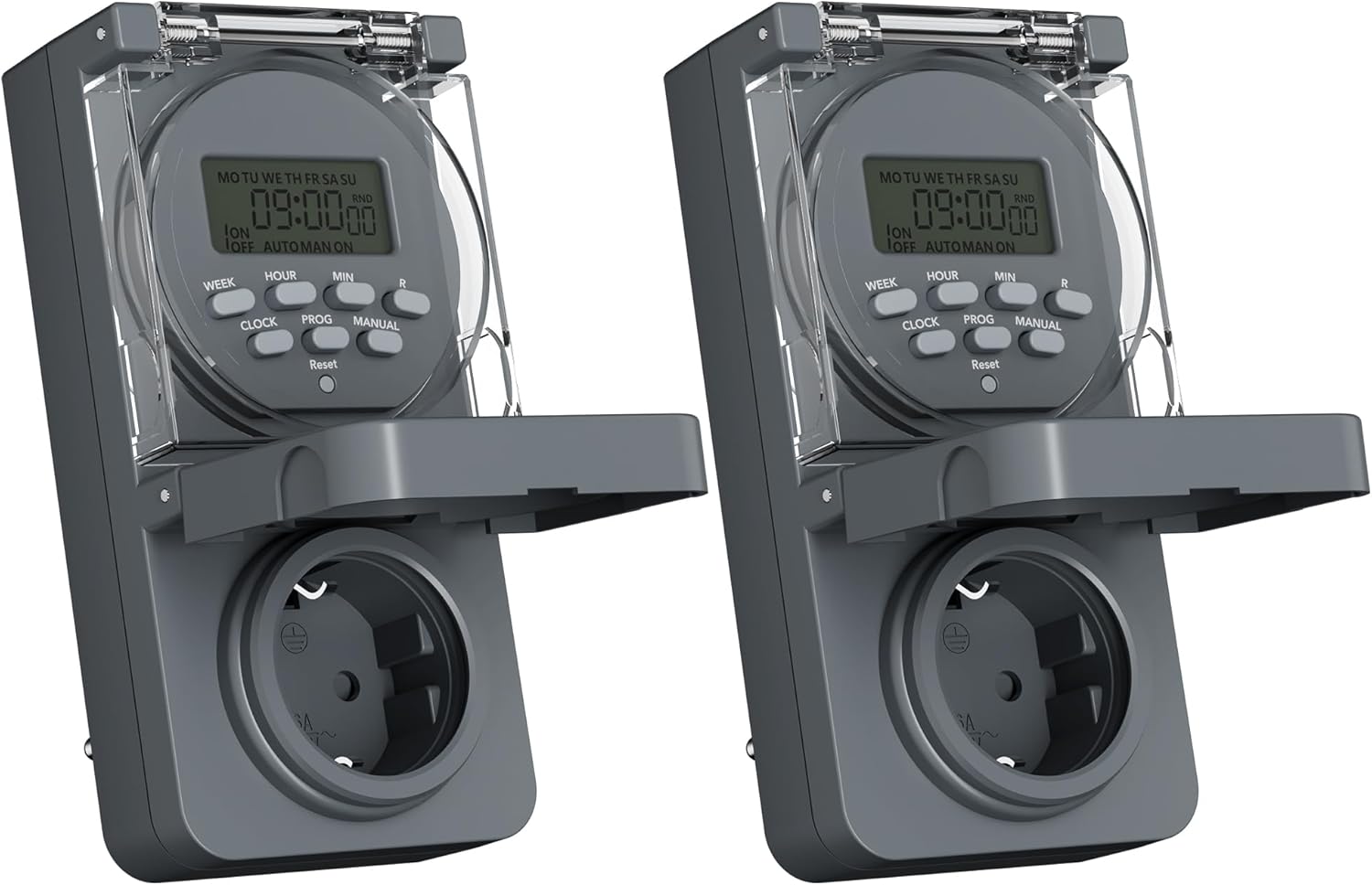
Image 1: Two HBN Digital Outdoor Timer Sockets, front view.

Image 2: Close-up of the timer's display and control buttons.
Баскыч функциялары:
- ЖУМА: Selects the day(s) of the week for programming.
- HOUR: Adjusts the hour setting.
- МИН: Adjusts the minute setting.
- СААТ: Exits programming mode and displays the current time. Used to set the current time.
- ПРОГ: Enters and cycles through the 8 ON/OFF program settings.
- КОЛ: КҮЙҮК, АВТОМАТТЫК жана ӨЧҮРҮҮ режимдеринин ортосунда которуштурат.
- RND (Random): Кокустук функцияны иштетет же өчүрөт.
- Кайтаруу: Clears all settings and returns the timer to factory defaults. Use a pointed object (e.g., a pen tip) to press.
5. Орнотуу
5.1 Баштапкы кубаттоо жана баштапкы абалга келтирүү
Before first use, or after a long period of inactivity, plug the timer into a live power outlet for at least 30 minutes to charge the internal backup battery. This ensures that settings are retained during power outages.
After charging, press the Калыбына келтирүү button using a pointed object to clear any pre-existing settings and ensure a fresh start.
5.2 Учурдагы убакытты жана күндү орнотуу
- басып, кармап туруңуз СААТ баскычы.
- Кармап жатканда СААТ, басыңыз ЖУМА repeatedly to set the current day of the week (MO, TU, WE, TH, FR, SA, SU).
- Кармап жатканда СААТ, басыңыз HOUR repeatedly to set the current hour (12-hour or 24-hour format).
- Кармап жатканда СААТ, басыңыз MIN repeatedly to set the current minute.
- бошотуңуз СААТ button. The current time and day are now set.
6. Иштөө нускамалары
6.1 Setting ON/OFF Programs
The timer allows you to set up to 8 ON/OFF programs. Each program consists of an ON time and an OFF time, along with specific days of the week.

Сүрөт 3: Мисamples of setting ON and OFF times for different programs.
- басыңыз ПРОГ button once. The display will show "1 ON". This is for setting the first ON time.
- Басыңыз ЖУМА repeatedly to select the desired day(s) for this program. Options include individual days, weekdays (MO TU WE TH FR), weekends (SA SU), all days (MO TU WE TH FR SA SU), or various combinations.
- Басыңыз HOUR to set the desired hour for the ON time.
- Басыңыз MIN to set the desired minute for the ON time.
- Басыңыз ПРОГ again. The display will show "1 OFF". This is for setting the first OFF time.
- Repeat steps 2-4 to set the day(s), hour, and minute for the OFF time. Ensure the day selection matches the ON time if you want the program to apply to the same days.
- Басууну улантыңыз ПРОГ to cycle through programs 2 ON, 2 OFF, up to 8 ON, 8 OFF. Repeat the setting process for each program as needed.
- Бардык керектүү программаларды орноткондон кийин, баскычын басыңыз СААТ программалоо режиминен чыгып, учурдагы убакытты көрсөтүүгө кайтуу үчүн баскычты басыңыз.
6.2 Random Function
The random function is designed to simulate presence by randomly turning the connected appliance ON and OFF within a specific time window, typically around your programmed ON/OFF times. This can deter potential intruders.

Image 4: The random function (RND) activated on the timer display.
- Кокустук функцияны иштетүү үчүн, баскычын басыңыз RND button. The display will show "RND".
- Өчүрүү үчүн басыңыз RND button again. "RND" will disappear from the display.
6.3 Кол менен башкаруу (КҮЙҮК/АВТОМАТТЫК/ӨЧҮК)
You can manually override the programmed settings using the КОЛ баскычы.
- Басыңыз КОЛ once: The timer switches to ON mode (output is continuously ON).
- Басыңыз КОЛ again: The timer switches to АВТО mode (follows programmed settings).
- Басыңыз КОЛ a third time: The timer switches to ӨЧҮРҮҮ mode (output is continuously OFF).
6.4 Summer/Winter Time Adjustment
To adjust for daylight saving time:
- басып, кармап туруңуз СААТ баскычы.
- Кармап жатканда СААТ, басыңыз КОЛ button. The display will show "+1h" for summer time or revert to normal for winter time.
7. Техникалык тейлөө
7.1 Тазалоо
To clean the timer, unplug it from the power outlet. Wipe the exterior with a soft, damp кездеме. Абразивдүү тазалоочу каражаттарды, эриткичтерди колдонбоңуз же түзмөктү сууга салбаңыз.
7.2 Сактоо
Узак мөөнөткө колдонулбаганда, таймерди салкын, кургак жерде, тике күн нурунан жана экстремалдык температурадан алыс сактаңыз.
8. Кыйынчылыктарды
- Таймер программалангандай күйбөй/өчпөй жатат:
- Check if the timer is in АВТО mode (not ON or OFF manually).
- Verify that the programmed ON/OFF times and days are set correctly.
- Ensure the connected appliance is working and properly plugged into the timer.
- Дисплей бош:
- Ensure the timer is plugged into a live power outlet.
- The internal backup battery might be completely drained. Plug the timer in for at least 30 minutes to charge it.
- Жөндөөлөр өчүрүлгөндөн кийин жоголотtage:
- The internal backup battery may not be sufficiently charged. Ensure the timer is regularly connected to power. If settings are lost, re-enter them after charging.
- Кокустук функция иштебей жатат:
- камсыз кылуу RND function is activated (RND icon visible on display).
- The random function operates around programmed times; ensure at least one program is set.
9. Техникалык шарттар

Image 5: Back of the timer showing electrical specifications.
| Өзгөчөлүк | Спецификация |
|---|---|
| Модел | CP-GOE22-1 |
| Электр камсыздоо | 230V~, 50Hz |
| Max Load | 16А / 3680 Вт |
| Коргоо классы | IP44 (чачууга каршы) |
| Программалардын саны | 8 күйгүзүү/өчүрүү программалары |
| Minimum Switching Time | 1 мүнөт |
| Башкаруу режимдери | КҮЙҮК, АВТО, ӨЧҮРҮҮ |
| Атайын функциялар | Random function, Summer/Winter time, 24-hour mode |
| Камдык батарея | Integrated (retains settings during power outagэс) |
| Өлчөмдөрү (болжол менен) | 5.5D x 8.5W x 12H см |
| Элемент Салмагы | 160 грамм |
| Материал | Пластик |
| UPC | 810079587476 |
| Өндүрүүчү | Ergo I&E CO.,LTD |
10. Кепилдик жана колдоо
Кепилдик жөнүндө маалымат же техникалык колдоо алуу үчүн, сатып алуу учурунда берилген документтерди караңыз же сатуучуга кайрылыңыз. Кепилдик боюнча дооматтар үчүн сатып алууну тастыктаган документти сактап коюңуз.


