1. Киришүү
This manual provides essential information for the safe and efficient operation of your JVC 65-inch AI Vision Series QLED Google TV, model LT-65NQ7165C. Please read these instructions thoroughly before using your television and retain them for future reference.
2. Кутуда эмне бар
Таңгактан чыгаргандан кийин, төмөндө көрсөтүлгөн нерселердин бардыгы бар экенин жана жакшы абалда экендигин текшериңиз:
- 1N LED телевизор
- 1N Remote Control (with 2 AAA batteries included)
- 1N Wall Mount Bracket
- 1N Table Top Stand
- 4x Stand Бурама
- 1N Электр кабели
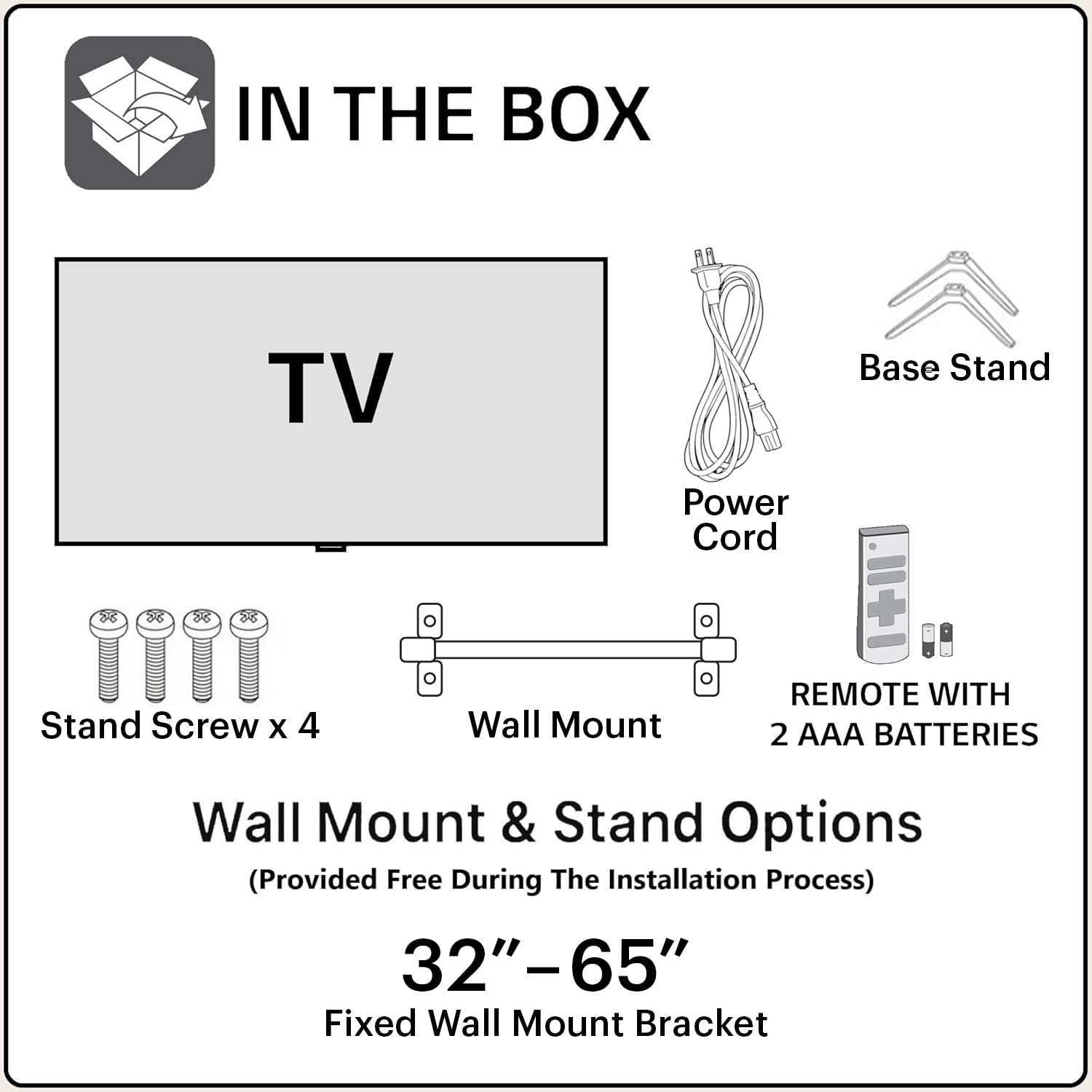
Image: Contents of the JVC 65-inch AI Vision Series QLED Google TV packaging.
3. Орнотуу колдонмосу
3.1. Монтаждоо параметрлери
Your JVC TV offers two primary mounting options: Table Top Stand or Wall Mount. Choose the option that best suits your viewчөйрө.
3.1.1. Table Top Stand Installation
- Телевизордун экранын кылдаттык менен ылдый каратып жумшак, тегиз жерге коюңуз.
- Attach the provided table top stands to the designated slots at the bottom of the TV.
- Secure the stands using the included stand screws.
- Телевизорду туруктуу, тегиз жерге коюңуз.
3.1.2. Дубалга монтаждоо
The TV comes with a fixed wall mount bracket. Professional installation is recommended for wall mounting to ensure safety and proper setup.
- Identify a suitable wall location, ensuring it can support the TV's weight (approximately 15 kg).
- Follow the instructions provided with the wall mount bracket for secure installation.
- Attach the TV to the installed wall mount.

Сүрөт: алдыңкы view of the JVC 65-inch AI Vision Series QLED Google TV.
3.2. Баштапкы байланыштар
Connect necessary devices to your TV using the available ports.
- Күч: Connect the power cord to the TV and a suitable power outlet.
- HDMI: Use the 3 HDMI ports to connect gaming consoles, set-top boxes, or Blu-ray players. The TV supports ALLM and eARC.
- USB: Катуу дисктерди жана башка USB түзмөктөрүн туташтыруу үчүн эки USB порту бар.
- Ethernet: Туруктуу зымдуу интернет байланышы үчүн.
- Оптикалык: Шайкеш үн системаларына санариптик аудио чыгаруу үчүн.

Сүрөт: Арткы view of the JVC 65-inch AI Vision Series QLED Google TV, highlighting connectivity ports.
4. Сыналгыңызды иштетүү
4.1. Күйгүзүү/өчүрүү
Press the power button on the remote control or on the TV itself to turn the television on or off.
4.2. Google TV интерфейси
Your JVC TV runs on Google TV, providing a personalized and intuitive user experience. The home screen displays recommended content, installed apps, and quick access to various features.
- Навигация: Use the directional pad on your remote to navigate through menus and select options.
- Колдонмолор: Access supported streaming applications like Netflix, Prime Video, YouTube, Zee5, and more. The TV has 2 GB RAM and 16 GB ROM for app storage.
- Экранды чагылдыруу: Cast content from compatible devices directly to your TV.
4.3. Google Жардамчысы
The remote control includes a dedicated Google Assistant button for voice commands. Press the button and speak into the remote to search for content, control smart home devices, or get information.
4.4. Байланыш өзгөчөлүктөрү
- Dual Band Wi-Fi: Интернетке кирүү үчүн 2.4 ГГц же 5 ГГц Wi-Fi тармактарына туташыңыз.
- Bluetooth 5.0: Зымсыз кулакчындарды, саундбарларды же башка Bluetooth иштетилген аксессуарларды туташтырыңыз.

Image: JVC TV remote control, featuring quick access buttons for popular streaming services and Google Assistant.
5. Дисплей жана аудио функциялары
5.1. Дисплей технологиясы
The JVC AI Vision Series QLED Google TV features a 4K Ultra HD (3840 x 2160) QLED display with a 60 Hz refresh rate. It supports HDR and HLG for enhanced contrast and vibrant colors, displaying 1.1 billion colors.

Image: Visual representation of the QLED display's color capabilities.
5.2. Аудио системасы
Experience immersive sound with 80 Watts of audio output, supported by Dolby Digital Plus and Dolby Atmos technologies. This provides a rich and dynamic audio experience for all your content.
6. Техникалык тейлөө
6.1. Экранды тазалоо
Экранды тазалоо үчүн аны жумшак, түксүз чүпүрөк менен акырын сүртүңүз. өжөр белгилери үчүн, бир аз гampкездемени суу же атайын экран тазалагыч менен сүртүңүз. Катуу химиялык заттарды же абразивдүү материалдарды колдонуудан алыс болуңуз.
6.2. Телевизордун корпусун тазалоо
Wipe the exterior of the TV with a soft, dry cloth. Do not use liquid cleaners directly on the TV body.
7. Кыйынчылыктарды
Телевизоруңузда көйгөйлөргө туш болсоңуз, төмөнкү жалпы чечимдерди караңыз:
- Кубат жок: Ensure the power cord is securely connected to both the TV and the power outlet. Check if the outlet is functioning.
- Сүрөт/үн жок: Verify that the correct input source is selected. Check all cable connections (HDMI, etc.) for looseness.
- Алыстан жооп бербейт: Replace the AAA batteries in the remote control. Ensure there are no obstructions between the remote and the TV's IR sensor.
- Тармакка туташуу маселелери: Restart your Wi-Fi router. On the TV, go to network settings and reconnect to your Wi-Fi network. For wired connections, check the Ethernet cable.
- Сүрөттүн сапаты маселелери: Сыналгы менюсунда сүрөт жөндөөлөрүн (жарыктык, контраст, түс) тууралаңыз. Мазмун булагы жогорку сапатта болушун камсыз кылыңыз.
8. Техникалык шарттар
| Өзгөчөлүк | Спецификация |
|---|---|
| Бренд | JVC |
| Модел | LT-65NQ7165C |
| Screen Size | 65 дюйм |
| Дисплей технологиясы | QLED |
| Резолюция | 4K (3840x2160 пиксел) |
| Жаңыртуу ылдамдыгы | 60 Гц |
| Операция системасы | Google TV |
| RAM эс тутуму | 2 ГБ |
| Сактоо сыйымдуулугу | 16 ГБ |
| Аудио чыгаруу | 80 Ватт |
| Аудио өзгөчөлүктөрү | Dolby Digital Plus, Dolby Atmos |
| Байланыш | Dual Band Wi-Fi, 3 HDMI ports (ALLM, eARC), 2 USB ports, Bluetooth 5.0, Optical, Ethernet |
| Өзгөчөлүктөр | HDR, HLG, Google жардамчысы, экранды чагылдыруу |
| Продукциянын өлчөмдөрү | 12.5D x 147W x 83H Сантиметр |
| Элемент Салмагы | 15 кг |
9. Кепилдик маалыматы
Your JVC TV comes with a буюмга 1 жылдык кепилдик жана 6 months on remote accessories. To avail of the brand warranty, please retain your purchase invoice. The user manual can also be accessed from the brand's official webсайт.
Эскертүү: The warranty does not cover light bleeding and dot issues (Mura issues) occurring on a certain Grey scale, as per the Mura Inspection standard, this is considered acceptable. As per ND (Neutral Density) Filter 2% guideline, this is not considered a panel defect.
10. Кардарларды колдоо кызматы
For further assistance, technical support, or service requests, please refer to the contact information provided on your purchase invoice or visit the official JVC customer support website. Ensure you have your product model number (LT-65NQ7165C) and purchase details ready when contacting support.


