1. Киришүү
This manual provides detailed instructions for the installation, operation, and maintenance of your SINOTIMER DC/AC 24V Digital Programmable Timer Switch, Model 24VDC. This device is designed for precise, programmable control of electrical circuits, offering up to 28 ON/OFF events per day across a 7-day cycle. Please read this manual thoroughly before use to ensure proper function and safety.

Image 1.1: The SINOTIMER 7 Day Digital Programmable Timer Switch.
2. Коопсуздук маалыматы
- Электр коркунучу: Installation and wiring should only be performed by qualified personnel. Ensure power is disconnected before any installation or maintenance.
- Тtage Шайкештик: This device operates on DC/AC 24V. Connecting to an incorrect voltage supply may damage the unit and pose a safety risk.
- Жүктөө жөндөмдүүлүгү: Do not exceed the maximum load rating of 10A at 250VAC (2000 watts). For higher loads, use an external contactor or relay.
- Курчап турган чөйрө: Install the timer in a dry, protected environment. While the unit has some dustproof features, direct exposure to water or extreme temperatures should be avoided.
- Батарея: The internal battery is for memory backup only. Do not attempt to charge or replace it unless specified in the maintenance section.
3. Пакеттин мазмуну
Пакетте бардык буюмдар бар экенин текшериңиз:
- 1x SINOTIMER Digital Programmable Timer Switch (Model: 24VDC)
- 1x Кронштейн
- 1x Чаң капкагы
- 1x CR2032 Battery (pre-installed or separate)
- 1x Disassembly Tool (small screwdriver)
- 2x орнотуу бурамалары
- 5x Spade Connecting Wires
- 1x Колдонуучунун колдонмосу (бул документ)
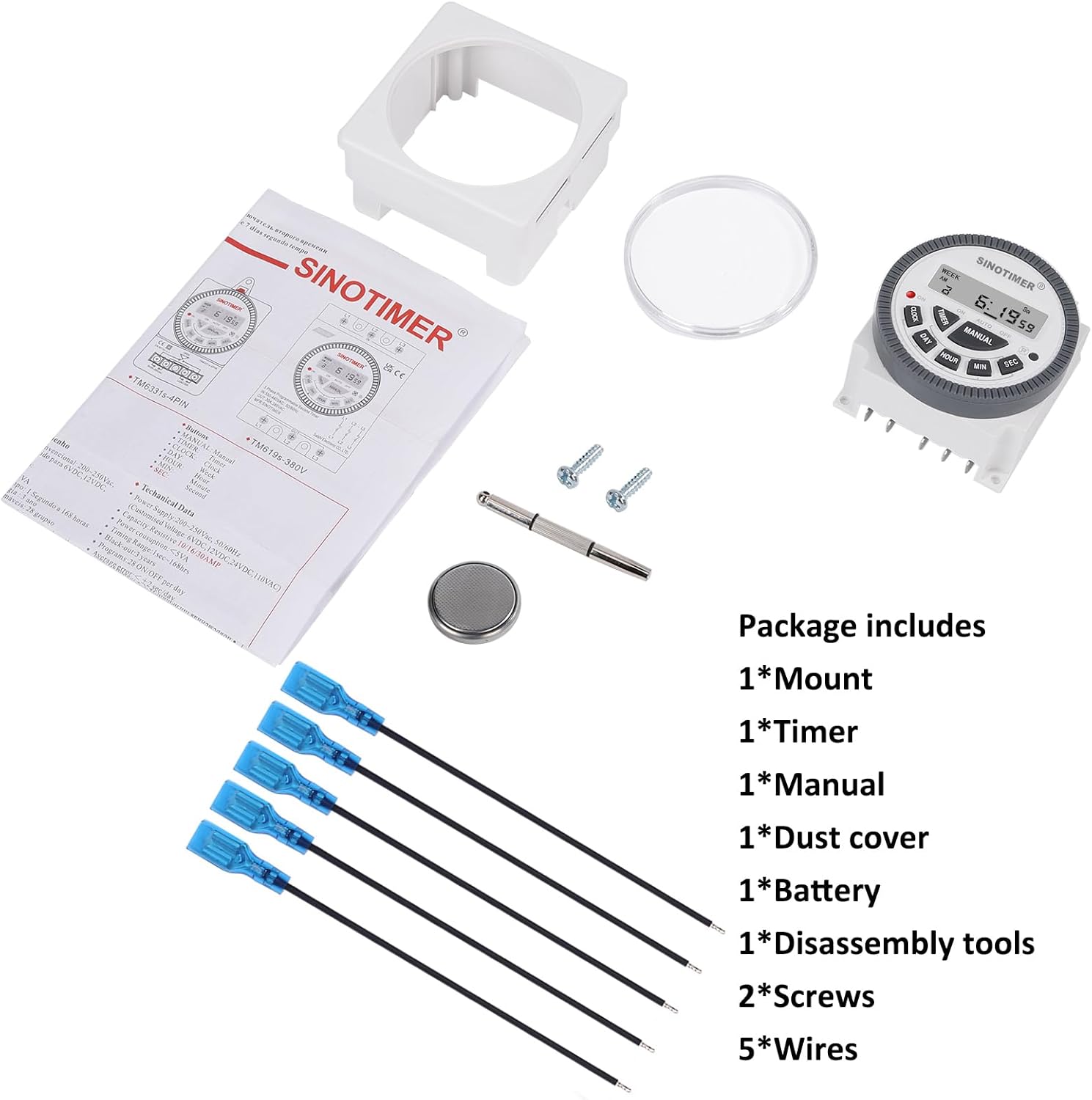
Image 3.1: Visual representation of the package contents, including the timer, mount, manual, dust cover, battery, disassembly tool, screws, and wires.
4. Продукт бүтүп калдыview & Өзгөчөлүктөрү
The SINOTIMER DC/AC 24V Digital Programmable Timer Switch is a versatile device designed for automating various electrical applications. Its compact design and digital display ensure ease of use and integration into control panels.
Негизги өзгөчөлүктөрү:
- 7 күндүк программалоо мүмкүнчүлүгү: Allows for up to 28 ON/OFF events per day, with flexible programming blocks for daily, weekly, or custom schedules.
- Санариптик дисплей: Clear LCD for time, day, and program status.
- Internal Battery Backup: Электр энергиясы өчүрүлгөн учурда программанын жөндөөлөрүн сактайтtages.
- SPDT Output: Single Pole Double Throw relay output (1 Normally Open + 1 Normally Closed contact).
- Жогорку жүк кубаттуулугу: Rated for up to 10A at 250VAC, 2000 watts.
- 12/24 саат форматы: User-selectable time display format.
- Чаң өткөрбөйт дизайн: Enhanced durability for various environments.

Сүрөт 4.1: Бүттүview of the timer's key features, including its robust design and advanced functionality.
5. Техникалык шарттар
| Өзгөчөлүк | Спецификация |
|---|---|
| Модел | 24VDC (TM-619) |
| Киргизүү көлөмүtage | DC/AC 24V |
| Output Type | SPDT (1NO+1NC) |
| Max жүктөө тогу | 10A @ 250VAC, 2000W |
| Программалануучу окуялар | Күнүнө 28га чейин күйгүзүү/өчүрүү |
| Убакыт форматы | 12 сааттык / 24 сааттык тандоо |
| Батареянын камдык көчүрмөсү | Internal CR2032 (for program memory) |
| Өлчөмдөр (D x W x H) | 1.77" x 2.83" x 2.83" (45 мм x 72 мм x 72 мм) |
| Салмагы | 5.3 унция (болжол менен 150 г) |
| Материал | Металл, пластик |

Image 5.1: Dimensional drawing and terminal layout of the timer switch.
6. Орнотуу жана зымдарды туташтыруу
ЭСКЕРТҮҮ: Disconnect all power before installation to prevent electric shock or equipment damage.
6.1 Монтаждоо
- Select a suitable location for mounting, ensuring it is protected from moisture and excessive heat.
- Attach the mounting bracket to a flat surface using the provided screws.
- Slide the timer switch into the mounting bracket until it clicks securely into place.
- Optionally, install the clear dust cover over the timer face for added protection.
6.2 Электр зымдары боюнча нускамалар
The timer switch features 5 spade connecting terminals. Refer to the wiring diagram below and the labels on the back of the unit for correct connections.
- 1 жана 2-терминалдар: Power Input (DC/AC 24V). Connect your 24V power supply here.
- Терминал 3: Common (COM) for the relay output.
- Терминал 4: Normally Open (NO) contact for the relay output. The circuit connected here will be ON when the timer is active.
- Терминал 5: Normally Closed (NC) contact for the relay output. The circuit connected here will be OFF when the timer is active.

Image 6.1: Simplified wiring diagram for the timer switch.

Сүрөт 6.2: Мисample of spade connectors attached to the timer terminals.
7. Иштөө нускамалары
After successful installation and power connection, the timer display should illuminate. If not, ensure power is supplied correctly and the internal battery is properly seated.
7.1 Баштапкы орнотуу (биринчи колдонуу)
- Кайтаруу: Press the 'R' (Reset) button with a pointed object (e.g., the provided disassembly tool) to clear all previous settings. The display will show '0:00'.
- Учурдагы убакытты коюу:
- басыңыз СААТ баскычы.
- Басыңыз КҮН to select the current day of the week (Mo, Tu, We, Th, Fr, Sa, Su).
- Басыңыз HOUR учурдагы саатты коюуга.
- Басыңыз MIN учурдагы мүнөттү коюуга.
- Басыңыз SEC to set the current second (optional, for precise synchronization).
- To switch between 12-hour (AM/PM) and 24-hour format, press СААТ жана КҮН бир эле убакта.
7.2 Иш-чараларды программалоону күйгүзүү/өчүрүү
Таймер 28га чейин КҮЙГҮЗҮҮ/ӨЧҮРҮҮ программаларын колдойт. Ар бир программа КҮЙГҮЗҮҮ убактысынан жана ӨЧҮРҮҮ убактысынан турат.
- басыңыз ТАЙМЕР button. The display will show '1 ON'. This is the first ON program.
- Басыңыз КҮН to select the day(s) for this program. You can choose a single day, weekdays, weekends, or various combinations. Keep pressing КҮН опциялар аркылуу айлануу.
- Басыңыз HOUR каалаган КҮЙГҮЗҮҮ саатын коюу үчүн.
- Басыңыз MIN каалаган КҮЙГҮЗҮҮ МҮНӨТҮН коюу үчүн.
- Басыңыз ТАЙМЕР again. The display will show '1 OFF'. This is the first OFF program.
- Repeat steps 2-4 to set the desired OFF day(s), hour, and minute for this program.
- Басууну улантыңыз ТАЙМЕР "2 КҮЙҮК", "2 ӨЧҮК" режимдерин "28 КҮЙҮК", "28 ӨЧҮК" режимдерине чейин алмаштыруу үчүн, ар бир программаны зарылчылыкка жараша коюңуз.
- Бардык керектүү программаларды орноткондон кийин, баскычын басыңыз СААТ button to return to the current time display. The programs are now saved.
7.3 Кол менен жокко чыгаруу
The КОЛ button allows you to override the programmed schedule temporarily or permanently.
- Басыңыз КОЛ төмөнкү режимдер аркылуу айлануу үчүн:
- КҮЙҮК: Output is continuously ON, ignoring programs.
- АВТО КҮЙҮҮ: Output is currently ON, following programs.
- АВТО ӨЧҮРҮҮ: Output is currently OFF, following programs.
- ӨЧҮК: Output is continuously OFF, ignoring programs.
- Тандоо АВТО КҮЙГҮЛҮҮ or АВТО ӨЧҮК to resume programmed operation.
8. Техникалык тейлөө
8.1 Тазалоо
Агрегатты жумшак, кургак чүпүрөк менен сүртүңүз. Абразивдүү тазалагычтарды же эриткичтерди колдонбоңуз.
8.2 Батареяны алмаштыруу
The internal CR2032 battery provides backup for program memory. If the display becomes dim or programs are lost during power outages, the battery may need replacement.
- ЭСКЕРТҮҮ: Disconnect main power to the timer before replacing the battery.
- Бирдиктин артындагы батарея отсегин табыңыз.
- Отсектин капкагын кылдаттык менен ачыңыз.
- Эски CR2032 батарейкасын чыгарып, жаңысын салыңыз, полярдуулуктун тууралыгын (+ тарабы өйдө) текшериңиз.
- Батарея уясынын капкагын жабыңыз.
- After replacement, perform an initial setup (Section 7.1) to reset and set the current time.

Image 8.1: Location of the replaceable CR2032 battery.
9. Кыйынчылыктарды
| Көйгөй | Мүмкүн себеп | Чечим |
|---|---|---|
| Дисплей бош же күңүрт | No power supply; Incorrect wiring; Dead internal battery. | Check 24V power input (Terminals 1 & 2). Verify wiring. Replace CR2032 battery. |
| Programs are not running | Timer is in Manual ON/OFF mode; Incorrect program settings; Incorrect current time. | Басыңыз КОЛ until 'AUTO ON' or 'AUTO OFF' is displayed. Review program settings (Section 7.2). Set current time correctly (Section 7.1). |
| Output does not switch ON/OFF | Incorrect output wiring; Load exceeds capacity; Faulty relay. | Verify output wiring (Terminals 3, 4, 5) to your load. Ensure load does not exceed 10A/2000W. If issues persist, contact support. |
| Убакыт так эмес | Internal clock drift; Battery low. | Reset and set time again. Consider replacing the internal battery if drift is significant. |
10. Кепилдик жана колдоо
For warranty information and technical support, please refer to the documentation provided with your purchase or contact SINOTIMER customer service through the retailer where the product was purchased. Please have your product model (24VDC) and purchase date available when contacting support.
Онлайн ресурстар: For additional information, FAQs, or to view other SINOTIMER products, visit the official SINOTIMER store or webсайт.


