Introduction
Thank you for choosing the DJXFLI Zoom Stage Light. This 200W COB Par Light is designed for professional stage lighting applications, offering adjustable zoom, barn doors, and versatile color temperature control (3500K-7500K). This manual provides essential information for safe installation, operation, and maintenance of your device. Please read it thoroughly before use and retain it for future reference.
Коопсуздук нускамалары
- электр менен жабдууну камсыз кылуу voltage matches the specified requirements of the fixture.
- Always connect the fixture to a grounded circuit to avoid electric shock.
- корпусту ачпаңыз; ичинде колдонуучу тейлей турган бөлүктөр жок. Бардык тейлөөлөрдү квалификациялуу кызматкерлерге тапшырыңыз.
- Жарык булагына түздөн-түз көз тийбеңиз.
- Ensure adequate ventilation around the fixture to prevent overheating. Do not block ventilation openings.
- Keep the fixture away from flammable materials and liquids.
- Тазалоодон же тейлөөдөн мурун электр энергиясын өчүрүңүз.
- Handle the fixture with care to prevent damage.
Пакеттин мазмуну
Төмөндө тизмеленген нерселердин баары пакетиңизге камтылганын текшериңиз:
- Stage Light x 1
- Колдонуучунун колдонмосу x 1
- Кубат кабели x 1
- DMX Cable x 1
- Bow Mount + Screws x 1 set

Image: Package contents showing the stage light, power cable, DMX cable, mounting bracket, and user manual.
Продукт бүттүview
The DJXFLI COB Par Light is a high-performance stage lighting fixture featuring a 200W COB LED source. It offers adjustable zoom from 5 to 50 degrees and integrated barn doors for precise light shaping. The fixture supports a wide color temperature range from 3500K (warm white) to 7500K (cool white), making it suitable for various applications.

Сүрөт: алдыңкы view of the DJXFLI Zoom Stage Light with barn doors, showing the light output.
Негизги өзгөчөлүктөрү:
- Чоңойтуу диапазону: 5-50 degrees for flexible beam adjustment.
- Сарай эшиктери: Adjustable barn doors for precise light shaping and spill control.
- Түс температурасы: 3500K-7500K adjustable warm white and cool white output.
- алсыздатуу: 0-100% smooth linear dimming.
- Жогорку CRI: Color Rendering Index (CRI) of ≥90 for accurate color reproduction.
- Башкаруу режимдери: DMX512, Sound Activated, Master-Slave, Auto.
- Муздатуу системасы: Integrated high-quality cooling system to prevent overheating.

Сүрөт: бүттүview of the light's features and control options.
Жайгашуу
1. Арматураны орнотуу
The DJXFLI Zoom Stage Light comes with a bow mount and screws for secure installation. It supports floor mounting or can be attached to a truss system using appropriate clampс (киргизилген эмес).
- Attach the bow mount to the sides of the fixture using the provided screws.
- For floor mounting, position the fixture on a stable, level surface.
- For truss mounting, secure the bow mount to a truss clamp (sold separately) and ensure it is safely fastened to the truss. Always use a safety cable.
2. Power Connection
Connect the provided power cable to the "POWER IN" port on the rear of the fixture and then to a suitable grounded power outlet (110V AC). The fixture also features a "POWER OUT" port for daisy-chaining power to other compatible fixtures.
3. DMX Connection (Optional)
For DMX control, connect a DMX cable from your DMX controller's output to the "DMX IN" port on the fixture. To daisy-chain multiple fixtures, connect a DMX cable from the first fixture's "DMX OUT" port to the next fixture's "DMX IN" port.

Image: Rear panel connections and controls.
Иштөө нускамалары
1. Control Panel Overview
The fixture features an LED display and four control buttons (MENU, UP, DOWN, ENTER) on the rear panel for navigating settings and modes.

Image: Control panel and various operational modes.
2. Иштөө режимдерин тандоо
басыңыз МЕНЮ button to cycle through the main menu options. Use the UP жана ылдый buttons to adjust values or select sub-menus, and ENTER ырастоо үчүн.
- DMX512 режими: Allows external control via a DMX controller. Set the DMX address using the menu.
- Авто ойнотуу режими: The fixture runs through pre-programmed light sequences automatically.
- Үн иштетилген режим: The light reacts to ambient sound, changing patterns and intensity.
- Master-Slave режими: Connect multiple fixtures via DMX cables. Set one fixture as "Master" and others as "Slave" to synchronize their operation.

Image: Visual representation of the four control modes.
3. Масштабды тууралоо
The fixture features an adjustable zoom mechanism, allowing you to change the beam angle from a narrow 5-degree spot to a wide 50-degree wash. This can be adjusted manually or via DMX, depending on the selected mode.

Image: Demonstrating the adjustable zoom feature from 5 to 50 degrees.

Image: Further illustration of zoom and strobe effects.
4. Barn Door Adjustment
The four barn door leaves can be individually adjusted to shape the light beam and prevent unwanted light spill onto other areas of the stage or set. Simply pivot each leaf to the desired position.
5. Түс температурасын жөндөө
The 2-in-1 COB LED allows for seamless adjustment between warm white (3500K) and cool white (7500K) color temperatures. Use the control panel or DMX to select the desired Kelvin value for your scene.

Сүрөт: Мисamples of different color temperatures achievable with the light.

Image: Further illustration of adjustable color temperature settings.
6. Dimming and Effects
The fixture supports 0-100% linear dimming for precise intensity control. Various effects such as strobe, gradient, jump, and pulse are available, either through auto-programs or DMX control.

Image: Demonstrating various lighting effects and features in a live setting.
Техникалык тейлөө
1. Тазалоо
Regular cleaning helps maintain optimal light output and extends the lifespan of the fixture. Disconnect power before cleaning.
- Use a soft, lint-free cloth to wipe the exterior of the fixture.
- Линзалар үчүн, чийилип калбашы үчүн атайын линза тазалоочу эритмени жана жумшак чүпүрөктү колдонуңуз.
- Periodically clean the ventilation openings to ensure proper airflow.
2. Муздатуу системасы
The fixture is equipped with a high-quality cooling system. Ensure that the ventilation openings are never obstructed to allow for efficient heat dissipation. Operating the light in excessively hot environments or with blocked vents can lead to premature LED degradation.
Проблемаларды чечүү
| Көйгөй | Мүмкүн себеп | Чечим |
|---|---|---|
| Күч жок | Электр кабели ажыратылган; розеткадан электр кубаты жок. | Электр кабелинин туташуусун текшерүү; розетка башка аспап менен сыноо. |
| Light not responding to DMX | Incorrect DMX address; DMX cable issue; DMX controller problem. | Verify DMX address setting; check DMX cable connections; test with a different DMX cable or controller. |
| Light output is dim or inconsistent | Dimmer setting too low; overheating; internal fault. | Adjust dimmer setting; ensure proper ventilation; contact support if problem persists. |
| Аппараттын ысып кетиши | Бөгөттөлгөн желдетүү; жогорку температурада иштөө. | Clear all obstructions from vents; ensure adequate airflow; operate within specified temperature range. |
Техникалык шарттар
| Өзгөчөлүк | Деталь |
|---|---|
| Модел | COB par lights |
| Бренд | DJXFLI |
| Жарык булагы | 200W COB LED (Warm White + Cool White 2-in-1) |
| Түс температурасы | 3500K - 7500K (Жөнгө салынуучу) |
| Жарыктык | 20000 люмен |
| CRI | ≥90 |
| Beam Angle (Zoom) | 5 - 50 градус |
| Караңгылык | 0-100% Сызыктуу Караңгылык |
| Башкаруу режимдери | DMX512, Sound Activated, Master-Slave, Auto |
| Тtage | 110 Вольт |
| Материал | Алюминий |
| Продукциянын өлчөмдөрү | 12"L x 14.41"W x 10.23"H |
| Элемент Салмагы | 15.67 фунт |
| Монтаж түрү | Floor Mount (Bow Mount included) |
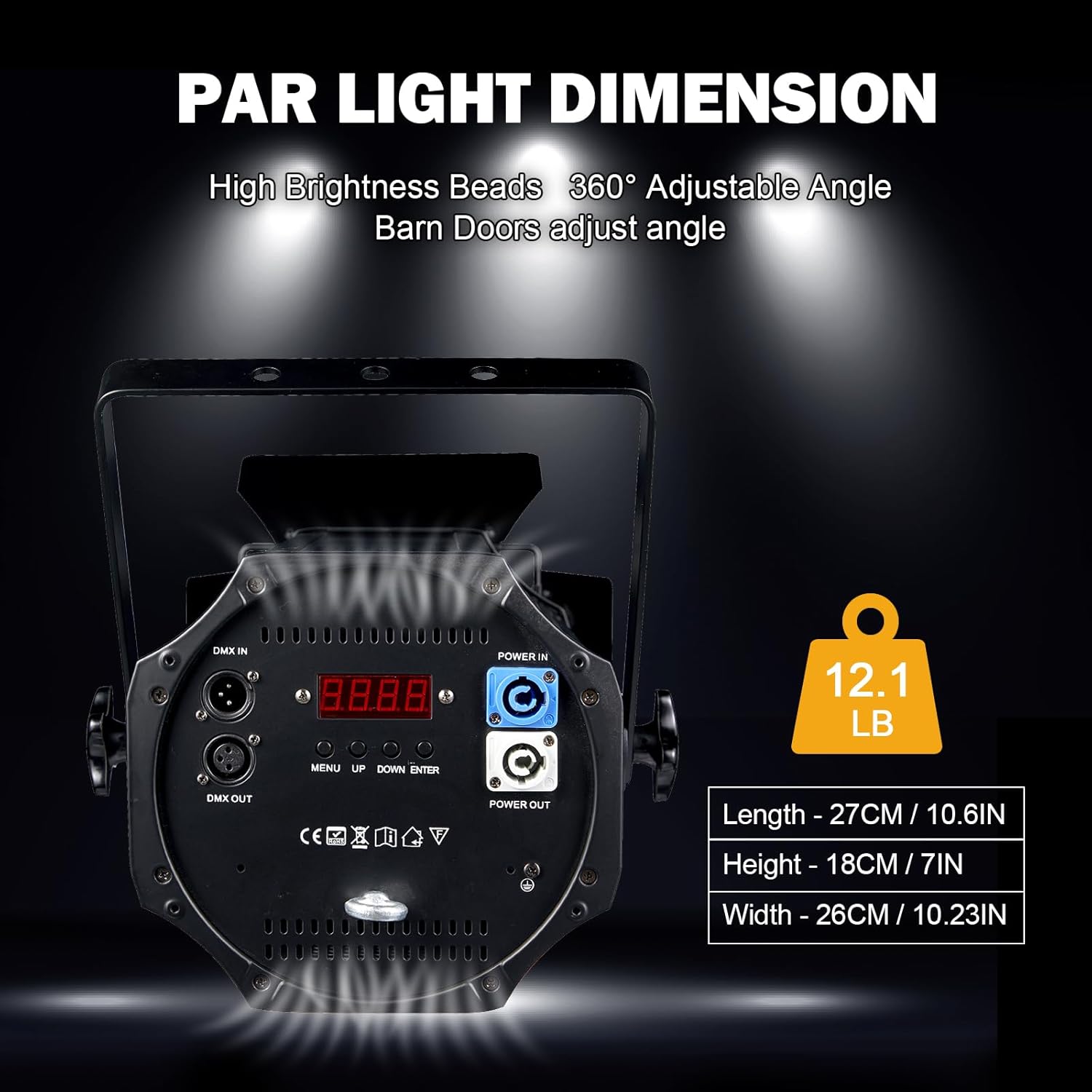
Image: Product dimensions and weight.
Кепилдик жана колдоо
For any questions, technical assistance, or warranty inquiries, please contact DJXFLI customer support. Our team is available to provide professional guidance and resolve any issues you may encounter.
Contact information can typically be found on the product packaging or the official DJXFLI website. Please have your product model number (COB par lights) and purchase details ready when contacting support.


