1. Киришүү
Thank you for choosing the Taiahiro Bk6301 Wireless Mechanical Gaming Keyboard and Mouse Combo. This manual provides detailed instructions for setting up, operating, and maintaining your new peripheral devices. This combo offers versatile connectivity options including 2.4G wireless, Bluetooth 5.0, and wired USB-C, ensuring compatibility with various devices.
2. Пакеттин мазмуну
Пакетиңизде бардык буюмдар бар экенин текшериңиз:
- Taiahiro Bk6301 Wireless Mechanical Gaming Keyboard
- Taiahiro Wireless Gaming Mouse
- USB 2.4G Receiver (stored in mouse battery compartment)
- USB-C - USB-A заряддоо/дата кабели
- User Manual
- 1 AA Battery (for mouse, may be pre-installed or included separately)

Image 2.1: Contents of the Taiahiro Bk6301 Keyboard and Mouse Combo package, including the keyboard, mouse, USB receiver, and USB-C cable.
3. Продукт бүтүп калдыview
3.1 Баскычтоптун өзгөчөлүктөрү
- 98-Ачкыч жайгашуусу: Compact design with a full numeric keypad.
- Mechanical Blue Switches: Provide tactile and audible feedback for typing.
- RGB жарыктандыруу: Customizable lighting effects.
- Adjustable Keyboard Stand: Allows for ergonomic positioning.
- Multi-Mode Connectivity: Supports 2.4G wireless, Bluetooth 5.0, and wired USB-C.
- Кайра заряддалуучу батарея: Built-in 2000mAh battery for wireless operation.
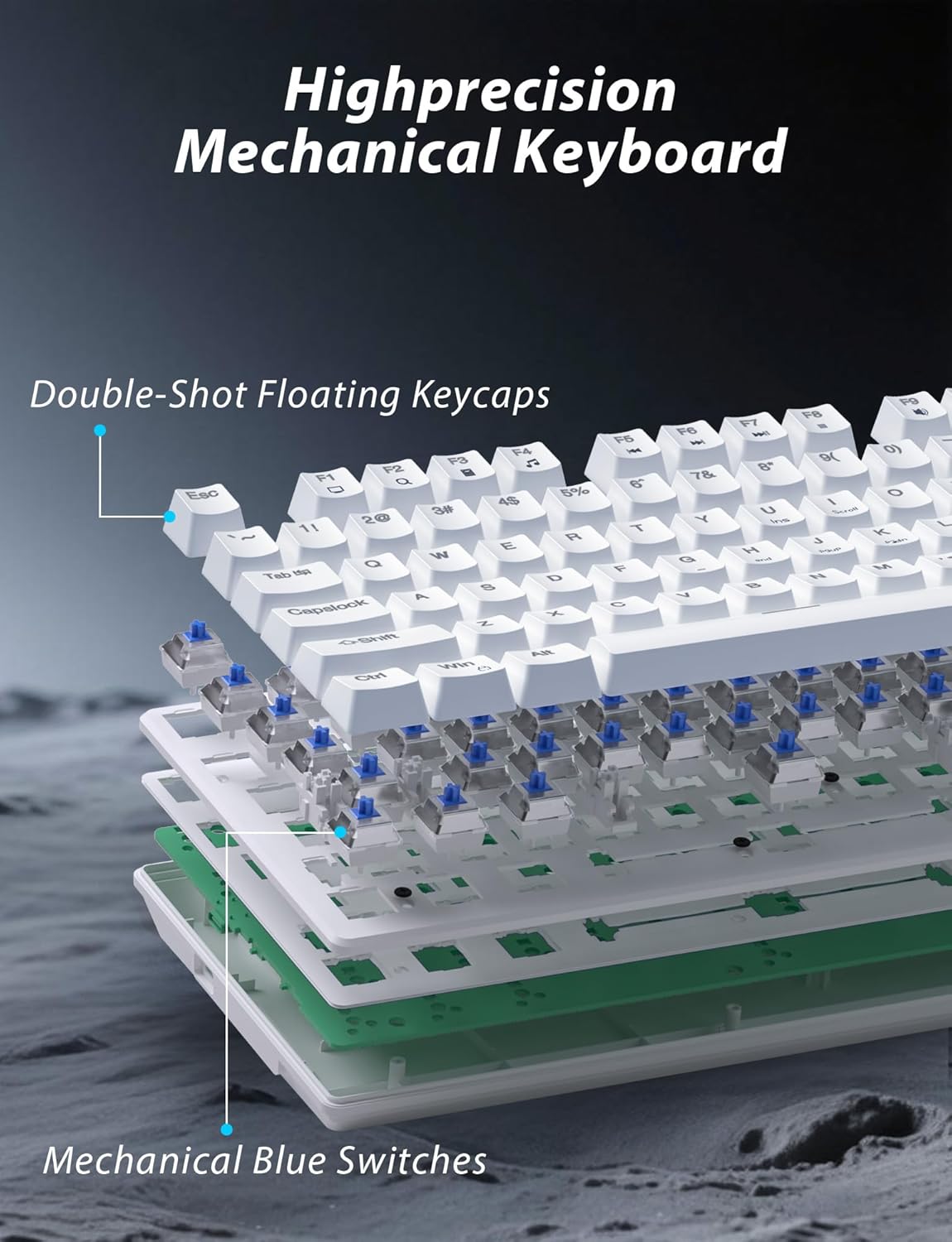
Сүрөт 3.1: Жарылып кеткен view illustrating the internal structure of the mechanical keyboard, highlighting the double-shot floating keycaps and mechanical blue switches.

Сүрөт 3.2: Каптал view of the keyboard demonstrating its ergonomic design and adjustable stand for comfortable use.
3.2 Чычкандын өзгөчөлүктөрү
- Эргономикалык дизайн: Shaped for comfortable grip.
- Жөнгө салынуучу DPI: Four levels (800/1600/2400/3200) for precision control.
- Алга/Артка баскычтары: Convenient side buttons for navigation.
- Кош режимдеги туташуу: Supports 2.4G wireless and Bluetooth.

Image 3.3: The wireless gaming mouse, highlighting its ergonomic shape and four adjustable DPI levels.
4. Орнотуу нускамалары
4.1 Клавиатураны туташтыруу
The keyboard supports three connection modes: 2.4G wireless, Bluetooth, and wired USB-C.

Image 4.1: The keyboard displaying its three connectivity options: Bluetooth, 2.4GHz wireless, and USB-C wired connection.
2.4G зымсыз режими:
- Locate the USB 2.4G receiver, typically stored in the mouse's battery compartment.
- USB ресиверди компьютериңиздеги жеткиликтүү USB портуна салыңыз.
- On the keyboard, slide the mode switch (usually located on the top edge or bottom) to the '2.4G' position.
- Клавиатура автоматтык түрдө туташышы керек.
Bluetooth режими:
- Slide the mode switch on the keyboard to the 'BT' (Bluetooth) position.
- The keyboard's indicator light will flash, indicating it is in pairing mode.
- On your device (computer, laptop, smartphone), open Bluetooth settings and search for new devices.
- Select "Taiahiro Bk6301" or a similar name from the list of available devices to pair.
- Жупташтырылгандан кийин, индикатор жарыгы туруктуу болуп калат.
Wired USB-C Mode:
- Берилген USB-C кабелин клавиатуранын USB-C портуна туташтырыңыз.
- Экинчи учун (USB-A) компьютериңиздеги жеткиликтүү USB портуна туташтырыңыз.
- The keyboard will function as a wired device and will charge simultaneously.
4.2 Mouse Connection
The mouse supports 2.4G wireless and Bluetooth connectivity.

Image 4.2: The underside of the mouse, illustrating the battery compartment for one AA battery and the storage slot for the tiny USB receiver.
Батарея орнотуу:
- Open the battery compartment on the underside of the mouse.
- Insert one AA battery, ensuring correct polarity.
- Батарея отсегин жабыңыз.
2.4G зымсыз режими:
- Ensure the USB 2.4G receiver is plugged into your computer.
- Slide the mode switch on the underside of the mouse to the '2.4G' position.
- Чычкан автоматтык түрдө туташуу керек.
Bluetooth режими:
- Slide the mode switch on the underside of the mouse to the 'BT' (Bluetooth) position.
- The mouse will enter pairing mode.
- On your device, open Bluetooth settings and search for new devices.
- Select "Taiahiro Mouse" or a similar name from the list to pair.
5. Иштөө нускамалары
5.1 Баскычтоптун функциялары
Жарыкты башкаруу:
The keyboard features customizable RGB backlighting.
- Change Backlight Mode: Басыңыз Fn + Башкы бет 18 түрдүү жарыктандыруу эффекттерин айланып өтүү.
- Жарыктыкты жөндөө: Басыңыз Fn + ↑ (Өйдө жебе) or Fn + ↓ (Төмөн жебе) to adjust between 5 brightness levels.
- Ылдамдыкты жөндөө: Басыңыз Fn + ← (Сол жебе) or Fn + → (Оңго жебе) to adjust between 5 lighting speed levels.

Image 5.1: Keyboard layout highlighting the function key combinations for controlling backlight modes, brightness, and speed.
Мультимедиа функциялары:
Басуу менен мультимедиа башкарууларына жетиңиз Fn key in combination with the designated F-keys (F1-F12).
- Fn+F1: Медиа ойноткуч
- Fn+F2: Үндү төмөндөтүү
- Fn+F3: Үндү көтөрүү
- Fn+F4: Үнсүз
- Fn+F5: Токто
- Fn+F6: Мурунку трек
- Fn+F7: Ойнотуу/Тыныгуу
- Fn+F8: Кийинки трек
- Fn+F9: Email
- Fn+F10: Web Браузер
- Fn+F11: Менин компьютерим
- Fn+F12: Калькулятор
5.2 Чычкан функциялары
DPI жөндөө:
басыңыз DPI баскычы (located behind the scroll wheel) to cycle through the four DPI settings: 800, 1600, 2400, and 3200. Each press changes the sensitivity, allowing you to adjust cursor speed to your preference.
6. Техникалык тейлөө
6.1 Тазалоо
- Баскычтоп: Use a soft, dry cloth to wipe the surface. For deeper cleaning, use compressed air to remove debris from between keys. Avoid using harsh chemicals or abrasive materials.
- Чычкан: Чычкандын бетин жумшак, бир аз г менен сүртүңүзamp кездеме. Ички компоненттерге эч кандай суюктук кирбеши керек.
6.2 Батареяны башкаруу
- Баскычтоп: The keyboard has a built-in rechargeable battery. Connect the USB-C cable to a power source (e.g., computer USB port, USB wall adapter) to charge. The indicator light will show charging status.
- Чычкан: The mouse uses one AA battery. Replace the battery when the mouse performance degrades or it stops responding. Ensure proper polarity when inserting a new battery.
7. Кыйынчылыктарды
If you encounter issues with your Taiahiro keyboard and mouse combo, please refer to the following solutions:
| Көйгөй | Мүмкүн чечим |
|---|---|
| Keyboard/Mouse not responding (2.4G) |
|
| Keyboard/Mouse not connecting (Bluetooth) |
|
| Keyboard backlight not working or stuck |
|
| Баскычтар жооп бербей жатат же эки жолу терип жатат |
|
8. Техникалык шарттар
| Өзгөчөлүк | Деталь |
|---|---|
| Модель номери | Bk6301 |
| Байланыш | Bluetooth 5.0, 2.4G зымсыз, USB-C зымдуу |
| Баскычтоптун түрү | Механикалык оюн баскычтобу |
| Ачкычтын жайгашуусу | 98 Keys (with Numeric Keypad) |
| Которуу түрү | Механикалык көк өчүргүчтөр |
| Баскычтоптун арткы жарыгы | RGB (18 режим, 5 жарыктык, 5 ылдамдык деңгээли) |
| Баскычтоптун батареясы | 2000mAh кайра заряддалуучу |
| Чычкандын DPI деңгээлдери | 800 / 1600 / 2400 / 3200 |
| Чычкан батареясы | 1 x AA Батарея |
| Шайкеш түзмөктөр | Personal Computer, Laptop, Smartphone |
| Элемент Салмагы | 2.72 pounds (combo) |
| Пакеттин өлчөмдөрү | 15 x 5.59 x 3.11 дюйм |
9. Кепилдик жана колдоо
9.1 Кепилдик маалыматы
Taiahiro products are covered by a limited warranty from the date of purchase. Please refer to the warranty card included in your package or visit the official Taiahiro website for detailed warranty terms and conditions. This warranty typically covers manufacturing defects and material faults under normal use.
9.2 Кардарларды колдоо
For technical assistance, troubleshooting, or any questions regarding your Taiahiro Bk6301 combo, please contact our customer support team. You can find contact information on the Taiahiro official website or through your purchase platform. When contacting support, please have your product model number (Bk6301) and purchase details ready.


