1. Продукт бүтүп калдыview
The Imou Cruiser Dual 2 is an advanced 10-megapixel Pan-Tilt-Zoom (PTZ) IP/Wi-Fi security camera designed for comprehensive outdoor surveillance. It features a dual-lens system, offering both wide-angle and detailed views, along with full-color night vision capabilities and integrated IR and red/blue warning lights for enhanced security.
This manual provides detailed instructions for the installation, operation, and maintenance of your Imou Cruiser Dual 2 camera.
Негизги өзгөчөлүктөрү:
- Кош линзалар системасы: Combines two cameras for a broader overview and detailed zoom.
- 10 Megapixel Resolution: Delivers clear and sharp video footage.
- Pan-Tilt-Zoom (PTZ): Allows remote adjustment of camera angle (355° pan, 90° tilt).
- Толук түстүү түнкү көрүнүш: Provides color images even in low-light conditions.
- IR жарыктандыруу: Standard infrared night vision for discreet monitoring.
- Кызыл жана көк эскертүү чырактары: Active deterrence feature to ward off intruders.
- Wi-Fi туташуусу: Easy wireless setup and access.
- Эки тараптуу аудио: Байланыш үчүн орнотулган микрофон жана динамик.

1.1-сүрөт: Фронт view of the Imou Cruiser Dual 2 camera, showcasing its dual-lens design and integrated lights.
2. Орнотуу жана орнотуу
2.1 Кутуда эмне бар
- Imou Cruiser Dual 2 Camera
- Кубаттуу адаптер
- Монтаж шаблону
- Монтаждоо бурамалар жана дубал сайгычтар
- Waterproof Connector (for Ethernet cable, if applicable)
- Quick Start Guide
2.2 Физикалык орнотуу
Before mounting, ensure the camera is within range of your Wi-Fi network and a power outlet. The camera can be mounted on a wall or under an eave.
- Жайгашкан жерди тандаңыз: Каалаганды камсыз кылган ылайыктуу сырткы жерди тандаңыз viewing angle and is protected from direct heavy rain.
- Монтаждоо үчүн даярдануу: Use the provided mounting template to mark the screw positions on the wall or ceiling.
- Бургулоо тешиктери: Drill holes at the marked positions. Insert wall plugs if mounting on masonry.
- Камераны коргоо: Attach the camera's mounting bracket to the surface using the screws.
- Туташуу кубаты: Кубат адаптерин камерага туташтырыңыз жана аны розеткага сайыңыз.
- Бурчту тууралоо: Loosen the adjustment screws on the bracket to set the initial camera angle, then tighten them.

2.1-сүрөт: Imou Cruiser Dual 2 camera mounted on an exterior brick wall, demonstrating a typical installation scenario.

2.2-сүрөт: Imou Cruiser Dual 2 camera installed under an eave, providing overhead surveillance.
2.3 Колдонмону жүктөө жана түзмөктү жупташтыруу
- Download Imou Life App: Издөө "Imou Life" in your mobile app store (App Store for iOS, Google Play for Android) and download the application.
- Эсеп түзүү: Open the Imou Life app and follow the on-screen instructions to create a new account or log in if you already have one.
- Түзмөк кошуу: Жаңы түзмөк кошуу үчүн колдонмонун жогорку оң бурчундагы "+" белгисин таптаңыз.
- QR кодун сканерлөө: Камерада же анын таңгагында жайгашкан QR кодун сканерлеңиз.
- Wi-Fi'га туташуу: Follow the app's instructions to connect the camera to your 2.4GHz Wi-Fi network. Ensure your phone is connected to the same Wi-Fi network during setup.
- Толук орнотуу: Туташтырылгандан кийин, камераңызга ат коюп, орнотуу процессин аягына чыгарыңыз.
3. Операция
3.1 Live View жана PTZ Control
From the Imou Life app, select your camera to access the live view. You can use the on-screen controls to:
- Пан: Swipe left or right on the live view to rotate the camera horizontally (up to 355°).
- Россия: Swipe up or down to adjust the camera vertically (up to 90°).
- Чоңойтуу: Pinch in or out on the screen to digitally zoom in or out of the image.

3.1-сүрөт: Diagram illustrating the 355° pan and 90° tilt capabilities of the Imou Cruiser Dual 2, providing extensive coverage.
3.2 Жазуу жана ойнотуу
The camera supports continuous recording or event-triggered recording to a local Micro SD card (not included) or to the Imou Cloud storage (subscription may be required).
- Жаздырууларга кирүү: In the Imou Life app, navigate to the camera's settings or playback section to view foo жазылганtage.
- Foo жүктөп алыңызtage: Select desired clips and download them to your mobile device.
3.3 Түнкү көрүү режимдери
The Imou Cruiser Dual 2 offers multiple night vision options:
- Infrared Mode (IR): Provides black and white video using infrared LEDs for discreet monitoring in complete darkness.
- Толук түстүү режим: Utilizes built-in spotlights to illuminate the area, providing full-color video at night.
- Smart Mode: The camera operates in IR mode and automatically switches to full-color mode when motion is detected, activating the spotlights.
3.4 Активдүү коркутуу
The camera features integrated red and blue warning lights and a siren to deter potential intruders.
- Жандандыруу: These features can be configured in the Imou Life app to activate automatically upon motion detection or manually triggered.
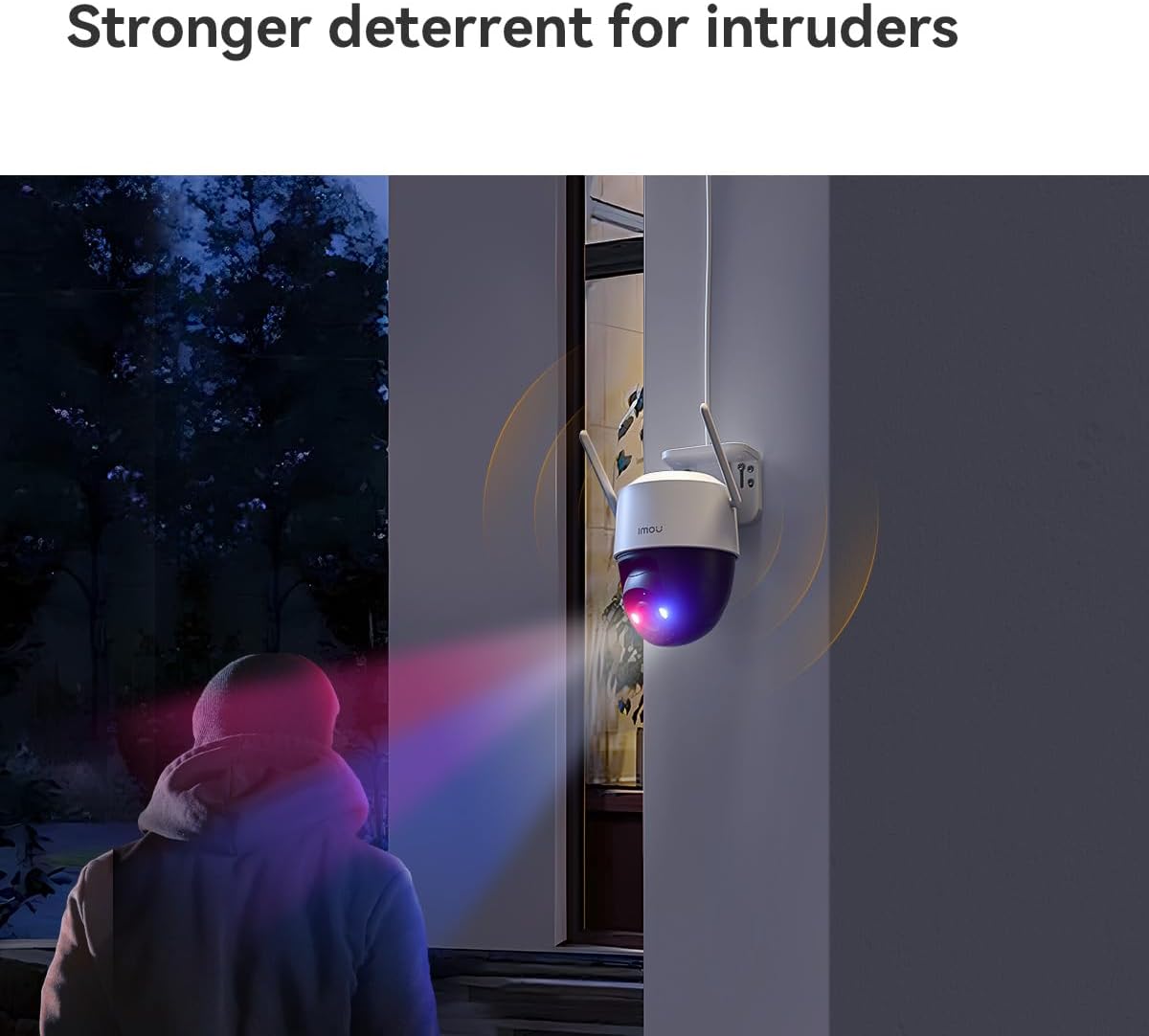
3.2-сүрөт: The Imou Cruiser Dual 2 camera actively deterring an intruder with its flashing red and blue warning lights.
4. Техникалык тейлөө
4.1 Камераны тазалоо
- Камера линзасын жана корпусун жумшак, d менен үзгүлтүксүз сүртүп туруңузamp чаңды жана кирди тазалоо үчүн кездеме.
- Avoid using harsh chemicals or abrasive cleaners, as these can damage the lens or finish.
4.2 Микропрограмма жаңыртуулары
Ensure your camera's firmware is up to date for optimal performance and security. The Imou Life app will typically notify you of available updates. Follow the in-app instructions to perform firmware upgrades.
4.3 Сактагычты башкаруу
If using a Micro SD card for local storage, periodically check its status in the app. Old footage may be overwritten automatically when the card is full. Consider backing up important footagд үзгүлтүксүз.
5. Кыйынчылыктарды
Жалпы маселелер жана чечимдер:
| Маселе | Мүмкүн чечим |
|---|---|
| Камера күйбөй жатат |
|
| Wi-Fi'га туташуу мүмкүн эмес |
|
| Сүрөттүн сапаты начар |
|
| Кыймылды аныктоо иштебей жатат |
|
6. Техникалык шарттар
| Өзгөчөлүк | Деталь |
|---|---|
| Модел | Cruiser Dual 2 |
| Резолюция | 10 Megapixel (5+5MP Dual Camera) |
| Объектив | 3.6 мм |
| Pan/Tilt диапазону | Pan 0~355°, Tilt 0~90° |
| Түнкү көрүнүш | IR, Full-color, Smart Mode |
| Байланыш | Wi-Fi (2.4 ГГц) |
| Сактагыч параметрлери | Micro SD Card, Cloud Storage |
| Өлчөмдөрү (L x W x Y) | 20.2 x 12.5 x 16 см |
| Салмагы | 680.39 грамм (болжол менен 1.5 фунт) |
| Электр камсыздоо | DC 12V (adapter included) |
7. Кепилдик жана колдоо
For warranty information, technical support, or further assistance, please refer to the official Imou website or contact Imou customer service directly. Details can typically be found on the product packaging or the Imou Life app's support section.
Онлайн ресурстар: www.imoulife.com


