1. Киришүү
This manual provides detailed instructions for the installation, operation, and maintenance of your XTRONS 12.3-inch Android 13 Car Stereo. Please read this manual thoroughly before using the product to ensure proper functionality and safety.
2. Applicable Models & Years
This unit is designed for the following vehicle models:
- AUDI A6 S6 RS6 (Typ C7) (2016-2018) with MiB System - Left Hand Drive
- AUDI A7 S7 RS7 (Typ C7) (2016-2018) with MiB System - Left Hand Drive
3. Негизги өзгөчөлүктөрү
- Операция системасы: Octa-core with Latest Android 13, 4GB DDR4 RAM, 64GB Solid State ROM.
- Дисплей: 1920*720 resolution, 12.3-inch IPS Touch Screen with 178° Viewбурч.
- Байланыш: Bluetooth 5.0, Dual Wi-Fi Band (2.4GHz/5GHz), Global 4G LTE (Micro-SIM card required, data only).
- Смартфон интеграциясы: Built-in Wireless CarPlay and Wireless/Wired Android Auto.
- Мультимедиа: Multi-task Display, Picture-in-Picture (PIP) functionality.
- Унаа интеграциясы: Retains original car functions (speed, fuel level, safety warnings, fiber optic sound system, radio, CD player, Bluetooth).
4. Пакеттин мазмуну
Пакетте бардык буюмдар бар экенин текшериңиз:
- 1 x ISO зым шнурлары
- 1 x GPS антеннасы
- 1 x Аудио кабели
- 1 x AMI Cable
- 1 x 4G антенна
- 1 x Мини динамик
- 1 x Fitting Frame
- 3 х бурамалар
- 1 x User Manual
- 1 x Орнотуу нускамасы

Сүрөт 4.1: Камтылган аксессуарлар
5. Орнотуу жана орнотуу
For detailed installation steps, refer to the included 'Installation Instruction' manual. Below are key considerations:
5.1 Шайкештикти текшерүү
Before installation, verify your factory stereo software version. Navigate to "Setup or Menu - setup MMI - Settings - version information" on your factory stereo. Compatible versions include MSTD, MHI2, and MHIG.

Figure 5.1: Software Version Compatibility
5.2 Audi Music Interface (AMI) Connection
If your vehicle is equipped with an Audi music interface, connect the provided XTRONS AMI cable (firstly connected with the audio extension cable) to the Audi music interface.

Figure 5.2: Audi Music Interface Connection
5.3 Физикалык орнотуу
The unit features a fully-laminated, ultra-slim design with a tailor-made bezel for seamless integration into your Audi's dashboard.

Figure 5.3: Installed XTRONS Car Stereo

Figure 5.4: Screen Size and Multi-tasking Display
6. Иштөө нускамалары
6.1 Колдонуучунун интерфейси жана навигациясы
The unit runs on Android 13, offering a responsive and intuitive touch screen interface. Navigate through applications and settings using the IPS touch screen.
6.2 Wireless CarPlay жана Android Auto
Connect your iPhone wirelessly via Bluetooth for CarPlay, or your Android phone wirelessly via Bluetooth or with a USB cable for Android Auto. This allows access to GPS, calls, music, Google Assistant, and Siri directly from the car stereo screen.

6.1-сүрөт: Wireless CarPlay жана Android Auto Interface
6.3 Global 4G LTE Connectivity
Insert a Micro-SIM card into the designated slot to enable 4G mobile broadband connection. This provides internet access for navigation, streaming, and app downloads. Note: This feature supports data only, not phone calls.
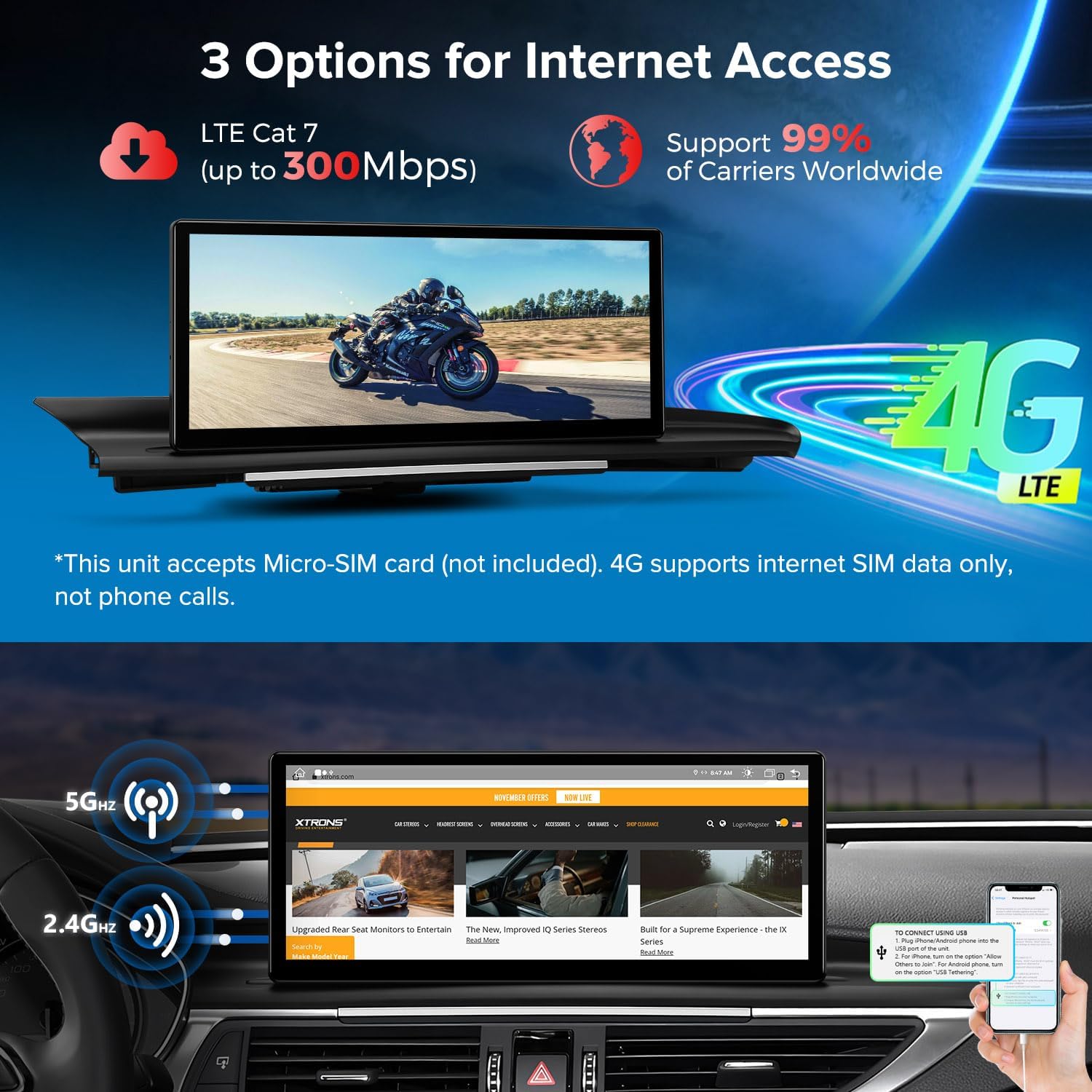
Figure 6.2: 4G LTE and Dual Wi-Fi Connectivity
6.4 Original Car Information Display
The car stereo seamlessly integrates and displays OEM car-centric functions such as speed, engine speed, remaining fuel, temperature, parking brake status, and seat belt reminders on its screen.

Figure 6.3: Original Car Information Display
6.5 Multi-tasking and Picture-in-Picture (PIP)
The system supports running two applications simultaneously on the 12.3-inch IPS screen, allowing for easier multi-tasking. The Picture-in-Picture feature ensures you don't miss video content while switching between other applications.
7. Техникалык шарттар
- Модель номери: 3dc0b50e-2f04-4346-a5f5-a6927a99377e
- Байланыш технологиясы: Bluetooth, HDMI, USB
- Контроллердин түрү: Android
- Өзгөчө өзгөчөлүгү: Touchscreen, Voice Control
- Шайкеш түзмөктөр: Smartphone, Speaker, Television, Personal Computer, Game Console
- Туташтыргыч түрү: 3.5 мм уяча, USB
- Аудио чыгаруу режими: Стерео, айлана
- Көлөмдүү үн каналынын конфигурациясы: 5.1
- Видеону коддоо: H.264, H.265/HEVC, MPEG-4
- Каналдардын саны: 6
8. Кыйынчылыктарды
If you encounter any issues with your XTRONS car stereo, please refer to the following general troubleshooting tips:
- Кубат жок: Check all power connections and ensure the vehicle's ignition is on.
- Үн жок: Үн жөндөөлөрүн текшериңиз, динамиктердин туташууларын текшериңиз жана туура аудио булагынын тандалганын текшериңиз.
- Сенсордук экран жооп бербейт: Try restarting the unit. If the issue persists, perform a factory reset (refer to the 'Settings' menu).
- GPS сигналын жоготуу: GPS антеннасынын туура орнотулганын жана ачык экенин текшериңиз view асмандын.
- Bluetooth туташуу маселелери: Стерео системаңызда да, түзмөгүңүздө да Bluetooth күйгүзүлгөнүн текшериңиз. Түзмөктөрдү ажыратып, кайра жупташтырып көрүңүз.
- CarPlay/Android Auto туташпай жатат: Check USB cable connection (if wired), ensure Bluetooth is on (if wireless), and verify your phone's settings for CarPlay/Android Auto.
- Жай аткаруу: Close unnecessary applications and clear cache. Consider a factory reset if performance remains poor.
For more specific issues, consult the detailed installation and user manuals provided with the product or contact XTRONS customer support.
9. Техникалык тейлөө
To ensure the longevity and optimal performance of your XTRONS car stereo, follow these maintenance guidelines:
- Тазалоо: Экранды жана сыртын тазалоо үчүн жумшак, кургак чүпүрөктү колдонуңуз. Абразивдүү тазалагычтардан же эриткичтерден качыңыз.
- Программалык камсыздоо жаңыртуулары: Regularly check for and install software updates to ensure the system runs efficiently and has the latest features and security patches.
- Экологиялык шарттар: Аппаратты экстремалдык температурага, түз күн нуруна узак убакытка же ашыкча нымдуулукка дуушар кылуудан алыс болуңуз.
- Кабелдик башкаруу: Бардык кабелдердин бекем туташтырылганын жана кысылбаганын же бузулбаганын текшериңиз.
10. Кепилдик жана колдоо
For warranty information, please refer to the warranty card included in your product packaging or visit the official XTRONS website. For technical support, product inquiries, or service requests, please contact XTRONS customer service through their official channels.


