1. Киришүү
The Mackie ProFX10 GO is a professional 10-channel analog audio mixer designed for portability and high-quality sound. It features a rechargeable, swappable battery for up to 8 hours of operation, making it ideal for remote gigs and live events. This mixer includes award-winning Onyx preamps, tone-shaping EQ, analog compression, GigFX+ effects, and three USB-C recording modes. Bluetooth connectivity allows for wireless audio streaming and integration with mobile devices.

Image: Mackie ProFX10 GO mixer set up on a table at an outdoor event, demonstrating its portability.
2. Орнотуу
2.1 Таңгактан чыгаруу жана алгачкы текшерүү
Таңгактан бардык компоненттерди этияттык менен алып салыңыз. Таңгактоо тизмесинде көрсөтүлгөн бардык буюмдардын бар экенин жана бузулбаганын текшериңиз. Эгерде кандайдыр бир буюмдар жок болсо же бузулган болсо, дароо дилериңизге кайрылыңыз.
2.2 Миксерди кубаттоо
The ProFX10 GO can be powered via the included AC adapter or its internal rechargeable battery. Ensure the battery is fully charged before portable use for optimal performance.
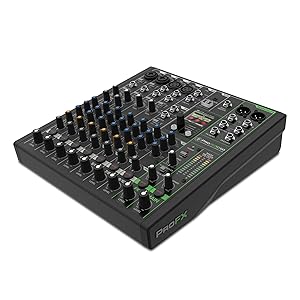
Image: The underside of the Mackie ProFX10 GO mixer, highlighting the compartment for the swappable, rechargeable GB-10 battery, which provides up to 8 hours of power.
2.3 Аудио булактарын туташтыруу
Connect microphones, instruments, and other audio devices to the appropriate input channels. The mixer features Onyx mic preamps on channels 1-4, stereo line inputs, and a stereo 1/8" AUX input.

Сүрөт: Жогору жактан ылдый карай деталдуу сүрөт view of the Mackie ProFX10 GO mixer, showing the layout of its 16 key features including Onyx mic preamps, Hi-Z switches, channel inserts, low-cut filters, one-knob compression, 3-band EQ, stereo line inputs, stereo 1/8" AUX input, bi-directional Bluetooth, GigFX+ effects, USB 3-4 return, USB recording modes, 48V phantom power, USB 1-2 output blend, headphone output, and ABS side protection.
3. Иштөө нускамалары
3.1 Onyx Preamps and EQ
The Onyx mic preamps provide up to 60 dB of gain with low noise, ensuring clear audio capture. Each channel features a 3-band EQ for tone shaping and a 100 Hz low-cut filter to reduce unwanted rumble.

Image: A close-up of the input section of the Mackie ProFX10 GO, detailing the Onyx mic preamps with XLR/TRS combo jacks, Hi-Z switches for instruments, insert points, 100 Hz low-cut filters, gain controls, and level set indicators for optimal input levels.
3.2 GigFX+ Effects
Enhance your sound with high-resolution GigFX+ effects, including reverbs, delays, and choruses. Use the full-color LCD screen to edit and save your own presets.
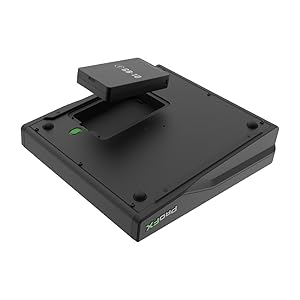
Image: The GigFX+ Effects Engine display on the Mackie ProFX10 GO, illustrating the 'ROOM REVERB' effect with adjustable parameters for Decay, Size, and Hicut, alongside options to access EQ and Presets.
3.3 USB-C Recording Modes
The ProFX10 GO offers three USB-C recording modes: Standard (full mix with effects), Loopback (includes computer audio), and Interface (records channels 1-2 directly with no effects). This allows for flexible recording to a computer.

Image: The USB-C recording mode selection panel on the Mackie ProFX10 GO, displaying options for 'STANDARD' (full mix with effects), 'LOOP BACK' (includes computer audio), and 'INTERFACE' (records channels 1-2 dry), along with a 'REC' button to initiate recording.
3.4 Bluetooth байланышы
Connect your phone or tablet via the dedicated Bluetooth channel for wireless audio streaming. This feature supports playing music, performing over backing tracks, or live streaming.

Image: A close-up of the Bluetooth pairing button on the Mackie ProFX10 GO mixer, clearly labeled 'HOLD TO PAIR' with a Bluetooth icon, indicating its function for wireless device connection.
3.5 Видео демонстрациялар
4. Техникалык тейлөө
To ensure the longevity and optimal performance of your Mackie ProFX10 GO mixer, follow these maintenance guidelines:
- Тазалоо: Use a soft, dry cloth to clean the exterior of the mixer. Avoid abrasive cleaners or solvents that could damage the finish.
- Чаңдан коргоо: Чаңдын топтолушун алдын алуу үчүн, колдонулбай турган учурда миксерди жаап коюңуз, анткени ал фейдерлерге жана туткаларга таасирин тийгизиши мүмкүн.
- Батареяга кам көрүү: For the rechargeable battery, follow the manufacturer's recommendations for charging and storage to maximize battery life. Avoid extreme temperatures.
- Кабелдик башкаруу: Ensure all cables are properly routed and secured to prevent strain on connectors and accidental disconnections.
5. Кыйынчылыктарды
If you encounter issues with your Mackie ProFX10 GO, refer to the following common troubleshooting steps:
- Кубат жок: Verify that the AC adapter is securely connected and plugged into a working outlet. If using battery power, ensure the battery is charged and correctly inserted.
- Үн чыгышы жок: Check all cable connections from inputs to outputs. Ensure channel levels, main mix levels, and headphone levels are appropriately set. Confirm that any mute buttons are disengaged.
- Бурмаланган аудио: Reduce input gain levels to prevent clipping (indicated by red overload LEDs). Check for proper impedance matching between sources and inputs.
- Bluetooth туташуу маселелери: Ensure the mixer's Bluetooth is in pairing mode and your device's Bluetooth is enabled and searching. Try restarting both devices.
- USB аркылуу жаздыруудагы көйгөйлөр: Verify that the correct USB-C recording mode is selected on the mixer and that your computer recognizes the mixer as an audio interface. Check software settings for input/output selection.
For persistent issues, consult the full user manual or contact Mackie support.
6. Техникалык шарттар
| Өзгөчөлүк | Деталь |
|---|---|
| Бренд | Макки |
| Модел | ProFX10 GO |
| Каналдардын саны | 10 |
| Продукциянын өлчөмдөрү | 11.8"D x 10.5"W x 3.8"H |
| Элемент Салмагы | 4.9 фунт |
| Байланыш технологиясы | Bluetooth, USB-C |
| Power Source | Батарея менен иштейт |
| Frequency Response | 20 Hz (full range implied) |
| Аудио киргизүү | XLR, TRS, 1/8" AUX |
| Output Connector Type | USB, Main Outs (XLR/TRS) |
| UPC | 810128262507 |
7. Кепилдик жана колдоо
7.1 Кепилдик маалыматы
The Mackie ProFX10 GO comes with a 1-year all-inclusive, non-transferable warranty. Please retain your proof of purchase for warranty claims.
7.2 Кардарларды колдоо
For technical assistance, product registration, or further inquiries, please visit the official Mackie website or contact their customer support directly. You can find additional resources and FAQs on their support pages.


