1. Киришүү
Thank you for choosing the XTRONS 12.3 Inch Android 13 Car Stereo. This advanced multimedia player is designed to integrate seamlessly with your Audi vehicle, providing enhanced navigation, entertainment, and connectivity features. This manual provides essential information for installation, operation, and maintenance to ensure optimal performance and user experience.

Image 1.1: XTRONS 12.3 Inch Android 13 Car Stereo integrated into an Audi dashboard.
2. Applicable Models and Compatibility
2.1 Транспорт каражаттарынын колдонулуучу моделдери
This unit is compatible with the following left-hand drive Audi vehicles equipped with the MIB System:
- Audi A4 S4 RS4 (B9) (2016-2020)
- Audi A5 S5 RS5 (B9) (2016-2020)

Image 2.1: Visual comparison of the Audi dashboard before and after XTRONS stereo installation, highlighting applicable models.
2.2 Software Version Compatibility
Before installation, verify your factory stereo software version. The unit is compatible with MSTD, MHI2, and MHIG software versions. To check your software version, navigate to "Setup or Menu - setup MMI - Settings - version information" on your factory stereo.
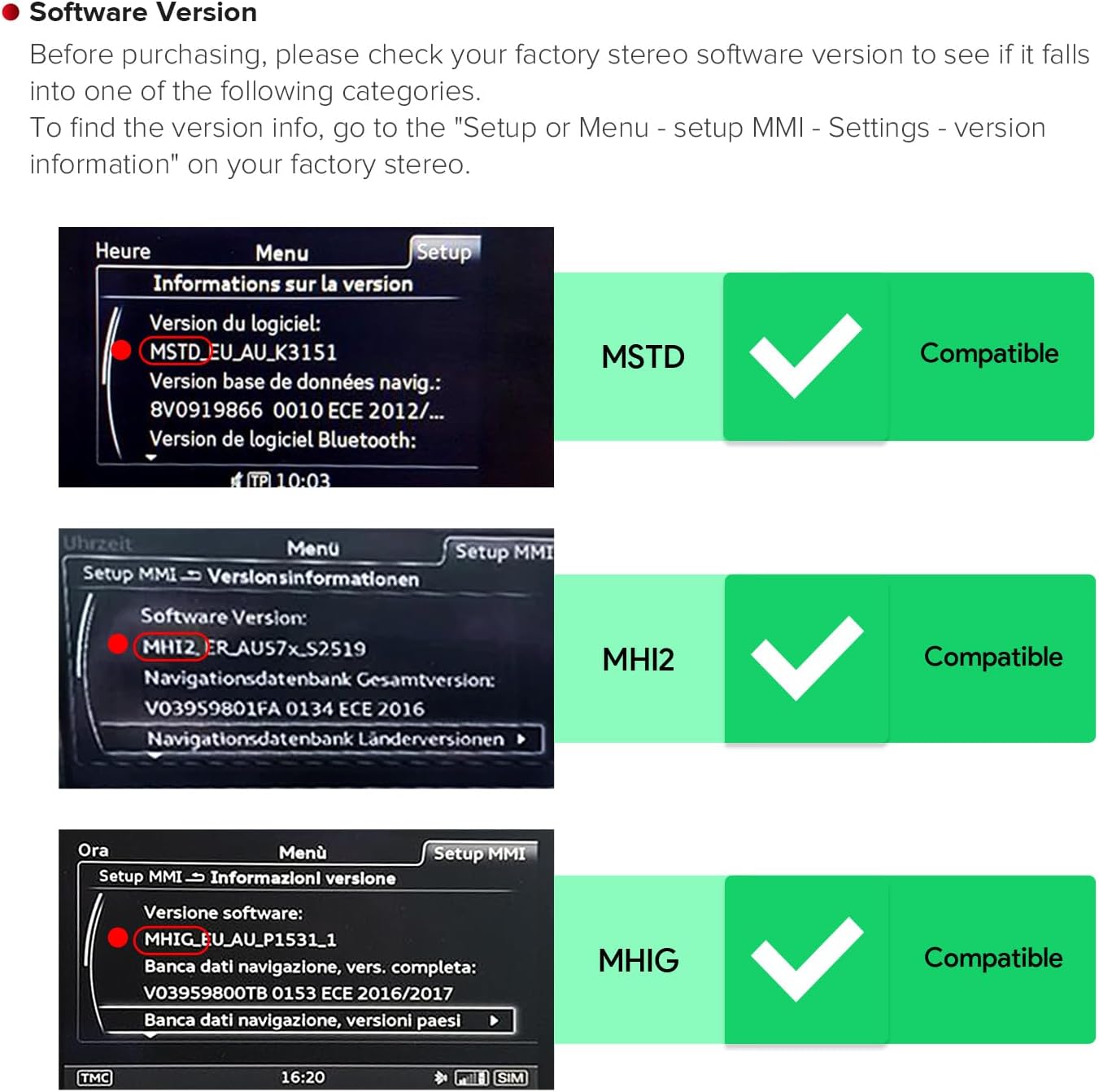
Сүрөт 2.2: Мисamples of compatible MMI software versions (MSTD, MHI2, MHIG) displayed on the factory stereo screen.
2.3 Audi Music Interface (AMI) Note
If your vehicle is equipped with an Audi Music Interface, you must connect the provided XTRONS AMI cable (firstly connected with the audio extension cable) to the Audi music interface for proper audio functionality. Both the AMI cable and extension cable are included in the package.
3. Пакеттин мазмуну
Төмөндө тизмеленген нерселердин баары пакетиңизде бар экенин текшериңиз:
- 1 x ISO зым шнурлары
- 1 x GPS антеннасы
- 1 x Аудио кабели
- 1 x AMI Cable
- 1 x 4G антенна
- 1 x Мини динамик
- 1 x Fitting Frame
- 3 х бурамалар
- 1 x User Manual
- 1 x Орнотуу нускамасы

Сүрөт 3.1: Бүттүview of the XTRONS car stereo dimensions and all included accessories.
4. Орнотуу
Professional installation is recommended. Refer to the included 'Installation Instruction' for detailed steps. Ensure the vehicle's power is disconnected before beginning installation.
4.1 Wiring Harness Overview
The following diagram illustrates the connections for the main unit and included cables:

Image 4.1: Detailed wiring diagram showing connections for the XTRONS car stereo.
- 4G SIM карта оюгу
- XTRONS 360° camera port (reserved port)
- LVDS Port
- Микрофон порту
- ISO зымдары
- Original CD Port
- Аудио чыгаруу
- Back Video Input, Reverse Camera Video Input
- CCD 12V, Reverse Camera ACC
- BACK, Reverse Control
- ACC
- USB порт 1
- USB порт 2
- Mini спикери
- GPS антеннасы
- 4G Антенна
5. Operation and Key Features
5.1 Дисплей жана колдонуучу интерфейси
The unit features a 12.3-inch IPS touch screen with a 1920x720 resolution, offering wide viewing angles and clear visuals. The Android 13 operating system provides a responsive and intuitive user experience.

Сүрөт 5.1: Бүттүview of display features including multi-tasking, Picture-in-Picture (PIP), IPS touch screen, and USB inputs.
- Multi-task Display: Run two applications simultaneously, such as navigation and music, on the 12.3-inch screen.
- Сүрөттөгү сүрөт (PIP): View videos in a small window while using other applications.
5.2 Байланыш
The stereo offers multiple connectivity options for internet access and smartphone integration.
- Global 4G LTE: Insert a Micro-SIM card (not included) to access 4G mobile broadband for data. This unit supports internet SIM data only, not phone calls.
- Эки Wi-Fi диапазону: Connect to 2.4GHz or 5GHz Wi-Fi networks for flexible and faster internet speeds.
- Bluetooth 5.0: Enjoy stable connections for hands-free calls and high-quality music streaming.

Image 5.2: Internet access options including 4G LTE (SIM data only) and dual-band Wi-Fi.
5.3 Smartphone Integration
Seamlessly integrate your smartphone for navigation, communication, and entertainment.
- Зымсыз Apple CarPlay: Connect your iPhone wirelessly via Bluetooth for access to GPS, calls, music, and Siri.
- Wireless/Wired Android Auto: Connect your Android phone wirelessly via Bluetooth or with a USB cable for access to GPS, calls, music, and Google Assistant.
- Экранды чагылдыруу: Wirelessly mirror your smartphone's display onto the car stereo screen.

Image 5.3: Smartphone integration features: Wireless CarPlay, Android Auto, and Screen Mirroring.
6. Техникалык тейлөө
To ensure the longevity and optimal performance of your XTRONS car stereo, follow these maintenance guidelines:
- Экранды тазалоо: Экранды акырын сүртүү үчүн жумшак, түксүз чүпүрөктү колдонуңуз. өжөр тактар үчүн, бир аз гampчүпүрөккө суу же экранды тазалоочу каражат. Катуу химиялык заттардан же абразивдүү материалдардан алыс болуңуз.
- Программалык камсыздоо жаңыртуулары: Periodically check for and install available software updates to ensure the system runs efficiently and has the latest features and security patches.
- Экологиялык шарттар: Аппаратты экстремалдык температурага, түз күн нуруна узак убакытка же ашыкча нымдуулукка дуушар кылуудан алыс болуңуз.
- Кабелдик байланыштар: Ensure all cables are securely connected. Avoid pulling on cables forcefully.
7. Кыйынчылыктарды
If you encounter issues with your XTRONS car stereo, refer to the following common problems and solutions:
| Көйгөй | Мүмкүн себеп | Чечим |
|---|---|---|
| Түзмөк күйбөйт | Электр байланышы бош, сактагыч күйүп кетти | Check power cables and fuse. Ensure proper installation. |
| Үн чыгышы жок | Incorrect audio cable connection, volume too low, mute activated | Verify audio cable connections, adjust volume, check if mute is active. Ensure AMI cable is connected if applicable. |
| Сенсордук экран жооп бербейт | Системанын катып калышы, программалык камсыздоонун убактылуу катасы | Бирдикти кайра иштетиңиз. Эгер маселе чечилбесе, баштапкы абалга келтириңиз (жөндөөлөр менюсун караңыз). |
| GPS сигналы жоголду же так эмес | GPS antenna obstruction or improper placement | GPS антеннасынын таза болушун текшериңиз view асмандын жана коопсуз байланышта. |
| Bluetooth байланышы көйгөйлөрү | Device not discoverable, interference | Эки түзмөктө тең Bluetooth иштетилгенин текшериңиз. Кайра жупташтырып көрүңүз. Түзмөккө жакыныраак жылыңыз. |
If the problem persists after attempting these solutions, please contact XTRONS customer support.
8. Техникалык шарттар
| Өзгөчөлүк | Деталь |
|---|---|
| Модель номери | 8bcd3f2f-c872-4447-9c21-9060854e9867 |
| Операция системасы | Android 13 |
| Процессор | Octa-Core |
| RAM | 4 ГБ DDR4 |
| ROM | 64 ГБ катуу абалдагы эс тутум |
| Screen Size | 12.3 дюйм |
| Screen Resolution | 1920x720 |
| Дисплей түрү | IPS сенсордук экраны |
| Байланыш | USB, Vehicle-specific wired connection, Global 4G LTE, Dual Wi-Fi (2.4GHz/5GHz), Bluetooth 5.0 |
| Өзгөчөлүктөр | Android Auto, Apple CarPlay, Built-In Bluetooth, Built-In Wi-Fi, Touchscreen, Multi-task Display, Picture-in-Picture |
| Шайкеш түзмөктөр | Смартфон |
| Аудио чыгаруу режими | Стерео, айлана |
| Көлөмдүү үн каналынын конфигурациясы | 5.1 |
| Каналдардын саны | 6 |
| Видеону коддоо | H.264, H.265/HEVC, MPEG-4 |
9. Кепилдик маалыматы
XTRONS products are covered by a manufacturer's warranty against defects in materials and workmanship. The specific warranty period and terms may vary by region and product. Please retain your proof of purchase for warranty claims. For detailed warranty information, refer to the warranty card included with your product or visit the official XTRONS webсайт.
10. Кардарларды колдоо кызматы
For technical assistance, troubleshooting, or any inquiries regarding your XTRONS 12.3 Inch Android 13 Car Stereo, please contact XTRONS customer support through the following channels:
- Онлайн колдоо: Visit the official XTRONS webКөп берилүүчү суроолор, колдоо макалалары жана байланыш формалары үчүн сайт.
- Электрондук почта колдоо: Refer to your product packaging or the XTRONS webтиешелүү колдоо электрондук почта дарегин алуу үчүн сайтка кириңиз.
- Телефондук колдоо: Check the XTRONS webаймактык телефон колдоо номерлери үчүн сайт.
When contacting support, please have your product model number (8bcd3f2f-c872-4447-9c21-9060854e9867) and proof of purchase readily available.


