1. Продукт бүтүп калдыview
The Anlapus Wireless Camera System provides comprehensive indoor surveillance solutions with advanced features for home monitoring. This system includes two distinct camera models: the C528 Dual Lens Camera and the C518 Pan/Tilt Camera. Both models offer high-definition video, two-way audio, and remote access via the Anlapus Smart app, ensuring you stay connected to your home and loved ones.
Негизги өзгөчөлүктөрү
- C528 Dual-Lens Design: Features one fixed lens and one rotatable lens for wider coverage and detailed monitoring (2MP + 2MP resolution).
- C518 1080p HD Resolution: Provides clear and sharp 1080p video for live streaming and recording.
- Инфракызыл түнкү көрүнүш: Both models offer up to 10 meters (33 feet) of clear night vision in low-light conditions.
- 360° Pan/Tilt View (C518): The C518 camera offers full panoramic surveillance with no blind spots.
- Auto-Tracking & Motion Detection: Intelligent features that detect movement, send alerts, and automatically follow moving subjects.
- Two-Way Talk & Gesture Calling: Communicate with family or pets, and initiate video calls with a simple "OK" gesture.
- Ийкемдүү сактагыч: Supports local storage via micro SD card (up to 256GB, not included).
- Wi-Fi туташуусу: C528 supports 2.4GHz Wi-Fi; C518 supports both 2.4GHz and 5GHz Wi-Fi for stable connection.

Сүрөт 1.1: Бүттүview of Anlapus camera key features including Pan & Tilt, Auto Tracking, Two-Way Audio, One-Click Call, Motion Detection, Night Vision, SD Card Storage, and 2.4GHz/5GHz WiFi.
2. Пакеттин мазмуну
Please check the package contents upon opening. If any items are missing or damaged, contact Anlapus customer support.
- Anlapus C528 Dual Lens Camera (Quantity as per purchase)
- Anlapus C518 Pan/Tilt Camera (Quantity as per purchase)
- Кубат адаптерлери (ар бир камера үчүн бирден)
- Монтаждоо бурамалар жана анкерлер
- Колдонуучунун Колдонмосу (бул документ)

Image 2.1: A set of Anlapus C528 (top two) and C518 (bottom two) cameras, illustrating the different models included in the system.
3. Коопсуздук маалыматы
Түзмөктүн туура иштешин камсыз кылуу жана ага зыян келтирбөө же жаракат алуунун алдын алуу үчүн ушул коопсуздук көрсөтмөлөрүн окуп чыгып, аткарыңыз.
- Камера менен кошо берилген түпнуска кубат адаптерин гана колдонуңуз.
- Do not expose the camera to water or moisture. This product is designed for indoor use only.
- Камераны күн тийе турган жерге же жылуулук булактарынын жанына коюудан алыс болуңуз.
- Камераны бөлүктөргө бөлүүгө же өзгөртүүгө аракет кылбаңыз. Бул кепилдикти жокко чыгарат.
- Камераны жана анын аксессуарларын балдар жана үй жаныбарлары жетпеген жерде сактаңыз.
- Ensure the camera is installed on a stable surface or securely mounted to prevent falling.
4. Орнотуу колдонмосу
4.1. Download the Anlapus Smart App
Издөө "Anlapus Smart" in the Apple App Store (for iOS devices) or Google Play Store (for Android devices) and download the application. Register an account if you are a new user.
4.2. Камераны күйгүзүңүз
Connect the power adapter to the camera's power port and plug it into a wall outlet. The camera will power on and initiate its startup sequence. Wait for the indicator light to flash, indicating it's ready for pairing.
4.3. Wi-Fiга туташыңыз
- Open the Anlapus Smart app and tap the "+" icon to add a new device.
- Select your camera model (C528 or C518) from the list.
- Камераны Wi-Fi тармагына туташтыруу үчүн экрандагы нускамаларды аткарыңыз.
- For C528: Ensure your Wi-Fi network is 2.4GHz. The C528 is ONLY compatible with 2.4GHz Wi-Fi.
- For C518: This camera supports both 2.4GHz and 5GHz Wi-Fi networks.
- The app will generate a QR code. Position the camera lens to scan this QR code from your phone screen. You will hear a confirmation sound once the scan is successful.
- Wait for the camera to connect to the network. Once connected, the indicator light will turn solid, and the camera will appear in your app's device list.
4.4. Камераны жайгаштыруу жана орнотуу
Каалаган жерди камсыз кылган жерди тандаңыз viewing angle and is within range of your Wi-Fi signal. The cameras can be placed on a flat surface or mounted to a wall or ceiling using the provided screws and anchors.
- For C528 (Dual Lens): Consider its dual-lens capability to cover a wider area.
- For C518 (Pan/Tilt): Place it where its 360° rotation can be fully utilized for panoramic surveillance.

Image 4.1: The Anlapus C518 camera demonstrating its 360-degree pan and tilt capability, allowing it to monitor an entire room.
5. Камераны иштетүү
5.1. Түз эфир View жана Control
From the Anlapus Smart app, tap on the camera's name to access its live view. Сенин колуңдан келет:
- Pan/Tilt (C518): Use the directional controls on the screen to rotate the camera horizontally (pan) and vertically (tilt) for a 360° view.
- Кош линза View (C528): Switch between the fixed and rotatable lenses to monitor different areas simultaneously or focus on specific details.
- Чоңойтуу: Pinch to zoom in on the live feed for a closer look.

Image 5.1: The Anlapus C528 dual-lens camera showing how its two lenses provide wider coverage, monitoring both a child playing and a cat on a scratching post.
5.2. Two-Way Talk and Gesture Calling
Both cameras support two-way audio communication.
- Эки тараптуу сүйлөшүү: Tap the microphone icon in the app to speak through the camera's speaker. Release the icon to listen.
- Бир тийүү менен чалуу: Press the call button on the camera (if available) to initiate a call to your linked app.
- Жаңсоо чалуу: Make an "OK" gesture in front of the camera lens to initiate a video call directly through the app. The app will display the other person's image for face-to-face interaction.

Image 5.2: Demonstrates the "One Touch Call" feature where a finger presses a button on the camera, and the "Gesture Call" feature where an "OK" hand gesture initiates a call.

Image 5.3: Illustrates the two-way audio feature, showing a child speaking through the camera and an adult responding via their phone.
5.3. Кыймылды аныктоо жана автокөзөмөл
The cameras are equipped with intelligent motion detection and auto-tracking capabilities.
- Кыймылды аныктоо: When motion is detected within the camera's field of view, you will receive instant push notifications on your Anlapus Smart app. You can customize detection sensitivity and set specific detection areas in the app settings.
- Автоматтык түрдө көзөмөлдөө: The camera (C518) can automatically lock onto and follow moving people, ensuring that critical moments are continuously captured.
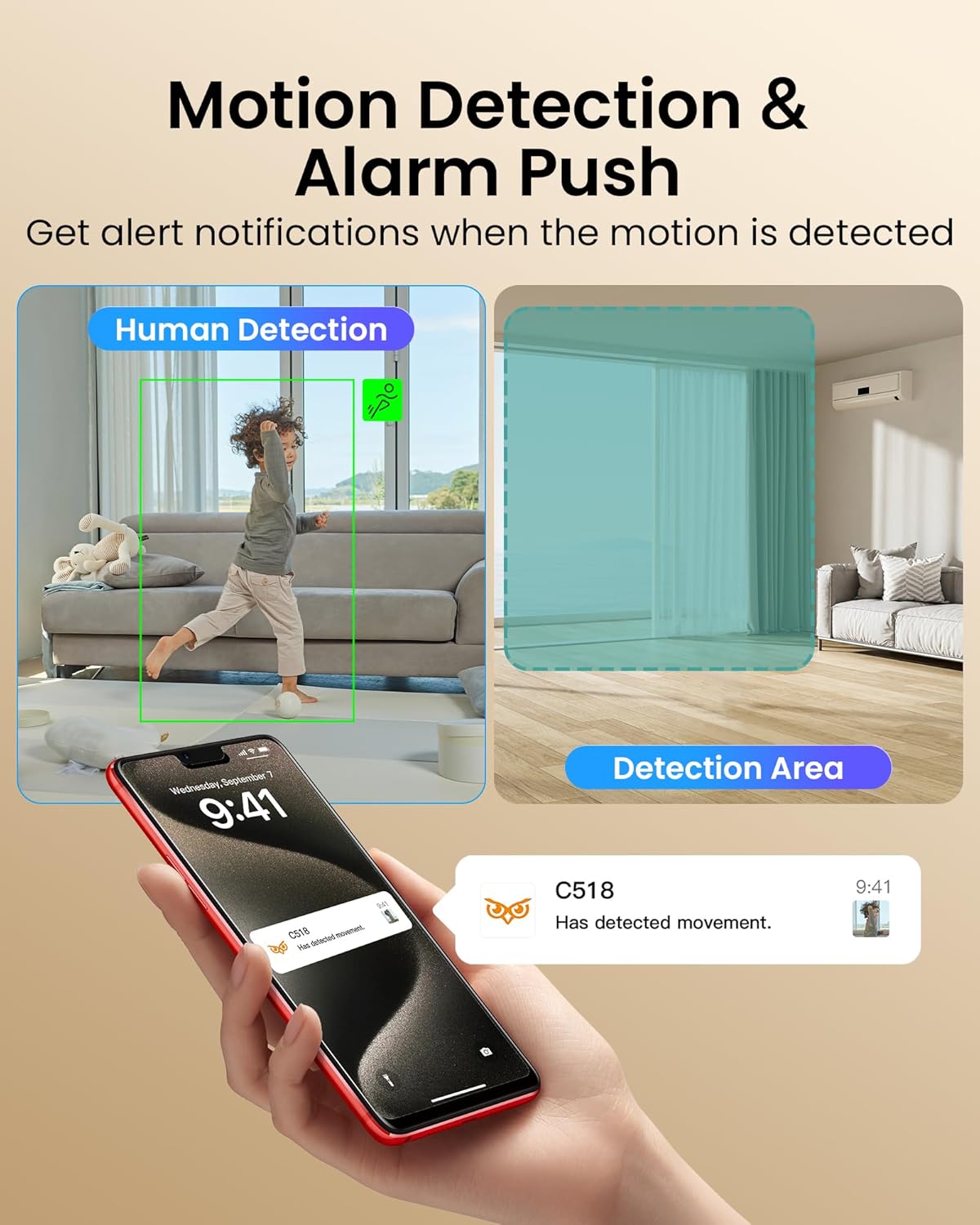
Image 5.4: Shows the motion detection feature, highlighting human detection and a customizable detection area, with a phone displaying an alert notification.

Image 5.5: Illustrates the smart auto-tracking function, showing the camera following a moving child across the room.
5.4. Түнкү көрүнүш
Both cameras are equipped with infrared night vision for clear monitoring in low-light or complete darkness.
- The cameras automatically switch to night vision mode when ambient light is insufficient.
- Infrared LEDs provide illumination for up to 10 meters (33 feet).

Image 5.6: Comparison of color night vision and IR night vision, showing a dog sleeping in the dark, with the color image on the left and the black and white IR image on the right.
5.5. Жазуу жана ойнотуу
The cameras support local video storage via a micro SD card (not included).
- Insert a micro SD card (up to 256GB) into the designated slot on the camera.
- Configure recording settings (e.g., continuous recording, motion-triggered recording) in the Anlapus Smart app.
- Жазылган footage through the playback feature in the app, allowing you to review өткөн окуялар.
6. Техникалык тейлөө
- Тазалоо: Камеранын линзасын жана корпусун тазалоо үчүн жумшак, кургак чүпүрөктү колдонуңуз. Суюк тазалагычтарды же аэрозолдорду колдонбоңуз.
- Программалык камсыздоонун жаңыртуулары: Regularly check for firmware updates through the Anlapus Smart app. Keeping your camera's firmware updated ensures optimal performance and access to new features.
- SD Card башкаруу: Periodically check the status of your SD card in the app. Format the SD card if necessary to maintain recording efficiency.
7. Кыйынчылыктарды
| Көйгөй | Мүмкүн себеп | Чечим |
|---|---|---|
| Камера Wi-Fi'га туташа албай жатат. | Incorrect Wi-Fi password; Camera too far from router; Incorrect Wi-Fi band (C528 only 2.4GHz). |
|
| Колдонмодо видео түрмөгү жок. | Camera offline; Poor network connection; App issue. |
|
| Motion detection alerts not received. | Notifications disabled; Incorrect detection settings; Network issues. |
|
| Эки тараптуу аудио иштебей жатат. | Microphone/speaker muted; App permissions; Network latency. |
|
8. Техникалык шарттар
| Өзгөчөлүк | C528 Dual Lens Camera | C518 Pan/Tilt Camera |
|---|---|---|
| Резолюция | 4MP (2MP + 2MP) | 1080p HD (2MP) |
| Линзанын түрү | Dual Lens (1 Fixed, 1 Rotatable) | Single Lens (Pan/Tilt) |
| Pan/Tilt диапазону | N/A (Rotatable lens only) | 360° Horizontal, Vertical Tilt |
| Түнкү көрүнүш | 10m (33ft) Infrared | 10m (33ft) Infrared |
| Wi-Fi туташуусу | 2.4 ГГц гана | 2.4 ГГц / 5 ГГц кош диапазондуу |
| Сактагыч | Микро SD карта (256 ГБ чейин, камтылган эмес) | Микро SD карта (256 ГБ чейин, камтылган эмес) |
| Аудио | Эки тараптуу сүйлөшүү | Эки тараптуу сүйлөшүү |
| Өзгөчөлүктөрү | Motion Detection, Gesture Call | Motion Detection, Auto-Tracking, One-Touch Call, Gesture Call |
9. Кепилдик жана колдоо
Anlapus products come with a standard manufacturer's warranty. For detailed warranty information, please refer to the warranty card included in your product packaging or visit the official Anlapus webсайт.
If you encounter any issues or have questions regarding your Anlapus camera system, please contact our customer support team:
- Электрондук почта: Refer to your product packaging or the Anlapus webэң акыркы колдоо электрондук почта дареги үчүн сайт.
- Webсайт: Anlapus расмий өкүлүнө баш багыңыз webКөп берилүүчү суроолор, көйгөйлөрдү аныктоо боюнча колдонмолор жана байланыш формалары үчүн сайт.
Please have your model number (C528 or C518) and purchase information ready when contacting support.


