1. Киришүү
Thank you for choosing the LAMAX W10.2 Outdoor Action Camera. This manual provides detailed instructions on how to set up, operate, and maintain your camera to ensure optimal performance and longevity. The LAMAX W10.2 is designed for capturing high-quality video and photos in various environments, featuring true 4K/60FPS recording, advanced MAXsmooth 2.0 stabilization, and robust waterproofing.
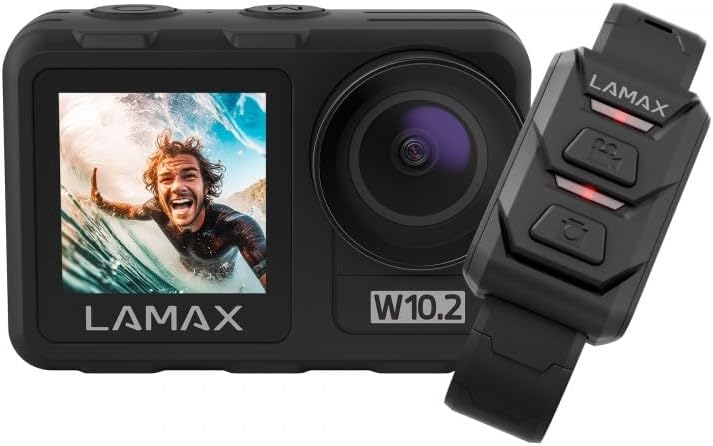
Image 1.1: The LAMAX W10.2 Action Camera shown with its accompanying remote control. The camera features a front display and a main lens, while the remote control has three buttons for easy operation.
2. Кутуда эмне бар
Upon unboxing your LAMAX W10.2, please verify that all the following components are included:
- LAMAX W10.2 аракет камерасы
- Waterproof Housing (for depths up to 40 meters)
- Алыстан башкаруу
- Мини штатив
- Clear Filter (for lens protection)
- USB заряддоо кабели
- Mounting Accessories (various mounts and adhesive pads)
- Тазалоочу кездеме
- Battery (C batteries required, included)

2.1-сүрөт: Ар тараптуу view of all items included in the LAMAX W10.2 package, including the camera, waterproof case, remote, various mounts, cables, and cleaning cloth.
3. Продукт бүтүп калдыview
Familiarize yourself with the key components and features of your LAMAX W10.2 camera:
- Кош дисплейлер: Features both a main rear touchscreen and a front display for easy framing and monitoring.
- Touch Control and Buttons: The touchscreen provides intuitive control, while physical buttons offer practical operation, especially underwater.
- Объектив: High-quality lens for capturing sharp images and videos.
- Микрофон: Аудио жаздыруу үчүн орнотулган микрофон.
- Баяндамачы: Аудио ойнотуу үчүн.
- USB порт: Заряддоо жана маалыматтарды өткөрүү үчүн.
- HDMI порту: Тышкы дисплейлерге туташуу үчүн.
- Батарея бөлүмү: Батареяны орнотуу үчүн астыңкы жагында жайгашкан.
- MicroSD картасынын уячасы: For memory card insertion (card not included).

Сүрөт 3.1: Детальдуу view of the LAMAX W10.2 camera highlighting its 2-inch touchscreen, mode setting/display switch, record ON/OFF button, camera and WLAN power button, and tripod thread for direct attachment.
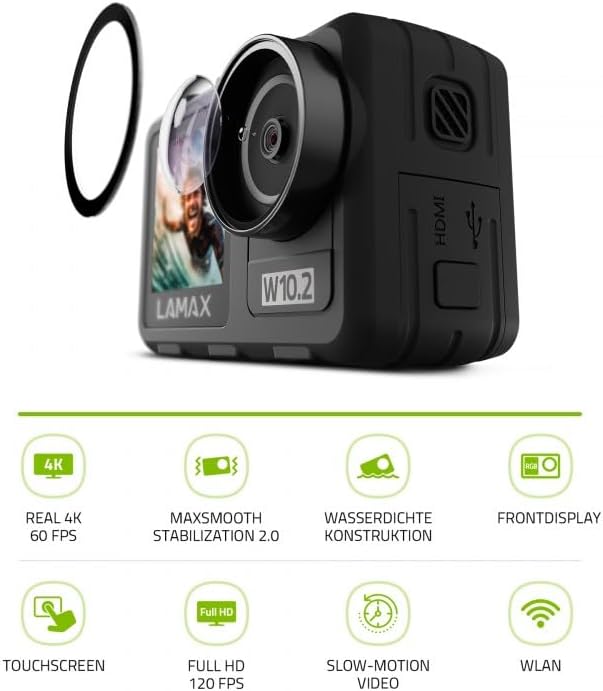
Image 3.2: The LAMAX W10.2 camera accompanied by icons representing its key features: Real 4K 60 FPS, MAXsmooth Stabilization 2.0, Waterproof Construction, Front Display, Touchscreen, Full HD 120 FPS, Slow-Motion Video, and WLAN (Wi-Fi).
4. Орнотуу
4.1. Батареяны заряддоо
- Батарея уясынын капкагын ачыңыз.
- Insert the included battery, ensuring correct polarity.
- Connect the camera to a USB power source using the provided USB cable. The charging indicator light will illuminate.
- Толук заряддалгандан кийин индикатордун жарыгы өзгөрөт же өчөт.
4.2. MicroSD картасын салуу
A MicroSD card (not included) is required to store videos and photos. Use a Class 10 or higher MicroSD card with a maximum capacity of 128GB.
- Камераңыздын капталынан MicroSD карта уячасын табыңыз.
- MicroSD картаны алтын түстүү контакттары камеранын арткы бетине каратып, ордуна чыкылдаганча салыңыз.
- Чыгаруу үчүн картаны сыртка чыкканга чейин акырын түртүңүз.
4.3. Күйгүзүү / Өчүрүү
- Күйгүзүү үчүн: Экран жарыктанганга чейин Кубат баскычын (адатта үстү же капталында жайгашкан) бир нече секунд басып туруңуз.
- Өчүрүү үчүн: Камера өчкөнгө чейин Күйгүзүү баскычын кайра басып, кармап туруңуз.
5. Иштөө нускамалары
5.1. Негизги операция
- Которуу режими: Use the Mode button or touchscreen gestures to switch between video, photo, and playback modes.
- Жаздыруу/Жапкыч: Press the Shutter/Record button (usually on top) to start/stop video recording or take a photo.
- Навигация: Use the touchscreen or physical navigation buttons to browse menus and settings.
5.2. Видео жаздыруу
The LAMAX W10.2 supports true 4K video recording at 60 frames per second (FPS) for incredibly detailed footage.
- Резолюция орнотуулары: Access video settings to select resolutions such as 4K/60FPS, 2.7K, 1080p, and 720p.
- Жай кыймыл: Capture dynamic slow-motion footage at up to 4x in Full HD (1080p).
- MAXsmooth 2.0 Stabilization: This advanced electronic stabilization ensures smooth, shake-free video, even during intense action. It is automatically enabled for optimal performance.
5.3. Сүрөткө тартуу
Capture high-resolution still images with various settings:
- Сүрөт режимдери: Standard photo, burst mode, time-lapse photo.
- Орнотуулар: Adjust exposure, white balance, and ISO for different lighting conditions.
5.4. Гидроизоляция
The LAMAX W10.2 is designed for aquatic adventures:
- Without Housing: The camera is waterproof up to 12 meters (approximately 40 feet) without the need for additional housing.
- With Included Housing: When placed in the provided waterproof housing, the camera can be submerged up to 40 meters (approximately 130 feet).
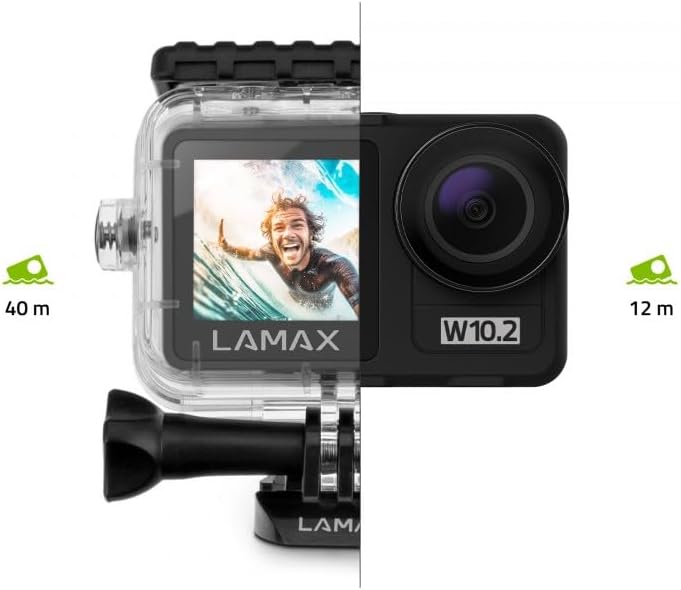
Image 5.1: Visual representation of the LAMAX W10.2's waterproofing capabilities, showing it can go to 12 meters without a case and 40 meters with the included waterproof housing.
5.5. Wi-Fi and Mobile App
Connect your camera to your smartphone via Wi-Fi for remote control, live preview, and easy file өткөрүп берүү.
- Download the official LAMAX mobile app from your device's app store.
- Enable Wi-Fi on your camera through the settings menu.
- Смартфонуңузда камеранын Wi-Fi тармагына туташыңыз (SSID жана сырсөз камеранын экранында көрсөтүлөт).
- Open the LAMAX app to control the camera, view footage, жана жүктөп алуу fileзымсыз.
5.6. Алыстан башкаруу
Камтылган алыстан башкаруу алыстан ыңгайлуу иштөөгө мүмкүндүк берет.
- Жупташтыруу: Follow the instructions in the camera's settings menu to pair the remote control.
- Функциялары: Typically, the remote allows you to start/stop recording and take photos without touching the camera.
6. Техникалык тейлөө
Proper maintenance ensures the longevity and performance of your LAMAX W10.2 camera.
- Тазалоо: Use the provided cleaning cloth to gently wipe the lens and screen. For stubborn smudges, use a lens cleaning solution designed for optics. Do not use abrasive materials.
- Суу өткөрбөй турган турак жайга кам көрүү: After use in water, rinse the waterproof housing with fresh water and allow it to air dry. Inspect the O-ring seal for any debris or damage before each use.
- Сактагыч: Камераны салкын, кургак жерде күндүн тике тийген нурунан жана экстремалдык температурадан алыс сактаңыз. Узак мөөнөткө сактасаңыз, батареяны алып салыңыз.
- Батареяга кам көрүү: Avoid fully discharging the battery frequently. Charge the battery regularly, even if not in use, to maintain its health.
7. Кыйынчылыктарды
If you encounter issues with your LAMAX W10.2, refer to the following common problems and solutions:
| Көйгөй | Мүмкүн себеп | Чечим |
|---|---|---|
| Камера күйбөйт. | Low battery; battery incorrectly inserted; camera frozen. | Charge the battery; reinsert battery correctly; perform a hard reset (refer to manual for specific button combination). |
| Video footage титиреп турат. | MAXsmooth 2.0 stabilization is off; extreme vibrations. | Ensure MAXsmooth 2.0 is enabled in settings; use appropriate mounts to minimize vibration. |
| Wi-Fi'га туташпай жатат. | Wi-Fi not enabled on camera; incorrect password; app issue. | Enable Wi-Fi on camera; double-check password; restart camera and app. |
| Camera is not waterproof. | Waterproof housing not properly sealed; O-ring damaged or dirty. | Ensure housing is securely latched; clean and inspect O-ring for damage before each use. |
| MicroSD карта катасы. | Incompatible card; card full; card corrupted. | Use a recommended Class 10 or higher card; format the card (this will erase data); try a different card. |
8. Техникалык шарттар
Detailed technical specifications for the LAMAX W10.2 Action Camera:
| Өзгөчөлүк | Деталь |
|---|---|
| Бренд | LAMAX |
| Модель номери | 10.2 |
| Продукциянын өлчөмдөрү | 3.2 x 6.4 x 4.2 см; 127 г |
| Фотосенсордук технология | CMOS |
| Видео тартуунун резолюциясы | 4K |
| Макс фокус узундугу | 5.03 Миллиметр |
| Видео тартуу форматы | MP4 |
| Screen Size | 2 дюйм |
| Байланыш технологиясы | HDMI, Wi-Fi |
| Түс | Кара боз |
| Өзгөчөлүктөр | Remote Control, Shockproof, Slow Motion, Timer, Touchscreen |
| Видеокамера түрү | Аракет Камера |
| Батареялар | C batteries required (included) |
| Биринчи жеткиликтүү күн | 10-январь, 2025-жыл |
9. Кепилдик жана колдоо
LAMAX products are designed for reliability and performance. For information regarding warranty coverage, technical support, or service, please refer to the official LAMAX webсайтка же түздөн-түз кардарларды тейлөөгө кайрылыңыз.
- Онлайн колдоо: Visit the LAMAX official website for FAQs, software updates, and digital manuals.
- Кардарларды тейлөө: Contact details for customer support can typically be found on the LAMAX website's 'Support' or 'Contact Us' section.


