Introduction
This manual provides detailed instructions for the setup, operation, and maintenance of your Speedlink CONUX RGB Gaming Headset. Please read this manual carefully before using the product to ensure proper functionality and longevity.
The CONUX RGB stereo gaming headset features powerful 50mm driver units for precise audio reproduction, from deep bass to high treble. It includes multi-coloured RGB illumination for an enhanced gaming atmosphere. Designed for comfort, it features ultra-soft padding and a robust metal frame. The headset offers variable size adjustment and a detachable, sensitive microphone with a flexible arm. An integrated cable remote control allows for quick volume adjustment and microphone muting. Universal compatibility is provided via a 3.5mm jack plug and a supplied Y-adapter, supporting PC, PS5, PS4, Xbox, and Switch platforms.
Пакеттин мазмуну
Пакетте бардык буюмдар бар экенин текшериңиз:
- CONUX RGB Gaming Headset
- 3.5mm Y-Adapter (2 x 3.5mm TRS 3-pin)
- USB-A Cable (for RGB lighting power)
- Колдонуучунун Колдонмосу (бул документ)
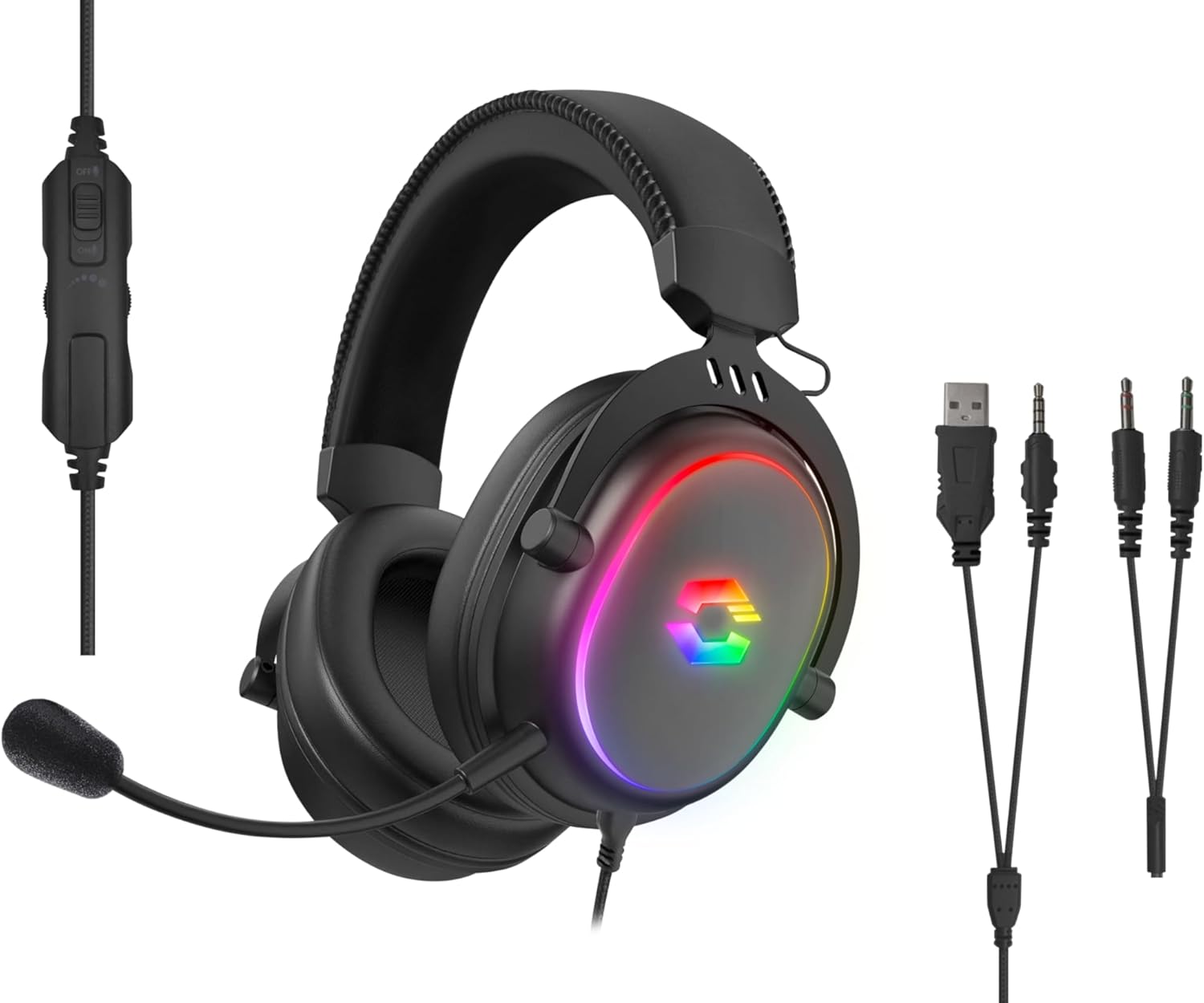
Image: The CONUX RGB Gaming Headset shown with its integrated cable remote, detachable microphone, 3.5mm jack, USB-A cable for RGB, and the included Y-adapter.
Жайгашуу
Гарнитураны туташтыруу
- For PC/Laptop (with separate audio/mic ports):
- Connect the headset's 3.5mm jack to the supplied 2 x 3.5mm Y-adapter.
- Plug the green connector of the Y-adapter into your computer's audio output (headphone) jack.
- Plug the pink connector of the Y-adapter into your computer's microphone input jack.
- For PC/Laptop/Gaming Console (with combined 3.5mm TRRS jack):
- Directly plug the headset's 3.5mm 4-pin (TRRS) jack into the combined audio/microphone port of your device (e.g., PS5, PS4, Xbox Series X/S, Switch, mobile phone, laptop with single jack).
- Powering RGB Lighting:
- Connect the USB-A cable from the headset to any available USB-A port on your PC, console, or a USB power adapter. This cable is solely for powering the RGB LED lighting.

Сүрөт: Шайкештик бүттүview showing support for PC, PS5, PS4, Xbox One, Xbox Series X/S, Nintendo Switch/OLED/Lite.
Иштөө нускамалары
Гарнитураны тагынуу
- Adjust the headband to ensure a comfortable and secure fit. The headband is designed for variable size adjustment.
- Position the earcups over your ears so they fully enclose them, utilizing the ultra-soft padding for maximum comfort during extended use.
Микрофонду колдонуу
- The microphone is detachable. To attach, align the microphone jack with the port on the left earcup and insert firmly.
- Adjust the flexible arm of the microphone to position it optimally near your mouth for clear voice capture.
- Use the integrated cable remote control to mute/unmute the microphone. A switch or button on the remote will control this function.
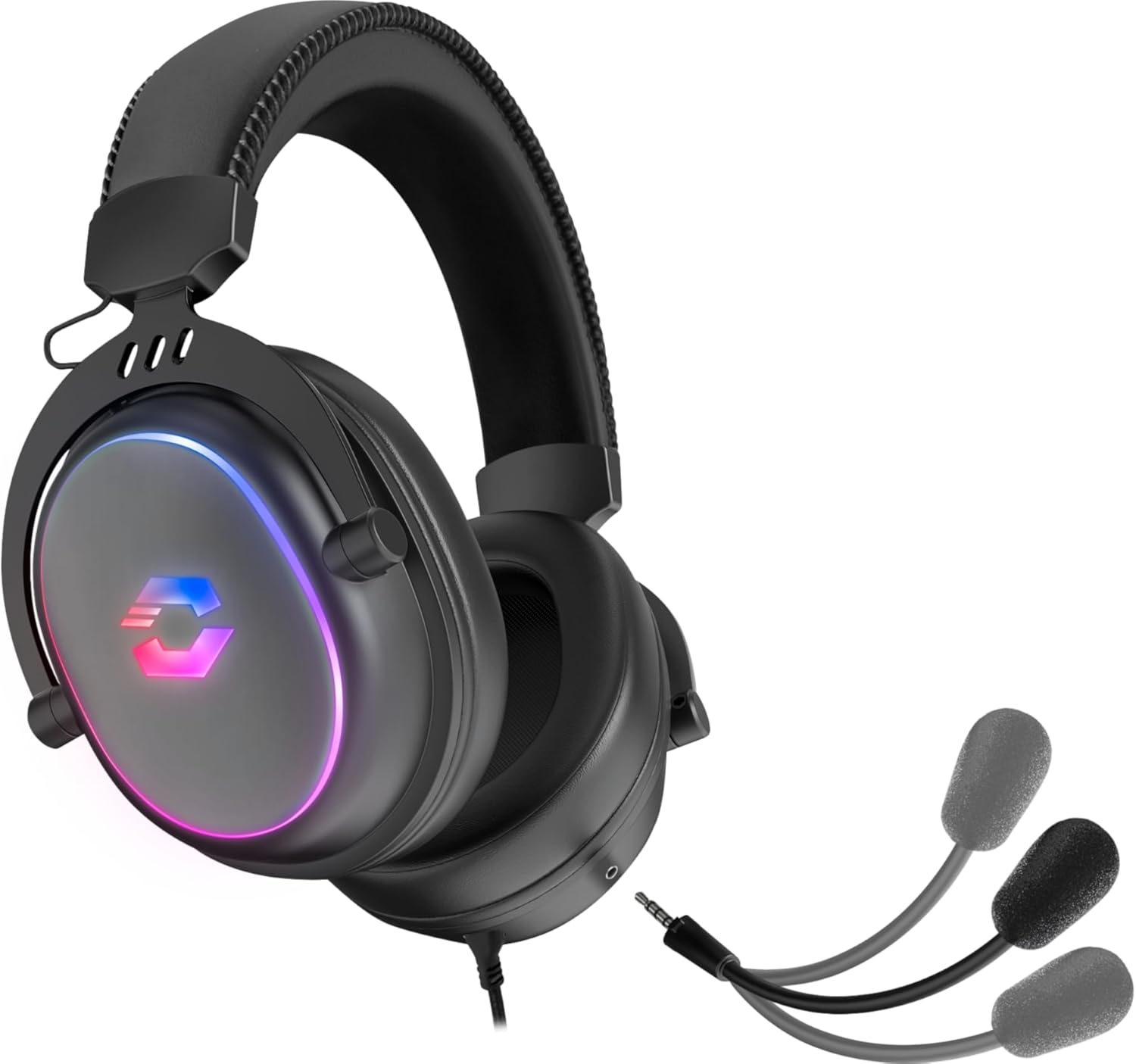
Image: The CONUX headset demonstrating its detachable microphone feature.
Үндү көзөмөлдөө
- The integrated cable remote control features a volume wheel or slider. Rotate or slide it to increase or decrease the audio volume.
RGB жарыктандыруу
- The multi-coloured RGB lighting on the earcups will illuminate automatically when the USB-A cable is connected to a powered USB port.
- The lighting provides an aesthetic enhancement and does not affect audio performance.

Image: The CONUX headset illuminated with its multi-colored RGB lighting effect.
Техникалык тейлөө
- Тазалоо: Use a soft, dry cloth to clean the headset. Do not use abrasive cleaners or solvents.
- СактагычГарнитураны салкын, кургак жерде, күн нуру түз тийбеген жана өтө жогорку температурадан алыс сактаңыз.
- Колдонуу: Avoid dropping the headset or subjecting it to strong impacts. Do not expose to liquids, heat, or cold.
- Кабельдер: Do not pull on the cables when disconnecting. Always grasp the plug firmly.
Проблемаларды чечүү
| Көйгөй | Мүмкүн себеп | Чечим |
|---|---|---|
| Гарнитурадан үн жок |
|
|
| Микрофон иштебей жатат |
|
|
| RGB жарыктандыруу иштебейт |
|
|
Техникалык шарттар
| Өзгөчөлүк | Деталь |
|---|---|
| Модель аты | Speedlink Conux (SL-860017-BK) |
| Байланыш технологиясы | Wired (3.5mm Jack, USB-A for RGB) |
| Наушник уясы | 3.5 mm Jack (TRRS 4-pin) |
| Камтылган компоненттер | Headset Cable, 3.5mm Y-Adapter |
| Материал | Пластик, металл |
| Кулак жайгаштыруу | Кулак үстүндө |
| Форма фактору | Кулак үстүндө |
| Түс | Кара |
| Элемент Салмагы | 265 грамм (болжол менен 9.3 унция) |
| Продукциянын өлчөмдөрү | 162 x 208 x 87 mm (W×H×D) / 6.38 x 8.19 x 3.43 inches |
| Аудио драйвер түрү | Динамикалык драйвер |
| Аудио драйверинин өлчөмү | 50 миллиметр |
| Жыштыкка жооп берүү (наушник) | 20Гц-20кГц |
| Импеданс (наушник) | 32Ω |
| Үн басымынын деңгээли | 106дБ ± 3дБ |
| Микрофондун сезгичтиги | -42дБ ± 3дБ |
| Noise Control | Үн изоляциясы |
| Кабелдин узундугу | 1.8 метр |
| Шайкеш түзмөктөр | Gaming Consoles, Tablets, Mobile phones, Laptops, Desktops (PC, PS5, PS4, Xbox Series X/S, Switch) |
Safety Instructions and Conformity
Please observe the following important safety instructions to prevent damage, explosion, fire, or electric shock:
- Түзмөктөрдү колдонуучу колдонмодо көрсөтүлгөндөй гана колдонуңуз.
- Do not open or repair the device.
- Аппаратты суюктуктарга, ысыкка же муздак жерге тийгизбеңиз.
- Жарнамада түзмөктү колдонбоңузamp айлана-чөйрө.
- Аппаратты кургак чүпүрөк менен тазалаңыз.
- Аппаратты жана бардык бош бөлүктөрүн балдардан, үй жаныбарларынан жана уруксаты жок адамдардан алыс кармаңыз.
- Only use the device with the appropriate provided accessories.
- Disconnect cables from the devices if they will not be used for a long time. When disconnecting the cables, do not pull on the cord but on the plug.
- Don't use the cables in any way other than mentioned in the user guide; don't bend, cut, extend, knot or step on them.
- Аппараттын тешиктерине эч кандай бөтөн нерселерди киргизбеңиз.
- Эгерде аппараттар кандайдыр бир жол менен бузулса же өтө ысып кетсе, аларды дароо колдонууну токтотуңуз.
- Эгерде сизде кардиостимулятор бар болсо же башка сезимтал электрондук жашоо жардамдарына көз каранды болсоңуз, радио сигналдарды чыгарган түзмөктөрдү колдонууда этият болуңуз.

Image: Detailed safety instructions, warning symbols, and conformity notices, including CE, UKCA, and WEEE markings.
Warning Symbols and Markings
The product bears the following symbols:
- ⚠: Warning symbol, indicating important safety information.
- ♻: WEEE (Waste Electrical and Electronic Equipment) symbol, indicating separate collection for electrical and electronic equipment. Do not dispose of with household waste.
- CE: CE marking, indicating conformity with European Union directives.
- UKCA: UK Conformity Assessed marking, indicating conformity with applicable UK legislation.
Шайкештик жөнүндө эскертүү
Аппараттын (аппараттардын) иштешине күчтүү статикалык, электрдик же жогорку жыштыктагы талаалар (радио орнотмолору, мобилдик телефондор, микротолкундар, электростатикалык разряддар) таасир этиши мүмкүн. Эгер бул орун алса, incre аракетин көрүңүзasing тоскоолдук жараткан түзмөктөрдөн аралык. Шайкештик жөнүндө билдирүү башка тилдерде: www.speedlink.com
The product complies with the following directives: EMC 2014/30/EU, RoHS 2011/65/EU.
Кепилдик жана колдоо
For warranty information and technical support, please visit the official Speedlink website or contact their customer service. Details can typically be found at www.speedlink.com.
Manufacturer: Speedlink (Zeitfracht Medien GmbH, Im Dorf 5, 27404 Heeslingen, GERMANY)


