Introduction
Thank you for choosing the WONLINK WL-NE3502 WiFi Range Extender. This device is designed to expand your existing WiFi network coverage, eliminate dead zones, and provide a stable, high-speed internet connection throughout your home or office. With dual-band support (2.4GHz and 5GHz) and speeds up to 1200Mbps, it is ideal for 4K streaming, online gaming, and connecting multiple devices. This manual provides detailed instructions for setup, operation, maintenance, and troubleshooting to ensure optimal performance.

Image: The WONLINK WL-NE3502 WiFi Range Extender, a black device with four external antennas and LED indicators, designed to boost WiFi signals.
Коопсуздук маалыматы
- Түзмөктү сууга, отко, нымдуулукка же ысык чөйрөгө тийгизбеңиз.
- Аппаратты ажыратууга, оңдоого же өзгөртүүгө аракет кылбаңыз.
- Өндүрүүчү тарабынан берилген же сунушталган кубат адаптерин гана колдонуңуз.
- Ашыкча ысып кетүүнүн алдын алуу үчүн аппараттын айланасында туура желдетүүнү камсыз кылыңыз.
- Аппаратты күчтүү электромагниттик талаалардан алыс кармаңыз.
- Бул аппарат имараттын ичинде гана колдонуу үчүн.
Пакеттин мазмуну
Сураныч, таңгактын ичиндегисин кылдаттык менен текшериңиз. Эгерде кандайдыр бир буюм жок болсо же бузулуп калса, сатуучуга кайрылыңыз.
- 1 x WONLINK WL-NE3502 WiFi Range Extender
- 1 х Ethernet кабели
- 1 x Ыкчам орнотуу колдонмосу
- 1 x Кепилдик картасы
Продукт бүттүview
The WL-NE3502 features a compact design with multiple antennas for enhanced signal transmission and reception. It includes LED indicators for power, WiFi signal strength, and connection status, providing clear visual feedback on its operational state.
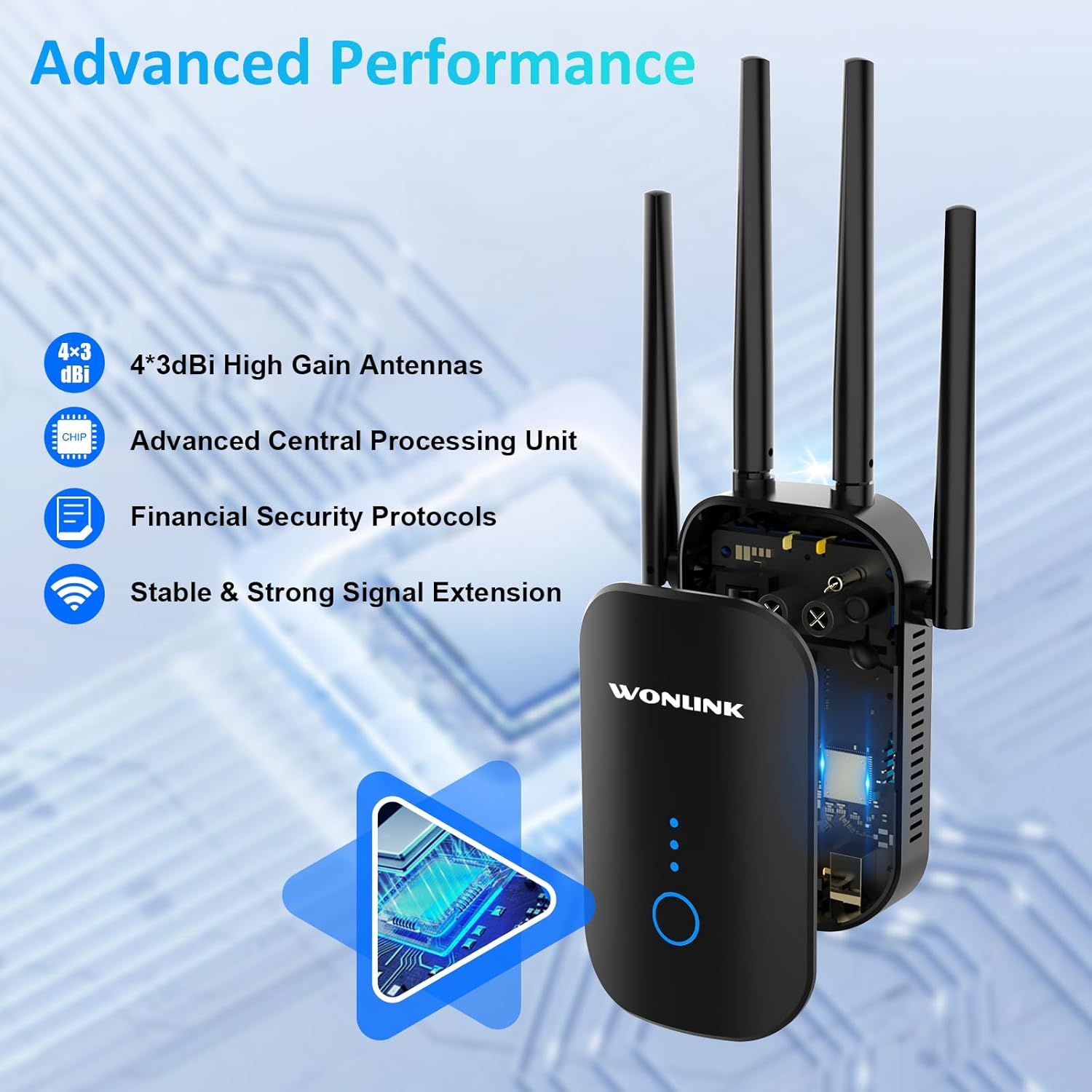
Image: An illustration highlighting the advanced performance features of the WONLINK WL-NE3502, including 4x3dBi high gain antennas, an advanced CPU, financial security protocols, and stable signal extension.
LED көрсөткүчтөрү:
- Power LED: Кубаттын абалын көрсөтөт.
- WiFi LED: Indicates WiFi signal status.
- Сигнал күчү LEDs: Indicate the strength of the extended WiFi signal.
Баскычтар жана порттор:
- WPS/Reset баскычы: Used for quick setup via WPS or to reset the device to factory settings.
- Ethernet порту: Түзмөктөрүңүзгө же негизги роутериңизге зымдуу туташуулар үчүн.
Жайгашуу
The WONLINK WL-NE3502 can be set up using a web browser or via WPS.
Метод 1: Web Browser Setup (Recommended)
- Күйгүзүү: Plug the extender into a power outlet near your main router. Wait for the Power LED to turn solid.
- Connect to Extender's WiFi: On your computer or mobile device, connect to the WiFi network named "XXXXX-2G" or "XXXXX-5G" (the default SSID of the extender). No password is required for the initial connection.
- Мүмкүнчүлүк Web Интерфейс: ачуу а web браузер (мисалы, Chrome, Firefox) жана териңиз 192.168.10.1 дарек тилкесине кирип, андан кийин Enter баскычын басыңыз.
- Кирүү: Enter "admin" for both the username and password (default credentials). Click "Login".
- Режимди тандоо: Choose your desired operating mode (Repeater, AP, or Router). For extending existing WiFi, select "Repeater Mode".
- Select WiFi Network: The extender will scan for available WiFi networks. Select the WiFi network you wish to extend from the list.
- Сырсөздү киргизиңиз: Enter the password for your main WiFi network.
- Configure Extended Network: You can choose to keep the same SSID as your main network or create a new one for the extended network.
- Орнотууларды колдонуу: Click "Apply" or "Save". The extender will restart.
- Кеңейтүүчүнү көчүрүү: Once restarted, unplug the extender and move it to a location halfway between your router and the WiFi dead zone. Ensure the Signal Strength LEDs indicate a good connection.
- Connect to Extended WiFi: Reconnect your devices to the newly configured extended WiFi network.

Image: A visual guide demonstrating the web-based setup process for the WONLINK WL-NE3502, showing connection to the extender's WiFi, accessing the web interface, and selecting the network to extend.

Image: Screenshots illustrating the easy setup process for the WONLINK WL-NE3502 using a smartphone, detailing steps to connect to the extender's WiFi, access the web interface, and select the WiFi signal to extend.
Method 2: WPS Setup (If your router supports WPS)
- Күйгүзүү: Plug the extender into a power outlet near your main router. Wait for the Power LED to turn solid.
- Extenderдеги WPSти басыңыз: Press the WPS button on the WONLINK WL-NE3502 extender. The WiFi LED will start blinking.
- Роутерде WPS баскычын басыңыз: Эки мүнөттүн ичинде негизги роутериңиздеги WPS баскычын басыңыз.
- Байланышты күтүңүз: The extender will automatically connect to your router. The Signal Strength LEDs on the extender will light up, indicating a successful connection.
- Кеңейтүүчүнү көчүрүү: Once connected, unplug the extender and move it to a location halfway between your router and the WiFi dead zone. Ensure the Signal Strength LEDs indicate a good connection.
Иштөө режимдери
The WONLINK WL-NE3502 supports multiple operating modes to suit various networking needs:
- Кайталоо режими: Extends the coverage of an existing wireless network. This is the most common mode for eliminating WiFi dead zones.
- Кирүү чекити (AP) режими: Зымдуу тармактык туташууну зымсыз туташууга айландырат. Ethernet портунан жаңы WiFi хотспот түзүү үчүн идеалдуу.
- Багыттоочу режим: Functions as a basic router, creating a new private network. This mode is less common for an extender but can be useful in specific scenarios.
Иштөө нускамалары
Once set up, the WL-NE3502 operates automatically to provide extended WiFi coverage. Here are some key aspects of its operation:
Оптималдуу жайгаштыруу:
For best performance, place the extender in a location where it can receive a strong signal from your main router and also effectively transmit to the areas needing coverage. A good indicator is when the Signal Strength LEDs show at least two or three bars.

Image: Illustrations showing optimal placement of the WONLINK WL-NE3502 WiFi extender in various rooms of a home, including the living room, kitchen, bedroom, and bathroom, to ensure comprehensive coverage.

Image: A cross-section diagram of a multi-story house illustrating how the WONLINK WL-NE3502 WiFi extender eliminates dead zones by extending the WiFi signal from the main router to all areas, including basements and courtyards.
Кош тилкелүү туташуу:
The WL-NE3502 supports both 2.4GHz and 5GHz WiFi bands. The 2.4GHz band offers wider coverage, while the 5GHz band provides faster speeds for demanding applications like 4K streaming and online gaming.

Image: A graphic illustrating the 1200Mbps ultra-speed internet capability of the WONLINK WL-NE3502, showing 5.8GHz band at 867Mbps and 2.4GHz band at 300Mbps, suitable for HD streaming, gaming, and video calls.

Image: A comparison graphic showing the high-speed performance of the WONLINK WL-NE3502, highlighting 802.11ac standard with 867Mbps on 5.8GHz and 300Mbps on 2.4GHz, improving speed by 35% over 802.11n.
Түзмөктөрдү туташтыруу:
Once the extender is set up, your devices (smartphones, tablets, laptops, smart TVs, gaming consoles, etc.) can connect to the extended WiFi network just as they would to any other WiFi network. Look for the SSID you configured during setup.

Image: A collage showing various WiFi-enabled devices, including mobile phones, desktops, gaming consoles, smart TVs, and security cameras, enjoying a lag-free connection provided by the WONLINK WL-NE3502 extender.

Image: A diagram illustrating MU-MIMO technology, showing how the WONLINK WL-NE3502 improves network utilization by allowing simultaneous communication with multiple wireless terminals, unlike older technology.
Техникалык тейлөө
To ensure the longevity and optimal performance of your WONLINK WL-NE3502, follow these maintenance guidelines:
- Тазалоо: Түзмөктү жумшак, кургак чүпүрөк менен акырын сүртүңүз. Суюк тазалоочу каражаттарды же аэрозольдорду колдонбоңуз.
- Вентиляция: Ensure the ventilation holes are not blocked. Avoid placing the device in enclosed spaces.
- Программалык камсыздоонун жаңыртуулары: WONLINK кызматкерин мезгил-мезгили менен текшерип туруңуз webмикропрограммалык камсыздоону жаңыртуу сайты. Микропрограммалык камсыздоону жаңыртуу иштин натыйжалуулугун жакшыртып, жаңы функцияларды кошуп, каталарды оңдой алат.
- Кайра иштетилүүдө: If you experience network issues, try restarting the extender by unplugging it for 10 seconds and then plugging it back in.
Проблемаларды чечүү
If you encounter issues with your WONLINK WL-NE3502, refer to the following common problems and solutions:
| Көйгөй | Мүмкүн болгон себеп / Чечим |
|---|---|
| Power LED жок | Узарткычтын иштеген электр розеткасына туура сайылганын текшериңиз. Башка розеткадан аракет кылып көрүңүз. |
| Кирүү мүмкүн эмес web management page (192.168.10.1) |
|
| Poor signal strength from extender |
|
| Extended network not visible or no internet |
|
| Slow speeds on extended network |
|
Техникалык шарттар
| Өзгөчөлүк | Деталь |
|---|---|
| Модель номери | WL-NE3502 |
| Бренд | WONLINK |
| Маалыматтарды өткөрүү ылдамдыгы | 1200 Мбит/сек чейин (5 ГГцде 867 Мбит/сек, 2.4 ГГцде 300 Мбит/сек) |
| Жыштык тилкелери | 2.4 ГГц жана 5 ГГц (Эки тилкелүү) |
| Зымсыз стандарттар | IEEE 802.11ac/a/b/g/n |
| Антенналар | 4 x 3dBi жогорку күчөткүчтүү антенналар |
| Коопсуздук протоколдору | WPA3, WPA2-PSK, WPA-PSK, WEP (64/128-bit) |
| Порттар | 1 x 10/100 Mbps Ethernet порту |
| Иштөө режимдери | Repeater, AP, Router |
| Шайкеш түзмөктөр | Smartphones, Tablets, Computers, WiFi-enabled Devices |
| Өлчөмдөр | 8.15 x 3.82 x 3.03 дюйм (болжол менен) |
| Элемент Салмагы | 7 унция (болжол менен) |
Кепилдик жана колдоо
WONLINK products come with a standard manufacturer's warranty. Please refer to the warranty card included in your package for specific terms and conditions. For technical support, product inquiries, or warranty claims, please contact WONLINK customer service.
- Онлайн колдоо: Visit the official WONLINK webКөп берилүүчү суроолор, драйверлер жана микропрограмма жаңыртуулары үчүн сайт.
- Электрондук почта колдоо: Refer to your warranty card or the quick installation guide for the support email address.
- 24H техникалык колдоо: WONLINK offers online technical support.

Image: A graphic highlighting key features: wide compatibility with 99% of routers, advanced security with 64/128bit WEP, WPA/WPA2 encryption, and 24-hour online technical support.


