Introduction
This manual provides detailed instructions for the setup, operation, and maintenance of your SPYPOINT Flex-Dark Twin Pack Cellular Trail Cameras. Designed for reliable outdoor use, these cameras capture high-resolution photos and videos, offering advanced scouting capabilities with cellular connectivity.

Image: The SPYPOINT Flex-Dark Twin Pack, showing two cameras, straps, and product packaging.
Кутуда эмне бар
Your SPYPOINT Flex-Dark Twin Pack includes the following components:
- FLEX-DARK Camera (2 units)
- Preactivated SIM Cards (4 units)
- Antenna (1 unit per camera, total 2)
- Installation Strap (2 units)
- Колдонуучунун Колдонмосу жана Тез Баштоо Колдонмосу
Орнотуу колдонмосу
1. Физикалык орнотуу
- Антенна орнотуу: Screw the antenna firmly into the designated port on the top of the camera.
- MicroSD картасын салыңыз: Open the camera latch and insert a compatible MicroSD card (not included) into the card slot. Ensure it is inserted correctly until it clicks into place.
- Күйгүзүү: Insert the required batteries (8x AA or SPYPOINT LIT-22 rechargeable battery pack, sold separately) into the battery compartment. Slide the ON/OFF switch to the 'ON' position.
- MicroSD картасынын форматы: With the camera powered on, press the 'FORMAT' button to format the MicroSD card. This prepares the card for optimal camera performance.
- Сыноо баскычы: Press the 'TEST' button to verify the camera's functionality and ensure it captures an image.

Image: Steps for physical setup, showing antenna installation, MicroSD card insertion, and turning the camera on.

Image: Illustrates the location of the format and test buttons on the camera.
2. App Setup and Activation
- Download the SPYPOINT App: Download and install the free SPYPOINT app on your mobile device from your app store.
- Каттоо эсебин түзүү: Open the app and follow the prompts to create a new SPYPOINT account or log in to an existing one.
- Камера кошуу: In the app, tap the '+' icon to add a new camera.
- QR кодун сканерлөө: Use your phone's camera to scan the QR code located inside the camera's battery compartment. This links your camera to your account.
- Select Plan: Choose your desired photo transmission plan. A free plan offering 100 photos/month is included.
- Баштапкы туташуу: Allow a few minutes for the camera to connect to the cellular network and report its status to the app.
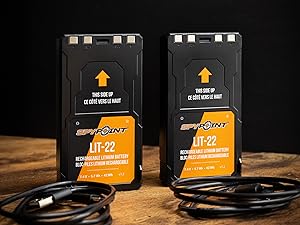
Image: The SPYPOINT app screen with a prominent '+' button for adding a new device.

Image: Instructions to scan the QR code inside the camera for device identification and activation.
Иштөө нускамалары
1. Сүрөт жана видео тартуу
The Flex-Dark camera captures high-quality images and videos based on your settings. All captured media is sent to your SPYPOINT app.
- 40MP Photos: The camera captures still images at a resolution of 40 megapixels, providing clear and detailed visuals.
- 1080p Video with Sound: Record high-definition videos at 1080p resolution, complete with audio, to gain more insight into wildlife activity.
- Multi-shot Mode: Capture multiple photos per detection event.
- Time-Lapse+: Set the camera to capture images at predefined intervals, useful for monitoring large areas or slow-moving events.
- Ыңгайлаштырылуучу график: Program the camera to operate only during specific times of the day or week.

Сүрөт: мурункуample of a 40MP photo captured by the Flex-Dark camera, viewed on the SPYPOINT app.

Image: A screenshot from the SPYPOINT app showing a 1080p video with sound, captured by the camera.
2. Night Vision and Detection
The Flex-Dark features advanced night vision capabilities to ensure discreet monitoring.
- No-Glow LEDs: The camera uses infrared LEDs that emit no visible light, making it undetectable to wildlife and humans during nighttime operation.
- Жарыгы аз светодиоддор: An alternative setting that provides a subtle glow, which can be useful in certain situations.
- Алыстан которуу: You can switch between no-glow and low-glow settings remotely via the SPYPOINT app.
- 100ft Detection Range: The motion sensor can detect movement up to 100 feet away.
- Тез триггер ылдамдыгы: The camera boasts a quick trigger speed of 0.3 seconds to minimize missed events.

Image: Highlights the no-glow feature of the Flex-Dark camera, designed to avoid disturbing wildlife.
3. Уюлдук байланыш
The Flex-Dark camera utilizes cellular networks to transmit photos and videos directly to your SPYPOINT app, eliminating the need for Wi-Fi.
- Cross-Carrier Coverage: The camera automatically connects to the strongest available cellular signal from major carriers, ensuring reliable transmission in various locations.
- Free Photo Transmission Plan: Each camera includes a free plan for 100 photos per month. Upgrade options are available for more photos.
- Алыстан башкаруу: Камера жөндөөлөрүн башкаруу, view images, and check camera status remotely through the SPYPOINT app.

Image: Illustrates the cross-carrier cellular coverage feature, showing the camera connecting to different network signals.
Техникалык тейлөө
- Батареяны текшерүү: Regularly monitor battery levels via the SPYPOINT app. Replace AA batteries or recharge LIT-22 battery packs as needed to ensure continuous operation.
- Линзаны тазалоо: Gently clean the camera lens and sensor window with a soft, lint-free cloth to prevent smudges or dirt from affecting image quality.
- Программалык камсыздоонун жаңыртуулары: Check the SPYPOINT app periodically for available firmware updates. Keeping your camera's firmware up-to-date ensures optimal performance and access to new features.
- MicroSD картасын башкаруу: Format your MicroSD card regularly (e.g., monthly) to maintain performance and prevent data corruption. Consider replacing older cards.
- Физикалык текшерүү: Periodically inspect the camera casing, antenna, and latch for any signs of damage or wear, especially after harsh weather conditions.

Image: SPYPOINT LIT-22 rechargeable battery packs, an optional power source for extended use.

Image: A SPYPOINT 32GB MicroSD card, essential for camera operation (sold separately).
Проблемаларды чечүү
If you encounter issues with your Flex-Dark camera, refer to the following common solutions:
- Camera Not Reporting:
- Ensure the camera is powered on and has sufficient battery life.
- Check the cellular signal strength in the camera's location via the app. Relocate the camera if the signal is weak.
- Verify that your photo transmission plan is active and not depleted.
- Confirm the MicroSD card is properly inserted and formatted.
- Сүрөттүн/видеонун сапаты начар:
- Clean the camera lens and sensor window.
- Ensure the camera is mounted securely to prevent movement.
- Check for obstructions in front of the camera's field of view.
- Verify that the camera settings (e.g., photo resolution) are configured as desired in the app.
- No Detections:
- Confirm the camera is in an active mode (not scheduled off).
- Check the detection range and sensitivity settings in the app.
- Ensure there are no obstacles blocking the motion sensor.

Сүрөт: мурункуample of a camera status message in the SPYPOINT app indicating a reporting issue.

Image: The 'Status' button within the SPYPOINT app, used to check detailed camera information and connectivity.
Техникалык шарттар
| Модель номери | FLEX-DARK US-TWIN-PACK |
| Сүрөттүн резолюциясы | 40 мегапиксел |
| Video Resolution | 1080p with Sound |
| Түнкү көрүнүш | No-Glow / Low-Glow LEDs |
| Тактоо диапазону | 100 метрге чейин |
| Триггер ылдамдыгы | 0.3 секунд |
| Байланыш | Cellular (Cross-Carrier) |
| Power Source | 8x AA Batteries or SPYPOINT LIT-22 Battery Pack (sold separately) |
| Эс | MicroSD картасы (512 ГБ чейин, кошулган эмес) |
| Өлчөмдөр | 10 x 2 x 2.7 дюйм |
| Элемент Салмагы | 2.12 фунт |
Кепилдик жана колдоо
Your SPYPOINT Flex-Dark Cellular Trail Camera comes with a 2 жылдык кепилдик, өндүрүш кемчиликтери жана аткаруу маселелери боюнча тынчтыкты камсыз кылуу.
For technical assistance, troubleshooting, or warranty claims, please visit the official SPYPOINT support website or contact their customer service. Detailed contact information can typically be found on the SPYPOINT website or within the SPYPOINT app.
Always refer to the latest information available on the official SPYPOINT resources for the most up-to-date support and product details.


