1. Киришүү
This manual provides detailed instructions for the installation, operation, and maintenance of your Eonon P6 Motorcycle CarPlay & Android Auto Display. Please read this manual thoroughly before using the product to ensure proper functionality and safety.
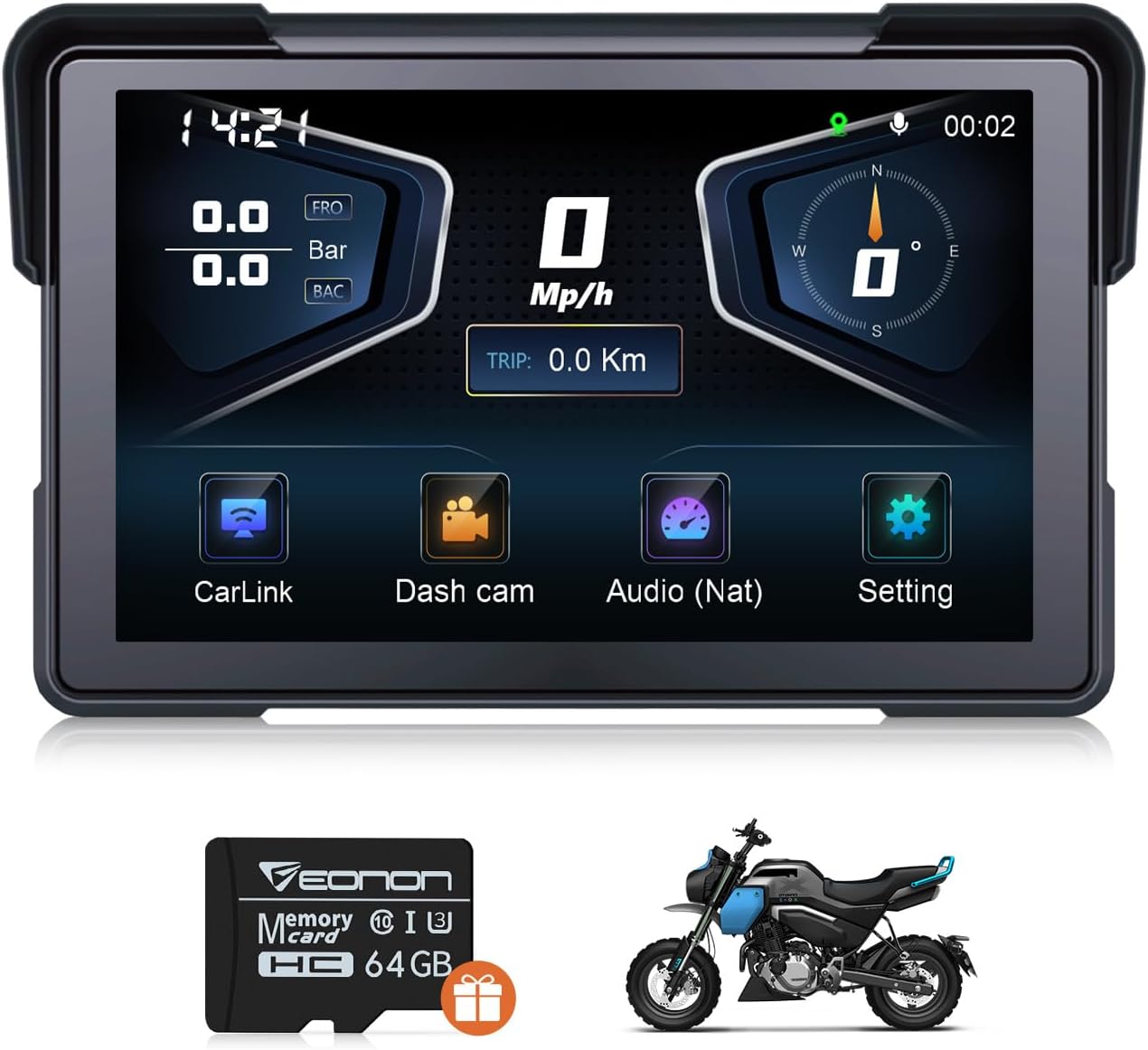
Figure 1.1: Eonon P6 Motorcycle Display
2. Продукт бүтүп калдыview
2.1 Негизги өзгөчөлүктөрү
- Зымсыз CarPlay & Android Auto: Seamless smartphone integration for navigation, calls, music, and messaging via Bluetooth.
- Advanced Recording System: Front 4K + rear 1K 110° wide-angle dual-camera DVR with loop recording, photo, and video locking.
- Multifunctional Dashboard: Displays tire pressure, speed, compass direction, and time on a 1024*600 IPS 7-inch screen.
- Ар тараптуу аудио чыгаруу: Features built-in speaker and Bluetooth output options for audio.
- Durable and Easy to Install: IP68 waterproof and dustproof rating, designed for easy installation, includes a 64GB Micro SD card (supports up to 256GB).
- Кош Bluetooth: Allows simultaneous connection to smartphone and Bluetooth headset/helmet.
- Compass & Barometer: Assists with navigation and monitors altitude changes.
2.2 Пакеттин мазмуну
Төмөндө тизмеленген нерселердин баары пакетиңизге камтылганын текшериңиз:
- Кубат кабели (x1)
- Камера (x2)
- Wired remote control (x1)
- Hexagon wrench (x1)
- кашаа (x1)
- Phillips screwdriver (x1)
- Open-end wrench (x1)
- GPS антеннасы (x1)
- Tire pressure sensor (x2)
- Power cable for testing (x1)
- Колдонуучунун колдонмосу (x1)
- 64GB microSD card (pre-installed in the slot) (x1)

2.1-сүрөт: кутуда эмне бар
3. Орнотуу жана орнотуу
3.1 Дисплейди орнотуу
- Install the bracket securely to the motorcycle handlebar using the provided screws.
- Attach the Eonon P6 display to the installed bracket. Adjust its angle for optimal viewing and then tighten it securely.
- Ensure the display is firmly mounted and does not obstruct your view же мотоциклди башкаруу.

3.1-сүрөт: Орнотуу кадамдары
3.2 Зымдарды туташтыруу
Connect the power cable, cameras, GPS antenna, and wired remote control according to the wiring diagram provided in the separate quick start guide. Ensure all connections are secure and waterproof.
3.3 Баштапкы күйгүзүү
Once all connections are made, turn on your motorcycle's ignition. The Eonon P6 display should power on automatically. Follow any on-screen prompts for initial setup.
4. Иштөө нускамалары
4.1 Зымсыз CarPlay жана Android Auto туташуусу
The Eonon P6 supports wireless CarPlay and Android Auto for seamless smartphone integration.
4.1.1 CarPlay Connection
- On the P6 display, click 'CarLink' and then select 'CarPlay'.
- On your iPhone, turn on Bluetooth and Wi-Fi.
- In your iPhone's Bluetooth device list, find 'EONON_XXXX' and enter the password to pair.
- Once connected, tap 'Use CarPlay' on your iPhone.

Figure 4.1: CarPlay Connection Steps
4.1.2 Android Auto туташуу
- On the P6 display, click 'CarLink' and then select 'Android Auto'.
- On your Android phone, turn on Bluetooth and Wi-Fi.
- In your Android phone's Bluetooth device list, find 'EONON_XXXX' and enter the password to pair.
- Wait for a pop-up window on your Android phone for Android Auto in-car authorization, then tap to pair.

Figure 4.2: Android Auto Connection Steps
Video 4.1: Demonstration of setting up wireless Android Auto on the Eonon P6 display.
4.2 DVR Operation
The Eonon P6 features a dual-camera DVR system for recording your rides.
- Жаздыруу: The system supports continuous loop recording.
- Video Locking: Маанилүү тамак-ашtage кайра жазууну алдын алуу үчүн кулпуланган болот.
- Viewing Footage: Footagе болот viewed directly on the display or via your smartphone using the dedicated app.
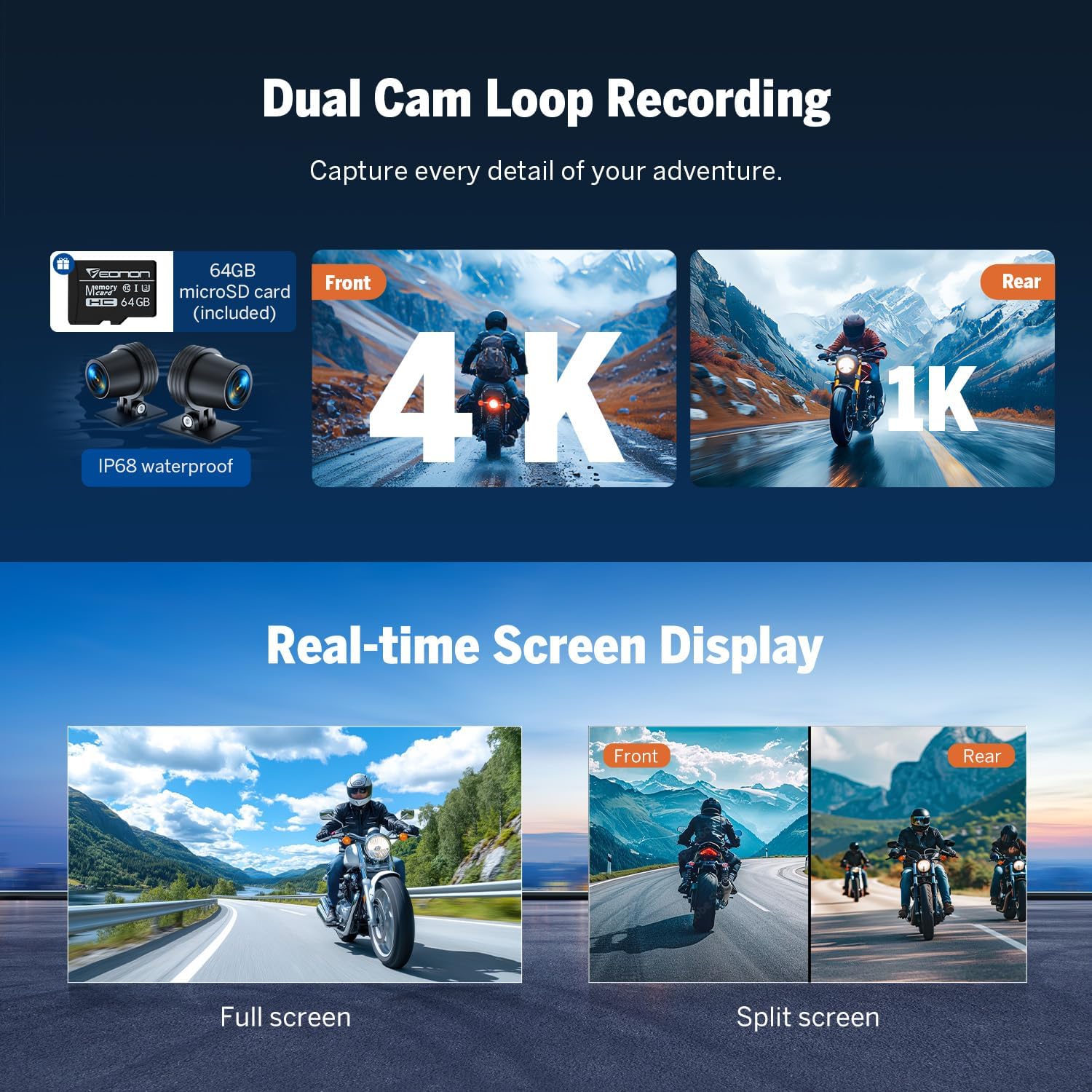
Figure 4.3: Dual Cam Loop Recording
4.3 Аудио чыгаруу
Audio from the P6 display can be outputted via the built-in speaker or a Bluetooth headset.
- Камтылган динамик: Түз аудио ойнотуу үчүн.
- Bluetooth гарнитура: Connect your Bluetooth-enabled headset or helmet for private audio and calls.

4.4-сүрөт: Аудио чыгаруу параметрлери
Video 4.2: Instructions on how to output audio to a Bluetooth headset from the Eonon P6.
4.4 Multifunctional Dashboard Display
The 7-inch IPS screen provides real-time information crucial for your ride.
- Шина басымын көзөмөлдөө системасы (TPMS): Real-time display of tire pressure for enhanced safety.
- Ылдамдык көрсөтүү: Учурдагы ылдамдыкты көрсөтөт.
- Компас: Багыттоочу көрсөтмөлөрдү берет.
- Убакытты көрсөтүү: Учурдагы убакытты көрсөтөт.
- Барометр: Monitors altitude changes.

Figure 4.5: Smart Riding Dashboard

Figure 4.6: TPMS and Data Storage
4.5 Колдонмо интеграциясы
Download the Viidure app to manage and view your riding footage жана маалыматтар.

Figure 4.7: App Integration with Viidure
Download the Viidure app: https://www.6zhentan.com/app/d0001/index.html
4.6 Wired Handlebar Remote
The wired remote control provides convenient access to functions while riding, ideal for motorcycles and ATVs.

Figure 4.8: Wired Handlebar Remote
5. Техникалык тейлөө
- Тазалоо: жумшак колдонуу, damp cloth to clean the display screen and exterior. Avoid abrasive cleaners or solvents.
- Программалык камсыздоо жаңыртуулары: Мезгил-мезгили менен өндүрүүчүнүн текшерүү website for available software updates to ensure optimal performance and new features.
- Сактагыч: Узак мөөнөткө колдонулбаганда, аппаратты салкын, кургак жерде сактаңыз.
6. Кыйынчылыктарды
- Кубат жок: Check all power connections. Ensure the motorcycle's ignition is on.
- Дисплей жооп бербейт: Try restarting the device by cycling the motorcycle's ignition.
- Bluetooth туташуу маселелери: Ensure Bluetooth is enabled on both the P6 and your smartphone. Forget and re-pair the device if issues persist.
- GPS сигналы начар: Ensure the GPS antenna is installed correctly and has a clear view асмандын.
- Камера көйгөйлөрү: Check camera connections. Ensure the SD card is properly inserted and not full.
7. Техникалык шарттар
| Өзгөчөлүк | Спецификация |
|---|---|
| Модель аты | P6 |
| Дисплей өлчөмү | 7 дюйм |
| Display Resolution | 1024 * 600 IPS |
| Камеранын чечилиши | Front 4K, Rear 1K |
| Суу өткөрбөйт рейтинги | IP68 |
| Иштөө температурасы | -20°Cден +60°Cге чейин |
| Байланыш технологиясы | Bluetooth, Wi-Fi, USB |
| Эстутум сактоо сыйымдуулугу | 64 ГБ (256 ГБ чейин кеңейтилет) |
| Элемент Салмагы | 3.04 фунт |
| Пакеттин өлчөмдөрү | 11.25 x 7 x 3.25 дюйм |
| Унаа кызматынын түрү | Мотоцикл |
8. Кепилдик жана колдоо
8.1 Кепилдик маалыматы
The Eonon P6 Motorcycle Display comes with a 2-Year Manufacturer Warranty. Please retain your proof of purchase for warranty claims.
8.2 Кардарларды колдоо
For technical assistance, troubleshooting, or warranty inquiries, please refer to the contact information provided on the official Eonon webсайт же сатып алуу платформаңыз.


