1. Продукт бүтүп калдыview
The Eonon Android 13 Car Stereo is a custom-designed head unit for Honda Civic 2006-2011 Left-hand drive vehicles. It features a 10.1-inch IPS HD touchscreen, Wireless CarPlay & Android Auto, and an advanced Android 13 system for enhanced in-car entertainment and navigation.

Figure 1.1: Eonon Android 13 Car Stereo with CarPlay interface.
2. Колдонулуучу унаа моделдери
This car stereo is specifically designed for Honda Civic models manufactured between 2006 and 2011, for left-hand drive vehicles. Please ensure your vehicle's dashboard dimensions and model year align before installation. Эскертүү: This car stereo is not compatible with the co-pilot airbag indicator light.
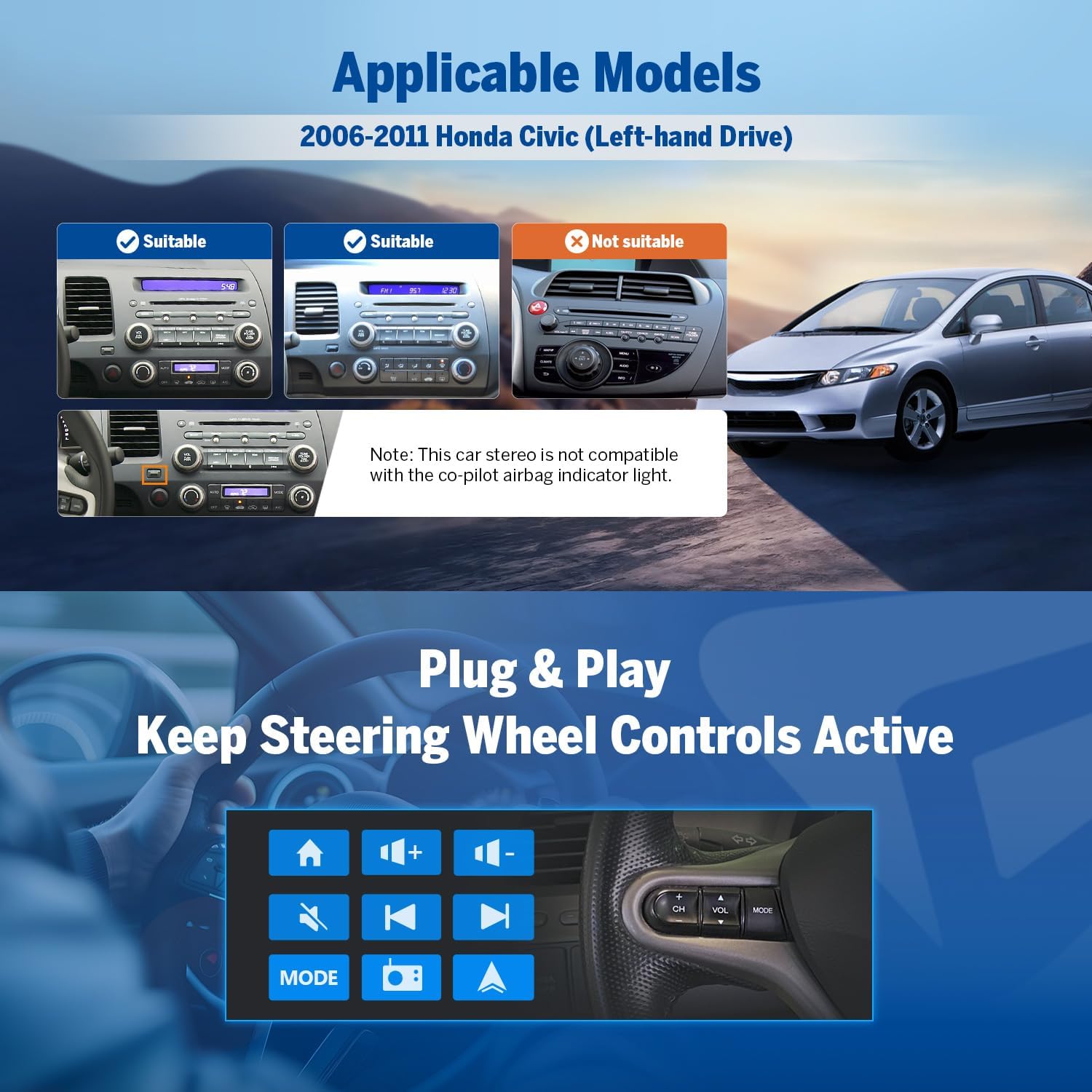
Figure 2.1: Compatibility guide for Honda Civic dashboards.
3. Кутуда эмне бар
Upon unboxing, verify that all the following components are included:
- Reversing Camera A0125 x1
- Электр кабели x1
- GPS антеннасы x1
- USB Adapter Cable x2
- Audio/Video Adapter Cable x1
- Audio Adapter Cable x1
- Reverse Video Input Cable x1
- 15A Spare Fuse x1
- Тышкы микрофон x1
- Колдонуучунун колдонмосу x1

3.1-сүрөт: Продукт пакетинин мазмуну.
4. Орнотуу жана орнотуу
The Eonon car stereo is designed for a plug-and-play installation, aiming to retain your car's factory features such as steering wheel controls. Professional installation is recommended.
4.1 Электр өткөргүч схемасы
Refer to the detailed wiring diagram for proper connection of all cables and accessories. Ensure all connections are secure before powering on the unit.
4.1-сүрөт: Башкы блоктун комплекстүү зым схемасы.
4.2 Retaining Factory Features
The unit supports integration with existing steering wheel controls, door reminders, and AC information/control, providing a seamless upgrade while preserving essential vehicle functionalities.

Figure 4.2: Integration with car's factory features.
5. Иштөө нускамалары
5.1 Android 13 системасы
The head unit runs on the latest Android 13 system, powered by an RK3562 Quad-core ARM Cortex-A53 CPU (2.0GHz) with 2GB RAM and 32GB ROM. This configuration ensures smooth multitasking and fast app response times.

Figure 5.1: Android 13 system interface.
5.2 Display and Audio Excellence
The 10.1-inch IPS HD capacitive touchscreen offers a resolution of 1280x720 and a wide 178° viewing angle for clear visuals. The built-in 36-band EQ and 4x45W surround sound amplifier provide a customizable and immersive audio experience, supporting various media formats including 1080P video, MP3, FLAC, and APE.

Figure 5.2: Display features and screen mirroring.

Figure 5.3: Audio customization options.
5.3 Wireless CarPlay & Android Auto
Enjoy seamless integration with your smartphone using Wireless CarPlay and Android Auto. Access navigation, music, calls, and messages via voice commands or the touchscreen. Wired options are also available for flexibility.

5.4-сүрөт: Зымсыз CarPlay жана Android Auto функциялары.
5.3.1 Зымсыз Apple CarPlay туташуу
- Унаа стереосундагы Zlink5 колдонмосун чыкылдатыңыз.
- iPhone'уңузда Wi-Fi жана Bluetooth'ду күйгүзүңүз.
- Find 'EONON' in your phone's Bluetooth device list and enter 0000 to pair. Once connected, tap 'Use CarPlay'.
- Байланышты аяктоо үчүн бир нече секунд күтө туруңуз.
5.3.2 зымсыз Android Auto туташуу
- Унаа стереосундагы Zlink5 колдонмосун чыкылдатыңыз.
- Android телефонуңузда Wi-Fi жана Bluetooth'ду күйгүзүңүз.
- Find 'EONON' in your phone's Bluetooth device list, enter 0000 and click 'OK'.
- Байланышты аяктоо үчүн бир нече секунд күтө туруңуз.
5.4 Bluetooth байланышы
Equipped with Bluetooth 5.4 and an independent Bluetooth module, the unit provides stable hands-free calls, high-quality music streaming, and quick phonebook searches.

Figure 5.5: Bluetooth features.
5.5 Advanced Features & Expandability
The unit supports backup camera input, dual-band Wi-Fi (2.4G/5G), and app installation. It includes 3 USB ports for external devices and is compatible with additional Eonon accessories (sold separately).
- Камдык камера: Supports A0125 rearview camera (included). Provides 720P AHD video with a 140° rear viewing angle and reversing guidelines.
- Dashcam: Compatible with Eonon dashcam (A100, not included) for 120° viewing angle and video playback.
- OBD2 Scanner: Supports OBD2 scanner (V0056, not included) for vehicle fault diagnosis and real-time status monitoring.

Figure 5.6: Backup camera features.

Figure 5.7: Dashcam compatibility.

Figure 5.8: OBD2 scanner compatibility.
5.6 Колдонуучу интерфейсин ыңгайлаштыруу
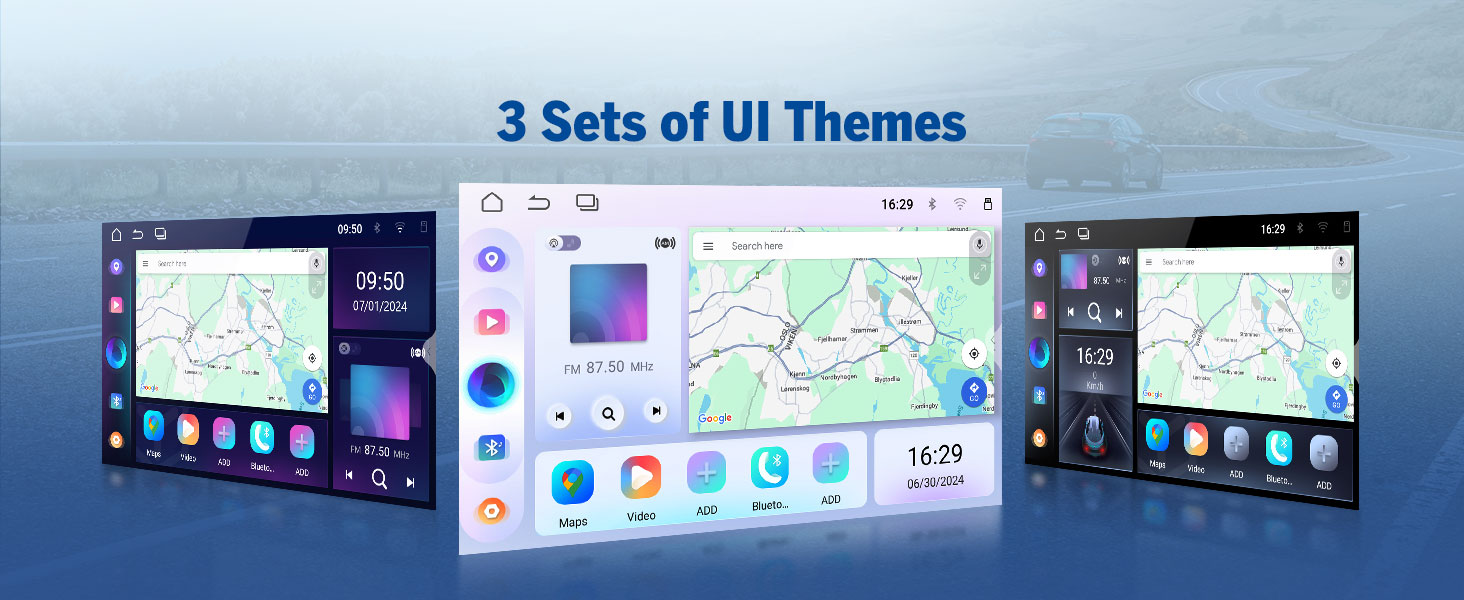
Personalize your stereo's appearance with options for boot logo, button color, and wallpaper. The unit also offers three distinct UI themes to choose from.

Figure 5.9: UI customization options.
6. Техникалык тейлөө
To ensure the longevity and optimal performance of your Eonon car stereo, follow these maintenance guidelines:
- Тазалоо: Экранды жана сыртын тазалоо үчүн жумшак, кургак чүпүрөктү колдонуңуз. өжөр тактар үчүн, бир аз гampчүпүрөктү суу менен. Катуу химиялык заттардан же абразивдүү материалдардан алыс болуңуз.
- Температура: Аппаратты өтө ысык жана муздак температурага узак убакыт бою тийгизүүдөн сактаңыз.
- Программалык камсыздоо жаңыртуулары: Regularly check for and apply Over-The-Air (OTA) firmware updates to fix software issues and enhance security. Note that these updates are for the software, not for an upgrade of the Android system.
7. Кыйынчылыктарды
This section addresses common issues you might encounter with your Eonon car stereo.
| Көйгөй | Мүмкүн себеп | Чечим |
|---|---|---|
| Күч жок | Blown fuse, incorrect wiring, loose power connection. | Check the 15A spare fuse. Verify all power cables are securely connected according to the wiring diagram. |
| Үн чыгышы жок | Incorrect speaker wiring, volume too low, mute enabled, ampкөтөргүч маселеси. | Check speaker connections. Increase volume. Ensure unit is not muted. Verify ampкөтөргүч байланыштар. |
| CarPlay/Android Auto туташпай жатат | Bluetooth/Wi-Fi off, incorrect pairing, Zlink5 app not launched. | Ensure Bluetooth and Wi-Fi are enabled on both devices. Re-pair the devices. Launch the Zlink5 app on the stereo. |
| Сенсордук экран жооп бербейт | Программалык камсыздоодогу мүчүлүштүк, экран коргоочусунун кийлигишүүсү. | Restart the unit. If a screen protector is installed, ensure it is properly applied and not causing issues. |
| Poor GPS Signal | GPS антеннасынын жайгаштырылышы, айлана-чөйрөнүн кийлигишүүсү. | Ensure the GPS antenna is placed in an unobstructed location, typically on the dashboard with a clear view асмандын. |
8. Техникалык шарттар
| Өзгөчөлүк | Деталь |
|---|---|
| Модель номери | HCIV1X6 |
| Операция системасы | Android 13 |
| CPU | RK3562 Төрт ядролуу ARM Cortex-A53 @ 2.0 ГГц |
| RAM | 2 ГБ |
| ROM | 32 ГБ |
| Дисплей өлчөмү | 10.1 дюйм |
| Дисплей түрү | IPS HD Capacitive Touchscreen |
| Резолюция | 1280x720 |
| Viewбурч | 178° |
| Ampөмүрлүү | 4x45W Surround Sound |
| Эквалайзер | 36-тилкелүү EQ |
| Bluetooth версиясы | 5.4 |
| Wi-Fi | Dual-band (2.4G/5G) |
| USB порттору | 3 |
| Элемент Салмагы | 4.4 фунт |
| Пакеттин өлчөмдөрү | 17.25 x 11.35 x 9.2 дюйм |
9. Кепилдик жана колдоо
For warranty information and technical support, please refer to the official Eonon website or contact their customer service directly. Eonon offers convenient online firmware updates (OTA) to ensure your head unit remains up-to-date and to address any software issues.
кире аласыз Amazon'догу EONON дүкөнү көбүрөөк продукт маалымат жана аксессуарлар үчүн.


