1. Продукт бүтүп калдыview
The TOPDON ArtiDiag600 Elite is a powerful and comprehensive OBD2 scanner designed for full-system vehicle diagnostics. It offers a wide range of functions, including reading and clearing Diagnostic Trouble Codes (DTCs), analyzing real-time data, and accessing Electronic Control Unit (ECU) information across all major vehicle systems such as Engine, ABS, Transmission Control Module (TCM), Steering Angle Sensor (SAS), Tire Pressure Monitoring System (TPMS), and Supplemental Restraint System (SRS).
This diagnostic tool is an upgraded version of previous models like the AD500, AD600S, and AD600 Pro, featuring enhanced hardware and software for a smoother and faster diagnostic experience. It supports over 70 car brands and 10,000 vehicle models, including compatibility with FCA Gateway for newer Chrysler, Jeep, Dodge, and Fiat vehicles (2017 onwards), and CAN-FD protocol for 2024 models like GM's Blazer and Cadillac CT series, and Chrysler's Grand Cherokee and Grand Wagoneer.

Figure 1.1: The TOPDON ArtiDiag600 Elite diagnostic tool, showcasing анын компакттуу дизайны жана колдонуучу интерфейси.
2. Пакеттин мазмуну
Upon unboxing your TOPDON ArtiDiag600 Elite, please verify that all components listed below are present and in good condition:
- ArtiDiag600 Elite Diagnostic Tool x 1
- OBD 16 Pin Diagnostic Cable x 1
- Type-C USB кабели x 1
- Ыкчам колдонуучу колдонмо x 1
- Колдонуучунун колдонмосу x 1
- Көтөрмө кап x 1

Figure 2.1: All items included in the ArtiDiag600 Elite package, neatly arranged within the carrying case.
3. Орнотуу жана алгачкы колдонуу
3.1 Аппаратты заряддоо
Before first use, ensure the ArtiDiag600 Elite is fully charged. Connect the provided Type-C USB cable to the device and a suitable power adapter. The device features a built-in Lithium Ion battery.
3.2 Күйгүзүү жана баштапкы конфигурация
Press and hold the power button to turn on the device. Follow the on-screen prompts to complete the initial setup, which includes selecting your preferred language (12 languages supported) and connecting to a Wi-Fi network for updates.
3.3 Программалык камсыздоо жаңыртуулары
The ArtiDiag600 Elite comes with 2 years of free software and vehicle coverage updates. It is highly recommended to perform a one-click update upon initial setup to ensure you have the latest features and vehicle compatibility. Regular updates keep your tool current with new vehicle models and diagnostic capabilities.

Figure 3.1: The device screen showing the update interface, highlighting the 2-year free update feature.
4. Operating the ArtiDiag600 Elite
4.1 Унаага туташтыруу
Locate your vehicle's OBD2 port, typically under the dashboard on the driver's side. Connect the OBD 16 Pin Diagnostic Cable from the ArtiDiag600 Elite to the vehicle's OBD2 port. Turn the vehicle's ignition to the 'ON' position (engine off).
4.2 Smart AutoVIN Identification
The ArtiDiag600 Elite features an AutoVIN function that automatically identifies your vehicle's VIN (Vehicle Identification Number) and provides precise vehicle information in seconds. This streamlines the diagnostic process by eliminating manual input.
4.3 Full-System Diagnostics
Navigate to the 'Diagnostics' menu on the device. The tool can perform a full-system scan, covering all electronic control units (ECUs) in your vehicle. This includes, but is not limited to, Engine, ABS, TCM, SAS, TPMS, and SRS systems. You can read and clear DTCs, view live data streams, and access ECU information for comprehensive troubleshooting.
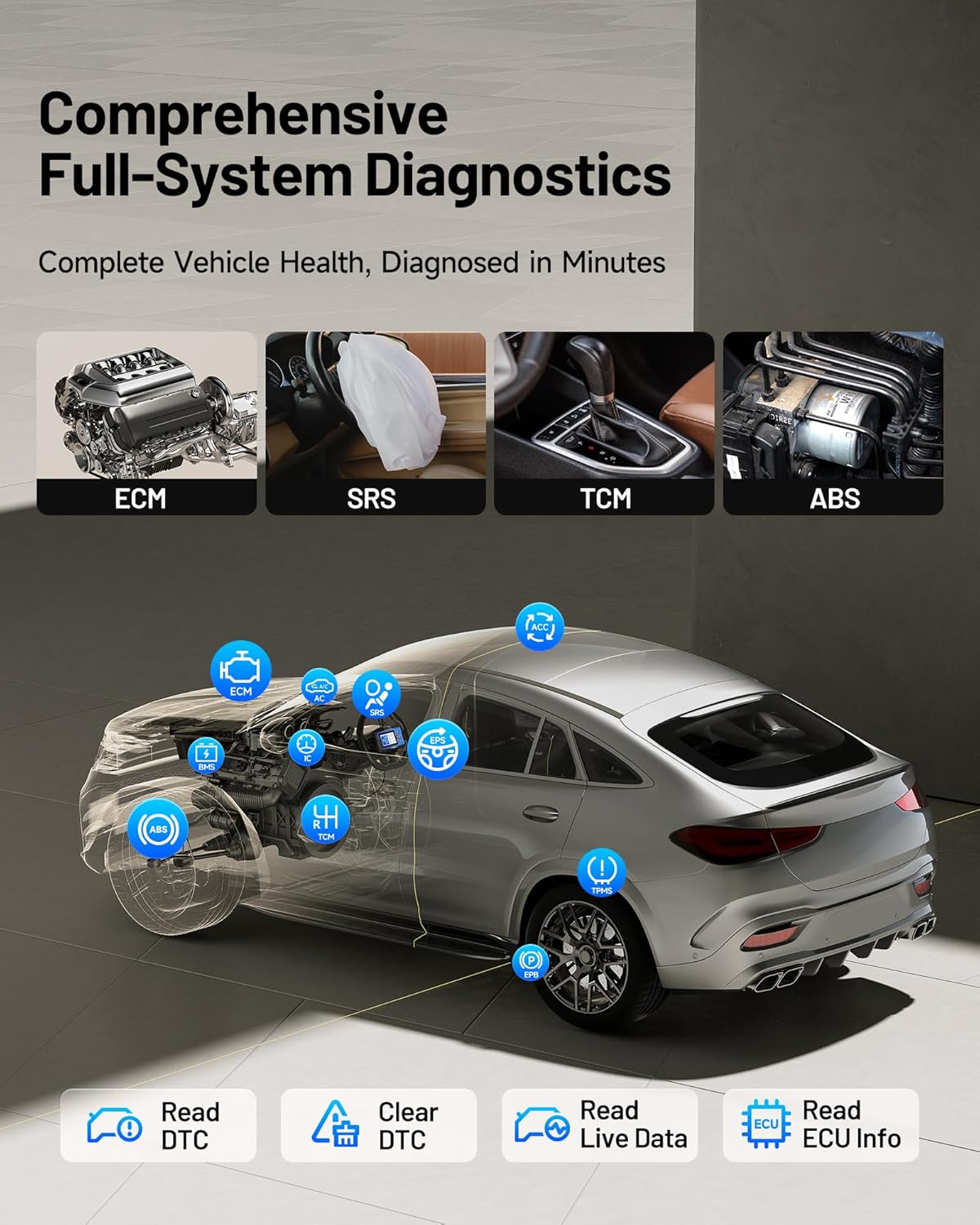
Figure 4.1: An illustration demonstrating the ArtiDiag600 Elite's capability to perform comprehensive diagnostics across all vehicle systems.
4.4 Жандуу берилиштердин мониторинги
Monitor real-time data parameters from various sensors and modules. The ArtiDiag600 Elite allows you to compare up to four data streams simultaneously, which is crucial for identifying intermittent issues and analyzing vehicle performance trends.
4.5 Диагностикалык отчетту түзүү
After completing a diagnostic session, the tool can generate detailed professional reports. These reports can be easily shared via email or QR code, providing a convenient way to document and communicate findings.

Figure 4.2: Visual representation of Smart AutoVIN, graphic live data, online user feedback, and diagnostic report generation features.
4.6 FCA Gateway and CAN-FD Support
The ArtiDiag600 Elite supports FCA Gateway access, enabling full diagnostics on newer Chrysler, Jeep, Dodge, and Fiat models from 2017 onwards. It also supports the CAN-FD protocol, ensuring compatibility with the latest vehicle models, including select GM and Chrysler vehicles from 2020-2024.

Figure 4.3: Diagram illustrating the FCA Gateway access and CAN-FD protocol support for modern vehicles.
5. Maintenance and Reset Services
The ArtiDiag600 Elite provides 13 essential and advanced reset services to assist with routine vehicle maintenance and specific system recalibrations. These functions help ensure your vehicle operates optimally and can save time and costs associated with dealership visits.
5.1 Essential Reset Services (9 Functions)
- Майды калыбына келтирүү: Май алмаштырылгандан кийин майдын иштөө мөөнөтү системасын баштапкы абалга келтирет.
- Дроссельди адаптациялоо: Initializes the throttle actuators to the default state.
- SAS баштапкы абалга келтирүү (Рулду башкаруу бурчун башкаруу сенсору): Performs calibration for the Steering Angle Sensor.
- Brake Reset (EPB): Resets the electronic parking brake pads after replacement.
- TPMSти баштапкы абалга келтирүү (дөңгөлөк басымын көзөмөлдөө системасы): Resets tire pressure sensors after replacement or rotation.
- BMSти баштапкы абалга келтирүү (Батареяны башкаруу системасы): Алмаштыргандан кийин жаңы батареяны каттайт.
- ABS кан агуу: Bleeds air from the brake system after component replacement.
- DPF регенерациясы (Дизель бөлүкчөлөрүнүн чыпкасы): DPF чыпкасынан бөлүкчөлөрдү тазалайт.
- Инжектор коддоо: Жаңы инжектор номерлерин ECUга коддойт.
5.2 Advanced Reset Services (4 Functions)
- AFSти баштапкы абалга келтирүү (Адаптивдүү алдыңкы жарыктандыруу системасы): Initializes the adaptive headlight system.
- AdBlue баштапкы абалга келтирүү: Resets the urea level after AdBlue fluid refill.
- Токтотуу/Баштоо баштапкы абалга келтирүү: Resets the engine start-stop system.
- Windows калибрлөөсү: Performs window initialization/calibration.

Figure 5.1: ашыкview of the 13 essential and advanced maintenance functions available on the ArtiDiag600 Elite.
6. Кыйынчылыктарды
This section provides general guidance for common issues you might encounter while using the ArtiDiag600 Elite. For more detailed troubleshooting or specific technical assistance, please refer to the support section.
6.1 Түзмөк күйбөй жатат
- Ensure the device is fully charged. Connect it to a power source using the provided Type-C USB cable and allow it to charge for at least 30 minutes before attempting to power it on again.
- Verify that the power button is being pressed and held for a sufficient duration (typically 3-5 seconds).
6.2 Failure to Connect to Vehicle
- Check that the OBD 16 Pin Diagnostic Cable is securely connected to both the ArtiDiag600 Elite and the vehicle's OBD2 port.
- Унаанын от алдыруу системасы "КҮЙҮК" абалында (кыймылдаткыч өчүрүлгөн) экенин текшериңиз.
- Verify that the vehicle's battery has sufficient voltagд. Батарея көлөмү азtagбайланышты болтурбай коё алат.
- Confirm that the vehicle model is supported by the ArtiDiag600 Elite. Refer to the vehicle coverage list in the specifications or on the TOPDON webсайт.
6.3 Diagnostic Functions Not Working
- Ensure the device software is up-to-date. Outdated software may lack support for newer vehicle systems or specific functions.
- Verify that the specific function (e.g., a reset service) is supported for your vehicle's make, model, and year. Not all functions are universally applicable.
- If an error message appears, note the message and consult the user manual or TOPDON support for specific guidance.
7. Техникалык шарттар
| Өзгөчөлүк | Description |
|---|---|
| Бренд | ТОПДОН |
| Модел | ArtiDiag600 Elite |
| Продукциянын өлчөмдөрү | 8.66"L x 3.35"W x 11.42"H |
| Элемент Салмагы | 2.29 фунт |
| Операция системасы | Android 11.0 |
| CPU | 4 ядролук процессор |
| Эс | 2 ГБ ОЗУ, 32 ГБ ROM |
| Дисплей | 5 дюймдук LCD |
| Батарея | 1 литий-иондук батарейка (кошулган) |
| Унаа камтуу | 70+ Brands, 10,000+ Models (from 1996 Onward) |
| Колдоого алынган протоколдор | FCA Gateway, CAN-FD, Full OBD2 Modes |
| Тилдер | 12 languages (English, German, Russian, Japanese, Portuguese, Polish, Spanish, French, Turkish, Korean, Simplified/Traditional Chinese) |
| UPC | 850051166800 |

Figure 7.1: Illustration of the ArtiDiag600 Elite's extensive vehicle compatibility across American, European, and Asian brands.
8. Кепилдик жана колдоо
8.1 Кепилдик маалыматы
The TOPDON ArtiDiag600 Elite comes with a 1 жылдык кепилдик from the date of purchase. This warranty covers manufacturing defects and ensures reliable operation of your device. Please retain your proof of purchase for warranty claims.
8.2 Free Software Updates
ырахат алыңыз 2 years of FREE software and vehicle coverage updates. These updates are crucial for keeping your ArtiDiag600 Elite compatible with the latest vehicle models and diagnostic technologies. Updates can be performed directly on the device via Wi-Fi.
8.3 Кардарларды колдоо
TOPDON provides professional customer service available 24/7 to assist you with any questions, technical issues, or troubleshooting needs. You can reach out to TOPDON support through their official website or the contact information provided in the quick user guide.


