1. Киришүү
This manual provides detailed instructions for the installation, operation, and maintenance of your Eonon E46X7 Android 14 Car Stereo. Please read this manual thoroughly before using the product to ensure proper functionality and to maximize your user experience. Keep this manual for future reference.

Image 1.1: Eonon E46X7 Car Stereo with accessories.
2. Колдонулуучу моделдер
The Eonon E46X7 Android 14 car stereo is designed for compatibility with the following BMW 3 Series (E46) models:
- BMW E46 M3 / 328i / 330Ci / 325i / 325xi / 328i / 328xi / 330i / 330xi 3 Series (1998-2006)
- BMW M3 (2000-2006)
No additional frame or cable changes are typically needed for these models, offering a plug-and-play installation. For specific model compatibility, refer to the detailed images provided.

Image 2.1: Visual guide for applicable BMW E46 models and AC control panel considerations.
3. Кутуда эмне бар
Орнотууну баштоодон мурун бардык компоненттер бар экендигин текшериңиз:
- E46X7 Car Stereo (x1)
- Электр зымы (x1)
- GPS антеннасы (x1)
- USB адаптер кабели (x2)
- Аудио/видео адаптер кабели (x2)
- Reverse video input cable (x1)
- 15А сактагыч (x1)
- Тышкы микрофон (x1)
- КАНБУС (x1)
- Кол менен (x1)
- Эки тараптуу чаптама чаптама (x1)
- Radio antenna adapter (x2)

Image 3.1: Contents of the Eonon E46X7 package.
4. Орнотуу жана орнотуу
4.1 Power Cable Connector Verification
Before installation, confirm the type of your original car radio power connector:
- If your 17-pin connector has 4 empty pins, it is ЖОК suitable for direct installation.
- If your 17-pin connector does not have empty pins, or if you have a 40-pin connector, the E46X7 can be installed directly.
- If the connector in the trunk is 17-pin or 40-pin, an additional Eonon A0590 extension harness may be required (not included).

Image 4.1: Power connector compatibility guide.
4.2 AC Control Panel Relocation
If your car's air conditioning control panel is located in the center console, it must be removed and reinstalled below the E46X7 car stereo. Refer to Image 2.1 for a visual guide on this process.
4.3 Электр өткөргүч схемасы
Follow the wiring diagram carefully for correct connections. Ensure all cables are securely connected to their respective ports.
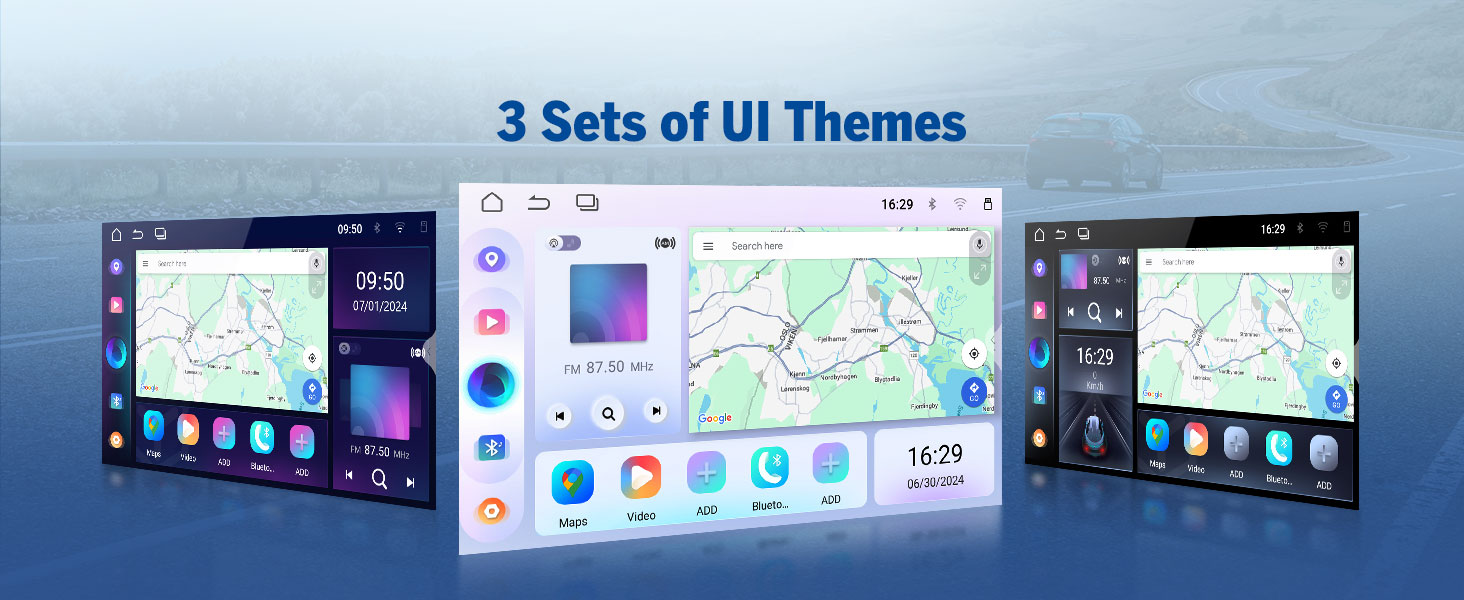
Image 4.2: Comprehensive wiring diagram for the E46X7 unit.
5. Иштөө нускамалары
5.1 Wireless CarPlay & Android Auto
The E46X7 supports both wireless Apple CarPlay and Android Auto for seamless smartphone integration. This allows for hands-free control of music, navigation, calls, and messages via voice commands like 'Hey Siri' or 'Hey Google'.
5.1.1 Зымсыз Apple CarPlay туташуу
- Унаа стереосундагы Zlink5 колдонмосун чыкылдатыңыз.
- iPhone'уңузда Wi-Fi жана Bluetooth'ду күйгүзүңүз.
- Find 'EONON' in your phone's Bluetooth device list and enter '0000' to pair. Once connected, tap 'Use CarPlay'.
- Wait a few seconds for the connection to complete.
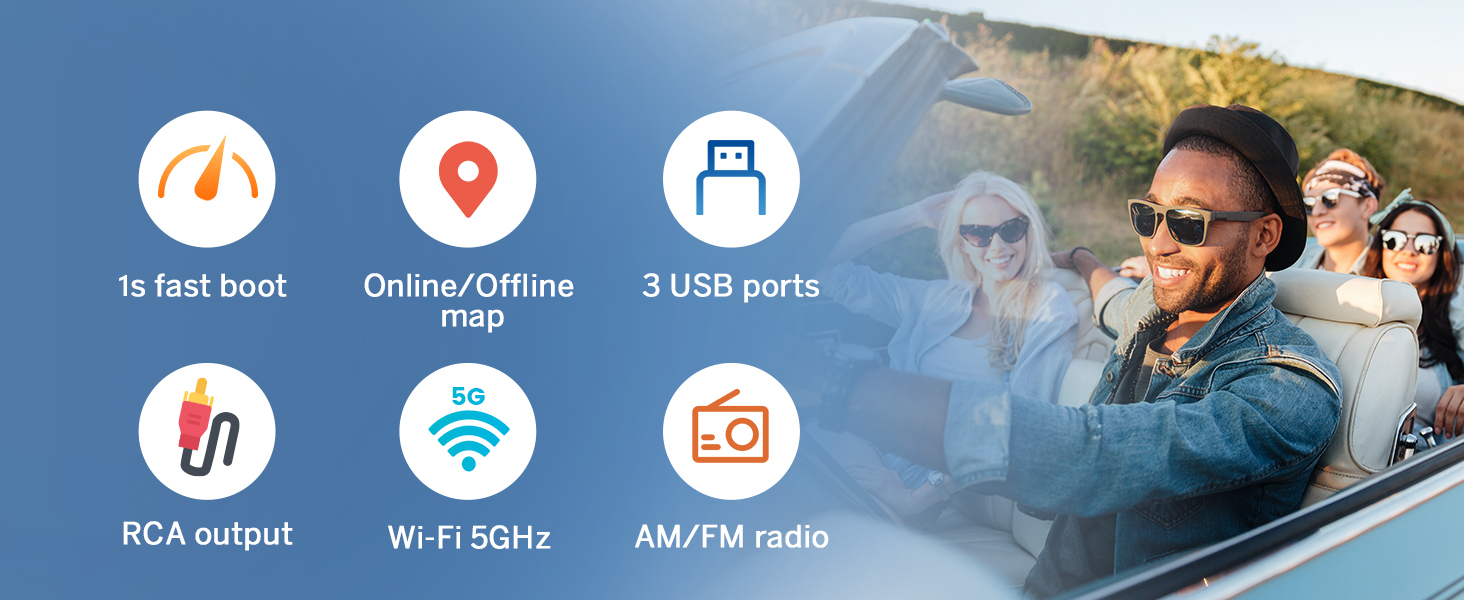
Image 5.1: Wireless Apple CarPlay connection steps.
5.1.2 зымсыз Android Auto туташуу
- Унаа стереосундагы Zlink5 колдонмосун чыкылдатыңыз.
- Android телефонуңузда Wi-Fi жана Bluetooth'ду күйгүзүңүз.
- Телефонуңуздун Bluetooth түзмөктөрүнүн тизмесинен 'EONON' таап, жупташтыруу үчүн '0000' деп терип, 'OK' баскычын басыңыз.
- Wait a few seconds for the connection to complete.

Image 5.2: Wireless Android Auto connection steps.
5.2 Экранды чагылдыруу
Mirror your smartphone's display onto the car stereo screen.
5.2.1 Screen Mirroring for iOS
- Click the Zlink5 app on the car stereo. Set the car stereo to iPhone wireless screen mirroring mode.
- iPhone'дун хотспотун күйгүзүп, унаанын стереосуна туташыңыз.
- Turn on the iPhone screen mirroring function and select 'zj-airplay'.

Image 5.3: iOS Screen Mirroring connection steps.
5.2.2 Screen Mirroring for Android
- Click the Zlink5 app on the car stereo. Set the car stereo to Android wireless screen mirroring mode.
- Телефонуңуздун Bluetooth'ун күйгүзүңүз. Телефонуңуздун Bluetooth түзмөктөрүнүн тизмесинен 'EONON'ду таап, жупташтыруу үчүн '0000' деп киргизиңиз.
- Телефондун хотспотту күйгүзүп, унаанын стереосуна туташыңыз.
- Install the Zplus app on your phone. Turn on the app and select 'wireless connection'.
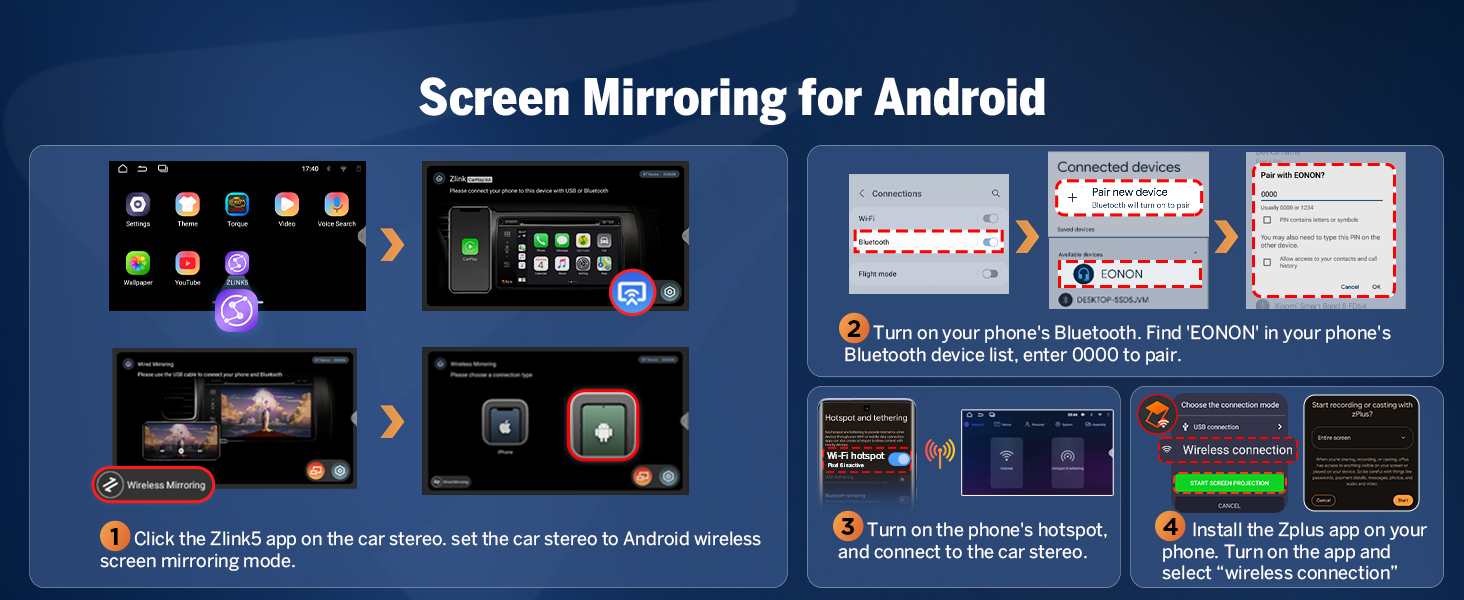
Image 5.4: Android Screen Mirroring connection steps.
5.3 Built-in DSP (Digital Signal Processing)
The integrated DSP chip allows for precise audio tuning. It features a 4x45W output, a 36-band equalizer, and 6 EQ modes to customize your sound experience. DSP enables time alignment, ensuring sound waves from different speakers reach the listener simultaneously for improved sound quality and precision.
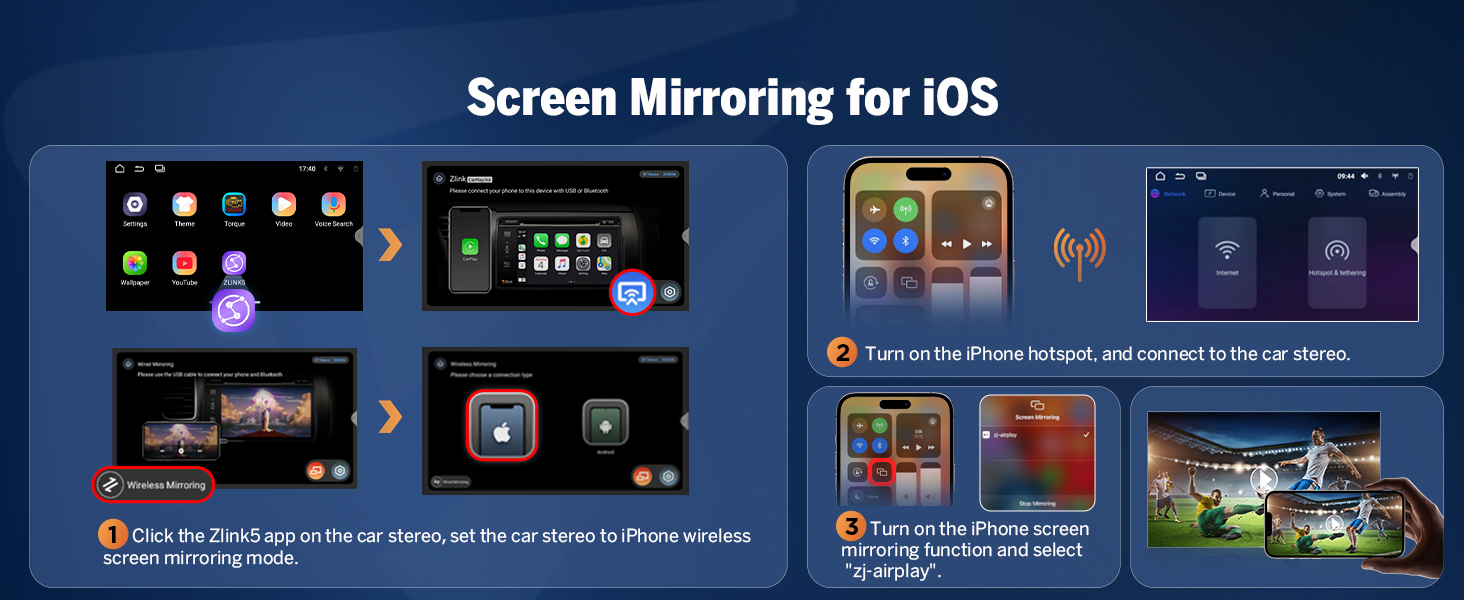
Image 5.5: Built-in DSP features and interface.
5.4 Bluetooth байланышы
The E46X7 includes an independent Bluetooth module and an extra Bluetooth antenna for quick, stable connections, noise reduction, crystal-clear call quality, and high-quality Bluetooth music streaming.

Image 5.6: Bluetooth module and features.
5.5 Колдонуучу интерфейсин ыңгайлаштыруу
Personalize your car stereo's appearance with various customization options:
- Boot Logo: Set a custom boot logo.
- Баскычтын түсү: Adjust the color of the physical buttons.
- Обои: Choose from various wallpapers or upload your own.
- UI темалары: Select from 3 distinct user interface themes.

Image 5.7: User interface customization options.
6. Функциялар & Техникалык шарттар
6.1 Негизги өзгөчөлүктөрү
- Операция системасы: Newest Android 14 System (API level 34)
- Процессор: Rockchip processor (outperforms conventional 8-core processors)
- Эстутум: 3 ГБ RAM + 32 ГБ ROM
- Дисплей: 9-inch IPS 1280x720 resolution HD screen with 178° viewing angle, multi-touch capacitive touchscreen.
- Аудио: Built-in DSP chips, 4x45W output, 36-band equalizer adjustment.
- Байланыш: Wireless/Wired CarPlay & Android Auto, Bluetooth, Wi-Fi (5GHz), USB (3 ports), AUX audio input.
- Радио: 18 FM/AM channels.
- Жаңыртуулар: Online firmware updates (OTA) for software enhancements and security. Note: These updates are for software, not Android system upgrades.
- Шайкештик: Supports Eonon dashcam (A100) and DAB+ box (502) (not included). Eonon rearview camera (A0125) is included and supported.
- Тез жүктөө: 1-second fast boot.
- Навигация: Online/Offline map support.
- Чыгуу: RCA чыгаруу.

Image 6.1: Android 14 system overview.

Image 6.2: Performance benchmark (AnTuTu scores).
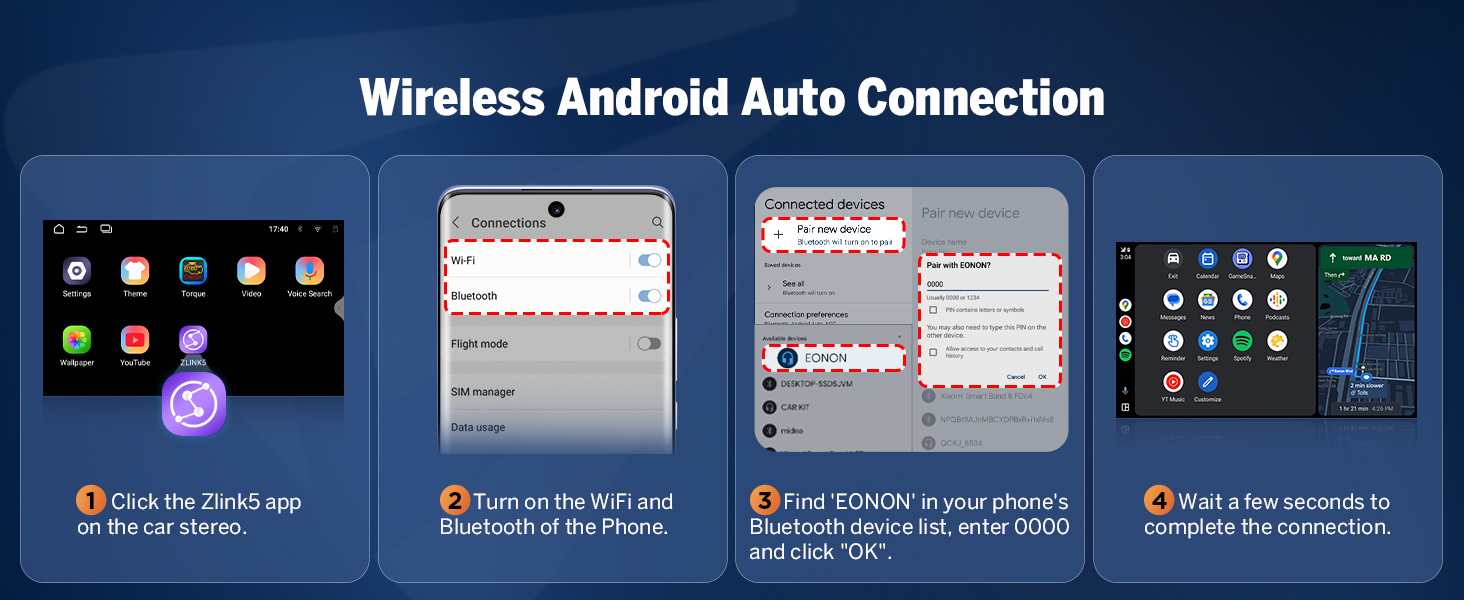
Image 6.3: 9-inch IPS display features.
6.2 Жалпы спецификациялар
- Продукциянын өлчөмдөрү: 8.98 x 3.94 x 5.32 дюйм
- Элемент Салмагы: 3.59 фунт
- Модель аты: E46X7
- Экрандын өлчөмү: 9 дюйм
- Монтаж түрү: Куралдар тактасы
- Аудио чыгаруу режими: Стерео
7. Техникалык тейлөө
To ensure the longevity and optimal performance of your Eonon E46X7 car stereo, follow these general maintenance guidelines:
- Тазалоо: Экранды жана сыртын тазалоо үчүн жумшак, кургак чүпүрөктү колдонуңуз. Бетине зыян келтирүүчү абразивдүү тазалагычтардан же эриткичтерден алыс болуңуз.
- Программалык камсыздоо жаңыртуулары: Regularly check for and install available firmware updates via OTA (Over-The-Air) to benefit from performance improvements and security enhancements.
- Экологиялык шарттар: Аппаратты экстремалдык температурага, түз күн нуруна узак убакытка же ашыкча нымдуулукка дуушар кылуудан алыс болуңуз.
- Кабелдик байланыштар: Кабелдик туташуулар коопсуз жана бузулбашы үчүн мезгил-мезгили менен текшерип туруңуз.
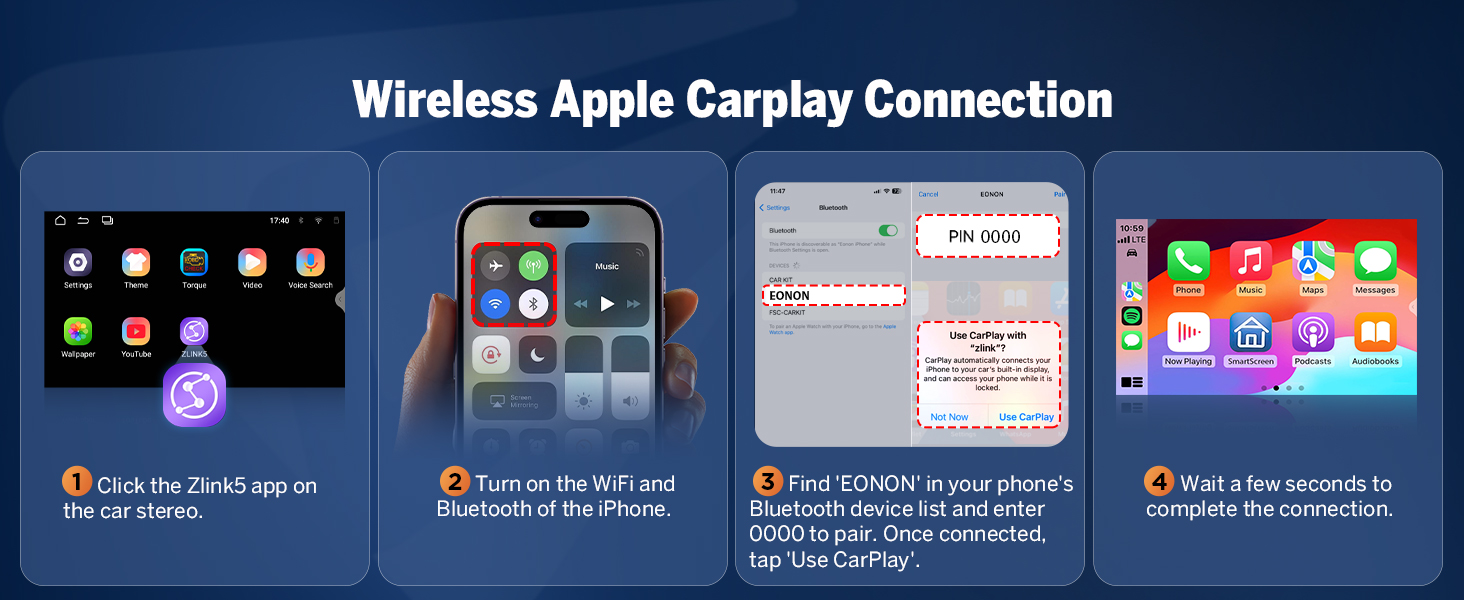
Image 7.1: Over-the-air firmware update screen.
8. Кыйынчылыктарды
If you encounter issues with your Eonon E46X7, refer to the following common troubleshooting tips:
- Кубат жок: Бардык электр туташууларын жана 15А сактагычын текшериңиз. Унаанын от алдыруу системасы күйүк экенин текшериңиз.
- Үн жок: Verify speaker connections, check volume levels, and ensure the DSP settings are correctly configured. Confirm that the audio output mode is set to Stereo.
- CarPlay/Android Auto туташпай жатат: Ensure Wi-Fi and Bluetooth are enabled on both the stereo and your phone. Re-pair the devices. Check the Zlink5 app settings.
- Рулдун башкаруу элементтери иштебейт: Some vehicles may require specific programming or an additional adapter for full steering wheel control functionality. Consult your vehicle's manual or Eonon support.
- Камдык камеранын көйгөйлөрү: Ensure the camera is correctly wired to the reverse video input. Verify the camera's resolution is supported (minimum 720p).
- Жөндөөлөр сакталбайт: Ensure the unit is receiving constant power (B+ wire) to retain settings when the car is off.
- Системанын кечигүүсү/жооп бербөө: Close unnecessary background applications. Perform a system restart. Ensure the firmware is up to date.
For persistent issues, contact Eonon customer support for further assistance.
9. Кепилдик жана колдоо
Eonon products typically come with a manufacturer's warranty. Please refer to the warranty card included with your product or visit the official Eonon webдеталдуу кепилдик шарттары жана шарттары үчүн сайт.
For technical support, product inquiries, or warranty claims, please contact Eonon customer service through their official channels. You can often find support information on the Eonon brand store page on Amazon or their dedicated support webсайт.
Visit the official EONON Store: EONON Store


