Introduction
This manual provides essential information for the safe and efficient operation, maintenance, and troubleshooting of your Leitz IQ Slim Paper Shredder. Please read this manual thoroughly before using the shredder and retain it for future reference.
The Leitz IQ Slim Paper Shredder is designed for home and home office use, offering P4 cross-cut security for confidential documents. It features a compact design, quiet operation, and anti-jam technology to ensure a smooth shredding experience.
Коопсуздук маалыматы
ЭСКЕРТҮҮ: Бул коопсуздук нускамаларын аткарбоо өрт, электр шок же жаракат алып келиши мүмкүн.
- Колдорду, чачты жана кенен кийимдерди кагаз киргизүү тешигинен алыс кармаңыз.
- Балдарды жана үй жаныбарларын майдалагычтан алыс кармаңыз.
- Unplug the shredder when not in use or before moving, cleaning, or emptying the waste bin.
- Do not shred metal objects, adhesive labels, or wet paper.
- Эгерде электр шнуру бузулган болсо, майдалагычты иштетпеңиз.
- Do not attempt to service the shredder yourself. Refer all servicing to qualified service personnel.
- Майдалагыч туруктуу, тегиз жерге коюлганын текшериңиз.
Жайгашуу
- Пакеттен чыгаруу: Carefully remove the shredder from its packaging. Ensure all components are present, including the shredder head, waste bin, and power cord.
- Жайгашкан жери: Position the shredder on a flat, stable surface in your desired home or office location. Ensure there is adequate space around the unit for ventilation and access to the power outlet.
- Контейнерди орнотуу: Place the waste bin securely into the shredder base. The shredder head should sit firmly on top of the bin. The unit will not operate if the head is not correctly seated.
- Кубат туташуу: Электр шнурын стандарттуу электр розеткасына сайыңыз.

1-сүрөт: Фронт view of the Leitz IQ Slim Paper Shredder, illustrating its compact design suitable for home or office environments.
Иштөө нускамалары
Башкаруу панелиview
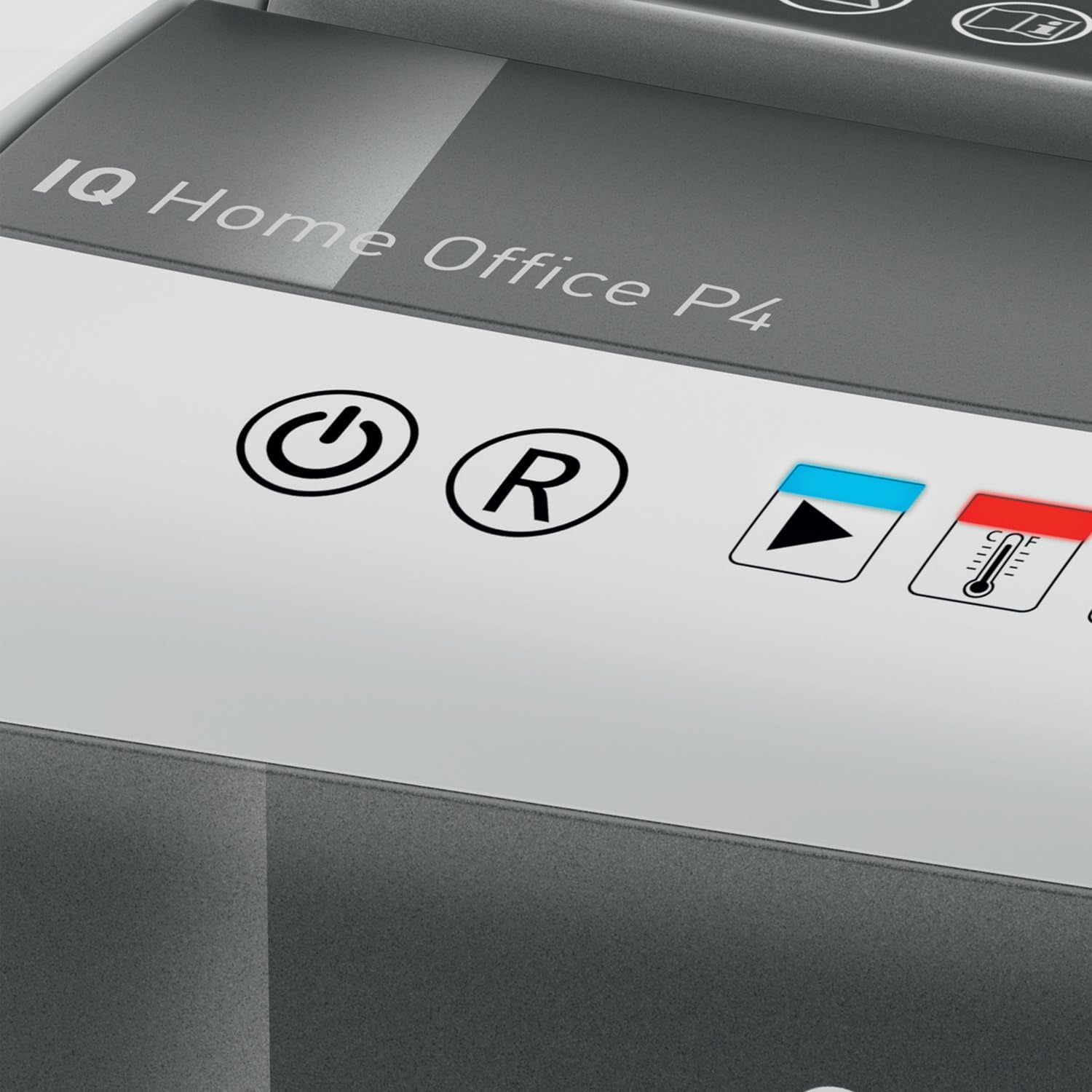
2-сүрөт: Close-up of the shredder's touch control panel, showing the power, reverse, and status indicators.
The shredder features intuitive touch controls for easy operation.
- Кубат баскычы (⌛): Press to turn the shredder ON or OFF.
- Reverse Button (R): Press to reverse the shredding mechanism, useful for clearing minor paper jams.
- Overload Indicator (Red LED): Illuminates if too much paper is inserted, indicating a potential jam.
- Overheat Indicator (Red LED with Thermometer): Illuminates when the shredder has reached its maximum continuous run time and needs to cool down.
Документтерди майдалоо
- Ensure the shredder is plugged in and powered ON.
- Insert up to 10 барак of letter-size (8.5" x 11") paper into the paper entry slot. The shredder will automatically begin shredding.
- The shredder can also process staples and small paper clips.
- For optimal performance and to prevent jams, avoid exceeding the maximum sheet capacity.

3-сүрөт: The shredder in operation, demonstrating the secure cross-cut shredding of a confidential document.

4-сүрөт: Visual representation of the shredder's capacity, capable of shredding up to 10 letter-size sheets simultaneously.
Continuous Run Time and Cool Down
The shredder has a continuous run time of approximately 6 мүнөт. After this period, the overheat indicator LED will illuminate, and the shredder will automatically shut off to prevent damage. Allow the shredder to cool down for at least 30 minutes before resuming operation. This helps prolong the life of the motor.
Техникалык тейлөө
Таштанды кутусун бошотуу
үзгүлтүксүз бошотуңуз 6-gallon (225 sheet capacity) waste bin to prevent paper jams and maintain optimal shredder performance. The transparent window on the bin allows for easy monitoring of the shredded paper level.
- Ensure the shredder is turned OFF and unplugged from the power outlet.
- Carefully lift the shredder head off the waste bin.
- Empty the shredded paper into a suitable recycling container.
- Replace the shredder head securely onto the waste bin.

5-сүрөт: The shredder head lifted from the waste bin, revealing the shredded paper inside and demonstrating the bin's capacity.
Тазалоо
To clean the exterior of the shredder, wipe it with a soft, dry cloth. Do not use abrasive cleaners or solvents. For optimal performance, consider using shredder oil sheets periodically to lubricate the cutting blades. Follow the instructions provided with the shredder oil sheets.
Проблемаларды чечүү
| Көйгөй | Мүмкүн себеп | Чечим |
|---|---|---|
| Шредер иштебей жатат. | Not plugged in; shredder head not properly seated; power switch off. | Ensure power cord is securely plugged in. Re-seat the shredder head firmly onto the waste bin. Turn the power switch ON. |
| Кагаз тыгылышы. | Too much paper inserted; paper folded or crumpled. | басыңыз Артка (R) button to clear the paper. If necessary, unplug the shredder, carefully remove the shredder head, and manually clear the paper. Do not force paper. |
| Майдалагыч иштеп жатканда токтойт жана Ашыкча ысытуу индикатору күйүп турат. | Үзгүлтүксүз иштөө убактысынан ашып кетти. | Allow the shredder to cool down for at least 30 minutes. The LED will turn off when it is ready for use again. |
| Шредер ызы-чуу чыгарып жатат. | Blades require lubrication; waste bin is full. | Use shredder oil sheets to lubricate the blades. Empty the waste bin. |
Техникалык шарттар
| Өзгөчөлүк | Спецификация |
|---|---|
| Модель номери | 170004 |
| Shred түрү | Кайчылаш кесүү |
| Коопсуздук деңгээли | DIN P4 |
| Барактын сыйымдуулугу | Up to 10 sheets (8.5" x 11" paper) |
| Бин сыйымдуулугу | 6 галлон (болжол менен 225 барак) |
| Үзгүлтүксүз иштөө убактысы | 6 мүнөт |
| Муздатуу убактысы | Болжол менен 30 мүнөт |
| Shred Speed | мүнөтүнө 6 фут |
| чылпак | Paper, staples, paper clips |
| Анти-джем технологиясы | Automatic stop and reverse |
| Controls | Сенсордук башкаруу |
| Өнүмдүн Өлчөмдөрү (Ж x Y x D) | 10 x 14.7 x 14.5 дюйм |
| Элемент Салмагы | 15.12 фунт |
| Өндүрүүчү | ACCO бренддери |
Кепилдик жана колдоо
Чектелген Кепилдик
Your Leitz IQ Slim Paper Shredder is covered by a Чектелген 2 жылдык кепилдик from the date of purchase. This warranty covers defects in materials and workmanship under normal use. It does not cover damage resulting from misuse, abuse, accident, unauthorized service, or normal wear and tear.
Кепилдик дооматтары үчүн сатып алганыңыздын далилин сактап коюңуз.
Кардарларды колдоо
For technical assistance, warranty inquiries, or to order replacement parts, please contact Leitz customer support. Refer to the contact information provided on the official Leitz webсайтка же продуктунун таңгагына.
Online resources and FAQs may also be available on the Leitz brand webсайт: Visit the Leitz Store on Amazon


