Introduction
This manual provides comprehensive instructions for the setup, operation, maintenance, and troubleshooting of your EWEADN Wireless Mechanical Typewriter Keyboard. Please read this manual carefully before using the product to ensure optimal performance and longevity.
Продукт бүттүview
Негизги өзгөчөлүктөрү
- Ретро машинка Дизайн: Aesthetic design with electroplated punk keycaps and a metallic matte texture.
- Tri-Mode туташуу: Bluetooth 5.0, 2.4 ГГц зымсыз жана USB-C зымдуу туташууларын колдойт.
- Көп түзмөктү колдоо: Бир эле учурда 5ке чейин түзмөктү туташтырат.
- Механикалык көк өчүргүчтөр: Provides a tactile and audible typing experience with satisfying feedback.
- 87 Негизги Анти-Гостинг: Ensures accurate and smooth input even during high-speed typing or gaming.
- White Backlit with 10 Effects: Single-color backlight with various lighting modes and adjustable brightness.
- Батареянын узак иштөө мөөнөтү: Узак пайдалануу үчүн 1900mAh батарейка менен жабдылган.
- Кеңири шайкештик: Compatible with Windows 7/8/10/XP/Vista, Linux, and Mac OS systems.
Компоненттер
Пакетке төмөнкүлөр кирет:
- EWEADN Wireless Mechanical Typewriter Keyboard
- USB-C Cable
- 2.4GHz USB Receiver (typically stored in the keyboard's battery compartment or a dedicated slot)
- Колдонуучунун Колдонмосу (бул документ)

Сүрөт: бүттүview of the TK940 keyboard highlighting its main features.

Сүрөт: жарылды view illustrating the internal components of the keyboard, including keycaps, switches, metal panel, battery, and PCB.
Жайгашуу
Tri-Mode Connection
Your EWEADN keyboard supports three connection modes: Bluetooth, 2.4GHz wireless, and USB-C wired. You can connect up to 5 devices simultaneously and switch between them easily.
- Bluetooth Connection (BT1/BT2/BT3):
- Баскычтоп күйгүзүлгөнүн текшериңиз.
- Басып кармап туруңуз FN + 1, FN + 2, же FN + 3 for approximately 3-5 seconds until the indicator light flashes rapidly, indicating pairing mode.
- On your device (computer, tablet, smartphone), enable Bluetooth and search for "EWEADN Keyboard" or similar.
- Жупташтыруу үчүн баскычтопту тандаңыз. Туташтырылгандан кийин индикатор жарыгы өчүп-өчүп токтойт.
- Жупташтырылган Bluetooth түзмөктөрүнүн ортосунда которулуу үчүн, жөн гана басыңыз FN + 1, FN + 2, же FN + 3.
- 2.4 ГГц зымсыз туташуу:
- Locate the 2.4GHz USB receiver (dongle). It is usually stored in a slot on the keyboard.
- USB ресиверди компьютериңиздеги жеткиликтүү USB портуна сайыңыз.
- Басыңыз FN + 4 on the keyboard to switch to 2.4GHz mode. The keyboard should connect automatically.
- USB-C зымдуу туташуу:
- Берилген USB-C кабелинин бир учун клавиатуранын USB-C портуна туташтырыңыз.
- USB-C кабелинин экинчи учун компьютериңиздеги жеткиликтүү USB портуна туташтырыңыз.
- Басыңыз FN + 5 on the keyboard to switch to wired mode. The keyboard will function as a wired device and also charge its internal battery.
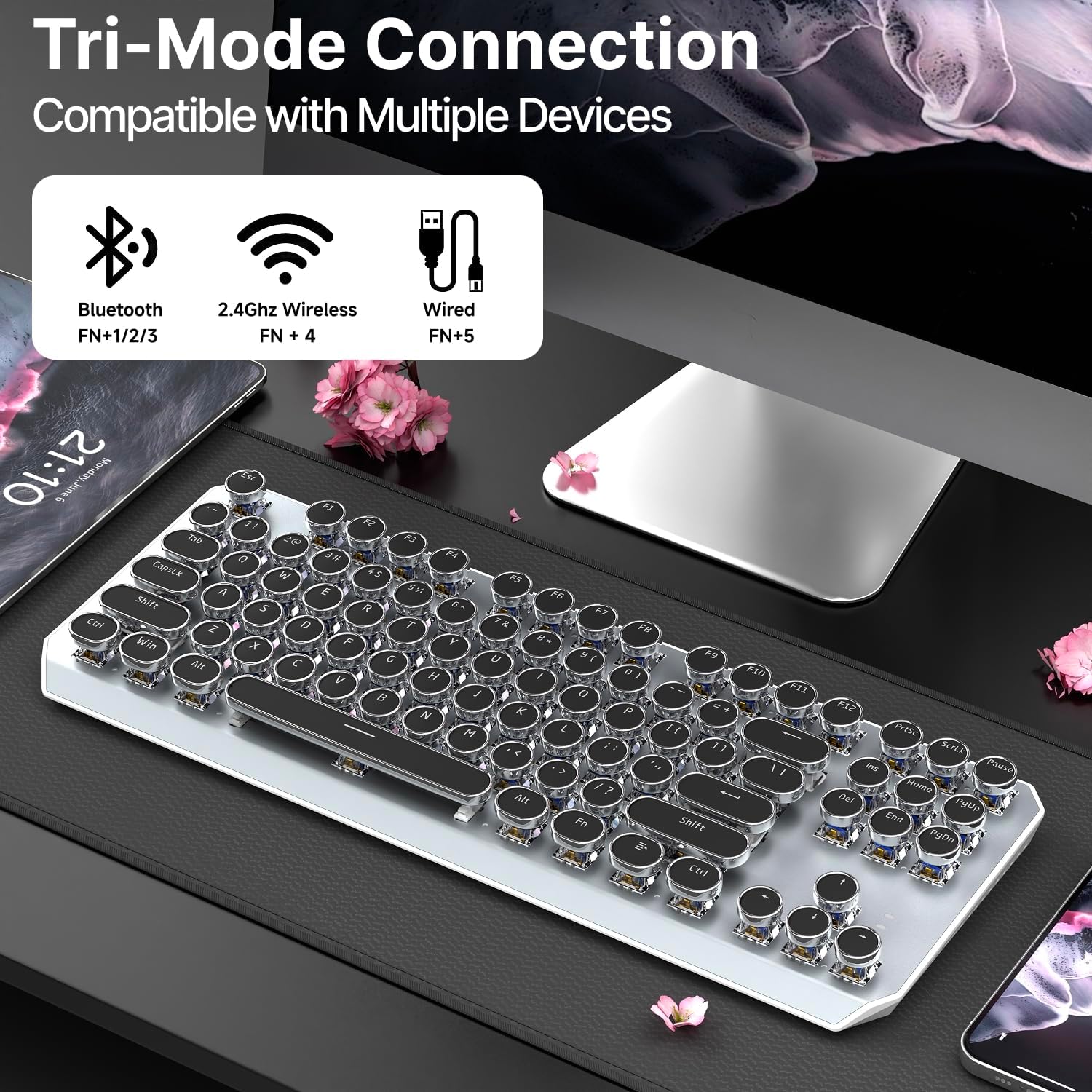
Image: Visual guide to the keyboard's tri-mode connection options and how to activate them using FN key combinations.

Сүрөт: Жакын план view demonstrating the physical connections and key combinations for Bluetooth, 2.4GHz wireless, and USB-C wired modes.
Иштөө нускамалары
Арткы жарыкты башкаруу
The keyboard features a white backlight with 10 different lighting effects. Use the following key combinations to control the backlight:
- Жарык эффектин өзгөртүү: Басыңыз FN + 6 / 7 / 8 / 9 to cycle through the 10 available lighting effects.
- Жарыктыкты жогорулатуу: Басыңыз FN + ↑ (Up Arrow).
- Жарыктыкты азайтуу: Басыңыз FN + ↓ (Down Arrow).
- Reset Lighting: Басыңыз FN + ESC to revert to default lighting settings.
- Slow Down Lighting Effect: Басыңыз FN + ← (Left Arrow).
- Speed Up Lighting Effect: Басыңыз FN + → (Right Arrow).

Image: Illustration of the keyboard's lighting effects and the corresponding FN key commands for adjustment.

Image: Detailed visual guide to controlling the keyboard's backlight settings, including brightness, effect changes, and speed adjustments.
Anti-Ghosting
The 87-key layout features full anti-ghosting, meaning that each key press is registered accurately, even when multiple keys are pressed simultaneously. This prevents key conflicts and ensures precise input for both typing and gaming.
Шайкештик
The EWEADN Wireless Mechanical Typewriter Keyboard is designed for wide compatibility with various operating systems, including:
- Windows 7 / 8 / 10 / XP / Vista
- Linux
- Mac OS systems
No specific drivers or software are required for basic functionality.
Техникалык тейлөө
- Тазалоо:
To clean the keyboard, power it off and disconnect it from any devices. Use a soft, lint-free cloth slightly dampened with water or a mild cleaning solution. For dust and debris between keycaps, use compressed air or a small brush. Avoid excessive moisture.
- Батареяга кам көрүү:
The keyboard is equipped with a 1900mAh rechargeable battery. To prolong battery life:
- Батареяны бат-баттан толук кубаттап калуудан алыс болуңуз.
- Берилген USB-C кабелин колдонуп, баскычтопту кубаттаңыз.
- Эгер клавиатураны узак убакытка сактасаңыз, аны болжол менен 50% кубаттап, салкын, кургак жерде сактаңыз.

Image: Visual representation of the keyboard's 1900mAh battery capacity and its potential duration.

Image: Detailed breakdown of battery life estimates with backlight on and off.
- Сактагыч:
Клавиатураны таза, кургак жерде, өтө жогорку температурадан жана түз күн нурунан алыс сактаңыз.
Проблемаларды чечүү
| Көйгөй | Мүмкүн себеп | Чечим |
|---|---|---|
| Keyboard not responding / "Doesn't work" | Low battery, incorrect connection mode, pairing issue, faulty receiver (2.4GHz). |
|
| Ачкычтар катталбайт же жасалма | Software conflict, physical obstruction, or rare hardware issue. |
|
| Bluetooth байланышы туруксуз | Interference, distance, low battery, device driver issues. |
|
| Арткы жарык иштебей жатат же тыгылып калган | Low battery, software glitch, or incorrect setting. |
|
Техникалык шарттар
| Өзгөчөлүк | Деталь |
|---|---|
| Модель номери | EWEADN-TK940-2 |
| Байланыш технологиясы | Bluetooth 5.0, 2.4 ГГц зымсыз, USB-C зымдуу |
| Ачкычтардын саны | 87 |
| Которуу түрү | Blue Mechanical Linear Switch |
| Иштеп жаткан күчтөр | 50±10гф |
| Өткөрүү соккусу | 2.2 ± 0.5м |
| Total Travel | 4.0±0.4мм |
| Батарея сыйымдуулугу | 1900mAh (9V batteries included) |
| Баскычтоптун арткы жарыгы | Single Color (White), 10 Lighting Effects |
| Anti-Ghosting | Толук ачкыч Анти-Гостинг |
| Шайкеш түзмөктөр | Laptop, PC, Gaming Console, Tablet, Smartphone |
| Операциялык системалар | Windows 7/8/10/XP/Vista, Linux, Mac OS |
| Элемент Салмагы | 1.83 фунт |
| Пакеттин өлчөмдөрү | 15.98 x 11.02 x 2.13 дюйм |

Image: Detail of the Blue Mechanical Linear Switches used in the keyboard.

Image: Technical specifications of the Blue Mechanical Linear Switches, including operating force and travel distances.
Кепилдик жана колдоо
EWEADN is committed to providing excellent customer service. For any inquiries, troubleshooting assistance, or support regarding your product, please contact us via email:
Our support team can assist with pre-sales questions, troubleshooting, accessory reissues, and returns/exchanges.

Сүрөт: бүттүview of the comprehensive after-sales support provided, including contact information.


