1. Киришүү
This manual provides detailed instructions for the installation, operation, and maintenance of your KERUI 2.4GHz WiFi Water Leak Detector. Please read this manual thoroughly before using the device to ensure proper function and safety. This device is designed to detect water leaks and water levels, providing real-time alerts to help protect your home from water damage.
2. Продукт бүтүп калдыview

2.1-сүрөт: The KERUI Water Leak Detector main unit.
2.1 Негизги өзгөчөлүктөрү
- 3-in-1 Advanced Functionality: Equipped with a top sensor, two bottom sensors, and an extra-long detachable detection cable (105cm) for comprehensive water leak and water level detection. Easily switch between modes by connecting or disconnecting the cable.
- Реалдуу убакыт эскертмелери: Connects to 2.4GHz WiFi to send instant alerts and notifications to your smartphone via the Tuya Smart app when a leak is detected.
- Катуу 100дБ Ойготкуч: Emits a continuous 100dB audible alarm for 60 seconds upon detection, ensuring you are alerted even if not near your phone.
- Компакт жана көрктүү дизайн: Measuring approximately 65x65x28 mm, the detector is discreet and integrates seamlessly into any home environment.
- IP67 суу өткөрбөйт рейтинги: Durable IP67 waterproof casing and anti-rust coating ensure long-term use in humid environments.
2.2 Пакеттин мазмуну
Пакетиңизде бардык буюмдар бар экенин текшериңиз:
- KERUI Water Leak Detector
- 105cm External Probe
- Hook and Screws for mounting
- User Manual
- 4 AAA батарейкалары (кошулган)

2.2-сүрөт: The detector unit with its external detection cable.
3. Орнотуу
3.1 Батареяны орнотуу
The device requires 4 AAA alkaline batteries. These are typically pre-installed. To activate, open the battery compartment and remove the protective film from the batteries. Ensure correct polarity when inserting or replacing batteries.

3.1-сүрөт: Illustration of battery installation. Open the compartment, insert 4 AAA batteries, ensuring correct polarity.
3.2 Колдонмону жүктөп алуу жана жупташтыруу
The KERUI Water Leak Detector operates with the Tuya Smart application. Ensure your smartphone is connected to a 2.4GHz Wi-Fi network before proceeding.
- Колдонмону жүктөп алыңыз: Scan the QR code provided in the manual or search for "Tuya Smart" in your smartphone's app store (Google Play Store for Android, Apple App Store for iOS).
- Катталуу/Кирүү: Open the Tuya Smart app and register a new account or log in with an existing one.
- Түзмөк кошуу:
- Ensure the detector is powered on (batteries installed and protective film removed).
- In the Tuya Smart app, tap the "+" icon to add a device.
- Select "Security & Sensor" then "Water Leak Detector (Wi-Fi)".
- Follow the on-screen instructions to connect the device to your 2.4GHz Wi-Fi network. This usually involves pressing a button on the detector to enter pairing mode.
- Once connected, you can rename the device for easier identification (e.g., "Kitchen Leak Sensor").
3.2-сүрөт: Steps for app download and Wi-Fi pairing. Scan the QR code to download the Tuya Smart app, then follow in-app instructions to connect to your 2.4GHz Wi-Fi network.
Download the Tuya Smart App: https://smartapp.tuya.com/tuyasmart
4. Операция
4.1 аныктоо режимдери
The detector offers three detection methods:
- Water Leak Detection (Default): The two probes on the back of the alarm detect water. When water bridges these probes, the alarm triggers.
- Drip Detection: A probe on the front of the alarm is designed to detect small drips. Place it directly under a potential drip source.
- Суунун деңгээлинин мониторинги: Use the included 105cm external detection cable with two probes to monitor specific water levels. Connect the cable to the detector to activate this mode.

4.1-сүрөт: Three usage options for the water immersion alarm. This includes hanging the external probe, placing the unit on the ground to detect leaks from the back sensors, or placing it to detect drips from the front sensor.
4.2 Сигналдын иштеши
When water is detected by any of the sensors, the device will:
- Emit a loud 100dB audible alarm for 60 seconds.
- Send instant notifications to your smartphone via the Tuya Smart app.
4.2-сүрөт: The 100dB alarm is designed to be heard across your home, providing immediate awareness of a water event.
4.3 App Notifications and Remote Monitoring
The Tuya Smart app allows for remote monitoring and management:
- Receive real-time push notifications on your phone when a leak is detected, even when you are away from home.
- View the history and timestamps of all alarm events within the app.
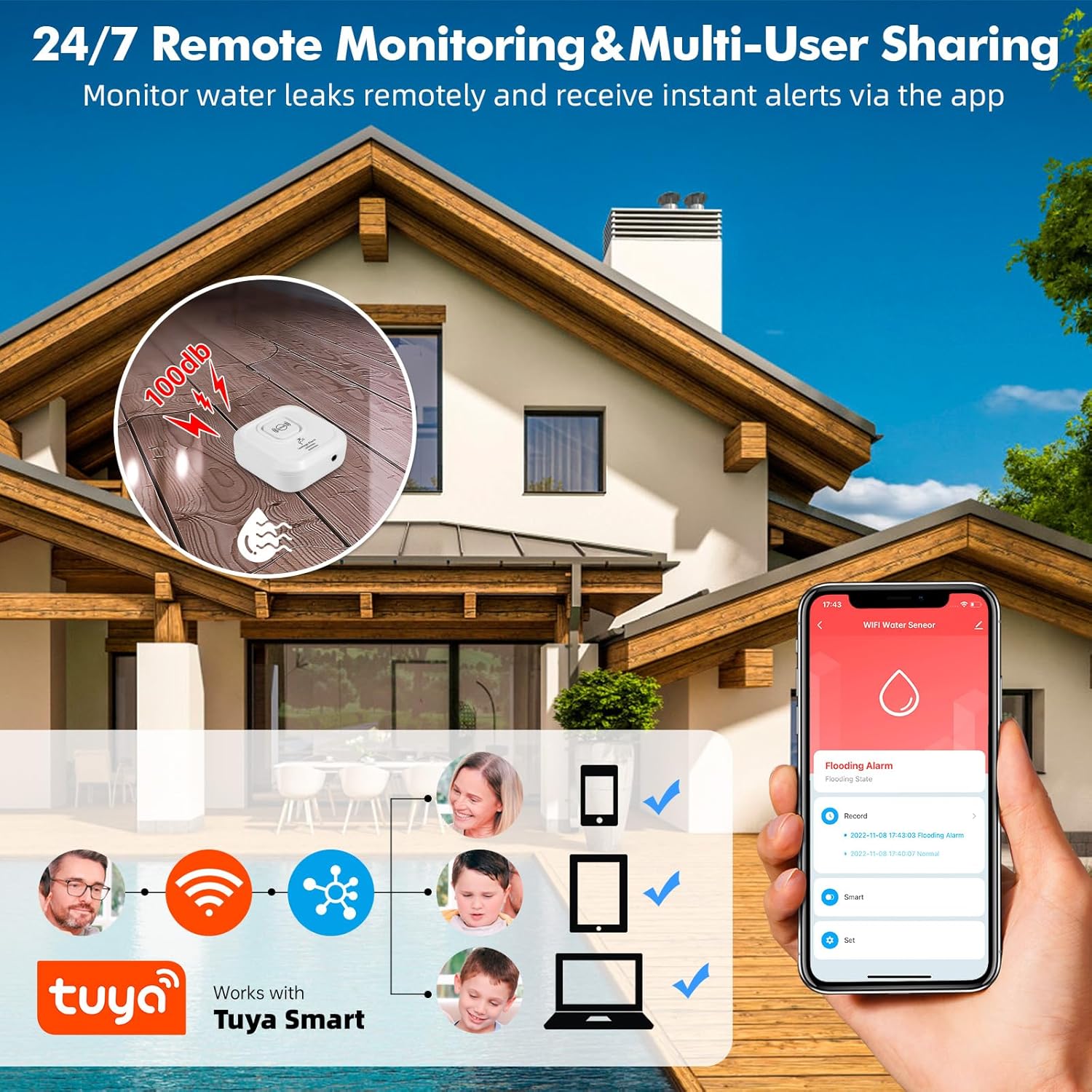
- Share device access with multiple users (family members) through the app.
- App notifications are free. Optional phone call and SMS notifications may incur charges (refer to Tuya app for details).

4.3-сүрөт: Remote monitoring and multi-user sharing capabilities through the Tuya Smart app, allowing multiple family members to receive alerts.

4.4-сүрөт: Example of real-time water leak notifications received through the Tuya Smart app.
5. Орнотуу жана жайгаштыруу
The compact design and IP67 rating allow for flexible placement in various locations prone to water leaks.
- Сунушталган жерлер: Near water-containing appliances such as dishwashers, washing machines, water heaters, under sinks, in bathrooms, kitchens, basements, laundry rooms, and near sump pumps.
- Монтаждоо параметрлери:
- Жерге жайгаштыруу: Simply place the detector on the floor in areas where leaks are likely to occur. Use the back sensors for general leak detection or the front sensor for drip detection.
- Wall Mounting/Hanging: Utilize the included hook and screws to mount the detector on a wall. The 105cm external probe can then be extended to the desired detection point, such as inside a cabinet under a sink.
- Naming Devices: Use the Tuya Smart app to name each detector and specify its location (e.g., "Basement Water Heater," "Kitchen Sink") for clear identification of alarm sources.

5.1-сүрөт: Examples of suitable locations for installing the KERUI Water Leak Detector.
6. Техникалык тейлөө
- Батареяны алмаштыруу: The app will notify you when battery levels are low. Replace all 4 AAA batteries promptly to ensure continuous protection. Always use new alkaline batteries.
- Сенсор тазалоо: Periodically inspect the detection probes for any dirt, dust, or corrosion. Clean them gently with a soft, dry cloth to ensure optimal sensitivity.
- Программалык камсыздоонун жаңыртуулары: Check the Tuya Smart app regularly for any available firmware updates for your device. Updates can improve performance and add new features.
- Экологиялык шарттар: While the device is IP67 rated, avoid prolonged submersion or exposure to extreme temperatures outside its operating range.
7. Кыйынчылыктарды
| Көйгөй | Мүмкүн себеп | Чечим |
|---|---|---|
| Түзмөк күйбөйт. | Батареялар өлүп калган же туура эмес орнотулган. | Ensure batteries are inserted with correct polarity. Replace with new AAA alkaline batteries. |
| Колдонмо эскертмелери алынган жок. |
|
|
| Device does not detect water. |
|
|
| Audible alarm is too quiet or not sounding. |
|
|
| 2.4 ГГц Wi-Fi'га туташуу мүмкүн эмес. |
|
|
8. Техникалык шарттар
| Өзгөчөлүк | Деталь |
|---|---|
| Бренд | KERUI |
| Модел | Суу агып чыгууну аныктоочу |
| Байланыш | 2.4 ГГц Wi-Fi |
| Power Source | 4 х AAA щелочтук батарейкалар |
| Үн деңгээли | 100 дБ |
| Башкаруу ыкмасы | Tuya Smart Application |
| Өлчөмдөрү (L x W x Y) | 8 x 2.5 x 8 cm (approx. 65x65x28 mm for the main unit) |
| Салмагы | 44 грамм |
| Суу өткөрбөйт рейтинги | IP67 |
| External Probe Length | 105 см |
| Max Range (Wireless) | 20 метр (болжол менен, айлана-чөйрөгө жараша) |
| Sensor Technology | Байланыш сенсору |
9. Коопсуздук маалыматы
- Аппаратты балдар жана үй жаныбарлары жетпеген жерде сактаңыз.
- Түзмөктү өз алдынча бөлүктөргө бөлүүгө же оңдоого аракет кылбаңыз. Бул кепилдикти жокко чыгарып, зыян келтириши мүмкүн.
- Колдонулган батарейкаларды жергиликтүү эрежелерге ылайык жок кылыңыз. Батареяларды отко таштабаңыз.
- Ensure the device is placed on a stable surface or securely mounted to prevent accidental falls.
- This device is designed to detect water leaks and levels. It is not a substitute for proper plumbing maintenance or flood prevention measures.
10. Кепилдик жана колдоо
For any questions, suggestions, or technical support regarding your KERUI Water Leak Detector, please contact KERUI customer service. Refer to the product packaging or the official KERUI webбайланыш маалыматы үчүн сайт.
Information regarding specific warranty periods or repair services is not available in this manual. Please retain your purchase receipt for warranty claims.