1. Киришүү
Thank you for choosing the HOU iPad Keyboard Case. This manual provides detailed instructions for setting up, operating, and maintaining your new keyboard case. Designed for enhanced productivity and protection, this accessory transforms your iPad into a versatile workstation.
2. Шайкештик
This keyboard case is designed to be compatible with specific iPad models. Please verify your iPad's model number to ensure proper fit and functionality.
How to Check Your iPad Model:
- барыңыз Орнотуулар iPad'иңизде.
- Басыңыз Генерал, анда Жөнүндө.
- табыңыз Модель номери. It typically starts with 'A' followed by four digits (e.g., A2602).
- Alternatively, the model number is printed in tiny text on the back case of your iPad.
Шайкеш iPad моделдери:
- iPad 9th Generation 10.2 inch 2021 (Model Numbers: A2602/A2603/A2604/A2605)
- iPad 8th Generation 10.2 inch 2020 (Model Numbers: A2270/A2428/A2429/A2430)
- iPad 7th Generation 10.2 inch 2019 (Model Numbers: A2200/A2197/A2198)
- iPad Air 3 (10.5 inch)
- iPad Pro 10.5 inch 2017

3. Негизги өзгөчөлүктөрү
The HOU iPad Keyboard Case offers a range of features designed to enhance your iPad experience:
- Silent & Responsive Typing: Equipped with premium silicone-coated scissor switches for quiet, comfortable, and efficient typing.
- Magnetic Detachable Design: The keyboard can be easily detached from the case, allowing for flexible use in tablet mode or laptop mode.
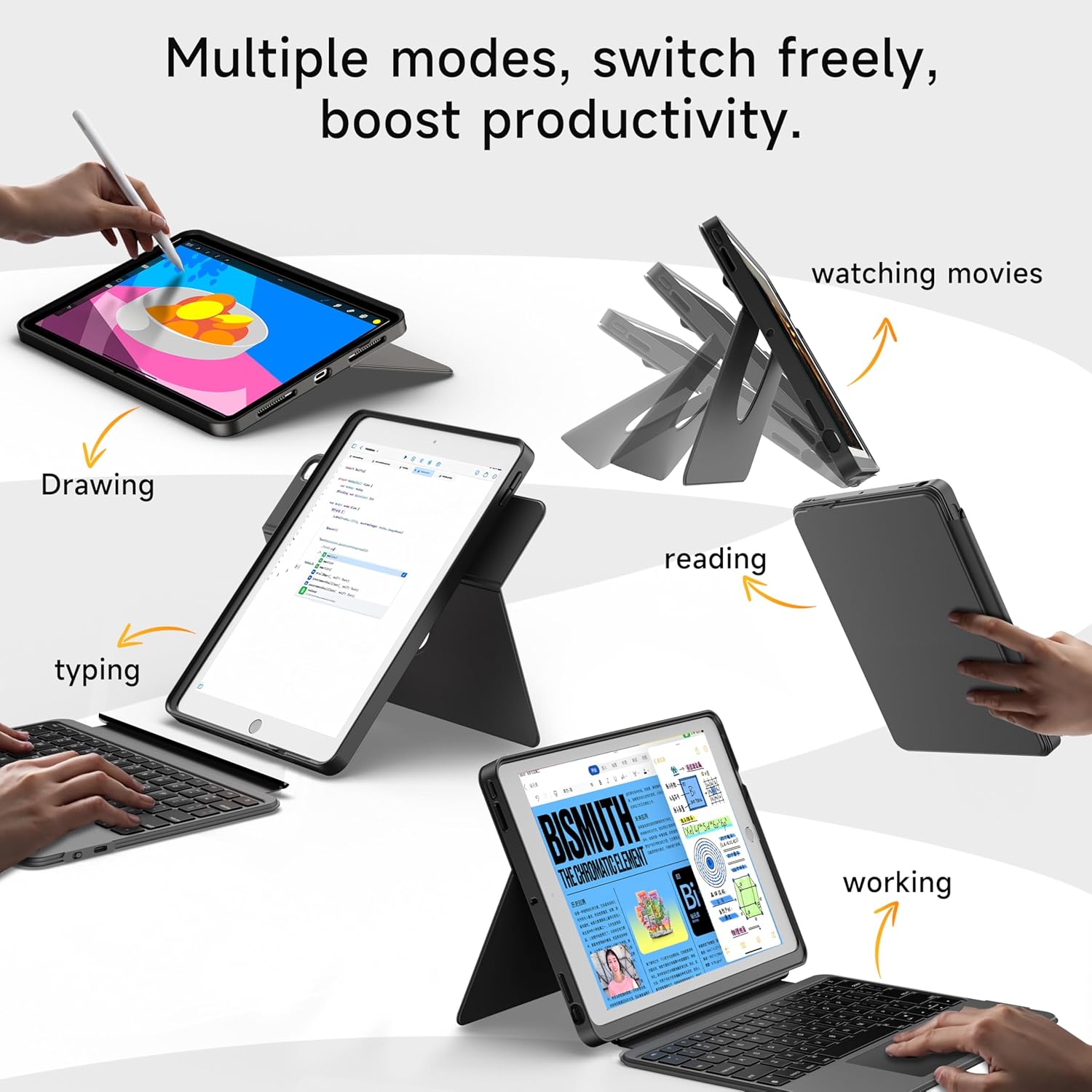
- 360° Rotating Stand with Adjustable Angles: Provides versatile viewing angles, supporting both portrait and landscape orientations for various activities like reading, watching, or presenting.
- 7-Color Backlit Keyboard: Features adjustable 7-color backlighting for typing in low-light conditions, with customizable brightness levels.
- Аскердик деңгээлдеги коргоо: The shockproof silicone case offers 360° protection against drops and spills.
- Secure Apple Pencil Storage: Includes an elastic strap to securely hold your Apple Pencil.
- Интегралдык сенсордук такта: A large multi-touch touchpad supports iOS gestures for precise navigation.
- Батареянын узак иштөө мөөнөтү: The keyboard features a 500mAh battery, providing up to 50 hours of use with backlighting off, or 4-6 hours with backlighting on.

4. Орнотуу нускамалары
4.1. Баскычтопту заряддоо
Before first use, ensure the keyboard is fully charged.
- USB-C кубаттоо портун баскычтоптун капталынан табыңыз.
- Connect the provided USB-C cable to the keyboard and a compatible power adapter (not included).
- The LED indicator will turn red during charging and turn off when fully charged. A 2-hour charge provides weeks of use.

4.2. Bluetooth Жупташтыруу
Follow these steps to connect your keyboard to your iPad via Bluetooth:
- Ensure the keyboard is charged and turn it on using the power switch.
- iPad'иңизден төмөнкүгө өтүңүз Орнотуулар > Bluetooth.
- басып, кармап туруңуз FN + CONTROL + R keys on the keyboard for 3 seconds to enter pairing mode. The Bluetooth indicator light on the keyboard will flash.
- On your iPad, select "HOU Keyboard" from the list of available devices.
- Once paired, the Bluetooth indicator light on the keyboard will turn off.
5. Иштөө нускамалары
5.1. Using the Keyboard
The keyboard provides a full QWERTY layout with dedicated iOS command keys for efficient workflow.
- Кыска Keys: Access one-tap shortcuts for screen brightness, media playback, volume control, Lock, Home, and Emoji functions.
- Терүү: Enjoy a comfortable and quiet typing experience for documents, emails, and more.

5.2. Арткы жарыкты тууралоо
Баскычтоптун жарыктыгын жөнгө салууга мүмкүн болгон 7 түстүү жарыктандыруусу бар.
- Түсү өзгөртүү: Басыңыз FN + Light Bulb icon to cycle through the 7 available colors.
- Жарыктыкты жөндөө: Басыңыз FN + Өйдө жебе or FN + Төмөн жебе to increase or decrease backlight brightness.
5.3. Сенсордук панелди колдонуу
The large multi-touch touchpad supports various iOS gestures for intuitive navigation:
- Бир манжа менен таптоо: Чыкылдатыңыз/Тандоо.
- Two Fingers Swipe: Өйдө/ылдый/солго/оңго жылдырыңыз.
- Three Fingers Swipe Up: Башкы экранга өтүңүз.
- Three Fingers Swipe Down: View Башкаруу борбору.
- Чымчып киргизүү/чыгуу: Чоңойтуу/кичирейтүү.
5.4. Utilizing the 360° Rotating Stand
The integrated stand allows for flexible viewтандоо параметрлери:
- Пейзаж режими: Ideal for watching videos, presentations, or typing.
- Портрет режими: Perfect for reading documents, browsing social media, or video calls.
- Жөнгө салынуучу кыйшаюусу: Tilt the screen from 90° (typing) to 170° (movie nights) for optimal comfort.


6. Техникалык тейлөө
To ensure the longevity and optimal performance of your HOU iPad Keyboard Case, follow these maintenance guidelines:
- Тазалоо: жумшак колдонуу, damp Корпустун жана клавиатуранын сыртын сүртүү үчүн чүпүрөк колдонуңуз. Катуу химиялык заттардан же абразивдүү материалдардан алыс болуңуз.
- Сактагыч: When not in use, keep the keyboard case closed to protect the screen and keyboard. Store in a cool, dry place away from extreme temperatures.
- Суюктуктардан алыс болуңуз: While the case offers some protection, avoid direct exposure to liquids to prevent damage to the electronic components.
7. Кыйынчылыктарды
If you encounter any issues with your HOU iPad Keyboard Case, refer to the following common solutions:
- Keyboard Not Connecting via Bluetooth:
- Клавиатура толугу менен заряддалганын жана күйүп турганын текшериңиз.
- Turn off and on your iPad's Bluetooth, then try pairing again.
- Make sure your iPad's operating system is iOS 15.3 or later.
- Баскычтоп жооп бербейт:
- Клавиатуранын батареясынын деңгээлин текшериңиз. Зарыл болсо, кайра заряддаңыз.
- Bluetooth байланышын кайра туташтырыңыз.
- Арткы жарык иштебейт:
- Баскычтоп күйгүзүлгөнүн текшериңиз.
- Басыңыз FN + Light Bulb icon to activate or change backlight settings.
- Touchpad Lag or Unresponsiveness:
- Клавиатуранын батареясынын заряды өтө төмөн эмес экенин текшериңиз.
- Restart the Bluetooth connection on your iPad.
8. Продукттун спецификациялары
| Өзгөчөлүк | Деталь |
|---|---|
| Бренд | HOU |
| Модель номери | B0DTKBTV4H |
| Шайкеш түзмөктөр | iPad 9th/8th/7th Gen 10.2", iPad Air 3, iPad Pro 10.5" 2017 |
| Байланыш технологиясы | Bluetooth |
| Keyboard Description | Ergonomic, Ultra-Silent Keys, X-shaped high-rebound keys |
| Өзгөчөлүктөр | Backlit (7-Color), Detachable Case, Hotkeys and Media Keys, Portable, Trackpad, 360° Rotating Stand, Apple Pencil Holder |
| Батарея сыйымдуулугу | 500mAh (Lithium) |
| Батареянын иштөө мөөнөтү | Up to 50 hours (backlight off), 4-6 hours (backlight on) |
| Заряддоо порту | USB-C |
| Материал | Silicone (Shockproof, Military-Grade Protection) |
| Элемент Салмагы | 1.34 фунт (болжол менен 608 г) |
| Камтылган компоненттер | Keyboard, Case, USB-C Charging Cable |
9. Кепилдик жана Кардарларды колдоо
Your HOU iPad Keyboard Case is backed by a comprehensive warranty and dedicated customer support.
- 1-Year Replacement Guarantee: Enjoy peace of mind with a 1-year replacement warranty covering manufacturing defects.
- 30 күндүк төлөмдү кайтаруу саясаты: If you are not completely satisfied with your purchase, you may return it within 30 days for a full refund.
- 24/7 Кардарларды колдоо: For any questions, concerns, or assistance, please contact our customer support team available 24 hours a day, 7 days a week.


