1. Киришүү
This manual provides detailed instructions for the safe and efficient operation of your Memorex MX-TT700 7-in-1 Nostalgic Wooden Music Center. Please read this manual thoroughly before using the device and retain it for future reference.
1.1 Продукт бүттүview
The Memorex MX-TT700 is a versatile audio system combining vintage aesthetics with modern functionality. It features a 3-speed turntable, CD/MP3 player, USB playback, Bluetooth streaming, AM/FM radio, and an AUX-in port. It also supports recording audio from various sources directly to a USB drive.
1.2 Кутуда эмне бар
- Memorex MX-TT700 Music Center
- AC адаптер
- 45 RPM адаптери
- Aux-in кабели
- Instruction Manual (IM)
2. Коопсуздук боюнча маанилүү маалымат
Please observe the following safety precautions to prevent electric shock, fire, or damage to the unit.
- Кубат булагы: Белгиленген AC адаптерин гана колдонуңуз. Voltage сиздин жергиликтүү электр камсыздооңузга дал келет.
- Вентиляция: Желдетүүчү тешиктерди жаппаңыз. Аба агымынын жакшы айланышы үчүн түзмөктүн айланасында жетиштүү орун калтырыңыз.
- Суу жана ным: Do not expose the unit to rain, moisture, or dripping/splashing liquids. Keep objects filled with liquids, such as vases, away from the unit.
- Жылуулук: Аппаратты радиаторлор, жылуулук регистрлери, мештер же башка аппараттар (анын ичинде) сыяктуу жылуулук булактарынын жанына койбоңуз. ampкөтөргүчтөр) жылуулукту пайда кылуучу.
- Тазалоо: Тазалоодон мурун блокту розеткадан сууруп алыңыз. Кургак чүпүрөктү гана колдонуңуз.
- Тейлөө: Бул продуктту өзүңүз тейлөөгө аракет кылбаңыз. Бардык тейлөөнү квалификациялуу тейлөө кызматкерлерине тапшырыңыз.
- Жайгашкан жери: Place the unit on a stable, flat surface. Avoid placing it in direct sunlight or areas with excessive dust or vibration.
3. Продукт бүтүп калдыviewКомпоненттер жана башкаруу элементтери
Familiarize yourself with the various parts and controls of your music center.
3.1 Алдыңкы панелдин башкаруу элементтери

Сүрөт: алдыңкы view of the Memorex MX-TT700, highlighting the control panel with LCD display, buttons, and knobs.
- LCD дисплей: Учурдагы режимди, трек маалыматын, радио жыштыгын ж.б. көрсөтөт.
- Кубат/Режим баскычы: Turns the unit on/off and selects input mode (Phono, CD, USB, Bluetooth, AM, FM, AUX).
- Үн баскычы: Башкы үн деңгээлин тууралайт.
- USB порт: USB ойнотуу жана жаздыруу үчүн.
- CD лоток: Аудио компакт-дисктерди киргизүү үчүн.
- Repeat/Random Button: Controls playback modes for CD/USB.
- Өткөрүп жиберүү/Издөө баскычтары (<< / >>): Navigates tracks/stations.
- Ойнотуу/тындыруу баскычы: Ойноону көзөмөлдөйт.
- Токтотуу баскычы: Ойноону токтотот.
- Ачуу/жабуу баскычы: CD лотокту ачат жана жабат.
- Жазуу баскычы: Initiates recording to USB.
- Программа/Эс тутум баскычы: Programs CD tracks or saves radio presets.
- FM Antenna (Pigtail): For FM radio reception (located at the back).
- AUX уячасы: Тышкы аудио түзмөктөрдү туташтыруу.
- Гарнитура уячасы: Жеке угуу үчүн.
3.2 Айлануучу тетиктер
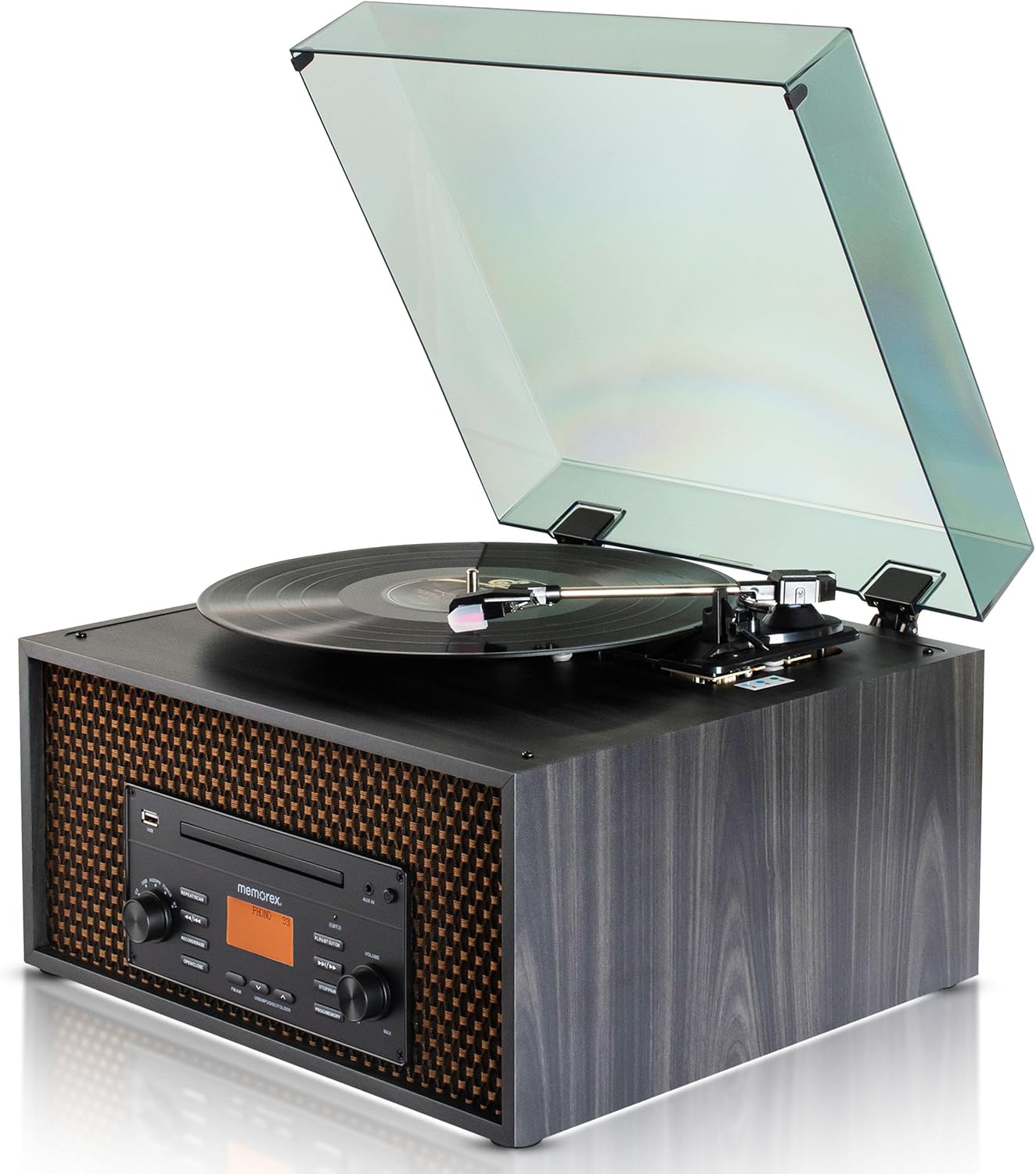
Сүрөт: Жогорку view of the Memorex MX-TT700, showing the turntable platter, tonearm, stylus, and open dust cover.
- Бурулма табак: Жазуулар кайда жайгаштырылат.
- Тонарм: Стилусту кармап, рекорддук оюктарды байкайт.
- Стилус (Ийне): Reads the record grooves.
- 45 RPM адаптер: Used for playing 7-inch records with large center holes.
- Ылдамдыкты тандоочу которгуч: Adjusts turntable speed (33 1/3, 45, 78 RPM).
- Чаң капкагы: Айланма табакчаны чаңдан коргойт.
4. Орнотуу колдонмосу
4.1 Пакеттен чыгаруу жана жайгаштыруу
- Агрегатты таңгагынан кылдаттык менен чыгарыңыз.
- Place the music center on a flat, stable surface, away from direct sunlight, heat sources, and excessive dust or vibration.
- Агрегаттын айланасында адекваттуу вентиляция бар экендигин текшериңиз.
- Remove any protective materials from the turntable, including the stylus protector.
4.2 Кубат туташтыруу
- Connect the supplied AC adapter to the DC IN jack on the back of the unit.
- AC адаптерин стандарттуу розеткага сайыңыз.
4.3 Antenna Connection (FM)
Extend the FM pigtail antenna located at the back of the unit for optimal FM radio reception. Adjust its position if reception is poor.
5. Операция
Turn the Power/Mode knob to switch on the unit. The LCD display will illuminate. Rotate the knob to select your desired audio source.
5.1 Айлануучу табактын иштеши

Image: Detail of the turntable area, illustrating the 3-speed selector switch (33 1/3, 45, 78 RPM).
- Turn the Power/Mode knob to select "PHONO" mode.
- Чаң капкагын көтөрүңүз.
- Place a record on the turntable platter. If playing a 7-inch record with a large center hole, place the 45 RPM adapter on the spindle first.
- Set the speed selector switch to the correct speed for your record (33 1/3, 45, or 78 RPM).
- Gently lift the tonearm using the cueing lever and position the stylus over the desired track of the record.
- Lower the tonearm slowly onto the record using the cueing lever. The record will begin to play.
- Үн баскычын колдонуу менен үндү тууралаңыз.
- To stop playback, lift the tonearm, return it to the tonearm rest, and secure it.
5.2 CD/MP3 ойнотуу
- Turn the Power/Mode knob to select "CD" mode.
- CD лотокту ачуу үчүн "OPEN/CLOSE" баскычын басыңыз.
- Place a CD (audio CD or MP3 CD) with the label side facing up into the tray.
- Press the "OPEN/CLOSE" button again to close the tray. The unit will read the disc.
- Press the "PLAY/PAUSE" button to start playback.
- Use the "<< / >>" buttons to skip tracks. Press and hold to fast forward/rewind.
- Press the "REPEAT/RANDOM" button to cycle through repeat modes (e.g., repeat one, repeat all, random).
- Press the "STOP" button to stop playback.
5.3 USB ойнотуу

Image: The music center with a USB drive inserted, illustrating its capability for USB playback and recording.
- USB флэш-дискти USB портуна салыңыз.
- Turn the Power/Mode knob to select "USB" mode. The unit will automatically detect and begin playing compatible audio files (MP3).
- Use the "<< / >>" buttons to skip tracks. Press and hold to fast forward/rewind.
- Press the "REPEAT/RANDOM" button to cycle through repeat modes.
- Press the "STOP" button to stop playback.
5.4 Bluetooth агымы

Image: The music center paired with a smartphone via Bluetooth, demonstrating wireless audio streaming.
- Turn the Power/Mode knob to select "BLUETOOTH" mode. The LCD display will show "BLUETOOTH" and flash, indicating it's in pairing mode.
- Bluetooth иштетилген түзмөгүңүздө (смартфон, планшет) Bluetooth'ту күйгүзүп, жеткиликтүү түзмөктөрдү издеңиз.
- Select "MX-TT700" from the list of devices. Once paired, the display will stop flashing and show "BLUETOOTH".
- Start playing music on your connected device. The audio will stream through the music center.
- Adjust volume on both the music center and your connected device.
5.5 AM/FM радиосу

Image: The music center displaying various FM radio frequencies, indicating its radio capabilities.
- Turn the Power/Mode knob to select "AM" or "FM" mode.
- Use the "<< / >>" buttons to manually tune to a station. Press and hold to auto-scan for the next available station.
- Алдын ала орнотууну сактоо үчүн: When on a desired station, press the "PROGRAM/MEMORY" button. The preset number will flash. Use "<< / >>" to select a preset number (1-20), then press "PROGRAM/MEMORY" again to confirm.
- Алдын ала орнотууну кайра чакырып алуу үчүн: In AM or FM mode, press the "PROGRAM/MEMORY" button repeatedly to cycle through saved presets.
- Adjust the FM pigtail antenna for best reception.
5.6 AUX-кирүү операциясы
- Connect an external audio device (e.g., smartphone, MP3 player) to the AUX-in jack on the front panel using the supplied 3.5mm aux-in cable.
- Turn the Power/Mode knob to select "AUX" mode.
- Туташкан тышкы түзмөгүңүздө аудиону ойнотуп баштаңыз.
- Adjust the volume on both the music center and your external device.
5.7 USB'ге жаздыруу
The MX-TT700 allows you to record audio from the Turntable, CD, or AUX-in directly to a USB flash drive in MP3 format.
- Insert a USB flash drive into the USB port. Ensure it has sufficient free space.
- Select the desired source you wish to record from (PHONO, CD, or AUX).
- Start playback on the source (e.g., begin playing a record, CD, or audio from an AUX-connected device).
- Press the "RECORD" button. The display will indicate recording is in progress.
- To stop recording, press the "RECORD" button again or the "STOP" button. The recorded file USB дискке сакталат.
6. Техникалык тейлөө
6.1 Агрегатты тазалоо
- Тазалоодон мурун ар дайым розеткадан ажыратыңыз.
- Сырткы беттерди сүртүү үчүн жумшак, кургак чүпүрөктү колдонуңуз. Абразивдүү тазалоочу каражаттарды, момдорду же эриткичтерди колдонбоңуз.
- For the dust cover, use a soft cloth and a mild detergent solution.
6.2 Turntable and Stylus Care
- Keep the dust cover closed when the turntable is not in use to prevent dust accumulation.
- Стилусту мезгил-мезгили менен жумшак щетка менен, артынан алдыга карай акырын сүртүп тазалап туруңуз.
- Үн сапатынын начарлаганын же көрүнөө эскирүүнү байкасаңыз, стилусту алмаштырыңыз.
6.3 CD/USB Care
- CD дисктерди четтеринен кармаңыз. Аларды жумшак, мамыксыз чүпүрөк менен ортосунан сыртка сүртүп тазалаңыз.
- Ensure USB drives are free of dust and debris before insertion.
7. Кыйынчылыктарды
If you encounter issues with your music center, refer to the following table for common problems and solutions.
| Көйгөй | Мүмкүн себеп | Чечим |
|---|---|---|
| Күч жок | AC adapter not connected properly; Power outlet not working. | AC адаптери блокко жана жумушчу розеткага бекем сайылганын текшериңиз. |
| Үн жок | Үнү өтө төмөн; Туура эмес режим тандалды; Кулакчындар туташтырылган. | Үндү катуулатыңыз. Туура киргизүү режимин тандаңыз. Кулакчындарды ажыратыңыз. |
| Айланма таблица айланбай же ойнобой жатат | Incorrect speed selected; Stylus protector still on; Tonearm not lowered. | Set correct speed. Remove stylus protector. Lower tonearm onto record. |
| CD ойнобой жатат | CD inserted incorrectly; Disc is dirty or scratched; Incorrect mode. | Insert CD label-side up. Clean or replace CD. Select "CD" mode. |
| Bluetooth жупташтырылган жок | Device too far; Bluetooth not enabled on external device; Unit not in pairing mode. | Ensure device is within 30 feet. Enable Bluetooth. Select "BLUETOOTH" mode on unit. |
| Радио кабыл алуу начар | FM антеннасы узартылган же туура эмес жайгаштырылган. | Extend and adjust the FM pigtail antenna for better signal. |
| USB жаздыруу иштебей жатат | USB drive full or incompatible; Source not playing. | Use a compatible USB drive with sufficient space. Ensure source audio is playing. |
8. Техникалык шарттар
| Модел | MX-TT700 |
| Power Source | AC адаптери (Киргизүү: 100-240V ~ 50/60Hz) |
| Айлануучу ылдамдыктар | 33 1/3, 45, 78 RPM |
| Bluetooth версиясы | (Not specified in JSON, assuming standard) |
| Bluetooth диапазону | 30 фут (10 метр) чейин |
| Радио жыштыктар | AM / FM PLL Radio (20 preset stations) |
| Speaker Output | 2 x 2W (Total 4W) |
| USB жаздыруу форматы | MP3 |
| Продукциянын өлчөмдөрү (L x W x Y) | 18.47" x 12.26" x 16.51" (46.91 см x 31.14 см x 41.94 см) |
| Элемент Салмагы | 3 фунт (1.36 кг) |
| Материал | Жыгач |
| Камтылган компоненттер | AC Adapter, 45 RPM Adapter, Aux-in Cable, Instruction Manual |
9. Кепилдик жана колдоо
Memorex products are designed for reliability and performance. For warranty information or technical support, please refer to the warranty card included with your product or visit the official Memorex webсайт.
Өндүрүүчү: Memorex
Webсайт: www.memorex.com (Эскертүү: Бул толтургуч URL, расмий колдоо алуу үчүн продуктуңуздун документтерин караңыз webсайт.)


