Introduction
This manual provides detailed instructions for the assembly, operation, and maintenance of your ODK 51-inch L-Shaped Desk. Please read all instructions carefully before beginning assembly and retain this manual for future reference. This desk is designed to maximize your workspace, fitting efficiently into corners and providing ample surface area for various activities.
Коопсуздук маалыматы
- Always assemble the desk on a flat, stable surface.
- Колдонуудан мурун бардык бөлүктөрдүн бекем бекитилишин текшериңиз.
- This desk is heavy and large; it may tip over if not properly assembled or if leaned on.
- Keep away from children and pets during assembly.
- Do not place objects exceeding the maximum weight limit of 150 pounds on the desk.
Пакеттин мазмуну
Before assembly, verify that all components are present and undamaged. If any parts are missing or damaged, please contact ODK customer service.
- Иш столунун панелдери (L формасындагы бөлүктөрү)
- Metal Frame Legs and Support Beams
- Жөнгө салынуучу бут тосмолор
- Монтаждоо жабдыктары (буроолор, болттар, аллен ачкычы)
- Наушник илгич
- Instruction Manual
Орнотуу жана монтаждоо нускамалары
Assembly typically takes approximately 25-30 minutes with one person. All necessary tools, including a screwdriver, are provided.
- Step 1: Prepare the Desktop Panels. Lay the desktop panels upside down on a soft, clean surface to prevent scratches.
- Step 2: Attach the Connecting Plates. Secure the metal connecting plates to the underside of the desktop panels where they will join to form the L-shape. Ensure screws are tightened firmly.
- Step 3: Assemble the Leg Frames. Attach the horizontal support beams to the vertical leg frames using the provided hardware. Ensure all connections are stable.
- Step 4: Attach Leg Frames to Desktop. Carefully align and attach the assembled leg frames to the pre-drilled holes on the underside of the desktop panels. Tighten all screws securely.
- Step 5: Install Diagonal Braces. Attach the diagonal braces to the leg frames for enhanced stability. These braces are crucial for the desk's structural integrity.
- Step 6: Install Adjustable Foot Pads. Жөнгө салынуучу бут жаздыкчаларын ар бир буттун астыңкы жагына бурап коюңуз. Бул жаздыкчалар тегиз эмес полдордо үстөлдү турукташтырууга жардам берет.
- 7-кадам: Кулакчындын илгичин бекитиңиз. Secure the headphone hook to your desired location on the desk frame.
- 8-кадам: Акыркы текшерүү. Carefully flip the desk upright. Ensure all screws are tight and the desk is stable. Adjust the foot pads as needed to eliminate any wobbling.
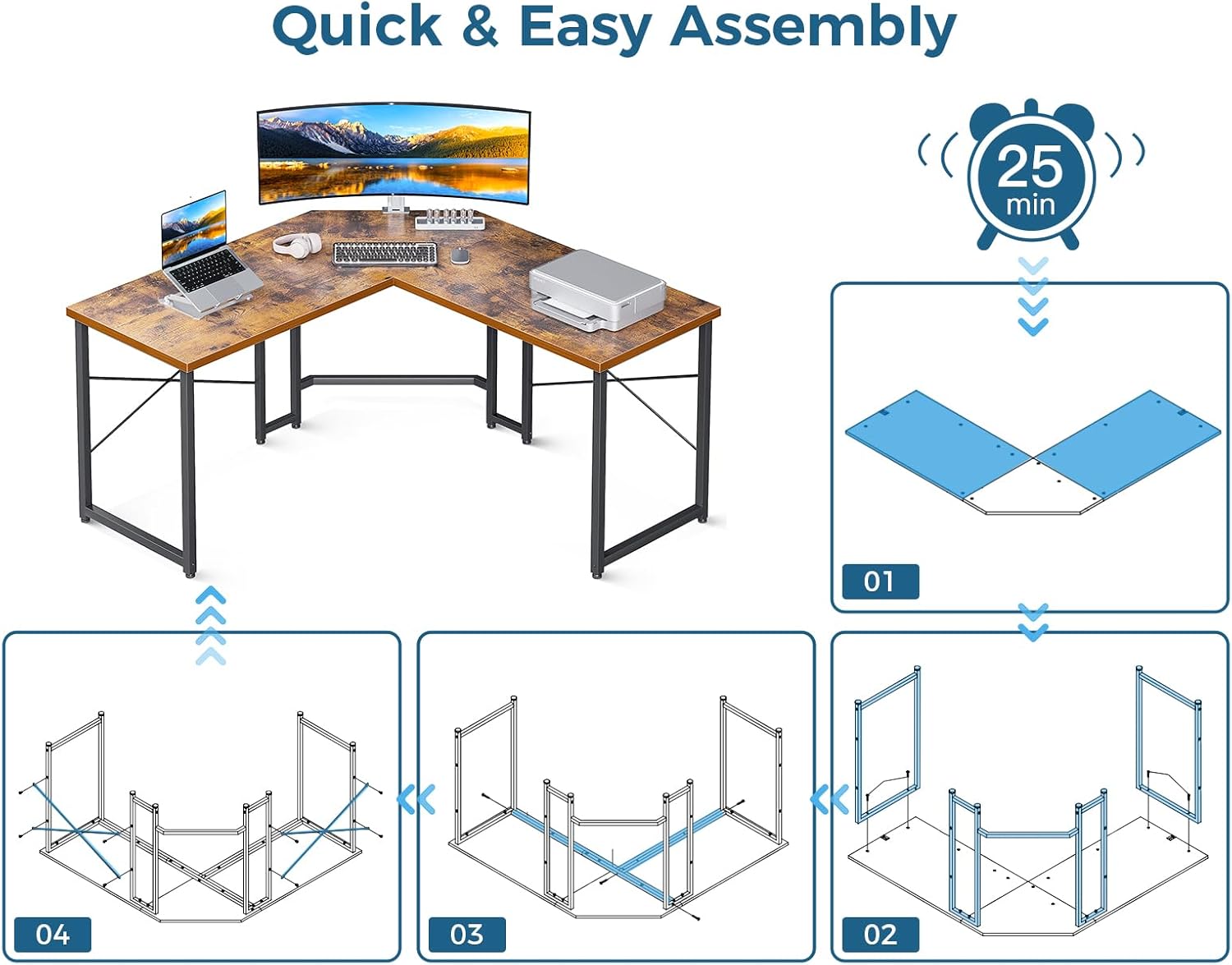
Image: Quick and Easy Assembly Steps

Image: Product Dimensions for ODK L-Shaped Desk
Иштөө нускамалары
The ODK L-Shaped Desk is designed for versatile use in home offices, gaming setups, or study rooms. Its L-shape maximizes corner space, providing ample room for multiple monitors, computers, and accessories.
- Жайгашкан жери: Position the desk in a corner to optimize room layout and create a dedicated workspace.
- Жумуш мейкиндиги: Utilize the expansive desktop for computers, monitors, keyboards, and other work or gaming essentials. The design allows for comfortable multi-monitor setups.
- Бут үчүн орун: The open design beneath the desk provides generous legroom, allowing for comfortable seating and movement of office chairs.
- Наушник илгич: Use the integrated headphone hook to keep your headphones organized and easily accessible.

Сүрөт: Ample Legroom Under the Desk

Image: ODK L-Shaped Desk in a Home Office Setup
Техникалык тейлөө
Proper care will ensure the longevity and appearance of your ODK L-Shaped Desk.
- Иш тактасын тазалоо: The engineered wood desktop is designed to be water-resistant. For daily cleaning, wipe the surface with a soft, damp cloth. For tougher stains, use a mild household cleaner and dry immediately. Avoid abrasive cleaners or harsh chemicals that may damage the finish.
- Рамканы тазалоо: Металл рамканы жарнама менен сүртүңүзamp кездеме. Датты болтурбоо үчүн жакшылап кургатуу керек.
- Үзгүлтүксүз текшерүүлөр: Мезгил-мезгили менен бардык бурамалар менен болтторду текшерип туруңуз, алар бекем бойдон калууда. Туруктуулукту сактоо үчүн зарыл болсо, кайра тартыңыз.
- Ашыкча салмактан алыс болуңуз: Do not exceed the maximum weight recommendation of 150 pounds to prevent structural damage.

Image: Premium Desktop and Sturdy Construction Details
Проблемаларды чечүү
| Көйгөй | Мүмкүн себеп | Чечим |
|---|---|---|
| Үстел солкулдап же туруксуз. | Uneven floor; loose screws; foot pads not adjusted. | Ensure all assembly screws are tightened. Adjust the adjustable foot pads on each leg until the desk is stable on the floor. |
| Монтаж учурунда тетиктер тегизделбейт. | Incorrect orientation of parts; screws not fully loosened. | Review the assembly diagram carefully. Loosen all screws slightly, adjust the parts into alignment, then re-tighten all screws. |
| Жок же бузулган бөлүктөрү. | Жеткирүү зыяны; таңгактоо катасы. | Do not proceed with assembly. Contact ODK customer service immediately for assistance. |
Техникалык шарттар
| Өзгөчөлүк | Деталь |
|---|---|
| Бренд | ODK |
| Модель номери | SPCB02030901012USDF-2 |
| Продукциянын өлчөмдөрү (D x W x Y) | 50.5" x 50.5" x 29.9" |
| Форма | L-Shaped (Rectangular sections) |
| Түс | Vintage (Top), Black (Base) |
| Жогорку Материал түрү | Инженердик жыгач |
| Негизги материал | Металл |
| Аяктоо түрү | Powder капталган |
| Элемент Салмагы | 36.4 фунт |
| Максималдуу салмак боюнча сунуш | 150 фунт |
| Ассамблея талап кылынат | Ооба |
| Ассамблеяга сунушталган адамдардын саны | 1 |
| Камтылган компоненттер | Наушник илгич |
Кепилдик жана колдоо
ODK provides a limited warranty for this product. For specific warranty details, please refer to the documentation included with your purchase or contact ODK customer service.
ODK offers a 30-day free return or exchange service. For any questions, concerns, or assistance with your product, please contact our 24-hour online professional customer service team. They are available to help solve any problems you may encounter.
For further support, please visit the official ODK store on Amazon: ODK Store


