Introduction
Welcome to the user manual for your AYANEO Pocket S Android Handheld Gaming Device. This manual provides essential information for setting up, operating, maintaining, and troubleshooting your device to ensure optimal performance and longevity. Please read this manual thoroughly before using your device.
Коопсуздук маалыматы
To prevent damage to your device or injury to yourself or others, please observe the following precautions:
- Аппаратты экстремалдык температурага, түз күндүн нуруна же жогорку нымдуулукка дуушар кылбаңыз.
- Аппаратты түшүрүүдөн же катуу таасирлерден сактаныңыз.
- Бекитилген заряддоочу түзүлүштөрдү жана аксессуарларды гана колдонуңуз.
- Аппаратты өз алдынча бөлүүгө же оңдоого аракет кылбаңыз. Квалификациялуу тейлөө кызматкерлерине кайрылыңыз.
- Аппаратты суудан жана башка суюктуктардан алыс кармаңыз.
Аппараттын компоненттери
Familiarize yourself with the various parts of your AYANEO Pocket S.
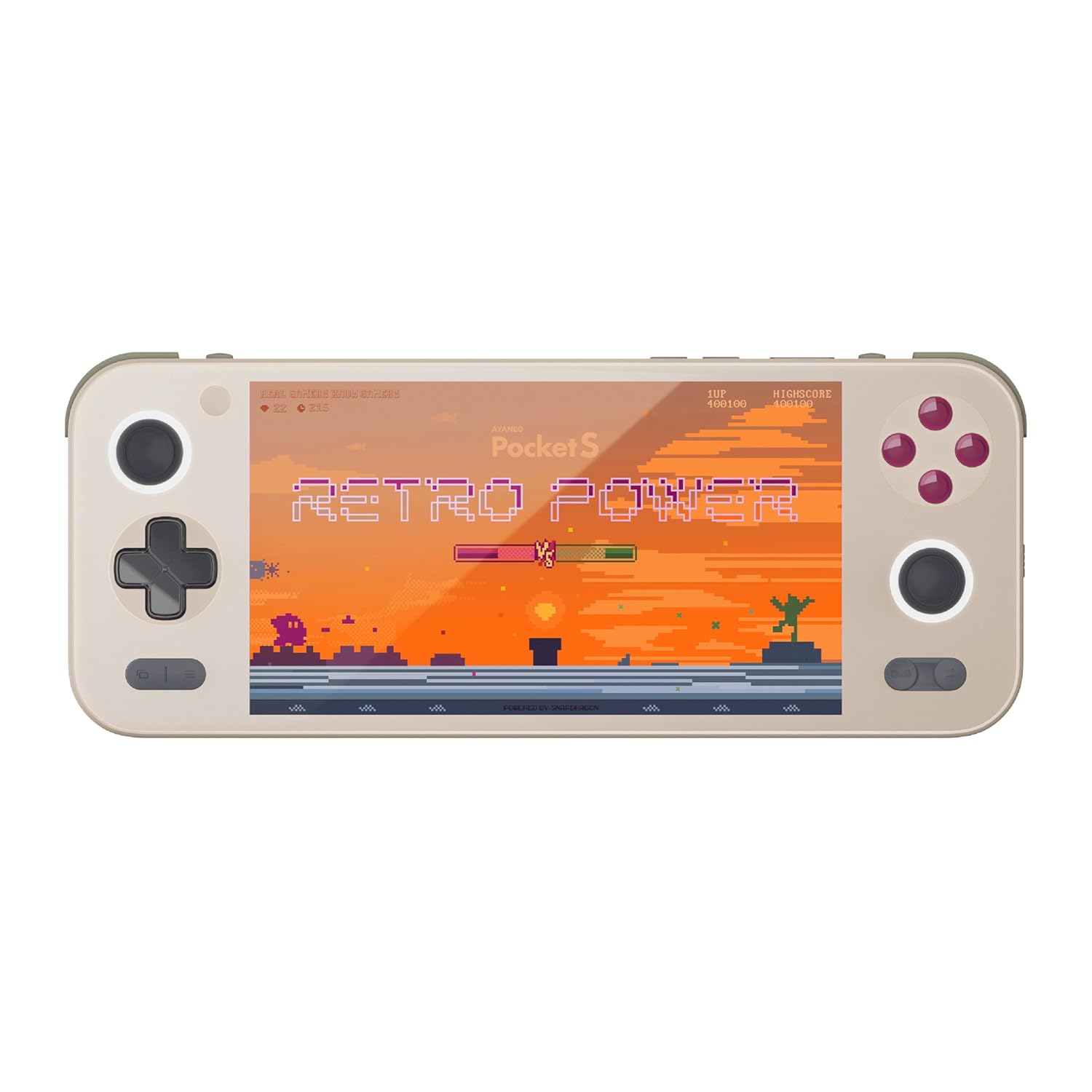
Сүрөт 1: Алдыңкы view of the AYANEO Pocket S, showing the screen, joysticks, D-pad, and action buttons.

Figure 2: Close-up of the Master Controller, highlighting the RGB Hall joysticks, Hall triggers, and crystal-textured keys.

Figure 3: Illustration of the internal VC thermal plate and active cooling system, along with the "Fishbone" biomimetic heat dissipation design on the side.

Figure 4: The AYANEO Pocket S displaying the AYASpace and AYAHOME Launcher interface, showing various game icons.
Негизги өзгөчөлүктөрү:
- Дисплей: 6-inch 2K Borderless IPS Screen (490 PPI, 120% sRGB, 85% DCI-P3)
- Процессор: Snapdragon G3x Gen 2 Gaming Platform
- Эстутум жана сактоо: Up to 16GB RAM, up to 1TB Storage (This model: 12GB RAM, 128GB Storage)
- Муздатуу: Large VC Heat Sink, Active Cooling System, "Fishbone" Cooling Vents
- Башкаруу каражаттары: Master Controller with RGB Hall Joysticks, Linear Hall Triggers, X-axis Vibration
- Операция системасы: Android 13
Орнотуу колдонмосу
1. Баштапкы заряддоо
Before first use, fully charge your AYANEO Pocket S. Connect the provided USB-C cable to the device's charging port and the other end to a compatible power adapter. The charging indicator will illuminate.
2. Күйгүзүү / Өчүрүү
- Күйгүзүү үчүн: Press and hold the Power button located on the top edge of the device until the AYANEO logo appears on the screen.
- Өчүрүү үчүн: Кубат параметрлеринин менюсу пайда болгонго чейин Кубат баскычын басып, кармап туруңуз. "Өчүрүү" дегенди тандап, ырастаңыз.
- Кайра баштоо үчүн: Кубат параметрлеринин менюсунан "Кайра баштоо" дегенди тандаңыз.
3. Баштапкы системанын конфигурациясы
Upon first power-on, you will be guided through the initial Android setup process. This includes:
- Тилиңизди тандоо.
- Wi-Fi тармагына туташууда.
- Signing in with your Google account (optional, but recommended for app downloads).
- Setting up screen lock and other security features.
4. Программалык камсыздоону жаңыртуу
It is recommended to check for and install any available system updates after initial setup to ensure you have the latest features and security patches. Navigate to Орнотуулар > Система > Системаны жаңыртуу.
Түзмөгүңүздү иштетүү
Навигация жана башкаруу элементтери
The AYANEO Pocket S features both touchscreen input and physical controller input for navigation and gameplay.
- Сенсордук экран: Use familiar Android gestures such as tap, swipe, pinch-to-zoom.
- Джойстиктер: Analog input for movement and camera control in games.
- D-Pad: Digital input for menu navigation and directional controls.
- Аракет баскычтары (A/B/X/Y): Primary input for in-game actions.
- Shoulder/Trigger Buttons (L1/L2/R1/R2): Additional input for various game functions.
- Функция баскычтары: Dedicated buttons for system functions, such as Home, Back, and Menu.
Аткаруу режимдери
The device offers multiple performance modes to optimize for either maximum performance or extended battery life.
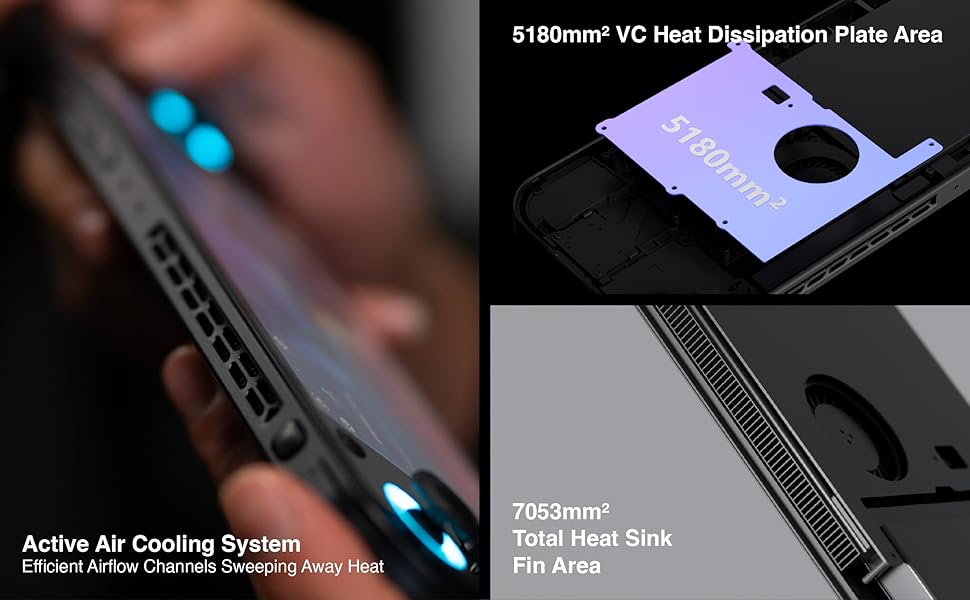
Figure 5: Diagram illustrating the three performance modes: Performance Turbo Mode, Balanced Mode, and Power-Saving Long Battery Life Mode.
- Performance Turbo Mode: Maximizes CPU, GPU, and fan speed for demanding games.
- Балансталган режим: Provides a good balance between performance and battery life for most games.
- Power-Saving Long Battery Life Mode: Optimizes for extended usage, suitable for less demanding applications or when battery conservation is critical.
You can switch between these modes via the AYASpace application or quick settings menu.
AYASpace and AYAHOME Launcher
The AYASpace application and AYAHOME Launcher provide a customized Android experience for gaming handhelds.
- Game Management: Organize and launch your games.
- Ачкыч картасы: Customize button assignments for mobile games that do not natively support physical controllers.
- Системанын жөндөөлөрү: Access performance mode settings, controller calibration, and other device-specific configurations.
Техникалык тейлөө
Аппаратты тазалоо
- Түзмөктүн экранын жана корпусун аарчуу үчүн жумшак, мамыксыз чүпүрөктү колдонуңуз.
- өжөр тактар үчүн, бир аз гampчүпүрөккө суу же экран тазалоочу каражат.
- Катуу химиялык заттарды, абразивдүү тазалоочу каражаттарды же аэрозоль чачыраткычтарын колдонбоңуз.
- Ensure all ports are free of dust and debris. Use a soft brush or compressed air if necessary, holding the can upright.
Батареяга кам көрүү
- Батареяны бат-баттан толук кубаттап калуудан алыс болуңуз.
- Do not leave the device uncharged for extended periods.
- Store the device in a cool, dry place if not used for a long time, with the battery charged to around 50%.
Программалык камсыздоо
- Regularly check for and install system updates.
- Keep your applications updated through the Google Play Store or AYASpace.
- Кэшти мезгил-мезгили менен тазалап, керексиз files системанын иштешин сактоо үчүн.
Проблемаларды чечүү
| Көйгөй | Мүмкүн себеп | Чечим |
|---|---|---|
| Түзмөк күйбөйт. | Батареянын заряды аз; Система иштебей калды. | Аппаратты жок эле дегенде 30 мүнөткө кубаттаңыз. Кубат баскычын 10-15 секунд кармап туруу менен мажбурлап өчүрүп күйгүзүңүз. |
| Экран жооп бербей жатат. | Программалык камсыздоонун иштебей калышы; Экрандын бузулушу. | Түзмөктү өчүрүп-күйгүзүңүз. Эгерде көйгөй чечилбесе, кардарларды тейлөө кызматына кайрылыңыз. |
| Games are lagging or performing poorly. | Incorrect performance mode; Background apps; Overheating. | Switch to Performance Turbo Mode. Close unnecessary background applications. Ensure cooling vents are not blocked. |
| Wi-Fi туташуу маселелери. | Incorrect password; Router issue; Device Wi-Fi module error. | Verify Wi-Fi password. Restart your router. Toggle Wi-Fi off and on on the device. |
If you encounter issues not listed here or if the suggested solutions do not resolve the problem, please contact AYANEO customer support.
Техникалык шарттар
| Өзгөчөлүк | Деталь |
|---|---|
| Модел | Чөнтөк С |
| Процессор | Snapdragon G3x Gen 2 Gaming Platform |
| Дисплей | 6-inch 2K Borderless IPS Display (2560*1440 resolution, 490 PPI, 120% sRGB, 85% DCI-P3) |
| RAM | 12GB (as per current model) |
| Сактагыч | 128GB (as per current model) |
| Операция системасы | Android 13 |
| Муздатуу системасы | Large VC Heat Sink, Active Cooling System, "Fishbone" Vents |
| Батарея | 1 литий-иондук батарейка (кошулган) |
| Өлчөмдөр | Болжол менен 8.42 x 3.35 x 0.55 дюйм |
| Салмагы | Болжол менен 1.59 фунт (0.72 кг) |
Кепилдик маалымат
AYANEO products typically come with a limited manufacturer's warranty. Please refer to the warranty card included in your product packaging or visit the official AYANEO webдеталдуу кепилдик шарттары жана шарттары үчүн сайт. Кепилдик дооматтар үчүн сатып алганыңыздын далилин сактаңыз.
Note: Protection plans may be available for purchase separately. These plans are offered by third parties and are not part of the standard manufacturer's warranty.
Кардарларды колдоо
For technical assistance, troubleshooting, or warranty inquiries, please contact AYANEO customer support through their official channels:
- Официалдуу Webсайт: www.ayaneo.com (Check for support section or contact page)
- Электрондук почта колдоо: чиновникке кайрылыңыз webэң акыркы колдоо электрондук почта дареги үчүн сайт.
- Online Community/Forums: AYANEO may host online communities where users can find answers and share experiences.
When contacting support, please have your device model (Pocket S) and serial number ready.


