1. Киришүү
This manual provides essential information for the safe and efficient operation of the DELTA VFD2A8ME21ANNAA Motor Drive. This Variable Frequency Drive (VFD) is designed for controlling the speed and torque of AC induction motors, offering precise control and energy efficiency. Please read this manual thoroughly before installation, operation, or maintenance to ensure proper usage and prevent potential hazards.
2. Коопсуздук маалыматы
ЭСКЕРТҮҮ: Бул коопсуздук көрсөтмөлөрүн аткарбоо олуттуу жаракатка же өлүмгө алып келиши мүмкүн.
- Read the user manual completely before attempting any operation or installation.
- Электр шок коркунучу: Always wait at least 10 minutes after removing power before servicing the unit. This allows residual voltagе таркатуу.
- Do not connect AC power to the output terminals (U/T1, V/T2, and W/T3). These terminals are for motor connection only.
- VFD жана мотордун туура жерге туташтырылганын камсыз кылыңыз.
- Only qualified personnel should perform installation, wiring, and maintenance.
- камсыз кылуу том экенин текшериңизtage matches the VFD's rated input voltage.
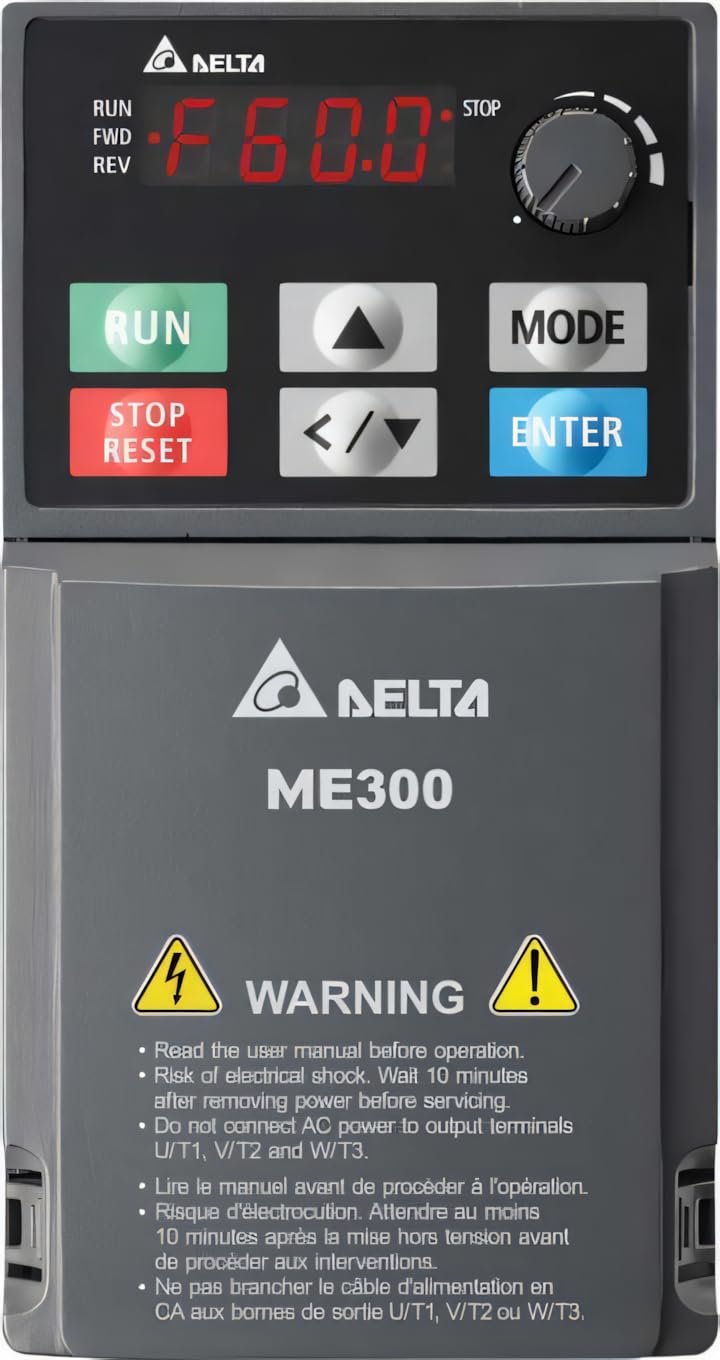
1-сүрөт: DELTA ME300 Series VFD showing the control panel with RUN, STOP/RESET, MODE, and ENTER buttons, a frequency display, and a rotary knob. The lower section displays the DELTA ME300 logo and critical safety warnings regarding electrical shock and proper wiring.
3. Орнотуу жана орнотуу
3.1 Таңгактан чыгаруу жана текшерүү
Upon receiving the VFD, carefully inspect the packaging for any signs of damage. Open the package and verify that all components are present and undamaged. If any damage is found, contact your supplier immediately.
3.2 Монтаждоо
The DELTA VFD2A8ME21ANNAA is designed for chassis mounting. Ensure the mounting surface is stable and capable of supporting the VFD's weight (approximately 7 pounds). Allow adequate clearance around the unit for proper ventilation and heat dissipation. Mount the VFD vertically to optimize cooling.
3.3 Электр зымдары
All wiring must comply with local and national electrical codes. Use appropriate wire gauges for the VFD's current rating.
- Кубат киргизүү: Connect the single-phase 230VAC power supply to the designated input terminals.
- Мотор чыгаруу: Connect the motor to the output terminals U/T1, V/T2, and W/T3. Do not connect AC power to these terminals.
- Негиздөө: Ensure the VFD is properly grounded to a reliable earth ground.
- Башкаруу зымдары: For external control, connect USB or RS-485 interface cables as required. Refer to the detailed wiring diagrams in the full manual for specific connections.
4. Иштөө нускамалары
4.1 Башкаруу панелинин үстүнөview
The VFD features an integrated control panel for local operation and parameter setting. Key components include:
- Санариптик дисплей: Shows operating frequency, parameters, and error codes (e.g., "F60.0" for 60.0 Hz).
- RUN баскычы (жашыл): Мотордун иштешин баштайт.
- STOP/RESET Button (Red): Мотордун иштешин токтотот жана бузулуу шарттарын баштапкы абалга келтирет.
- MODE баскычы: Used to switch between display modes and enter parameter setting menus.
- ENTER баскычы: Confirms parameter selections or values.
- Өйдө/төмөн жебелер (▲/▼): Менюларды карап чыгып, параметр маанилерин тууралаңыз.
- Солго/Оңго жебелер (</>): Shift cursor position during parameter editing.
- Ротари баскычы: Adjusts frequency or parameter values quickly.
4.2 Негизги операция
- Күйгүзүү: Apply 230VAC power to the VFD. The display will illuminate.
- Жыштык коюу: Use the Up/Down arrows or the rotary knob to set the desired output frequency.
- Моторду ишке киргизүү: басыңыз RUN баскычын басыңыз. Мотор белгиленген жыштыкка чейин ылдамдайт.
- Моторду токтотуу: басыңыз ТОКТОТ/КАЛЫПТАҢЫР баскычын басыңыз. Мотор жайлап, токтоп калат.
For advanced operation, including parameter programming and external control, refer to the detailed programming guide in the complete user manual.
5. Техникалык тейлөө
Regular maintenance ensures the longevity and reliable operation of your VFD. Always disconnect power and wait 10 minutes before performing any maintenance.
- Тазалоо: Periodically clean the VFD's exterior and ventilation openings to prevent dust accumulation, which can hinder cooling. Use a soft, dry cloth. Do not use liquid cleaners.
- Текшерүү: Regularly inspect wiring connections for tightness and signs of wear or damage. Check for any unusual noises or odors during operation.
- Fan Check: Ensure cooling fans are operating correctly and are free from obstructions.
- Экологиялык шарттар: Verify that the operating environment remains within the specified temperature range (-20°C to 60°C) and humidity levels.
6. Кыйынчылыктарды
This section provides basic troubleshooting steps for common issues. For complex problems or persistent faults, contact technical support.
| Көйгөй | Мүмкүн себеп | Чечим |
|---|---|---|
| VFD күйбөйт | Киргизүү кубаты жок; Сактагыч күйүп кеткен; Туура эмес зымдар | Электр менен камсыздоону текшериңиз; Сактагычтарды текшериңиз; Зымдардын туташуусун текшериңиз. |
| Мотор иштебейт | STOP/RESET button pressed; Fault condition; Incorrect frequency setting | Press RUN; Check for fault codes on display and clear; Adjust frequency. |
| Ашыкча токтун катасы | Motor overload; Short circuit in motor wiring; Incorrect VFD parameters | Reduce motor load; Check motor and wiring; Verify motor parameters. |
| Overvoltage күнөө | Жогорку кирүү көлөмүtage; Regenerative braking without braking resistor | Киргизүүнү текшерүү томtage; Consider adding a braking resistor if applicable. |
7. Техникалык шарттар
| Параметр | Нарк |
|---|---|
| Модел | VFD2A8ME21ANNAA (ME300 Series) |
| Бренд | ДЕЛТА |
| Power Rating | 0.5 HP (0.4 кВт) |
| Киргизүү көлөмүtage | 230VAC, 1-фаза |
| Output Current (Heavy Duty) | 2.8A |
| Output Current (Normal Duty) | 3.2A |
| Чыгуу жыштыгы | 599 Гц чейин |
| Enclosure Rating | IP20 |
| Монтаж түрү | Шасси тоосу |
| Интерфейс | USB, RS-485 |
| Иштөө температурасы | -20°Cден 60°Cге чейин |
| Элемент Салмагы | 7 фунт (болжол менен 3.18 кг) |
8. Кепилдик жана колдоо
8.1 Кепилдик маалыматы
This DELTA VFD product is covered by a standard manufacturer's warranty against defects in materials and workmanship. The specific terms and duration of the warranty may vary by region and purchase date. Please retain your proof of purchase for warranty claims. For detailed warranty information, refer to the official DELTA webсайтына кириңиз же ыйгарым укуктуу дистрибьюторуңузга кайрылыңыз.
8.2 Техникалык колдоо
For technical assistance, troubleshooting beyond this manual, or service inquiries, please contact DELTA technical support or your local authorized service center. Have your product model number (VFD2A8ME21ANNAA) and serial number ready when contacting support.
You can often find contact information on the official DELTA webсайты же продукт камсыздоочу аркылуу.


