Majority Darwin Bluetooth Alarm Clock with 10W Wireless Charging
Model: Darwin | Brand: Majority
Introduction
This manual provides detailed instructions for the operation and maintenance of your Majority Darwin Bluetooth Alarm Clock. This device integrates an FM radio, dual alarm clock, 10W wireless charging, and ambient lighting to enhance your bedside experience.
Коопсуздук маалыматы
- Колдонуудан мурун бардык нускамаларды кунт коюп окуп чыгыңыз.
- Аппаратты суудан жана нымдан алыс кармаңыз.
- Ашыкча температурага дуушар кылбаңыз.
- Агрегатты өз алдынча бөлүүгө же оңдоого аракет кылбаңыз. Квалификациялуу тейлөө кызматкерлерине кайрылыңыз.
- Зымсыз кубаттоо функциясын колдонуп жатканда жакшы желдетүүнү камсыз кылыңыз.
Пакеттин мазмуну
Бардык элементтер кутучада бар экенин текшериңиз:
- Majority Darwin Bedside Clock
- Электр кубаты адаптери
- User Manual

Image: Package contents of the Majority Darwin alarm clock, including the clock, power adapter, and user manual.
Продукт бүттүview
Familiarize yourself with the main components and control buttons of your Darwin alarm clock.
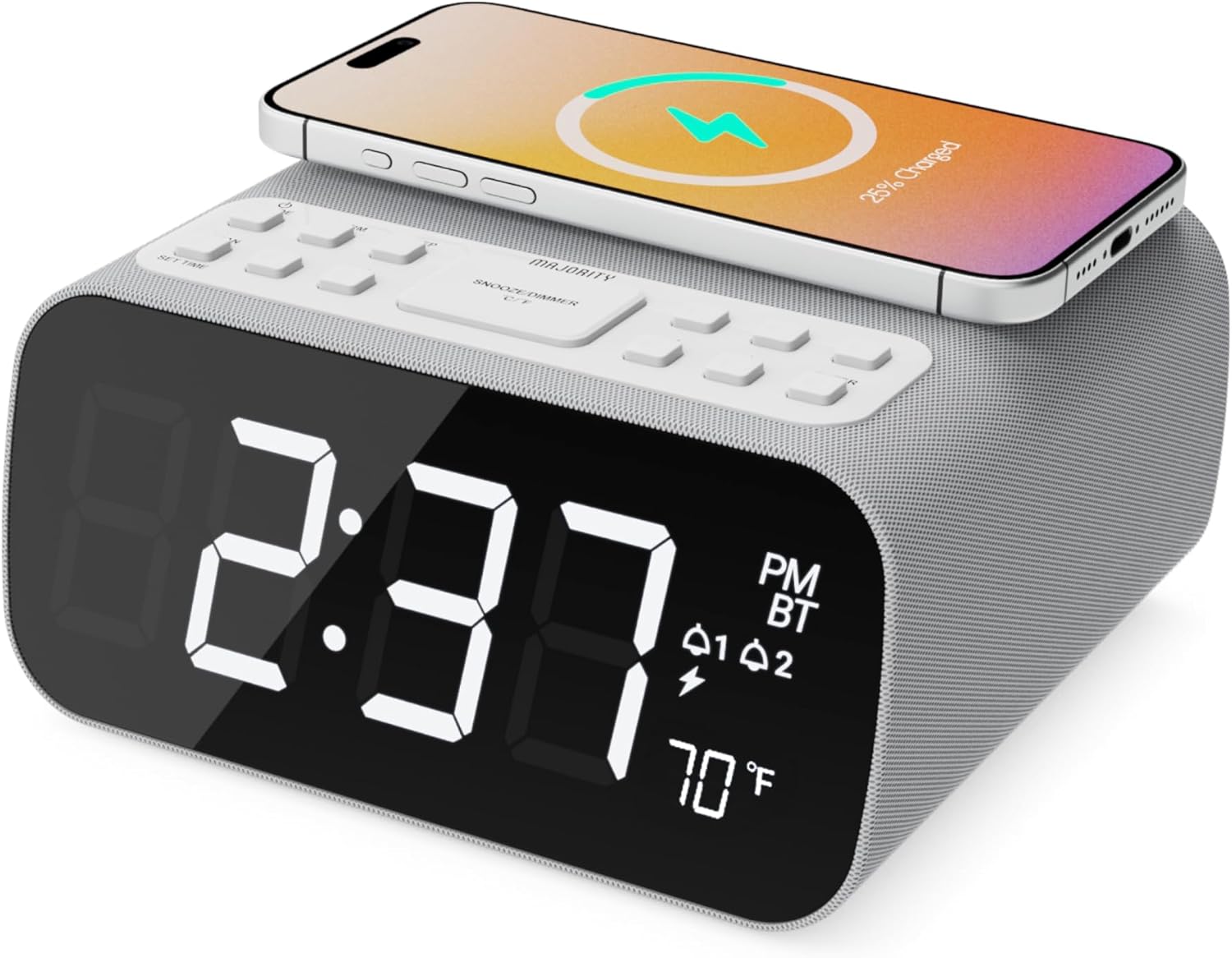
Сүрөт: алдыңкы view of the Majority Darwin alarm clock showing the large digital display, wireless charging pad on top, and control buttons.

Сүрөт: каптал view of the Majority Darwin alarm clock highlighting the control panel with buttons for time, alarm, volume, and light settings.
Жогорку панелдин башкаруу элементтери
- Зымсыз заряддоо аянтчасы: Place compatible devices here for 10W wireless charging.
- Тындырма/Жарык баскычы: Short press to snooze alarm; long press to adjust display brightness or cycle through ambient light colors.
- Time/Date Set Button: Press to enter time/date setting mode.
- Ойготкуч 1/2 баскычтары: Press to activate/deactivate Alarm 1 or Alarm 2. Long press to set alarm time.
- Volume/Tune Buttons: Adjust volume or tune FM radio stations.
- Режим баскычы: Switch between FM Radio, Bluetooth, and White Noise modes.
Rear Panel Controls & Ports
- DC 12V киргизүү: Connect the mains power adapter here.
- USB кубаттоо порту: For charging additional devices via USB cable.
- Батарея бөлүмү: For backup batteries (not for primary power).
- Диммер сыдырмасын көрсөтүү: Manually adjust the brightness of the main time display.
- Night Light Dimmer: Adjust brightness of the ambient light.
Жайгашуу
Power Connection
Connect the provided mains power adapter to the DC 12V input port on the rear of the alarm clock and plug it into a wall outlet. The display will light up.
For battery backup, open the battery compartment on the bottom and insert 2 x AAA batteries (not included). This will retain time settings during a power outage, бирок дисплейди же кубаттоо функцияларын иштетпейт.
Сүрөт: Арткы view of the Majority Darwin alarm clock with the power adapter connected to the DC 12V input.
Баштапкы убакытты орнотуу
- көпкө басыңыз Убакыт/дата коюлган button on the top panel. The hour digits will start flashing.
- колдонуу Volume/Tune саатты тууралоо үчүн баскычтар.
- басыңыз Убакыт/дата коюлган Саатты ырастоо жана мүнөт жөндөөсүнө өтүү үчүн баскычын кайра басыңыз.
- колдонуу Volume/Tune мүнөттөрдү тууралоо үчүн баскычтар.
- Repeat this process for setting the year, month, and day.
- басыңыз Убакыт/дата коюлган button one last time to save all settings.
Иштөө нускамалары
Time Display & Dimmer
The large LED display shows the current time.
Кол менен караңгылатуу: колдонуу Дисплейди күңүрттөтүү жылдыргычы on the rear panel to manually adjust the brightness of the time display.
Автоматтык караңгылатуу: The device features an auto-dimming function that adjusts display brightness at fixed time intervals (e.g., dimming at night, brightening during the day).

Сүрөт: алдыңкы view of the Majority Darwin alarm clock displaying time, AM/PM, and temperature, highlighting the dual alarm icons.
Сигнал орнотуу
The Darwin alarm clock supports two independent alarms (Alarm 1 and Alarm 2).
- Long press either the Ойготкуч 1 or Ойготкуч 2 button. The hour digits for that alarm will flash.
- колдонуу Volume/Tune каалаган ойготкуч саатын коюу үчүн баскычтар.
- Тийиштүү баскычты басыңыз Ойготкуч Саатты ырастоо жана мүнөт жөндөөсүнө өтүү үчүн баскычын кайра басыңыз.
- колдонуу Volume/Tune каалаган ойготкуч мүнөттөрдү коюу үчүн баскычтар.
- басыңыз Ойготкуч button again to select the alarm source (FM radio or built-in tone). Use Volume/Tune тандоо үчүн баскычтар.
- басыңыз Ойготкуч button again to set the alarm volume.
- басыңыз Ойготкуч Ойготкучту иштетүү үчүн баскычты акыркы жолу басыңыз. Дисплейде ойготкучтун сүрөтчөсү пайда болот.
Deactivating an Alarm: Short press the corresponding Ойготкуч 1 or Ойготкуч 2 button to turn it off. The alarm icon will disappear.
Тындырма функциясы
When an alarm sounds, short press the Тындыруу/Жарык button on the top panel to temporarily silence the alarm for 9 minutes. The alarm will sound again after the snooze period.
FM радиосунун иштеши
- басыңыз Mode баскычын дисплейде "FM" пайда болгонго чейин басыңыз.
- колдонуу Volume/Tune buttons to manually tune to your desired FM station.
- Auto Scan & Store Presets: көпкө басыңыз Mode button to automatically scan and save available FM stations as presets.
- баскычын кыска басыңыз Mode button to cycle through saved presets.
Bluetooth Pairing & Playback
- басыңыз Mode button until "BT" appears on the display and the Bluetooth indicator starts flashing.
- On your smartphone or other Bluetooth device, enable Bluetooth and search for "Majority Darwin".
- Select the device to pair. Once connected, the Bluetooth indicator on the alarm clock will stop flashing.
- You can now play audio from your device through the alarm clock's speaker. Use the Volume/Tune buttons on the alarm clock or your device to adjust volume.

Image: A smartphone displaying music playback, connected via Bluetooth to the Majority Darwin alarm clock.
Зымсыз заряддоо
The top surface of the alarm clock features a 10W wireless charging pad.
- Place your Qi-compatible smartphone directly onto the wireless charging pad.
- Ensure the phone is centered on the charging symbol for optimal charging.
- A charging indicator (e.g., a lightning bolt icon) may appear on your phone's screen or the alarm clock's display to confirm charging.
USB кубаттоо порту: An additional USB port on the rear allows you to charge other devices using a USB cable.
Image: The Majority Darwin alarm clock with a smartphone placed on top, indicating active wireless charging.
Night Light / Ambient Light
The alarm clock features an ambient light ring around its base.
- көпкө басыңыз Тындыруу/Жарык button to turn the ambient light on/off.
- баскычын кыска басыңыз Тындыруу/Жарык button to cycle through different color modes (e.g., red, green, blue, purple, white, color cycle).
- колдонуу Түнкү жарык күңүртөтүүчү on the rear panel to adjust the brightness of the ambient light.

Image: The Majority Darwin alarm clock illuminated with a vibrant ambient light from its base.
Ак ызы-чуу функциясы
The device includes various white noise sounds to aid relaxation and sleep.
- басыңыз Mode button until the white noise mode is activated (indicated by a specific icon or text on the display).
- колдонуу Volume/Tune buttons to adjust the volume of the white noise.
- баскычын кыска басыңыз Mode button again to cycle through different white noise sounds (e.g., nature sounds, fan noise).
Техникалык тейлөө
- Аппаратты жумшак, кургак чүпүрөк менен тазалаңыз. Абразивдүү тазалагычтарды же эриткичтерди колдонбоңуз.
- Вентиляция тешиктерин ачык кармаңыз.
- If not in use for an extended period, disconnect from power and remove backup batteries.
Проблемаларды чечүү
Кубат жок / Дисплей өчүк
- Кубат адаптери аспапка да, иштеген электр розеткасына да бекем туташып турганын текшериңиз.
- Электр розеткасынын иштешин текшериңиз.
Зымсыз кубаттоо иштебейт
- Түзмөгүңүздүн Qi шайкештигин текшериңиз.
- Make sure your phone is centered on the charging pad.
- Remove any thick phone cases or metallic objects between the phone and the charging pad.
Bluetooth жупташуу маселелери
- Ensure the alarm clock is in Bluetooth pairing mode (BT flashing).
- Make sure your device's Bluetooth is enabled and searching.
- Түзмөктү жупташып, кайра жупташып көрүңүз.
- Ensure no other devices are currently connected to the alarm clock via Bluetooth.
Ойготкуч угулбайт
- Сигнализация иштетилгенин текшериңиз (сигнализациянын сүрөтчөсү дисплейде көрүнүп турат).
- Ойготкучтун үнүн жөндөөнү текшериңиз.
- Ensure the correct alarm time is set.
Техникалык шарттар
| Өзгөчөлүк | Деталь |
|---|---|
| Бренд | Көпчүлүк |
| Модель аты | Дарвин |
| Зымсыз кубаттоо чыгышы | 10 Вт |
| Динамик чыгаруу күчү | 12 Ватт |
| Байланыш технологиясы | Bluetooth |
| Power Source | Mains Power (Battery Backup) |
| Продукциянын өлчөмдөрү | 13.07 x 8.22 x 6.09 дюйм |
| Элемент Салмагы | 1.42 фунт (645 грамм) |
| Өзгөчөлүктөр | Adjustable Volume, Dual Alarm, Bluetooth, Wireless Charging, FM Radio, Dimmable Display, Ambient Night Light, White Noise |
Кепилдик жана колдоо
The Majority Darwin Bluetooth Alarm Clock comes with a standard manufacturer's warranty. Please refer to the warranty card included in your package for specific terms and conditions.
For technical support, troubleshooting, or warranty claims, please visit the official Majority webсайтка же кардарларды тейлөөгө кайрылыңыз.
Online resources and FAQs may also be available on the product support page.


