1. Киришүү
Thank you for choosing the Shokz Opencomm2 2025 Wireless Earphones. These open-ear bone conduction headphones are designed for clear communication and comfortable listening, particularly in professional and active environments. This manual provides essential information for the proper use, setup, and maintenance of your device.

Image: The Shokz Opencomm2 2025 Wireless Earphones, showcasing their flexible, open-ear design and integrated microphone boom.
2. Продукт бүтүп калдыview
2.1 Кутуда эмне бар
- Shokz Opencomm2 2025 Wireless Earphones
- USB-C заряддоо кабели
- Ташуу кутусу
- Колдонуучунун колдонмосу (бул документ)
- Legal Statement & Warranty Card

Image: Contents of the Shokz Opencomm2 2025 package, including the earphones, charging cable, carrying case, and documentation.
2.2 Кулакчындын компоненттери
Familiarize yourself with the key components of your Opencomm2 earphones:
- Сөөк өткөргүчтөрү: These rest on your cheekbones, delivering audio without blocking your ear canals.
- Микрофон бум: Adjustable boom for clear voice pickup.
- Көп функциялуу баскыч: For power, pairing, play/pause, and call management.
- Үн баскычтары: Үндү жана тректи башкарууну жөндөө үчүн.
- USB-C заряддоо порту: Аппаратты заряддоо үчүн.

Сүрөт: жакын план view of the Shokz Opencomm2 earphone's right side, highlighting the multi-function button, volume controls, and the USB-C charging port.
3. Орнотуу
3.1 Наушниктерди заряддоо
- Connect the USB-C charging cable to the charging port on the earphones.
- Кабелдин экинчи учун USB кубат адаптерине (кошумча эмес) же компьютердин USB портуна туташтырыңыз.
- The LED indicator will show the charging status. A full charge takes approximately 1.5 hours.
3.2 Түзмөк менен жупташтыруу
- Наушниктердин өчүрүлгөнүн текшериңиз.
- Press and hold the multi-function button for 5-7 seconds until the LED indicator flashes red and blue alternately, indicating pairing mode.
- On your device (e.g., smartphone, computer), enable Bluetooth and search for available devices.
- Select "Opencomm2" from the list of found devices.
- Once connected, the LED indicator will flash blue once every few seconds, and you will hear a voice prompt "Connected".
4. Иштөө нускамалары
4.1 Наушник тагынуу
Place the flexible band behind your head, with the bone conduction transducers resting comfortably on your cheekbones, just in front of your ears. Adjust the microphone boom so it is positioned near your mouth for optimal voice clarity.
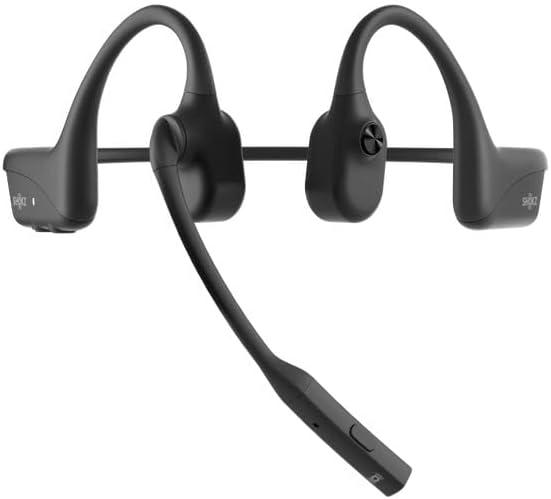
Image: The Shokz Opencomm2 2025 earphones positioned on a head, demonstrating the correct placement of the bone conduction transducers and microphone boom.
4.2 Негизги башкаруу каражаттары
- Күйгүзүү/өчүрүү: Көп функциялуу баскычты 2 секунд басып туруңуз.
- Ойнотуу/тындыруу: Көп функциялуу баскычты бир жолу басыңыз.
- Үнүн жогорулатуу/төмөндөтүү: Press the respective volume buttons.
- Кийинки трек: Үн + баскычын 2 секунд басып, кармап туруңуз.
- Мурунку трек: Үндү катуулатуу баскычын 2 секунд басып, кармап туруңуз.
- Чалууга жооп берүү/аяктоо: Көп функциялуу баскычты бир жолу басыңыз.
- Чакырууну четке кагуу: Көп функциялуу баскычты 2 секунд басып туруңуз.
- Микрофондун үнүн басуу: During a call, press the multi-function button twice.
5. Техникалык тейлөө
5.1 Тазалоо
Наушниктерди жумшак менен сүртүңүз, гamp кездеме. Катуу химиялык заттарды же абразивдүү тазалоочу каражаттарды колдонбоңуз. Заряддоодон мурун заряддоо порту кургак экенин текшериңиз.
5.2 Сактоо
Store the earphones in their carrying case when not in use to protect them from dust and damage. Avoid storing in extreme temperatures.
5.3 Сууга туруктуулук
The Opencomm2 earphones are water resistant, meaning they can withstand sweat and light splashes. They are not designed for submersion in water. Do not charge if wet.
6. Кыйынчылыктарды
- Кубат жок: Ensure the earphones are fully charged. Connect to a power source and check the LED indicator.
- Жупташуу мүмкүн эмес: Ensure the earphones are in pairing mode (red and blue flashing LED). Turn off and on your device's Bluetooth, then try pairing again. Move closer to your device.
- Үн жок: Check the volume levels on both the earphones and your connected device. Ensure the earphones are properly connected via Bluetooth.
- Чалуу сапаты начар: Ensure the microphone boom is positioned correctly near your mouth. Check for environmental noise interference.
- Үзгүлтүксүз туташуу: Move closer to your connected device. Avoid obstacles between the earphones and the device.
7. Техникалык шарттар
| Өзгөчөлүк | Спецификация |
|---|---|
| Модель аты | Opencomm2 |
| Байланыш | Зымсыз (Bluetooth 5.0) |
| Bluetooth диапазону | 10 метрге чейин (33 фут) |
| Аудио драйвер түрү | Сөөк өткөргүч айдоочу |
| Frequency Response | 20 Hz - 20 kHz (Resonant Mode) |
| Сезимталдуулук | 96 дБ |
| Импеданс | 32 Ом |
| Заряддоо убактысы | Болжол менен 1.5 саат |
| Элемент Салмагы | 35 грамм (1.23 унция) |
| Сууга туруктуулук деңгээли | Сууга чыдамдуу |
| Микрофон | Boom микрофону |
| Заряддоо порту | USB-C |
8. Кепилдик жана колдоо
Your Shokz Opencomm2 2025 Wireless Earphones come with a limited warranty. Please refer to the included Warranty Card for detailed terms and conditions. For technical support, product registration, or further assistance, please visit the official SHOKZ webсайтка же кардарларды тейлөө бөлүмүнө кайрылыңыз.
Онлайн колдоо: Visit the SHOKZ Store on Amazon


