Introduction
The Akko 5108B Plus is a high-performance mechanical keyboard designed for both gaming and productivity. It features a unique "Lord of Mysteries" theme, tri-mode connectivity (Bluetooth, 2.4GHz wireless, and wired Type-C), hot-swappable switches, customizable RGB backlighting, and durable PBT dye-sub keycaps. This manual provides detailed instructions for setup, operation, maintenance, and troubleshooting to ensure optimal use of your keyboard.

Figure 1: Akko 5108B Plus Mechanical Keyboard overview.
Жайгашуу
1. Пакеттин мазмуну
- Akko 5108B Plus механикалык клавиатура
- USB Type-C кабели
- 2.4 ГГц зымсыз алуучу
- Баскыч капкагын тарткыч
- Switch Puller
- Колдонуучунун Колдонмосу (бул документ)
2. Баскычтопту туташтыруу
The Akko 5108B Plus supports three connection modes: wired (USB Type-C), 2.4GHz wireless, and Bluetooth.

Figure 2: Tri-mode connection options for the keyboard.
2.1. Зымдуу режим
- Баскычтоптогу USB Type-C портун табыңыз.
- Берилген USB Type-C кабелинин бир учун клавиатурага, экинчи учун компьютериңиздеги жеткиликтүү USB портуна туташтырыңыз.
- Клавиатура сиздин операциялык системаңыз тарабынан автоматтык түрдө таанылат.

Figure 3: Detachable USB Type-C port for wired connection.
2.2. 2.4 ГГц зымсыз режим
- Locate the 2.4GHz wireless receiver (dongle) in the keyboard packaging.
- 2.4 ГГц ресиверди компьютериңиздеги жеткиликтүү USB портуна сайыңыз.
- Switch the mode selector on the keyboard to 2.4G mode. The keyboard should automatically connect.
2.3. Bluetooth режими
- Switch the mode selector on the keyboard to Bluetooth mode.
- Компьютериңизде же түзмөгүңүздө Bluetooth иштетип, жаңы түзмөктөрдү издеңиз.
- Select "Akko 5108B Plus" from the list of available devices.
- Follow any on-screen prompts to complete the pairing process. The keyboard can store up to three Bluetooth profiles.
Операция
1. Ыкчам алмаштыруучу которгучтар
The Akko 5108B Plus features premium gaming 5-pin hot-swappable sockets, allowing you to easily change mechanical switches without soldering. This enables customization of typing feel and sound.

Figure 4: Illustration of the hot-swappable switch feature.
1.1. Коммутаторлорду алмаштыруу
- Берилген өчүргүчтү тартуучуну колдонуп, өчүргүчтү үстүнөн жана астынан акырын кармаңыз.
- Которгучту розеткадан чыгаруу үчүн түз өйдө тартыңыз.
- Align the pins of the new switch with the holes in the socket.
- Press the new switch firmly and straight down until it clicks into place. Ensure pins are not bent.
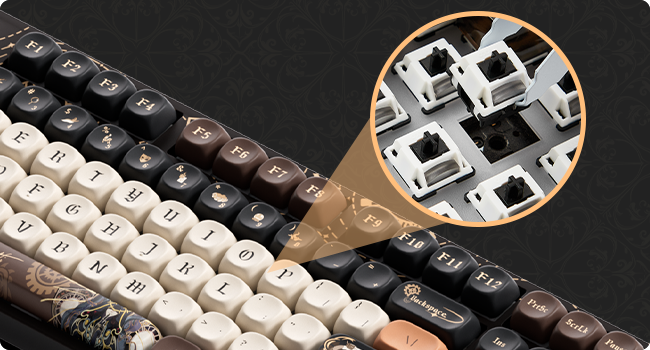
5-сүрөт: Детальдуу view of a switch being removed from the keyboard socket.
2. RGB арткы жарыктандыруу
The keyboard features customizable RGB backlighting with over 20 preset modes. You can also create custom lighting effects using the Akko Cloud Driver software.

Figure 6: Keyboard displaying various RGB lighting effects.
2.1. Adjusting Backlight Modes
Refer to the keyboard's function key combinations (Fn + specific keys) for cycling through preset RGB modes, adjusting brightness, and changing animation speed. These combinations are typically printed on the keycaps or detailed in the quick start guide.
3. Programmable Keys (Akko Cloud Driver)
All keys on the 5108B Plus can be programmed using the Akko Cloud Driver software. This allows for macro creation, key remapping, and custom lighting profiles.
- Akko булут драйверин расмий Akko сайтынан жүктөп алыңыз webсайт.
- Install and launch the software.
- Connect your keyboard in wired mode for best compatibility with the software.
- Follow the software's interface to customize key functions and lighting.
4. PBT Dye-Sub Keycaps
The keyboard is equipped with PBT dye-sublimated keycaps, known for their durability and resistance to wear and shine. The legends are infused into the plastic, ensuring they will not fade over time.

Figure 7: MOA Profile keycap height diagram, illustrating the ergonomic design.
Техникалык тейлөө
- Клавиатураны тазалоо: жумшак колдонуу, damp cloth to wipe down keycaps. For deeper cleaning, remove keycaps using the provided keycap puller and wash them with mild soap and water. Ensure they are completely dry before reattaching.
- Баскычтоптун корпусун тазалоо: Use a dry, soft cloth to wipe the keyboard body. Avoid using harsh chemicals or abrasive materials.
- Чаңды тазалоо: Баскыч капкактары менен өчүргүчтөрдүн ортосундагы чаңды жана калдыктарды тазалоо үчүн кысылган абаны колдонуңуз.
- Сактагыч: Узак мөөнөткө колдонулбаганда, клавиатураны кургак, салкын жерде күн тийбеген жерде сактаңыз.
Проблемаларды чечүү
| Көйгөй | Мүмкүн себеп | Чечим |
|---|---|---|
| Баскычтоп жооп бербей жатат (Зымдуу) | Бошогон кабель туташуу, туура эмес USB порт, драйвер маселеси. |
|
| Клавиатура жооп бербей жатат (зымсыз) | Low battery, incorrect mode, receiver not plugged in, interference. |
|
| RGB арткы жарыгы иштебей жатат | Арткы жарык өчүрүлдү, программалык камсыздоодо карама-каршылыктар бар. |
|
| Ачкычтар катталбайт же эки жолу терилбейт | Туура эмес өчүргүч, клавиатуранын астындагы калдыктар. |
|
Техникалык шарттар
| Өзгөчөлүк | Деталь |
|---|---|
| Модел | Акко 5108B Плюс |
| Байланыш | Tri-mode (Bluetooth 5.0, 2.4GHz Wireless, USB Type-C Wired) |
| Которгучтар | Hot-swappable 5-pin sockets (compatible with most mechanical switches) |
| Баскыч капкактары | PBT Dye-Sublimated, MOA Profile |
| Арткы жарык | RGB (20+ preset modes, customizable via software) |
| Программалануу | Akko Cloud Driver support for key remapping and macros |
| Макет | 108-key Full-size (approx.) |
| Өлчөмдөр | 19.25 x 8.95 x 2.45 дюйм (Пакеттин өлчөмдөрү) |
| Элемент Салмагы | 3.93 фунт |
| Өндүрүүчү | Акко |

Figure 8: Approximate dimensions of the Akko 5108B Plus keyboard.
Кепилдик жана колдоо
For warranty information, technical support, or to download the latest Akko Cloud Driver software, please visit the official Akko website or contact Akko customer service. Keep your purchase receipt for warranty claims.
Расмий Акко Webсайт: www.akkogear.com


