Introduction
The STRONG Leap-UNA TV Streaming Stick is a compact and powerful device designed to transform your television into a smart TV, providing instant access to a vast array of streaming content. Powered by Android TV 11, it offers seamless 2K resolution streaming with Wi-Fi 5 connectivity. This manual provides detailed instructions for setting up, operating, and maintaining your Leap-UNA streaming stick to ensure an optimal entertainment experience.
Коопсуздук маалыматы
- Аппаратты колдонуудан мурун бардык нускамаларды окуп чыгыңыз.
- Аппаратты жамгырдын, нымдуулуктун же экстремалдык температуранын таасиринде калтырбаңыз.
- Ашыкча ысып кетүүнүн алдын алуу үчүн аппараттын айланасында туура желдетүүнү камсыз кылыңыз.
- Аппарат менен кошо берилген кубат адаптерин гана колдонуңуз.
- Аппаратты өз алдынча бөлүүгө же оңдоого аракет кылбаңыз. Бардык тейлөөлөрдү квалификациялуу кызматкерлерге тапшырыңыз.
- Аппаратты түз күн нурунан жана жылуулук булактарынан алыс кармаңыз.
Пакеттин мазмуну
Сураныч, бардык буюмдар бар экенин жана жакшы абалда экендигин текшериңиз:
- STRONG Leap-UNA 2K Android TV Streaming Stick
- Алыстан башкаруу
- Power Adapter (or USB cable for power)
- HDMI Extender (if included)
- Колдонуучунун Колдонмосу (бул документ)
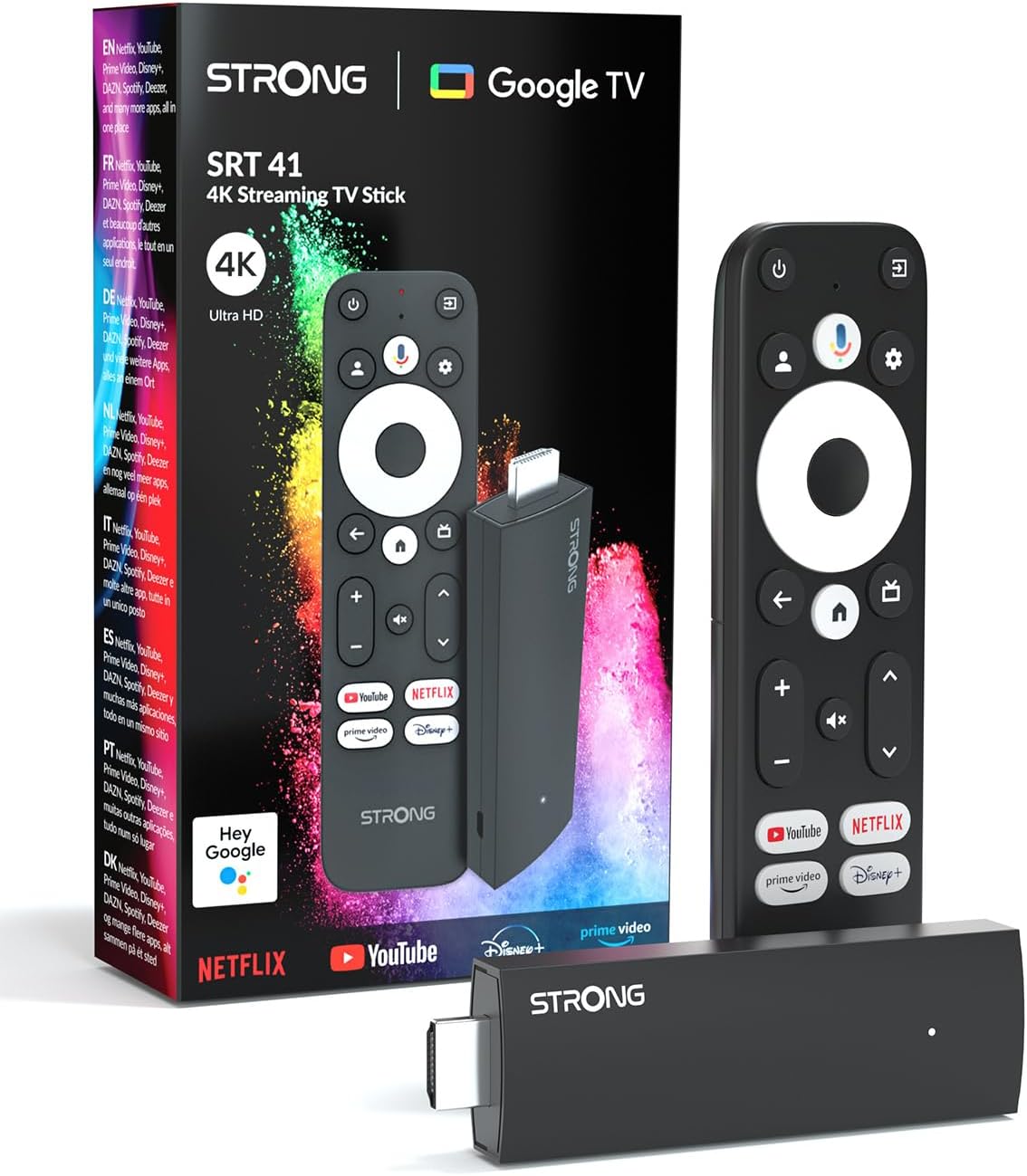
Image: The STRONG Leap-UNA streaming stick, its remote control, and the product packaging. This shows the main components included in the box.
Продукт бүттүview
The Leap-UNA stick is designed for ease of use and portability. It connects directly to your TV's HDMI port.
Түзмөктүн компоненттери:
- Streaming Stick: Compact device with an HDMI connector for TV and a Micro USB port for power.
- Алыстан башкаруу: Features dedicated buttons for power, navigation, volume, Google Assistant, and quick access to popular streaming services like Netflix and YouTube.

Image: A close-up of the STRONG Leap-UNA streaming stick, highlighting its compact design and connectivity options including HDMI and Micro USB ports.
Жайгашуу
Follow these steps to set up your STRONG Leap-UNA streaming stick:
- Сыналгыга туташуу: Plug the STRONG Leap-UNA streaming stick directly into an available HDMI port on your television. If space is limited, use an HDMI extender (if provided).
- Күйгүзүү: Connect the power adapter to the Micro USB port on the streaming stick and then plug the adapter into a power outlet. The device will power on automatically.
- HDMI киргизүүнү тандоо: Use your TV's remote control to select the correct HDMI input source to which the Leap-UNA stick is connected.
- Алыстан башкарууну жупташтыруу: Follow the on-screen instructions to pair your remote control. This usually involves pressing and holding specific buttons on the remote close to the stick.
- Wi-Fi'га туташуу: On the screen, select your Wi-Fi network from the list and enter the password. Ensure you have a stable internet connection for optimal streaming.
- Google Каттоо эсебин орнотуу: Sign in with your Google account. This is necessary to access the Google Play Store, Google Assistant, and other Google services. If you don't have one, you can create one.
- Колдонмолорду орнотуу: After initial setup, you can download and install your favorite streaming applications like Netflix, Amazon Prime Video, YouTube, and Disney+ from the Google Play Store.

Image: Visual representation of the simple setup process: 1. Connect the stick to your TV. 2. Connect to your internet box (Wi-Fi). 3. Start streaming your content.
Иштөө нускамалары
Алыстан башкарууну колдонуу:
The included remote control allows you to navigate the Android TV interface and control your streaming experience.
- Навигация аянтчасы: Менюлар аркылуу жылдыруу жана элементтерди тандоо үчүн тегерек баскычты колдонуңуз.
- Артка баскычы: Мурунку экранга кайтат.
- Үй баскычы: Android TV башкы экранына кайтып келет.
- Google Жардамчы баскычы: Үн буйруктарын иштетүү үчүн басыңыз.
- Үн баскычтары: Телевизордун үнүн тууралаңыз.
- Колдонмонун атайын баскычтары: Quickly launch Netflix, YouTube, Prime Video, and Disney+ (if available).

Image: The remote control for the STRONG Leap-UNA, highlighting its dedicated app buttons and the wide range of applications available through Google Play.
Google Жардамчы менен Үн менен башкаруу:
The integrated Google Assistant allows you to control your device and search for content using your voice. Press the Google Assistant button on your remote and speak your command. Examples камтыйт:
- "Ачык Netflix"
- "Find action movies"
- "Play [Movie Title]"
- "What's the weather?"

Image: The STRONG Leap-UNA remote control positioned in front of a TV screen, illustrating the use of Google Assistant for voice commands, such as "Avvia Netflix" (Start Netflix).
Chromecast камтылган:
With Chromecast built-in, you can cast content directly from your smartphone, tablet, or computer to your TV. Simply open a compatible app on your mobile device and tap the Cast icon ▶ to send the content to your TV.

Image: A TV screen displaying content being cast via Google Cast, with a smartphone in the foreground demonstrating the casting functionality.
Техникалык тейлөө
To ensure the longevity and optimal performance of your STRONG Leap-UNA streaming stick, follow these maintenance guidelines:
- Тазалоо: Аппаратты тазалоо үчүн жумшак, кургак чүпүрөктү колдонуңуз. Суюк тазалагычтарды же аэрозолдорду колдонбоңуз.
- Вентиляция: Ensure the device is placed in a well-ventilated area and that its vents are not blocked.
- Программалык камсыздоо жаңыртуулары: The device may receive automatic software updates. Ensure it is connected to the internet to receive these updates, which improve performance and add new features.
- Сактагыч: Узак мөөнөткө колдонулбаганда, аппаратты салкын, кургак жерде сактаңыз.
Проблемаларды чечүү
If you encounter issues with your STRONG Leap-UNA streaming stick, refer to the following common problems and solutions:
| Көйгөй | Мүмкүн себеп | Чечим |
|---|---|---|
| Кубат жок/Түзмөк күйбөй жатат | Power cable not connected properly; Faulty power adapter; Power outlet issue. | Check all power connections. Try a different power outlet. Ensure the power adapter is working. |
| Телевизордо сүрөт жок | Incorrect HDMI input selected; Loose HDMI connection; TV compatibility issue. | Ensure your TV is on the correct HDMI input. Reconnect the HDMI cable. Try a different HDMI port on your TV. |
| Алыстан башкаруу жооп бербей жатат | Batteries are low or dead; Remote not paired; Obstruction between remote and stick. | Replace batteries. Re-pair the remote control (refer to Setup section). Ensure no obstructions. |
| Буферлөө же агымдын сапаты начар | Weak Wi-Fi signal; Internet speed issues; Network congestion. | Move the stick closer to your Wi-Fi router. Restart your router. Check your internet speed. Reduce other network activity. |
| Колдонмолор бузулуп же катып калууда | App error; Insufficient memory; Software glitch. | Restart the app. Clear the app's cache (Settings > Apps > [App Name] > Clear cache). Restart the streaming stick. |
Техникалык шарттар
| Өзгөчөлүк | Деталь |
|---|---|
| Бренд | Күчтүү |
| Модель аты | Leap-UNA |
| Операция системасы | Android TV 11 |
| Резолюция | 2K |
| Байланыш технологиясы | Bluetooth, HDMI, IR, Wi-Fi (Wi-Fi 5) |
| Колдоого алынган Интернет кызматтары | Netflix, Amazon Prime Video, Disney+, YouTube |
| RAM өлчөмү | 1 ГБ |
| Өлчөмдөр | 9L x 3W x 1.5H сантиметр |
| Шайкеш түзмөктөр | TV, smartphone, tablet, personal computer, laptop |
| Түс | Кара |
Кепилдик жана колдоо
STRONG products are designed for reliability and performance. For warranty information and technical support, please refer to the warranty card included with your product or visit the official STRONG website. You can also contact customer support through the details provided on the packaging or webбул колдонмодо камтылбаган маселелер боюнча жардам алуу үчүн сайтка кайрылыңыз.
Акыркы маалымат жана колдоо алуу үчүн, төмөнкү дарекке кириңиз: www.strong.tv


