1. Киришүү
The Fanvil V66 is a professional IP videophone designed for business environments, offering advanced communication features and a modern design. It features a 7-inch color touchscreen, Bluetooth, and WiFi 6 connectivity, ensuring versatile and high-quality communication.
Кутуда эмне бар
- Fanvil V66 IP телефону
2. Продукт бүтүп калдыview
Familiarize yourself with the components of your Fanvil V66 Prime Business Phone.
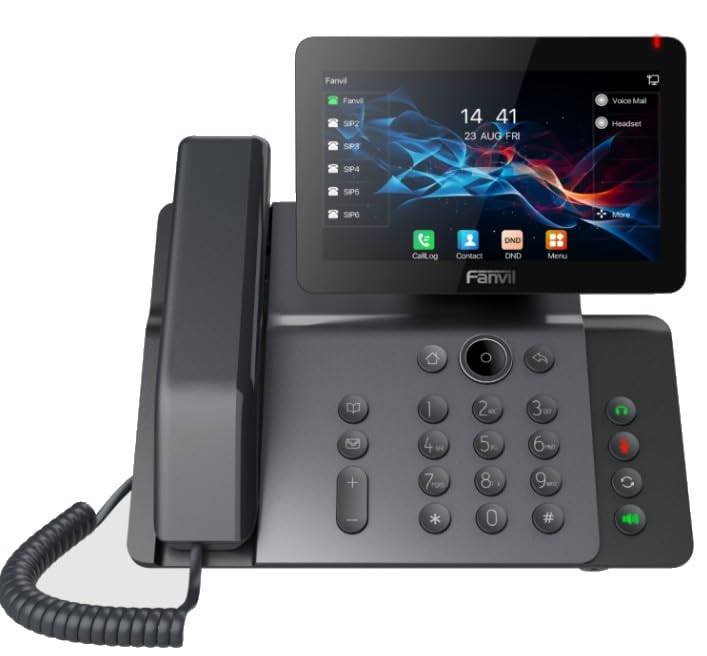
Сүрөт 1: Алдыңкы view of the Fanvil V66 Prime Business Phone, showing the 7-inch color display, numeric keypad, and function keys.
Негизги өзгөчөлүктөрү
- 7-inch HD Color LCD Screen: Inclinable design for optimal viewing.
- Bluetooth & WiFi 6 Connectivity: Тез жана туруктуу зымсыз байланыштар үчүн.
- 116-Key Numeric Keypad: Provides comprehensive control over phone functions.
- Integrated Audio and Video System: Supports high-quality professional calls and videoconferences.
- Интуитивдик колдонуучу интерфейси: Quick menu access for calls, contacts, and main functions.
3. Орнотуу
3.1 Телефонду чогултуу
- Үстөл стенди тиркөө: Align the stand with the slots on the back of the phone and push until it clicks into place.
- Телефонду туташтыруу: Оролгон трубканын шнурунун бир учун трубкага, экинчи учун телефондун түбүндөгү трубка портуна сайыңыз.
3.2 Тармакка жана электр кубатына туташуу
- Ethernet туташуусу: Plug one end of the Ethernet cable into the LAN port on the back of the phone and the other end into your network switch or router.
- Power Connection (Choose one):
- Ethernet аркылуу күч (PoE): If your network switch supports PoE, the phone will power on automatically once connected via the Ethernet cable. No separate power adapter is needed.
- Кубаттуу адаптер: If PoE is not available, connect a compatible power adapter to the DC 12V port on the phone and then plug it into a power outlet.
- The phone will automatically power on and begin the boot-up sequence.
3.3 Баштапкы конфигурация
Upon first boot, the phone may prompt you for initial network settings or firmware updates. Follow the on-screen instructions. For advanced network settings or SIP account configuration, consult your network administrator or IT support.
4. Иштөө нускамалары
4.1 Чалууларды жасоо
- Терүү: Pick up the handset, press the Speaker button, or press the New Call soft key. Dial the desired number using the keypad.
- Тез терүү: If configured, press the assigned speed dial key.
- Байланыштардан: Tap the "Contacts" icon on the display, select a contact, and tap the call icon.
4.2 Чалууларды кабыл алуу
When an incoming call rings, you can:
- Жооп: Pick up the handset, press the Speaker button, or tap the "Answer" soft key on the display.
- Баш тартуу: Tap the "Decline" soft key.
4.3 Using the 7-inch Color Display
The touchscreen display provides access to various functions and settings:
- Башкы экран: Displays time, date, line status, and quick access icons.
- Навигация: Swipe left/right or tap icons to navigate through menus.
- Жумшак баскычтар: Context-sensitive buttons displayed at the bottom of the screen.
- Орнотуулар: Access phone settings, network configuration, and user preferences.
4.4 Bluetooth and WiFi Connectivity
- Bluetooth: Go to "Settings" > "Bluetooth" to enable and pair with Bluetooth headsets or other devices.
- WiFi 6: Go to "Settings" > "Wi-Fi" to enable, scan for available networks, and connect. Enter the password if required.
5. Техникалык тейлөө
5.1 Телефонду тазалоо
- Телефондун бетин тазалоо үчүн жумшак, кургак, антистатикалык чүпүрөктү колдонуңуз.
- Экран үчүн, экранга арналган тазалоочу эритмени жана микрофибра кездемени колдонуңуз.
- Катуу химиялык заттарды, абразивдүү тазалагычтарды же ашыкча нымдуулукту колдонуудан алыс болуңуз.
5.2 Программалык камсыздоо жаңыртуулары
Periodically check for firmware updates to ensure optimal performance and security. Updates can usually be found in the phone's "Settings" menu under "System" or "Firmware Update," or provided by your IT department.
6. Кыйынчылыктарды
| Көйгөй | Мүмкүн себеп | Чечим |
|---|---|---|
| Телефон күйбөйт. | Эч кандай электр туташуусу же туура эмес кубат булагы. | Check power adapter connection or Ethernet cable for PoE. Ensure power outlet is functional. |
| Тармакка туташпай жатат. | Ethernet cable disconnected, incorrect network settings, or Wi-Fi issues. | Verify Ethernet cable is securely connected. Check Wi-Fi settings and password. Contact network administrator for IP configuration. |
| No dial tone or audio during calls. | Handset/headset not connected properly, volume too low, or SIP registration issue. | Ensure handset/headset is plugged in correctly. Adjust volume. Verify SIP account registration status on the display. |
| Display is unresponsive. | Убактылуу программалык ката. | Телефонду электр кубатынан ажыратып жана кайра туташтырып, өчүрүп-күйгүзүңүз. Эгерде көйгөй чечилбесе, колдоо кызматына кайрылыңыз. |
7. Техникалык шарттар
| Өзгөчөлүк | Деталь |
|---|---|
| Бренд | Fanvil |
| Модель номери | V62 PRO (Note: Product series is V66) |
| Түс | Кара |
| Дисплей | 7-inch HD Color LCD, Inclinable |
| Байланыш | Bluetooth, WiFi 6, Ethernet (PoE support) |
| Баскычтоп | 116 ачкыч |
| Материал | Пластик |
| Power Source | Power адаптер / PoE |
| Өлчөмдөрү (L x W x Y) | 20 x 20 x 15 см |
| Элемент Салмагы | 600 грамм |
| Шайкеш түзмөктөр | EHS (Electronic Hook Switch) headsets |
8. Кепилдик жана колдоо
For warranty information, please refer to the warranty card included with your product or visit the official Fanvil website. If you encounter any issues not covered in this manual or require further assistance, please contact your vendor or Fanvil technical support.
- Онлайн колдоо: Fanvil расмий сайтына баш багыңыз webКөп берилүүчү суроолор, документтер жана колдоо ресурстары үчүн сайт.
- Техникалык жардам: Contact your authorized Fanvil reseller or service provider.


