Introduction
This user manual provides comprehensive instructions for the setup, operation, maintenance, and troubleshooting of your THRUSTMASTER T598 Direct Drive Racing Wheel. Designed for an immersive racing experience, this wheel features next-generation Direct Axial Drive Technology and powerful Force Feedback, compatible with PlayStation 5, PlayStation 4, and PC platforms. Please read this manual carefully before using your device to ensure proper functionality and safety.
Коопсуздук маалыматы
Always observe the following safety precautions to prevent damage to the device or personal injury:
- Түзмөктү нымдуулуктан, чаңдан жана өтө жогорку температурадан алыс кармаңыз.
- Аппаратты өзүңүз ажыратпаңыз же оңдоого аракет кылбаңыз. Бардык тейлөөлөрдү квалификациялуу кызматкерлерге тапшырыңыз.
- Аппарат менен кошо берилген кубат адаптерин гана колдонуңуз.
- Ensure proper ventilation around the wheelbase during operation to prevent overheating.
- Avoid prolonged use at maximum force feedback settings to prevent fatigue or discomfort.
Пакеттин мазмуну
Сиздин пакетте бардык компоненттер бар экенин текшериңиз:
- THRUSTMASTER T598 Direct Drive Wheel Base
- Detachable Racing Wheel
- Педаль топтому
- Кубаттуу адаптер жана кабель
- Mounting System (Clamp or Hard-Mount Screws)
- USB туташуу кабели
- Колдонуучунун Колдонмосу (бул документ)

Image: The complete THRUSTMASTER T598 racing wheel setup, including the direct drive wheelbase, the detachable steering wheel, and the pedal set.
Жайгашуу
1. Attaching the Racing Wheel
- Align the quick-release mechanism on the racing wheel with the shaft on the wheelbase.
- Push the wheel firmly onto the shaft until it clicks into place.
- Tighten the locking screw (if present) to secure the wheel.

Image: Close-up of the THRUSTMASTER T598 racing wheel, highlighting its design and the central logo, indicating it's properly attached to the wheelbase.
2. Mounting the Wheelbase
The wheelbase can be mounted using the included clamp system or by hard-mounting to a cockpit.
Clamp Система:
- cl тиркеңизamp to the underside of the wheelbase.
- Position the wheelbase on a sturdy desk or table.
- Клamp screw until the wheelbase is securely fastened.
Hard-Mounting:
- Refer to your racing cockpit's instructions for compatible mounting points.
- Use appropriate screws (not always included) to secure the wheelbase to the cockpit.
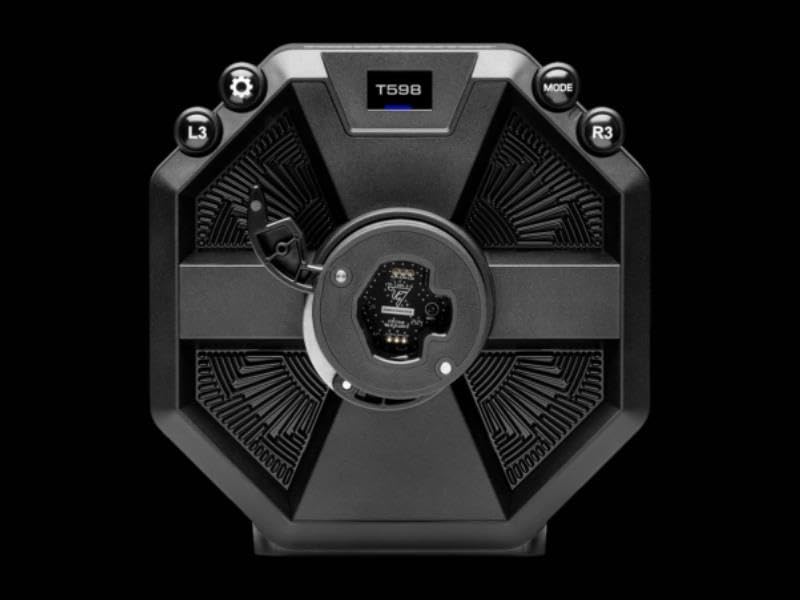
Сүрөт: Жогорку view of the THRUSTMASTER T598 wheelbase, showing the display and various control buttons (L3, R3, Mode, Settings gear icon) for configuration.
3. Connecting the Pedal Set
- Connect the pedal set cable to the designated port on the rear of the wheelbase.
- Туташуу коопсуз экенин текшериңиз.

Image: The THRUSTMASTER pedal set, featuring two pedals mounted on a sturdy base with the Thrustmaster logo, designed for realistic racing simulation.
4. Кубат жана USB туташуусу
- Connect the power adapter to the wheelbase and then to a wall outlet.
- Connect the USB cable from the wheelbase to an available USB port on your PlayStation console (PS4/PS5) or PC.
- The wheelbase will perform a self-calibration sequence upon power-on. Do not touch the wheel during this process.
Иштөө нускамалары
Негизги башкаруу элементтери жана дисплей
The T598 features an integrated display and various buttons for quick adjustments and status monitoring.

Image: Close-up of the THRUSTMASTER T598 wheelbase display, showing "FFB1 MASTER 100%" and control buttons (L3, R3), indicating force feedback master settings.

Image: Close-up of the THRUSTMASTER T598 wheelbase display, showing "FFB3 GEAR JOLT HIGH" and control buttons (L3, R3), indicating specific force feedback effects.
Use the L3 and R3 buttons, along with the MODE and Settings buttons, to navigate the display menu and adjust settings such as Force Feedback strength, vibration effects, and steering angle.
Force Feedback (FFB)
The T598 utilizes Direct Axial Drive Technology to deliver precise and powerful Force Feedback. This technology directly transmits motor forces to the steering wheel, providing realistic sensations of road texture, impacts, and vehicle dynamics.

Сүрөт: жарылган view diagram of the THRUSTMASTER T598 direct drive mechanism, illustrating the internal components responsible for generating force feedback, including the motor and drive shaft.
Adjust FFB settings via the wheelbase display or through the Thrustmaster control panel on PC for optimal experience in different racing titles.
Шайкештик
The THRUSTMASTER T598 is fully compatible with:
- PlayStation 5 (PS5)
- PlayStation 4 (PS4)
- Компьютер (Windows 10/11)
Ensure your console or PC operating system is up to date. For PC, download the latest drivers and firmware from the official Thrustmaster support webсайт.
Техникалык тейлөө
- Тазалоо: Use a soft, dry cloth to clean the wheel and wheelbase. Avoid abrasive cleaners or solvents.
- Сактагыч: When not in use, store the device in a cool, dry place, away from direct sunlight.
- Программалык камсыздоонун жаңыртуулары: Regularly check the official Thrustmaster support website for firmware updates. Keeping your device's firmware up to date ensures optimal performance and compatibility with new games and systems.
Проблемаларды чечүү
| Көйгөй | Мүмкүн чечим |
|---|---|
| Wheel not recognized by console/PC. |
|
| No Force Feedback or weak FFB. |
|
| Wheel calibration issues. |
|
Техникалык шарттар
| Өзгөчөлүк | Деталь |
|---|---|
| Продукт аты | THRUSTMASTER T598 Direct Drive Racing Wheel |
| Модель номери | T598 |
| Бренд | Thrustmaster |
| Force Feedback Technology | Түз октук диск |
| Шайкештик | PlayStation 5, PlayStation 4, ЖК |
| Продукциянын өлчөмдөрү | 12.6 x 17.72 x 13.78 inches (Wheelbase and Wheel) |
| Элемент Салмагы | Болжол менен 24.5 фунт |
Кепилдик жана колдоо
For warranty information and technical support, please visit the official Thrustmaster support webсайтка же кардарларды тейлөөгө кайрылыңыз. Кепилдик дооматтар үчүн сатып алганыңыздын далилин сактаңыз.
Thrustmaster расмий өкүлү Webсайт: колдоо.thrustmaster.com


