1. Киришүү
The Fanvil V60W is an advanced desktop IP phone designed for modern communication needs. It combines elegant design with robust functionality, featuring a 2.4-inch color display for an intuitive user interface. This device supports up to 4 SIP lines and includes 6 programmable keys for optimal customization. High-definition audio quality and 6-way audio conferencing capabilities make this phone ideal for professional communications. Versatile connectivity is provided through integrated dual-band 2.4G/5G WiFi (WiFi 6) and Bluetooth 5, eliminating the need for additional cables. Two 10/100 ports with PoE support ensure easy integration into your existing network. Its modern black design seamlessly fits into any office environment, while the ergonomic handset with a coiled cord ensures comfort during extended conversations.
2. Пакеттин мазмуну
Please verify that all items are present and in good condition upon opening the package. If any items are missing or damaged, please contact your vendor.
- Fanvil V60W IP Phone Unit
- Телефон
- Телефон шнур
- Ethernet кабели
- Кубат адаптери (эгер PoE колдонулбаса)
- Ыкчам орнотуу колдонмосу
3. Продукт бүтүп калдыview
Familiarize yourself with the components of your Fanvil V60W IP Phone.
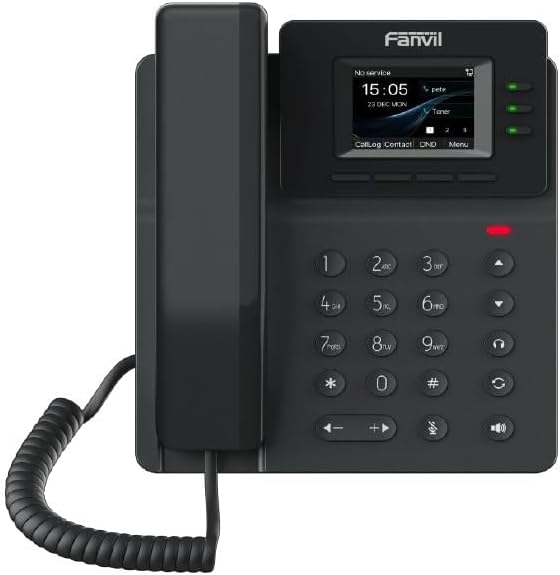
Figure 3.1: Fanvil V60W IP Phone Front View
This image displays the front of the Fanvil V60W IP Phone. It features a black handset on the left, connected by a coiled cord. The main unit on the right includes a color display showing "No service", "15:05", "23 DEC MON", and menu options like "CallLog", "Contact", "DND", and "Menu". Above the display, the "Fanvil" logo is visible. To the right of the display are three green indicator lights. Below the display is a standard numeric keypad (0-9, *, #) along with navigation keys (up, down, left, right), volume controls, and dedicated function keys for headset, speakerphone, mute, and redial/transfer. A red indicator light is visible above the keypad.
Негизги компоненттер:
- Дисплей экраны: 2.4-inch color display (320 x 240 resolution) for user interface and information.
- Программалануучу ачкычтар: 6 keys for custom functions.
- Сандык баскычтоп: Standard 0-9, *, # for dialing.
- Чабыттоо баскычтары: Меню багыттоо үчүн.
- Функция баскычтары: Dedicated keys for common features like speakerphone, mute, headset.
- Телефон: Ergonomic design for comfortable calls.
- LED көрсөткүчтөрү: For call status, message waiting, etc.
4. Орнотуу жана орнотуу
Follow these steps to set up your Fanvil V60W IP Phone.
4.1 Телефонду туташтыруу
- Телефонду туташтыруу: Оролгон трубканын шнурунун бир учун трубкага, экинчи учун телефондун түбүндөгү трубка портуна сайыңыз.
- Тармакка туташуу:
- Ethernet (PoE or Adapter): Connect an Ethernet cable from the LAN port on the phone to your network switch or router. If using Power over Ethernet (PoE), the phone will power on automatically.
- Кубат адаптери (эгер PoE жок болсо): If PoE is not available, connect the power adapter to the power port on the phone and then to a power outlet.
- Компьютерге туташуу (кошумча): If you wish to connect a computer through the phone, connect an Ethernet cable from the PC port on the phone to your computer.
4.2 Баштапкы конфигурация
Upon first boot, the phone will attempt to obtain network settings via DHCP. You may need to configure SIP accounts manually or via auto-provisioning.
- Орнотууларга кирүү: басыңыз Меню key on the phone to access system settings.
- Тармак орнотуулары: багыттоо Settings > Advanced Settings > Network to configure IP address, subnet mask, gateway, and DNS if not using DHCP.
- SIP каттоо эсеби: багыттоо Settings > Advanced Settings > Accounts to add or modify SIP accounts. You will need your SIP server address, SIP user ID, and password provided by your VoIP service provider.
- Wi-Fi конфигурациясы: багыттоо Орнотуулар > Wi-Fi to enable Wi-Fi and connect to an available wireless network.
5. Негизги операция
5.1 Чалуу
- Телефонду көтөрүңүз же басыңыз Динамик ачкыч.
- Номерин тер баскычтопту колдонуу.
- басыңыз Терүү key or wait a few seconds for the call to connect automatically.
5.2 Чакырууга жооп берүү
Телефон шыңгырганда:
- Телефонду көтөрүңүз, же
- басыңыз Динамик ачкыч, же
- Тийиштүү баскычты басыңыз Line ачкыч.
5.3 Чалууну аяктоо
Жигердүү чалууну бүтүрүү үчүн:
- Replace the Handset, же
- басыңыз Чакырууну аяктоо key (if available on screen or as a function key).
5.4 Үндү тууралоо
Чалуу учурунда колдонуңуз Үнүн жогорулатуу (+) жана Үнүн азайтуу (-) keys to adjust the handset, headset, or speakerphone volume.
6. Өркүндөтүлгөн функциялар
The Fanvil V60W offers several advanced features to enhance your communication experience.
- Чалууларды кармоо: басыңыз кармап туруңуз key during an active call to place it on hold. Press again to resume.
- Чалууларды которуу:
- Сокур өткөрүп берүү: Чалуу учурунда басыңыз Transfer, dial the new number, and press Transfer кайра.
- Катышкан трансфер: Чалуу учурунда басыңыз Transfer, dial the new number, wait for the other party to answer, then press Transfer аягына чейин кайра.
- 6 тараптуу аудио конференция:
- Make a call to the first party.
- басыңыз Conf key. The first party is put on hold.
- Dial the second party's number and wait for them to answer.
- басыңыз Conf key again to establish the conference.
- Repeat steps 2-4 for additional parties (up to 6 participants total).
- Bluetooth байланышы: Pair your Bluetooth headset or mobile device via Орнотуулар > Bluetooth for hands-free communication or contact synchronization.
- Программалануучу ачкычтар: Customize the 6 programmable keys via the phone's web интерфейс же Settings > DSS Key to assign speed dials, BLF (Busy Lamp Field), or other functions.
7. Техникалык тейлөө
Proper maintenance ensures the longevity and optimal performance of your Fanvil V60W IP Phone.
- Тазалоо: Телефондун бетин тазалоо үчүн жумшак, кургак чүпүрөктү колдонуңуз. Өжөр тактар үчүн бир аз сүртүңүзamp жумшак, абразивдүү эмес тазалоочу каражаты бар кездемени колдонсо болот. Ашыкча нымдуулуктан жана катуу химиялык заттардан алыс болуңуз.
- Чаңды тазалоо: Regularly wipe down the display and keypad to prevent dust buildup.
- Экологиялык шарттар: Keep the phone in a dry environment, away from direct sunlight, extreme temperatures, and sources of moisture.
- Программалык камсыздоонун жаңыртуулары: Periodically check for firmware updates from Fanvil's official website or through your service provider. Firmware updates can improve performance, add features, and fix bugs.
8. Кыйынчылыктарды
This section addresses common issues you might encounter with your Fanvil V60W IP Phone.
| Көйгөй | Мүмкүн себеп | Чечим |
|---|---|---|
| Телефон күйбөйт. | No power from adapter or PoE. | Check power adapter connection or ensure PoE is active on the Ethernet port. Try a different power outlet or Ethernet port. |
| Терүү обону жок / Чакыруу мүмкүн эмес. | Тармакка туташуу маселеси; SIP каттоо эсеби катталган эмес. | Verify Ethernet cable connection. Check network settings (IP address, gateway). Ensure SIP account status is "Registered" in the phone's settings. Contact your VoIP service provider. |
| Үн сапатынын начардыгы (жаңылык, статикалык). | Тармактын тыгыны; бузук кабель; айлана-чөйрөнүн кийлигишүүсү. | Check network bandwidth. Replace Ethernet cable. Move phone away from other electronic devices. Adjust volume settings. |
| Wi-Fi туташуусу туруксуз. | Weak signal; interference; incorrect password. | Move phone closer to Wi-Fi router. Check Wi-Fi password. Ensure router firmware is up to date. |
If the problem persists after attempting these solutions, please contact your technical support or VoIP service provider for further assistance.
9. Техникалык шарттар
Detailed technical specifications for the Fanvil V60W IP Phone.
- Дисплей: 2.4-inch (320x240) color screen
- SIP линиялары: 4
- Программалануучу ачкычтар: 6
- Аудио: HD Audio, 6-way audio conferencing
- Байланыш: Dual-band 2.4G/5G Wi-Fi (Wi-Fi 6), Bluetooth 5
- Ethernet порттору: 2 x 10/100 Mbps (with PoE support)
- Өлчөмдөрү (L x W x Y): 22 x 25 x 15 см (болжол менен)
- Салмагы: 600 грамм (болжол менен)
- Материал: Пластик
- Түсү: Кара
- Кубат булагы: Power adapter or PoE
- Шайкеш түзмөктөр: Ehs
10. Кепилдик жана колдоо
Кепилдик жөнүндө маалымат жана техникалык колдоо алуу үчүн, сатып алууңуз менен кошо берилген документтерди караңыз же расмий Fanvil веб-сайтына кириңиз. webсайт. Сатып алуу квитанциясын кепилдик дооматтары үчүн сатып алуунун далили катары сактаңыз.
- Өндүрүүчү: Fanvil
- Колдоо байланышы: Refer to Fanvil's official website for support channels (e.g., support portal, email, phone).
- Программалык камсыздоо жаңыртуулары: Information regarding software updates is not available in the product data. Please check the manufacturer's webакыркы жаңыртуулар үчүн сайт.
- Запастык бөлүктөр: Information regarding spare parts availability is not available.


