1. Киришүү
Thank you for choosing the Shokz OpenDots ONE Ear Cuff Wireless Earphones. These open-ear earphones are designed to provide a comfortable listening experience while keeping you aware of your surroundings. This manual provides detailed instructions for setup, operation, maintenance, and troubleshooting to ensure optimal performance.

Image 1.1: Shokz OpenDots ONE earphones and charging case.
The Shokz OpenDots ONE features:
- Open-ear ear-cuff design for pressure-free comfort and situational awareness.
- Dolby Audio support for immersive, high-quality sound with 16mm equivalent dual-driver system and Bassphere technology.
- Up to 40 hours of total battery life with the charging case, including quick charge functionality.
- Bluetooth 5.4 for stable multipoint connection.
- IP54 water resistance for protection against sweat and light splashes.
- Dedicated app for sound customization, touch control settings, and finding lost earphones.
- AI noise-canceling microphone for clear calls.
- DirectPitch technology to minimize sound leakage and enhance privacy.

Сүрөт 1.2: Бүттүview of key features including lightweight design, Dolby Audio, 40-hour battery, IP54 rating, and wireless charging.
2. Орнотуу
2.1. Наушникти жана капты заряддоо
Биринчи колдонуудан мурун, наушникти жана кубаттоочу кутучаны толук заряддаңыз.
- USB-C заряддоо: Connect the provided USB-C cable to the charging case and a power source. The indicator light on the case will show charging status. A full charge takes approximately 60 minutes.
- Зымсыз кубаттоо: Place the charging case on a compatible wireless charging pad. The indicator light will confirm charging.
- Тез кубаттоо: A 10-minute quick charge provides approximately 2 hours of playback.

Image 2.1: The charging case connected via USB-C, illustrating the 40-hour total playback and quick charge feature.

Image 2.2: The charging case placed on a wireless charging pad, demonstrating wireless charging capability.
2.2. Түзмөгүңүз менен жупташтыруу
- Open the charging case. The earphones will automatically enter pairing mode, indicated by a flashing LED light.
- Түзмөгүңүздө (смартфон, планшет, компьютер) Bluetooth жөндөөлөрүнө өтүңүз.
- Select "Shokz OpenDots ONE" from the list of available devices.
- Туташтырылгандан кийин, кулакчындардын LED индикатору күйүп-өчүүнү токтотот.
2.3. Наушник тагынуу
The OpenDots ONE features an ear-cuff design that rests gently on your ear without blocking the ear canal. They are designed to be worn without distinguishing between left and right, as the earphones automatically detect orientation.
- Gently place the earphone over your ear, ensuring the speaker rests comfortably near your ear canal.
- The flexible JointArc structure adapts to various ear shapes for a secure and comfortable fit.
- The design is compatible with glasses and masks, preventing interference.
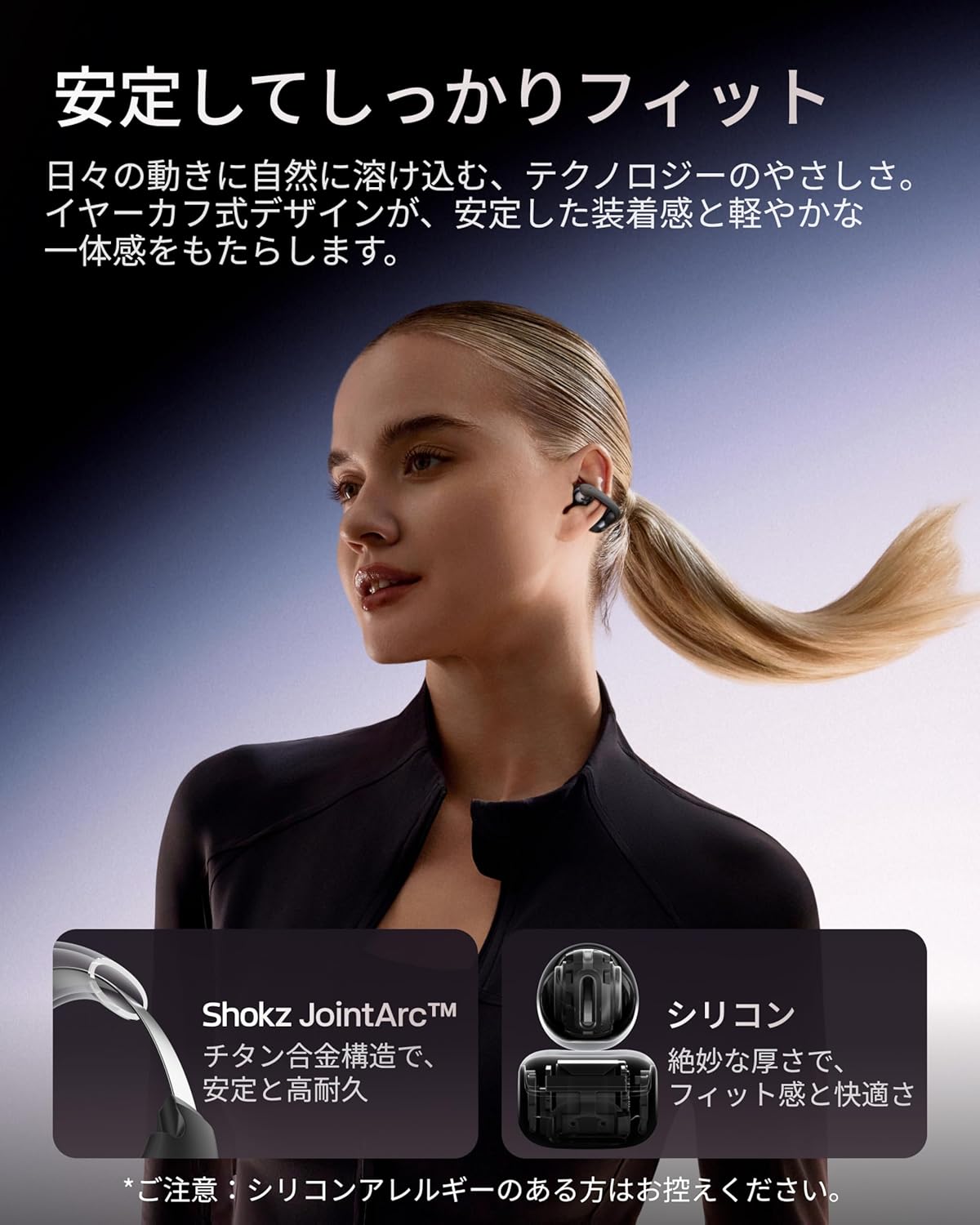
Image 2.3: A woman wearing the Shokz OpenDots ONE earphones, demonstrating the secure and comfortable ear-cuff fit.

Image 2.4: Visual guide for correct earphone placement and common incorrect wearing methods.
3. Наушниктерди иштетүү
3.1. Негизги сенсордук башкаруу каражаттары
The OpenDots ONE features intuitive touch controls on each earphone. You can customize these controls via the Shokz app.
- Ойнотуу/тындыруу: Double-tap the battery compartment or JointArc area.
- Үнүн жогорулатуу/төмөндөтүү: Touch and hold the top or bottom of the battery compartment.
- Кийинки трек: Triple-tap (customizable).
- Мурунку трек: Quadruple-tap (customizable).
- Чалууга жооп берүү/аяктоо: Эки жолу таптаңыз.
- Чакырууну четке кагуу: Тийип, кармап туруңуз.
- Үн Жардамчысын жандыруу: Triple-tap (customizable).
3.2. Shokz App Features
Download the dedicated Shokz app for enhanced control and customization.
- Үндү ыңгайлаштыруу: Choose from 4 preset EQ modes (Standard, Vocal, Bass Boost, Private) and 2 custom modes to adjust the sound profile.
- Сенсордук башкаруу жөндөөлөрү: Тийүү жаңсоолорун өз каалооңузга ылайыкташтырыңыз.
- Find My Earphones: Жоголгон кулакчындарды табыңыз.
- Программалык камсыздоонун жаңыртуулары: Наушникиңизди эң акыркы функциялар жана жакшыртуулар менен жаңыртып туруңуз.
- Prompt Volume Adjustment: Control the volume of system prompts.
- Жеке режим: Enhance sound leakage prevention for increased privacy.

Image 3.1: The Shokz app interface, showing options for EQ settings and other customizations.
3.3. Көп чекиттүү туташуу
The OpenDots ONE supports multipoint connection, allowing you to connect to two Bluetooth devices simultaneously. This enables seamless switching between devices, for example, from a laptop for music to a phone for a call.
- Ensure both devices are paired with your OpenDots ONE.
- The earphones will automatically switch audio source based on activity (e.g., incoming call).
4. Техникалык тейлөө
4.1. Тазалоо
- Наушниктерди жана заряддоо кутусун жумшак, кургак, түксүз чүпүрөк менен сүртүңүз.
- Абразивдүү тазалагычтарды, эриткичтерди же аэрозолдук спрейлерди колдонбоңуз.
- Ар кандай тешиктерге ным кирүүдөн сактаңыз.
4.2. Сактоо
- Кулакчындарды коргоо жана кубаттап туруу үчүн колдонулбаган учурда кубаттоо кутучасында сактаңыз.
- Ашыкча температурада же жогорку нымдуулукта сактоодон алыс болуңуз.
4.3. Сууга туруктуулук (IP54)
The OpenDots ONE earphones are rated IP54, meaning they are resistant to dust and splashing water from any direction. This makes them suitable for exercise and outdoor activities in light rain. However, they are not designed for submersion in water or exposure to pressurized water jets.
- Кулакчындарды атайылап сууга салбаңыз.
- If the earphones get wet, wipe them dry before placing them back in the charging case.
5. Кыйынчылыктарды
5.1. Үн жок же үзгүлтүктүү аудио
- Кулакчындардын заряддалганын текшериңиз.
- Check that the earphones are properly paired and connected to your device.
- Verify the volume levels on both the earphones and your connected device.
- Move closer to your device to ensure a stable Bluetooth connection.
- Bluetooth байланышын ажыратып, кайра туташтырууга аракет кылыңыз.
5.2. Жупташтыруу маселелери
- Кулакчындардын жупташтыруу режиминде экенин текшериңиз (жаркыраган LED).
- Кедерги болбош үчүн жакын жердеги башка түзмөктөрдө Bluetooth'ду өчүрүңүз.
- Телефонуңуздун Bluetooth жөндөөлөрүнөн түзмөктү унутуп, кайра жупташтырып көрүңүз.
- Perform a factory reset (refer to the Shokz app or official support for instructions).
5.3. Заряддоо көйгөйлөрү
- USB-C кабели корпуска да, кубат булагына да бекем туташып турганын текшериңиз.
- Эгер зымсыз кубаттоону колдонуп жатсаңыз, куту кубаттоочу тактага туура коюлганын текшериңиз.
- Башка заряддоо кабелин же кубат адаптерин колдонуп көрүңүз.
- Наушниктеги жана корпустун ичиндеги заряддоо контакттарын кургак кебез тампон менен тазалаңыз.
5.4. Sound Leakage
While DirectPitch technology significantly reduces sound leakage, some leakage may occur at very high volumes or in very quiet environments. To minimize this:
- Үнүн төмөндөтүңүз.
- Activate "Private Mode" in the Shokz app.
6. Техникалык шарттар
| Өзгөчөлүк | Деталь |
|---|---|
| Модель аты | OpenDots ONE |
| Өндүрүүчүнүн маалымдамасы | SHOKZ E310 |
| Байланыш технологиясы | Зымсыз |
| Зымсыз байланыш технологиясы | Bluetooth 5.4 |
| Frequency Response | 2400 МГц |
| Сезимталдуулук | 97.5 дБ |
| Кулак жайгаштыруу | Ачык кулак |
| Наушник форма фактору | Ачык кулак |
| Түс | Кара |
| Сууга туруктуулук деңгээли | IP54 (Сууга туруктуу) |
| Батареянын иштөө мөөнөтү (наушник) | 10 саатка чейин |
| Батареянын жалпы иштөө мөөнөтү (корпусу менен) | 40 саатка чейин |
| Заряддоо убактысы | Болжол менен 60 мүнөт |
| Charging Style | USB-C, зымсыз кубаттоо |
| Башкаруу түрү | Call Control, Volume Control, Media Control |
| Башкаруу ыкмасы | Колдонмо, тийүү |
| Продукт Салмагы | 65 грамм |
| Материалдар | Titanium Alloy, Silicone, PC |
| Сунушталган Колдонуулар | Exercise, Entertainment, Sports, Training, Running, Work, Meetings, Daily Use, Commuting |
| Шайкеш түзмөктөр | Bluetooth иштетилген түзмөктөр |
| Камтылган компоненттер | OpenDots ONE Earphones ×1, OpenDots ONE Charging Case ×1, USB-C Charging Cable ×1 |
7. Кепилдик жана колдоо
7.1. Кепилдик маалыматы
For specific warranty details, please refer to the warranty card included with your product or visit the official Shokz website. Typically, Shokz products come with a limited warranty covering manufacturing defects.
7.2. Кардарларды колдоо кызматы
If you encounter any issues not covered in this manual or require further assistance, please contact Shokz customer support through their official website or the dedicated Shokz app. You can also visit the Shokz Official Store on Amazon кошумча ресурстар үчүн.


