1. Киришүү
This manual provides essential information for the safe and effective use of your boAt Aavante Bar Quake 2.1 Channel Soundbar with Wired Subwoofer. Please read this manual thoroughly before operating the device and retain it for future reference. The boAt Aavante Bar Quake is designed to enhance your audio experience with its 200W RMS output and versatile connectivity options.
Негизги өзгөчөлүктөр төмөнкүлөрдү камтыйт:
- 200W RMS boAt Signature Sound: Күчтүү жана так аудиону берет.
- 2.1 Channel Soundbar with Wired Subwoofer: Provides immersive sound with enhanced bass.
- Multichannel Connectivity: Supports Bluetooth v5.3, AUX, USB, Optical, and HDMI-ARC.
- EQ режимдери: Offers tailored audio profiles for Movies, Music, News, and 3D content.
- Bass & Treble Controls: Жекелештирилген үн жөндөөлөрүн түзүүгө мүмкүндүк берет.
2. Коопсуздук боюнча маанилүү маалымат
Коопсуз иштөөнү камсыз кылуу жана зыян келтирбөө үчүн төмөнкү сактык чараларын сактаңыз:
- Аппаратты жамгырдын, нымдуулуктун же экстремалдык температуранын таасиринде калтырбаңыз.
- в ачпагылаasinг. Бардык тейлөөлөрдү квалификациялуу кызматкерлерге тапшырыңыз.
- Саундбардын жана сабвуфердин айланасында туура желдетүүнү камсыз кылыңыз.
- Аппарат менен кошо берилген кубат адаптерин гана колдонуңуз.
- Аппаратты жылуулук булактарынан жана түз күн нурунан алыс кармаңыз.
- Avoid placing heavy objects on the soundbar or subwoofer.
- Чагылган бороондо же көпкө колдонулбаганда электр сайгычын ажыратыңыз.
3. Пакеттин мазмуну
Пакетте бардык буюмдар бар экенин текшериңиз:
- boAt Aavante Bar Quake Soundbar
- Зымдуу сабвуфер
- Remote Control (with 2 x 12V Alkaline batteries included)
- Колдонуучунун Колдонмосу (бул документ)
- Кепилдик картасы
- Кубаттуу адаптер
4. Продукт бүтүп калдыview
Familiarize yourself with the components of your boAt Aavante Bar Quake sound system.
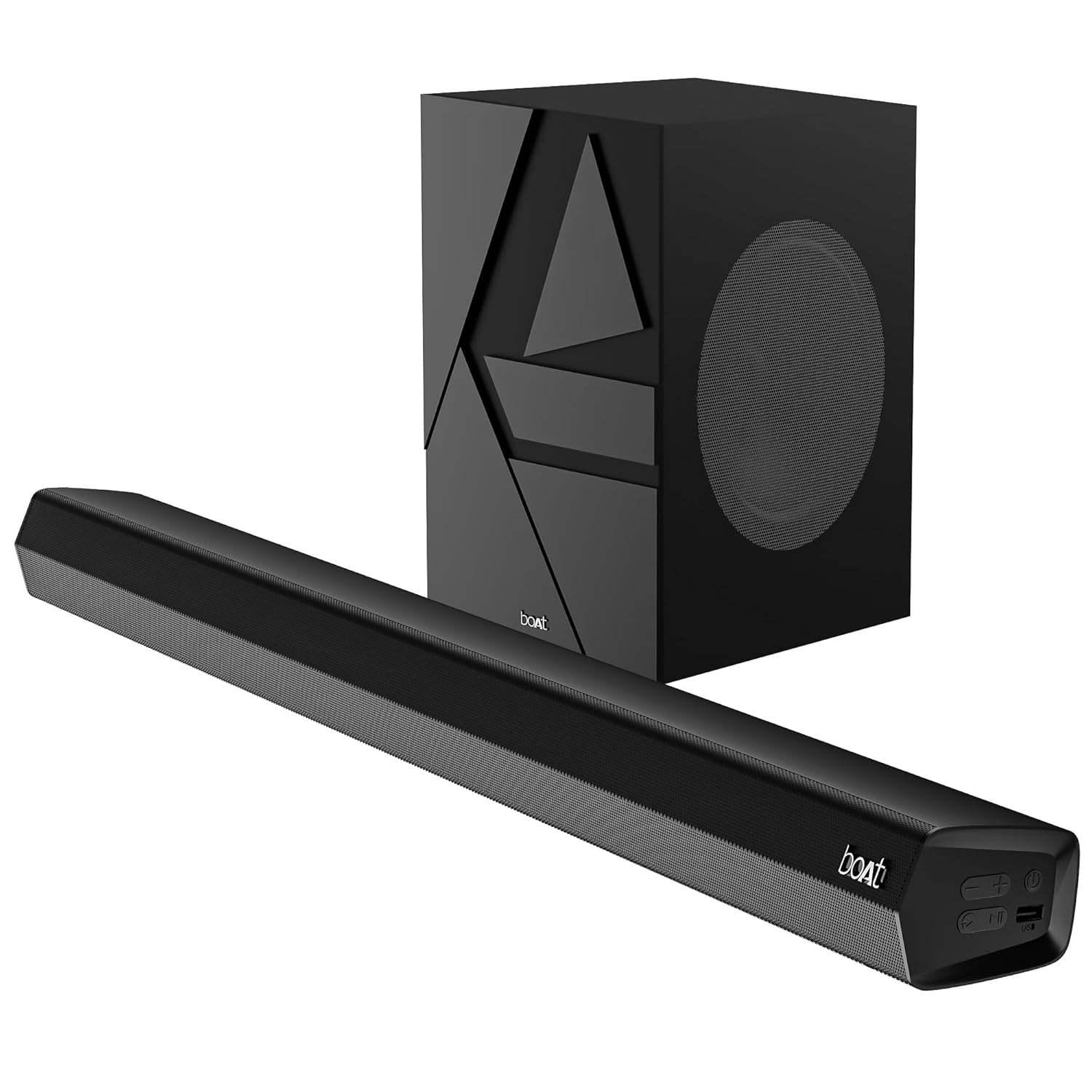
Image 1: The boAt Aavante Bar Quake soundbar and its accompanying wired subwoofer, showcasing алардын конструкциясы жана салыштырмалуу өлчөмдөрү.
4.1 Soundbar Features

Сүрөт 2: Жакын план view of the boAt Aavante Bar Quake soundbar, highlighting its sleek design and the '200W RMS boAt Signature Sound' feature.
The soundbar houses the main speakers and control interface. It delivers 200W RMS boAt Signature Sound for a powerful audio experience.
4.2 Зымдуу сабвуфер

Image 3: An illustration showing the boAt Aavante Bar Quake soundbar and its wired subwoofer integrated into a home entertainment setup, emphasizing the 2.1 channel configuration.
The wired subwoofer provides deep, rich bass, complementing the soundbar for a full-range audio output.
4.3 Байланыш порттору

Сүрөт 4: деталдуу view of the rear panel of the boAt Aavante Bar Quake soundbar, clearly showing the various input ports including USB, HDMI (ARC), AUX, and Optical, along with Bluetooth connectivity.
The soundbar features multiple input options for connecting various devices:
- USB порт: USB дисктерден аудио ойнотуу үчүн.
- HDMI (ARC) порту: For high-quality audio connection to compatible TVs.
- Bluetooth: Мобилдик түзмөктөрдөн зымсыз аудио агымы үчүн.
- AUX киргизүү: 3.5 мм аудио кабели аркылуу түзмөктөрдү туташтыруу үчүн.
- Оптикалык киргизүү: For digital audio connection from TVs or other sources.
4.4 Алыстан башкаруу

Image 5: The master remote control for the boAt Aavante Bar Quake, illustrating buttons for power, mute, input selection, volume, playback, EQ modes (Music, Movies, News, 3D), and dedicated bass and treble controls.
The included remote control allows full command over the soundbar's functions, including power, volume, input selection, EQ modes, and bass/treble adjustments.
5. Орнотуу
5.1 Орнотуу
- Саундбар: Place the soundbar on a stable, flat surface directly in front of your television, or mount it on the wall below your TV. Ensure there are no obstructions in front of the soundbar.
- ЛГурченко: Position the subwoofer on the floor, preferably in a corner or near a wall, to enhance bass response. Ensure it is within reach of the soundbar for the wired connection.
5.2 Сабвуферди туташтыруу
Connect the wired subwoofer to the dedicated subwoofer output port on the soundbar using the integrated cable.
5.3 Кубат туташтыруу
- Кубат адаптерин саундбардагы DC IN портуна туташтырыңыз.
- Кубат адаптеринин экинчи учун розеткага сайыңыз.
- Ensure the subwoofer is also connected to a power source if it has a separate power cable (for this model, it's wired to the soundbar).
5.4 Аудио байланыштар
Аудио булагын туташтыруу үчүн төмөнкү ыкмалардын бирин тандаңыз:
- HDMI ARC (сунушталат): Connect an HDMI cable from the HDMI ARC port on your TV to the HDMI ARC port on the soundbar. This allows audio to be sent from the TV to the soundbar and often enables TV remote control of the soundbar volume.
- Оптикалык: Connect an optical cable from your TV's optical output to the OPTICAL IN port on the soundbar.
- AUX: Connect a 3.5mm audio cable from your device's audio output to the AUX IN port on the soundbar.
- USB: Insert a USB drive into the USB port on the soundbar to play audio fileтүздөн-түз с.
- Bluetooth: See Section 6.2 for Bluetooth pairing instructions.
6. Иштөө нускамалары
6.1 Күйгүзүү/өчүрүү
басыңыз Күч түзмөктү күйгүзүү же өчүрүү үчүн үн тактасындагы же алыстан башкаруу пультундагы баскычты басыңыз.
6.2 Bluetooth жупташтыруу
- Саундбарды күйгүзүп, баскычын колдонуп Bluetooth режимин тандаңыз Киргизүү button on the remote or soundbar. The LED indicator will flash.
- Мобилдик түзмөгүңүздө Bluetooth'ду иштетиңиз жана жеткиликтүү түзмөктөрдү издеңиз.
- Select "boAt Aavante Bar Quake" from the list.
- Жупташкандан кийин LED индикатору жарк этүүнү токтотуп, туруктуу бойдон калат.
6.3 Киргизүү булагын тандоо
басыңыз Киргизүү button on the remote control or soundbar repeatedly to cycle through the available input sources: Bluetooth, AUX, Optical, HDMI ARC, and USB.
6.4 Үндү башкаруу
колдонуу Көлөм + жана Көлөмү - buttons on the remote control or soundbar to adjust the volume level.
6.5 EQ режимдери
The soundbar offers four preset equalizer modes to optimize audio for different content types. Press the corresponding button on the remote control to select:
- Тасмалар: Диалогдорду жана кинематографиялык эффекттерди күчөтөт.
- Музыка: салмактуу аудио про менен камсыз кылатfile музыка ойнотуу үчүн.
- Жаңылыктар: Жаңылыктар жана оозеки мазмун үчүн үндүн тунуктугун оптималдаштырат.
- 3D: Кененирээк, көбүрөөк таасирдүү үндөрдү жарататtage.
6.6 Бас жана жогорку жыштыктарды башкаруу элементтери
колдонуу BASS+ / BASS- жана TREB+ / TREB- buttons on the remote control to fine-tune the bass and treble levels according to your preference.
7. Техникалык тейлөө
7.1 Тазалоо
- Wipe the surfaces of the soundbar and subwoofer with a soft, dry cloth.
- Do not use liquid cleaners, aerosols, or abrasive chemicals, as these may damage the finish.
- Тазалоодон мурун аппараттын розеткадан ажыратылганын текшериңиз.
7.2 Сактоо
Эгерде түзмөктү узак убакытка сактап жатсаңыз, аны розеткадан сууруп, салкын, кургак жерде, күн нуру түз тийбеген жана өтө жогорку температурадан алыс сактаңыз.
8. Кыйынчылыктарды
| Көйгөй | Мүмкүн себеп | Чечим |
|---|---|---|
| Күч жок | Электр кабели туташкан эмес; Электр розеткалары активдүү эмес | Электр кабелинин бекем туташтырылганын текшериңиз; Башка розетканы колдонуп көрүңүз |
| Үн жок | Incorrect input source; Volume too low; Mute activated; Incorrect cable connection | Select correct input source; Increase volume; Deactivate mute; Check audio cable connections |
| Bluetooth жупташтыруу ишке ашпай калды | Саундбар жупташтыруу режиминде эмес; Түзмөк өтө алыс; Тоскоолдук | Ensure soundbar is in Bluetooth pairing mode; Move device closer; Avoid interference from other devices |
| Пульт иштебей жатат | Батареялар түгөнгөн; Пульт менен үн панелинин ортосундагы тоскоолдук | Replace remote control batteries; Remove any obstructions |
9. Техникалык шарттар
| Модель аты | Aavante Bar Quake |
| Динамик түрү | Саундбар |
| Көлөмдүү үн каналынын конфигурациясы | 2.1 |
| Динамиктин максималдуу чыгаруу күчү | 200 Ватт RMS |
| Байланыш технологиясы | Bluetooth v5.3, AUX, USB, Optical, HDMI-ARC |
| Frequency Response | 40 Гц |
| Аудио чыгаруу режими | Stereo, Movies, Music, News, 3D |
| Башкаруу ыкмасы | Алыстан |
| Монтаж түрү | Table & Wall |
| Продукциянын өлчөмдөрү | 90.3D x 6.5W x 8.6H Сантиметр |
| Элемент Салмагы | 6.5 кг |
| Камтылган компоненттер | User Manual, Warranty Card, Soundbar, Wired Subwoofer, Remote Control |
| Power Source | Зымдуу электр |
| Батареялар талап кылынат | Yes (2 x 12V Alkaline for remote, included) |
| Өндүрүүчү | Imagine Marketing Limited |
10. Кепилдик жана колдоо
10.1 Кепилдик маалыматы
The boAt Aavante Bar Quake comes with a 1 жылдык чектелген кепилдик from the date of purchase. This warranty covers manufacturing defects. Please retain your purchase receipt and warranty card for any warranty claims.
10.2 Кардарларды колдоо
For technical assistance, troubleshooting, or warranty claims, please contact boAt customer support. Refer to the contact information provided on your warranty card or visit the official boAt webакыркы колдоо чоо-жайын алуу үчүн сайт.


