Introduction
This manual provides instructions for the safe and efficient use of your OnePlus AIRVOOC 50W Magnetic Charger OAWV08. Please read this manual thoroughly before using the product and retain it for future reference.
The OnePlus AIRVOOC 50W Magnetic Charger OAWV08 is designed for powerful wireless flash charging, delivering a rapid 50W charge to compatible devices. It incorporates multiple cooling technologies, including a centrifugal fan, TEC (Thermoelectric Cooler) technology, and cooling fins, to ensure efficient heat dissipation and protect your device during charging. The aluminum construction enhances heat conductivity and durability.
Жайгашуу
Follow these steps to set up your OnePlus AIRVOOC 50W Magnetic Charger:
- Заряддагычты таңгактан чыгаруу: Carefully remove the magnetic charger from its packaging. Ensure all components are present.
- Кубатка туташуу: Connect the charger to a compatible power adapter (not included) using a USB-C cable (not included). For optimal 50W charging, use a power adapter that supports the required wattage and charging protocols.
- Жайгашкан жери: Place the charger on a stable, flat surface, away from direct sunlight, heat sources, and liquids. Ensure adequate ventilation around the charger.

Сүрөт: бурчтуу view of the OnePlus AIRVOOC 50W Magnetic Charger OAWV08. The charger is white and circular, with a central black fan and a red accent. The text "AIRVOOC 50W MAGNETIC CHARGER" and "OnePlus" are visible on the top surface. Vents are visible on the side.
Иштөө нускамалары
The OnePlus AIRVOOC 50W Magnetic Charger is designed for user-friendly operation:
- Баштапкы төлөм: Simply place your compatible smartphone onto the magnetic charging surface. The charger will automatically align with the device and begin charging.
- Magnetic Case Compatibility: For enhanced efficiency and optimal charging speed, it is recommended to use a OnePlus magnetic case with your device. This helps maintain consistent contact and reduces power loss.
- Кубаттоо абалы: The charger will indicate when charging is active. Refer to your smartphone's display for detailed charging status and battery percentage.
- Ending Charge: To stop charging, simply remove your smartphone from the magnetic charging surface. The charger will automatically enter a standby mode.
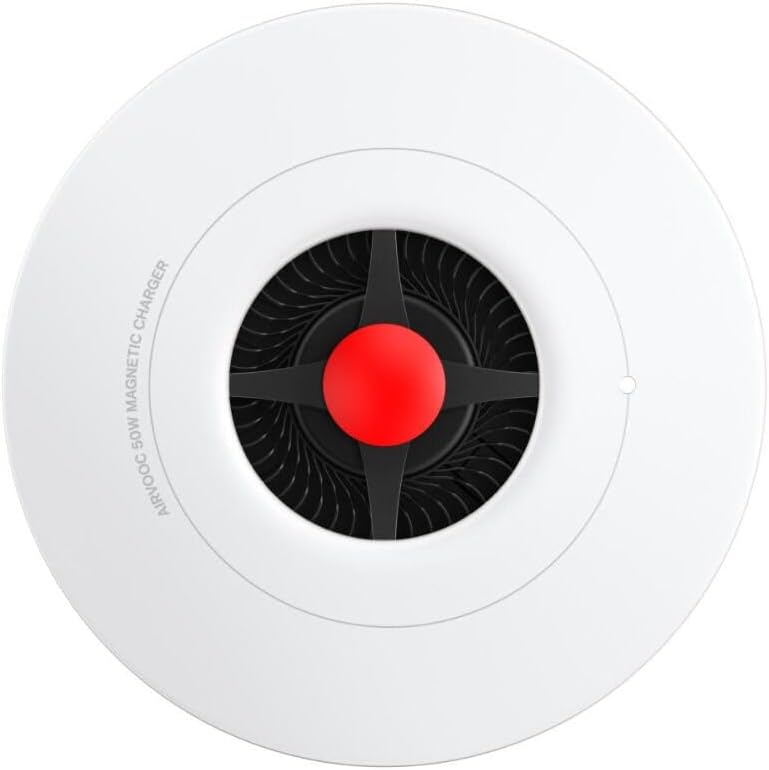
Сүрөт: жогорудан төмөнгө view of the OnePlus AIRVOOC 50W Magnetic Charger OAWV08. The circular white charger features a central black fan with a red hub. The text "AIRVOOC 50W MAGNETIC CHARGER" is visible along the edge.
Шайкештик
- OnePlus Devices: Optimized for OnePlus 13, providing 50W AIRVOOC fast wireless charging.
- iPhone Devices: Compatible with iPhone models that support wireless charging, offering a convenient standby charging mode.
- Other Wireless Charging Devices: May support other Qi-compatible devices at standard wireless charging speeds.
Техникалык тейлөө
To ensure the longevity and optimal performance of your charger, follow these maintenance guidelines:
- Тазалоо: Тазалоодон мурун кубаттагычты кубат булагынан ажыратыңыз. Кубаттагычтын бетин аарчуу үчүн жумшак, кургак, мамыксыз чүпүрөктү колдонуңуз. Абразивдүү тазалоочу каражаттарды, эриткичтерди же химиялык чачыраткычтарды колдонбоңуз.
- Сактагыч: Колдонулбай турган учурда, кубаттагычты салкын, кургак жерде, өтө жогорку температурадан жана нымдуулуктан алыс сактаңыз.
- Тоскоолдуктарды болтурбоо: Ensure the cooling vents and fan are free from dust and obstructions to maintain efficient heat dissipation.
Проблемаларды чечүү
If you encounter issues with your OnePlus AIRVOOC 50W Magnetic Charger, refer to the following common solutions:
- Заряддагыч иштебейт:
- Ensure the charger is securely connected to a functional power adapter and outlet.
- Кубат адаптери жетиштүү кубаттуулукту камсыз кылаарын текшериңизtagзаряддагыч үчүн.
- Try a different power adapter or USB-C cable.
- Түзмөк кубатталбай жатат:
- Ensure your device is properly aligned on the magnetic charging surface.
- Remove any non-magnetic or excessively thick phone cases that might interfere with wireless charging.
- Confirm that your device supports wireless charging.
- Түзмөгүңүздү өчүрүп күйгүзүңүз.
- Жай кубаттоо:
- Ensure you are using a power adapter capable of delivering the full 50W output.
- Check for any background applications on your phone that might be consuming excessive power.
- Ensure the charger's cooling vents are not obstructed.
- Ашыкча ысып кетүү:
- Заряддоочу түзүлүш жакшы желдетилген жерге коюлганын текшериңиз.
- Remove any foreign objects from the charging surface or cooling vents.
- Эгерде ысып кетүү улана берсе, колдонууну токтотуп, кардарларды тейлөө кызматына кайрылыңыз.
Техникалык шарттар
| Бренд | OnePlus |
| Модел | OAWV08 |
| Type | Магниттик зымсыз кубаттагыч |
| Зымсыз кубаттоо чыгышы | Up to 50W (AIRVOOC) |
| Power Source | Индукция |
| Шайкеш түзмөктөр | OnePlus 13, iPhone models supporting wireless charging, other Qi-compatible cellular phones |
| Өзгөчөлүктөр | Wireless Charging, Magnetic Alignment, Advanced Cooling (Centrifugal Fan, TEC, Cooling Fins) |
| Материал | Plastic, Aluminum (for cooling) |
| Түс | Ак |
| Өлчөмдөр | 10 x 10 x 1.27 см |
| Салмагы | 160 г |
Note: A compatible power adapter and USB-C cable are required and sold separately.
Кепилдик маалымат
Specific warranty details for the OnePlus AIRVOOC 50W Magnetic Charger OAWV08 are typically provided with the product packaging or available on the official OnePlus webсайт. Сураныч, эң так жана заманбап кепилдик шарттарын жана шарттарын алуу үчүн бул ресурстарды караңыз.
Кардарларды колдоо
For further assistance, technical support, or inquiries regarding your OnePlus AIRVOOC 50W Magnetic Charger OAWV08, please visit the official OnePlus support website or contact their customer service department. Contact information can usually be found on the OnePlus official webсайтында же продуктунун таңгагында.
Онлайн колдоо: www.oneplus.com/support (Чыгampшилтеме, расмий колдоо барагын текшериңиз)